

Description
Fliegerschiessen AXALP
Flugdemonstration der schweizer Luftwaffe.
Es sind zwei Startoptionen für Hubschrauber vorhanden. Cold+Dark Parkposition und ein Runway Start auf der selben Stelle für einen abflugbereiten Hubschrauber.
Für Flugzeuge empiehlt sich als Startort der Militärflugplatz Meiringen, der sich im Tal in unmittelbarer Nähe befindet. Für diesen Flugplatz gibt es auch zahlreiche Addons.
Zusätzliche Inhalte werden benötigt:
https://de.flightsim.to/file/5452/dave-s-3d-people-library
https://de.flightsim.to/file/1923/mikea-at-assetpack
https://de.flightsim.to/file/14024/windy-things
Installation: Die heruntergeladene Datei öffnen und den Ordner "chrispiaviation_axalp" in den Community-Ordner ziehen. Die o.g. Zusatzinhalte müssen sich ebenfalls im Community-Ordner befinden.
Fliegerschiessen AXALP
Aviation live fire demonstration of the swiss air force.
Two start options for helicopters are existing. One parking spot for Cold and Dark, as well as one runway start (on the same spot) for engines already running.
For fixed wing aircraft I recommend starting from the military airfield Meiringen which is down in the valley, not far away from the shooting range. There are several addons available for this particular airfield.
Additional files are needed:
https://de.flightsim.to/file/5452/dave-s-3d-people-library
https://de.flightsim.to/file/1923/mikea-at-assetpack
https://de.flightsim.to/file/14024/windy-things
Installation: Open the downloaded file and place the "chrispiaviation_axalp" folder inside the community folder. The additional files that've been listed also have to be inside the community folder.
Dependencies
Location
Fliegerschiessen AXALP
Experience the aviation live fire demonstration of the Swiss Air Force with Fliegerschiessen AXALP add-on. Choose from two helicopter start options and explore the detailed Cold+Dark Park position or a ready-to-go runway start. For fixed wing aircraft, fly from the nearby Meiringen military airfield and enhance your experience with available add-ons. Additional files are required for installation, providing a realistic and immersive flight simulation experience.


User Reviews
4 reviews
Version History
No version history available.
Related
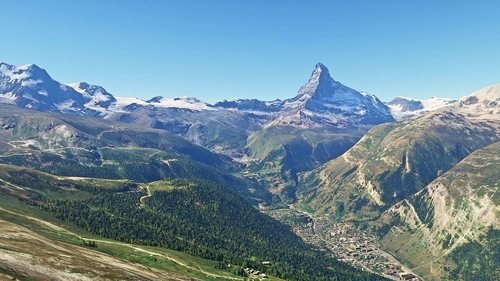
Matterhorn Mountain
Explore the stunning beauty of Matterhorn mountain with this add-on, featuring a fully photogrammetry-based model and terraformed edges for a more realistic experience. Version 2.0 includes new additions such as improved LOD levels, color-corrected textures, cable car pylons, and populated forests. Install by dragging the folder into your "Community" folder and enjoy the enhanced scenery around this iconic peak.
by NikPrist
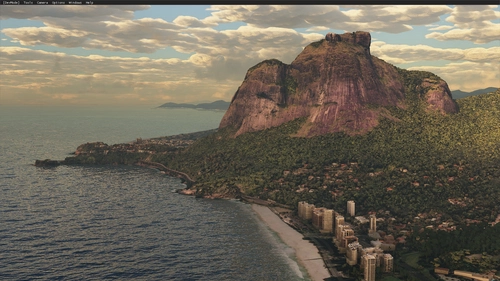
Rio de Janeiro Megapack Montanhas
Explore the detailed mountainous landscape of Rio de Janeiro in this updated megapack. Precisely positioned mountains like Pedra da Gávea and Pão de Açúcar using Google Maps models. Create your mod via Earth2MSFS for an effective import process. Stay tuned for further updates with optimized textures and added landmarks. Individualize your experience by adding specific mountain ranges to enhance your simulation.
by RodrigoMoraes94
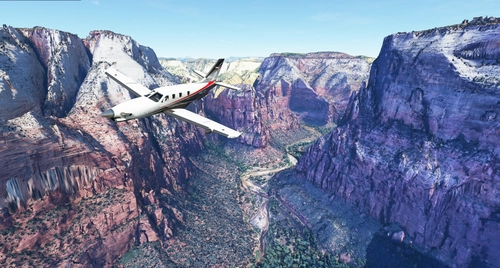
Zion Canyon National Park, Utah
Explore the breathtaking beauty of Zion Canyon National Park in Utah with this V1.0 scenery add-on. Discover well-known locations like the Zion Canyon Overlook, Angels Landing, and more. Experience corrected terrain heights and improved color blending for a more immersive flight simulation. Simply extract the file to your Community Folder and start your aerial adventure in this stunning national park.
by Jeppeson2001
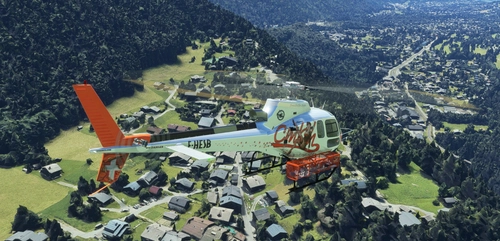
Chamonix-Mont-Blanc, Rhône-Alpes, France - Valley
Explore the stunning Chamonix-Mont-Blanc valley in Rhône-Alpes, France with this addon, including a semi-fictional DZ at Argentière. Enhance your experience by combining it with the Mountains addon. Download, extract into community folder, and enjoy photogrammetry and object data. This addon requires a minimum configuration for optimal performance.
by AdrianL
Log in to join the discussion
Log InComments(10)
3 months ago
about 2 years ago
almost 4 years ago
A massive thank you. I enjoy it very much:
https://www.youtube.com/watch?v=Hr82P7LkAks
Maybe, try adding more people, as there are more. This is the 2022 Axalp:
https://www.youtube.com/watch?v=bBrUDho9C3g
over 4 years ago
Wonderful! I feel like I'm there.
over 4 years ago
Hi!
Execlent, could it be possible to add the flight plan that is used ?
over 4 years ago
What you mean by flightplan? There is no flightplan.
over 4 years ago
The axalp run flight plan
Also could it be possible to do a better rendering of the bunkers?
Anyhow, excellent work!
over 4 years ago
MARVELLOUS !!! A huge THANK YOU VERY MUCH
over 4 years ago
wonderful!!!!! thank you :) :)
over 4 years ago
super cool merci