
Description
Welcome to the third part of our journey "Around the world in 80 flights" RETRO - Part 3
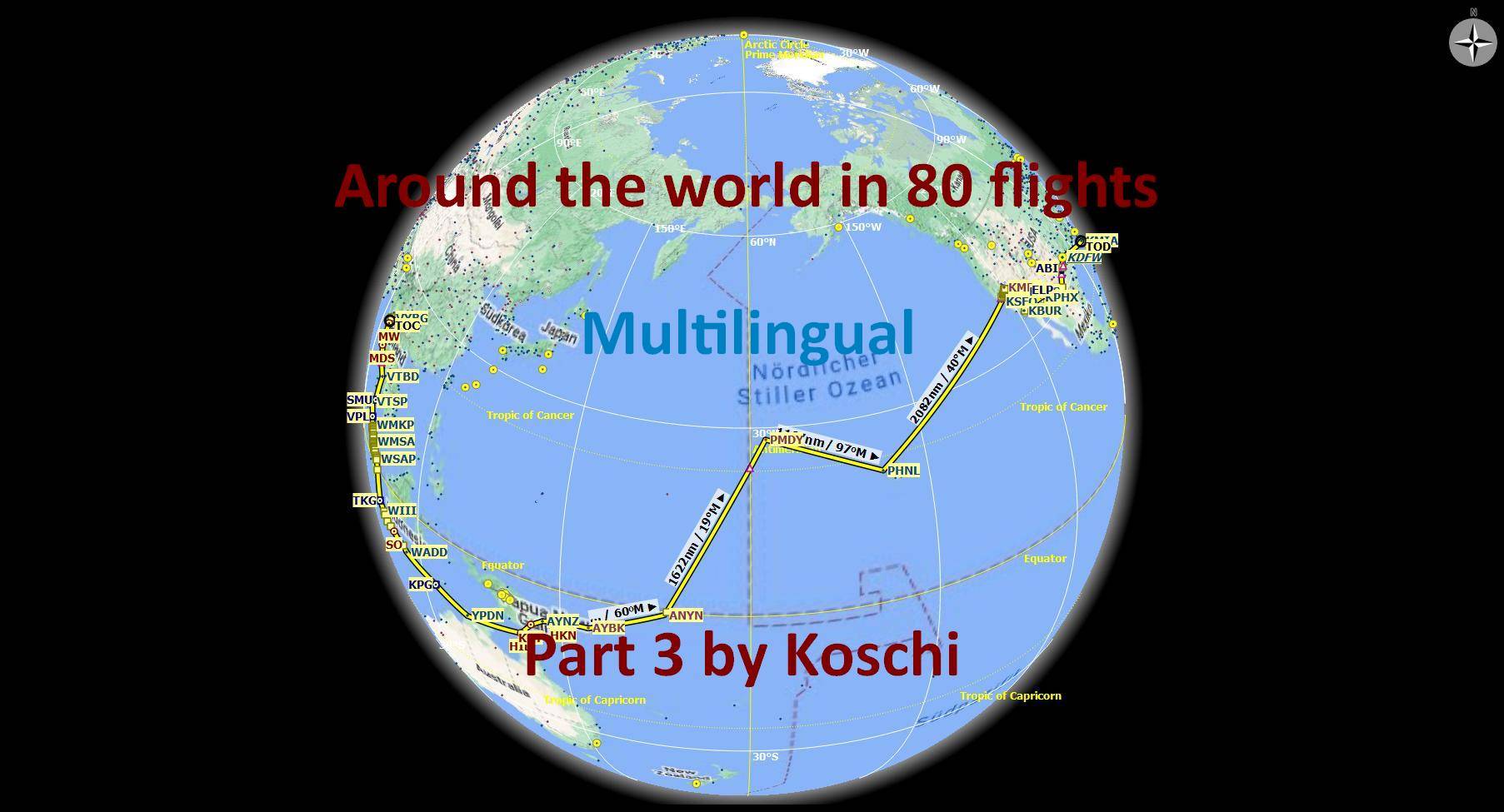
In this part, we cross the countries of Myanmar, Thailand, Malaysia, Singapore, Indonesia, East Timor, both the state and continent of Australia, on to Papua New Guinea, the island nation of the Solomon Islands, all the way to an epic crossing of the Pacific Ocean via Hawaii, before landing on the North American continent of the United States of America. We then cross the USA all the way to its east coast, in Miami.
Installation:
Unzip the two folders contained in the package into the Community folder. Restart the simulator.
Specification:
- You are flying around the world in a Beechcraft King Air 350i. The aircraft is interchangeable with some manual work, see Exchange file. Alternatively, there is also the MissionChanger from BuffyGC.
- The package is multilingual in the languages: English US, Spanish, French, Italian, Polish, Portuguese BR, Portuguese, Russian, Dutch, Finnish, Norwegian and Swedish. The basic language is German. The other languages are machine translated, so there may be errors in the translation. If you have a better translation, please send it to me.
- At each waypoint there are instructions in English from the artificial voice output when you skim the corresponding waypoint. All instructions can be read in the Navlog.
- Use the GPS and ATC.
- A GPS course is available that can be obtained. (see "Frequently Asked")
In addition, each waypoint is marked with a clearly visible marker. This can be activated in the support options / navigation aids. - The refuel button is only active on airfields with a fuel station. The gasoline will not be enough for the long Pacific flights. Assign a key with the function "load and refuel" and refuel in the air.
- Weather is freely selectable. Live weather is preset.
- The trip is only finished when engine and electrics are switched off and the handbrake is applied. To do this, roll into a parking lot.
- A LNMPLN file for Little Navmap is included in the package. There you can also find the texts for the waypoints in German language. Click on a waypoint in the flight plan table and press the Enter key. With a translation program you can translate the texts into your language.
- NEW: To shorten flight time over the sea, a teleport function has been added for very long routes in several legs, which can be triggered by the user.
Another tip:
Since SU11, the simulator no longer saves progress in time intervals, but only after a waypoint has been flown over. So you can abort the flight after each waypoint and continue it later.
Why not all 80 flights are combined in one adventure is due to the number of waypoints. If there are too many waypoints, the simulator will not run smoothly.
I wish you a lot of fun with the flights and always safe landings,
Koschi
Created with BushTripInjector by BuffyGC.
Part 1: https://flightsim.to/file/10044/flight-adventure-around-the-world-in-80-flights-retro
Part 2: https://flightsim.to/file/10158/around-the-world-in-80-flights-retro-part-2
Part 4: https://flightsim.to/file/10525/around-the-world-in-80-flights-retro-part-4
Recommended AddOns:
Please select according to interest.
Benicia - Martinez Bridge, San Francisco Bay Area by JGelert
Carquinez Bridge, San Francisco Bay Area by JGelert
Crescent Bridges New Orleans LA by michelvp
San Francisco - Oakland Bay Bridge Enhanced Night Lighting, San Francisco Bay Area, CA by JGelert
Globe Life Field (new Texas Rangers ballpark), Arlington, TX by JGelert
Stadium GBK ( Gelora Bung Karno ) by zibedvai
Stadium Perak - Malaysia by EnjoyItFly
Bandung City Landmarks by SukagalihSim
Blue Mosque Selangor (Malaysia) by Brandon Pann
Blue Origin launch site by droide
Diamond Head Crater by Mick51
Gas Monkey Garage by i9Simulations
Godzilla at i Gusti Ngurah Rai International Airport - Bali by zibedvai
Google Map -Supertree Grove Singapore by demotyken
I-City (Malaysia) by Brandon Pann
Ipoh Parade (Malaysia) by Brandon Pann
istiqlal mosque - jakarta by zibedvai
Keppel Bay - Singapore by FlyBoyRez1
Mount Graham observatory by droide
Pearl Harbor Alive by Mick51
Salesforce Tower by ahugepotato
Shwe Dagon Pagoda by ClemensFellner
South Mountain Radio Towers by TanTheMan
The National Monument - Monas by zibedvai
Bagan Sulemani by san
Phoenix Arizona Vegetation and Water by aniiran
Port of Honolulu, Honolulu HI by FreakyD
Abilene, Texas, USA rendered in 3D Photogrammetry by ballingerfrance
Bangkok Scenery by zinorules
Crockett - CA - USA by EnjoyItFly
Fort Worth - TX - USA by EnjoyItFly
Honolulu by steveli
Ipoh by Brandon
Ipoh, Malaysia Pt. 1 by Sebastian1911
Ipoh, Malaysia Pt. 2 by Sebastian1911
Ipoh, Malaysia Pt. 3 by Sebastian1911
New Orleans USA by marktaylor
Singapore CITY (High detail-OP) by amazigh
Singapore Downtown by EnjoyItFly
Singapore Orchard HQ by willnosm fs2020medan
Singapore Skyline by JacobTang
Buka AYBK by Mountainair
Paya Lebar Air Base- WSAP by FlyBoyRez1
RAAF Darwin Airbase - YPDN - Northern Territory - Australia by Tag21
Dallas Fort Worth International Airport KDFW, Dallas TX - USA by FreakyD
Daniel K Inouye International Airport, Honolulu HI USA - PHNL by FreakyD
KBUR, Hollywood Burbank Airport by ianthehippo
KLAS - Las Vegas Intl. Airport for MSFS by FeelThere, Inc.
KPHX - Phoenix Sky Harbor by unmlobo
Lae Nadzab International AYNZ by Mountainair
Nauru International Airport ANYN by timot75
Penang airport [WMKP] with jetway fix by ams7880
PMDY-Henderson Field, Midway Atoll, USA. - NEW VERSION - by JP
Sultan Abdul Aziz Shah Airport Subang (WMSA) by fardly83
VTBD Don Mueang International airport by fras444
VTSP - Phuket Intl. Airport Enhancement by Nokin
WIII - Soekarno Hatta Intl. Airport, Jakarta by capungflightTV
Herzlich willkommen zum dritten Teil unserer Reise „In 80 Flügen um die Welt“ - RETRO
In diesem Teil überqueren wir die Länder Myanmar, Thailand, Malaysia, Singapur, Indonesien, Osttimor, sowohl den Staat als auch den Kontinent Australien, weiter nach Papua-Neuguinea, den Inselstaat der Salomonen, bis hin zu einer epischen Überquerung des Pazifik über Hawaii, um dann auf dem nordamerikanischen Kontinent der Vereinigten Staaten von Amerika zu landen. Wir überqueren danach die USA bis hin zu ihrer Ostküste, in Miami.
Installation:
Entpacke den enthaltenen Ordner aus dem Paket in den Community-Ordner. Starte den Simulator neu.
Spezifikation:
- Du fliegst mit einer Beechcraft King Air 350i um die Welt. Das Flugzeug ist mit etwas Handarbeit austauschbar, siehe Exchange-Datei. Alternativ gibt es dazu auch den MissionChanger von BuffyGC.
- Das Paket ist multilingual in den Sprachen: Englisch US, Spanisch, Französisch, Italienisch, Polnisch, Portugiesisch BR, Portugiesisch, Russisch, Niederländisch, Finnisch, Norwegisch und Schwedisch. Die grundlegende Sprache ist deutsch. Die anderen Sprachen sind maschinell übersetzt, darum können Fehler in der Übersetzung enthalten sein. Wer eine bessere Übersetzung hat, kann sie mir bitte schicken.
- An jedem Wegpunkt gibt es Anweisungen in Englisch aus der künstlichen Sprachausgabe, wenn man den entsprechenden Wegpunkt überfliegt. Alle Anweisungen sind im Navlog nachlesbar.
- Nutze das GPS und ATC.
- Ein GPS-Kurs ist vorhanden, der erhalten werden kann. (siehe "Häufig Gefragt")
Zusätzlich ist jeder Wegpunkt mit einer gut sichtbaren Markierung versehen. Diese kann in den Unterstützungsoptionen / Navigationhilfen eingeschaltet werden. - Der Tanken-Button ist nur auf Flugplätzen mit Tankstelle aktiv. Das Benzin wird bei den langen Pazifikflügen nicht reichten. Belege eine Taste mit der Funktion "Beladen und Tanken" und tanke so in der Luft auf.
- Das Wetter ist frei wählbar. Live-Wetter ist voreingestellt.
- Der Trip ist erst beendet, wenn Motor und Elektrik abgestellt sind und die Handbremse angezogen ist. Rolle dazu am besten auf einen Parkplatz.
- Eine LNMPLN-Datei für Little Navmap ist im Paket enthalten. Dort sind auch die Texte für die Wegpunkte in deutscher Sprache nachzulesen. Klicke in der Flugplantabelle auf einen Wegpunkt und drücke dann die Entertaste. Mit einem Übersetzungsprogramm kannst du dir die Texte in deine Sprache übersetzen lassen.
- NEU: Um die Flugzeit über das Meer zu verkürzen, wurde für sehr lange Strecken in einigen Etappen eine Teleport-Funktion hinzugefügt, die vom Nutzer ausgelöst werden kann.: Um die Flugzeit über das Meer zu verkürzen, wurde für sehr lange Strecken in einigen Etappen eine Teleport-Funktion hinzugefügt, die vom Nutzer ausgelöst werden kann.
Noch ein Tipp:
Der Simulator speichert den Fortschritt seit SU11 nicht mehr in Zeitabständen, sondern nur noch, nachdem ein Wegpunkt überflogen wurde. Du kannst den Flug also nach jedem Wegpunkt abbrechen und später fortsetzen.
Warum nicht alle 80 Flüge in einem Adventure zusammengefasst sind, liegt an der Anzahl der Wegpunkte. Bei zu vielen Wegpunkten läuft der Simulator nicht mehr flüssig.
Ich wünsche viel Spaß bei den Flügen und immer sichere Landungen,
Koschi
Teil 1: https://flightsim.to/file/10044/flight-adventure-around-the-world-in-80-flights-retro
Teil 2: https://flightsim.to/file/10158/around-the-world-in-80-flights-retro-part-2
Teil 4: https://flightsim.to/file/10525/around-the-world-in-80-flights-retro-part-4
Frequently Asked Questions
"Around the world in 80 flights" RETRO - Part 3
Embark on the third leg of the retro journey "Around the world in 80 flights", spanning from Myanmar to the United States via Australia and the Pacific Ocean. Enjoy multilingual support and detailed instructions along the way in this flight adventure.
Supporters

Version History
- Waypoints added and descriptions revised in the navlog. - Since the mission no longer ran smoothly due to added waypoints and triggers, it was split into two halves of 10 legs each. - Missing navigation aids have been added. - The aircraft is no longer on the runway before take-off, but in a parking position. - The times and date of the next leg have been adjusted. - Translations have been corrected. - For very long routes, a teleport function has been added in some legs that can be triggered by the user. Images updated and added. # # # # # # # # # - Wegpunkte hinzugefügt und Beschreibungen im Navlog überarbeitet. - Da die Mission wegen hinzugefügter Wegpunkte und Auslöser nicht mehr flüssig lief, wurde sie in zwei Hälften von jeweils 10 Etappen aufgeteilt. - Fehlende Navigationshilfen wurden ersetzt. - Das Flugzeug befindet sich nicht mehr vor dem Start auf der Startbahn, sondern in einer Parkposition. - Die Tageszeiten und das Datum der nächsten Etappe wurden angepasst. - Übersetzungen wurden korrigiert. - Für sehr lange Strecken wurde in einigen Etappen eine Teleport-Funktion hinzugefügt, die vom Nutzer ausgelöst werden kann. - Bilder erneuert und hinzugefügt.
Related

Discover Germany - Part 1
Explore Germanys rich history and diverse landscapes with this Bush-Trip add-on. Discover iconic destinations such as Berlin, the Baltic Sea, North Sea, and Elbe River, covering 938 NM with 20 legs. Enjoy flying with a Cessna Skyhawk G1000 and multilingual support for a truly immersive experience. Install, start your engine, and embark on an unforgettable adventure in the skies.
by Koschi

Discover Germany - Part 2
Explore Germany from the Elbe to the Rhine in this flight simulation add-on. Follow a 863 NM route with 15 legs, flying a Cessna Skyhawk G1000. Available in multiple languages, with detailed landmarks and customizable weather settings. Installation is easy - just unpack and enjoy discovering Germany for yourself.
by Koschi

Discover Germany - Part 3
Embark on a journey through historical sites along the Rhine River in "Discover Germany - Part 3," covering 531 NM from Emmerich airfield to Lake Constance. Explore areas settled by the Romans and experience all the sights of World Update 6. Fly in a Cessna Skyhawk G1000 with multilingual support and customizable weather options. Join the adventure and discover Germany for yourself.
by Koschi
Legendary Route 66
Embark on the legendary Route 66, spanning 2,448 US miles from Chicago to LA/Santa Monica. Experience historical events and landmarks along the way in this immersive journey. Fly with a Cessna Grand Caravan EX and follow waypoints for a smooth simulator experience. Installation is easy - just extract the folder into your MSFS community folder.
by Koschi
Log in to join the discussion
Log InComments(3)
about 5 years ago
Hello, I don't understand how you can do leg from PHNL to KSFO. I didn't any airport to refill during this leg. Aircraft autonomy is 1.800nm and leg is about 2.000nm.
about 5 years ago
Hello guilhem034,
thank you for the comment. I have been well aware of this problem when creating the flights. With a propeller plane, this route can only be done with additional fuel tanks. I noted it similarly in the flight description. There it also says that you should use the function "Repair and refuel" in the options for this and assign a key or key combination to it for this purpose.
Continue to have fun with the flights, Koschi
about 5 years ago
So I should do a refill on air during this flight. Thank you for your reply!