
Description
Welcome to the second part of our flight adventure "Around the world in 80 flights" - RETRO
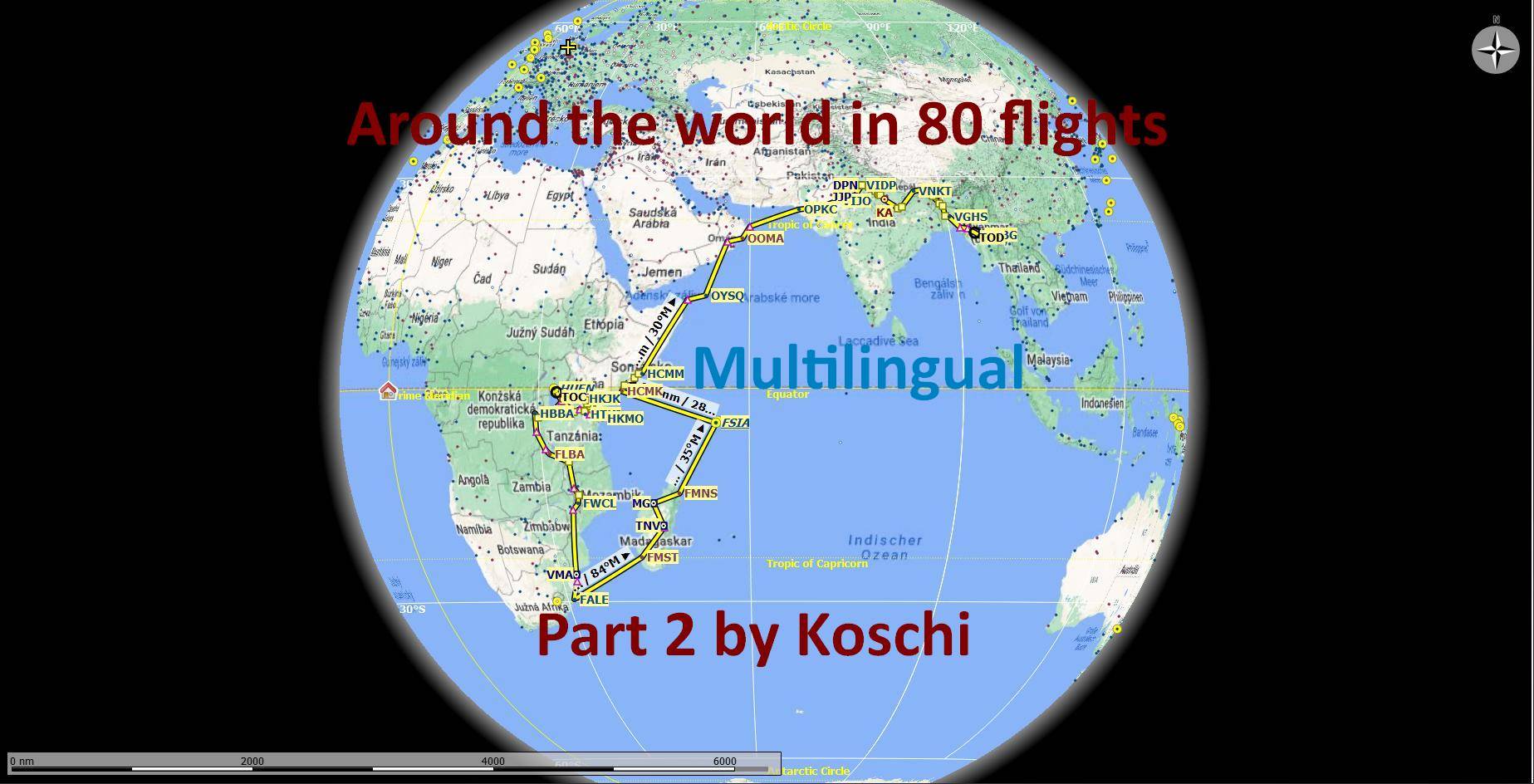
The journey begins at the last stop, in Uganda and takes us via Tanzania, Kenya, Burundi, Zambia, Malavi, Mozambique, South Africa, Madagascar, the Seychelles Islands, Somalia, Oman, Pakistan, India, Nepal, Bangladesh, to Myanmar, the former Burma. Highlights of this trip are certainly the great lakes of Africa, the island of Madagascar with its unique mountain landscape and of course the trip to the roof of the world, Mount Kilimanjaro.
Specification:
- You are flying around the world in a Beechcraft King Air 350i. The aircraft is interchangeable with some manual work, see Exchange file. Alternatively, there is also the MissionChanger from BuffyGC.
- The package is multilingual in the languages: English US, Spanish, French, Italian, Polish, Portuguese BR, Portuguese, Russian, Dutch, Finnish, Norwegian and Swedish. The basic language is German. The other languages are machine translated, so there may be errors in the translation. If you have a better translation, please send it to me.
- At each waypoint there are instructions in English from the artificial voice output when you skim the corresponding waypoint. All instructions can be read in the Navlog.
- Use the GPS and ATC.
A GPS course is available that can be obtained. (see "Frequently Asked")
In addition, each waypoint is provided with a clearly visible marker. This can be switched on in the support options / navigation aids. - The refuel button is only active on airfields with a fuel station. If the gasoline is not enough, you can stop at an airport to refuel.
- Weather is freely selectable. Live weather is preset.
- The trip is only finished when engine and electrics are switched off and the handbrake is applied. To do this, roll into a parking lot.
- A LNMPLN file for Little Navmap is included in the package. There you can also find the texts for the waypoints in German language. Click on a waypoint in the flight plan table and press the Enter key. With a translation program you can translate the texts into your language.
- NEW: For very long routes, a teleport function has been added in some legs that can be triggered by the user.
Another tip:
Since SU11, the simulator no longer saves progress in time intervals, but only after a waypoint has been flown over. So you can abort the flight after each waypoint and continue it later.
Created with BushTripInjector by BuffyGC.
Why not all 80 flights are combined in one adventure is due to the number of waypoints. With too many waypoints, the simulator no longer runs smoothly.
To part 1: https://flightsim.to/file/10044/flight-adventure-around-the-world-in-80-flights-retro
To part 3: https://flightsim.to/file/10331/around-the-world-in-80-flights-retro-part-3
To part 4: https://flightsim.to/file/10525/around-the-world-in-80-flights-retro-part-4
Have fun flying and always soft landings,
Koschi
NECESSARY ADDON:
Please install this AddOn before starting the first trip!!!
Victoria-Seychelles Airport by McBolid
Recommended AddOns:
WE HAVE HIPPOS - The Malawi Project (One Installer, 35 Airstrips, 35 Animal POIs and more...) by darshonaut
Mazar-E-Quaid Add-On Karachi by Syed Arbaz Rasheed
Bagan Sulemani by san
Umhlanga Rocks by Colin Falck
(VIDP) Indira Gandhi International Airport T1 & T2 (freeware) by zussh
[VNKT] - Tribhuvan International - Kathmandu, Nepal by Troglodytus
HKJK Nairobi, Kenya Airport Parking Update by JimBrown
Kilimanjaro International (HTKJ), Tanzania by quelcertoleo
OPKC - Jinnah Intl Airport Karachi by nsajid91
Herzlich willkommen zum zweiten Teil unseres Flugabenteuers „In 80 Flügen um die Welt“ - RETRO
Die Reise beginnt am letzten Stop, in Uganda und führt uns über Tansania, Kenia, Burundi, Sambia, Malavi, Mosambik, Südafrika, Madagaskar, die Seychellen-Inseln, Somalia, Oman, Pakistan, Indien, Nepal, Bangladesch, bis nach Myanmar, dem ehemaligen Birma. Höhepunkte dieser Reise sind sicher die großen Seen Afrikas, die Insel Madagaskar mit ihrer einzigartigen Berglandschaft und natürlich der Ausflug zum Dach der Welt, dem Kilimandscharo.
Spezifikation:
- Du fliegst mit einer Beechcraft King Air 350i um die Welt. Das Flugzeug ist mit etwas Handarbeit austauschbar, siehe Exchange-Datei. Alternativ gibt es dazu auch den MissionChanger von BuffyGC.
- Das Paket ist multilingual in den Sprachen: Englisch US, Spanisch, Französisch, Italienisch, Polnisch, Portugiesisch BR, Portugiesisch, Russisch, Niederländisch, Finnisch, Norwegisch und Schwedisch. Die grundlegende Sprache ist deutsch. Die anderen Sprachen sind maschinell übersetzt, darum können Fehler in der Übersetzung enthalten sein. Wer eine bessere Übersetzung hat, kann sie mir bitte schicken.
- An jedem Wegpunkt gibt es Anweisungen in Englisch aus der künstlichen Sprachausgabe, wenn man den entsprechenden Wegpunkt überfliegt. Alle Anweisungen sind im Navlog nachlesbar.
- Nutze das GPS und ATC.
Ein GPS-Kurs ist vorhanden, der erhalten werden kann. (siehe "Häufig Gefragt")
Zusätzlich ist jeder Wegpunkt mit einer gut sichtbaren Markierung versehen. Diese kann in den Unterstützungsoptionen / Navigationhilfen eingeschaltet werden. - Der Tanken-Button ist nur auf Flugplätzen mit Tankstelle aktiv. Wenn das Benzin nicht reicht, kann man auf einem Flughafen zwischenlanden, um zu tanken.
- Das Wetter ist frei wählbar. Live-Wetter ist voreingestellt.
Der Trip ist erst beendet, wenn Motor und Elektrik abgestellt sind und die Handbremse angezogen ist. Rolle dazu am besten auf einen Parkplatz. - Eine LNMPLN-Datei für Little Navmap ist im Paket enthalten. Dort sind auch die Texte für die Wegpunkte in deutscher Sprache nachzulesen. Klicke in der Flugplantabelle auf einen Wegpunkt und drücke dann die Entertaste. Mit einem Übersetzungsprogramm kannst du dir die Texte in deine Sprache übersetzen lassen.
- NEU: Für sehr lange Strecken wurde in einigen Etappen eine Teleport-Funktion hinzugefügt, die vom Nutzer ausgelöst werden kann.
Noch ein Tipp:
Der Simulator speichert den Fortschritt seit SU11 nicht mehr in Zeitabständen, sondern nur noch, nachdem ein Wegpunkt überflogen wurde. Du kannst den Flug also nach jedem Wegpunkt abbrechen und später fortsetzen.
Warum nicht alle 80 Flüge in einem Adventure zusammengefasst sind, liegt an der Anzahl der Wegpunkte. Bei zu vielen Wegpunkten läuft der Simulator nicht mehr flüssig.
Teil 1: https://flightsim.to/file/10044/flight-adventure-around-the-world-in-80-flights-retro
Teil 3: https://flightsim.to/file/10331/around-the-world-in-80-flights-retro-part-3
Teil 4: https://flightsim.to/file/10525/around-the-world-in-80-flights-retro-part-4
Ich wünsche viel Spaß bei den Flügen und immer sichere Landungen,
Koschi
Dependencies
Frequently Asked Questions
"Around the world in 80 flights" RETRO - Part 2
Embark on the second part of the "Around the world in 80 flights" RETRO adventure, starting in Uganda and journeying through Africa, the Middle East, and Asia. Fly a Beechcraft King Air 350i with multilingual support and detailed instructions at each waypoint. Experience diverse landscapes and landmarks, including the great lakes of Africa and the iconic Mount Kilimanjaro.
User Reviews
1 reviews
Version History
Interruption of flight plan due to missing navigation points rectified. The missing navigation points were replaced by waypoints. # # # # # Unterbrechung des Flugplanes durch nicht mehr vorhandene Navigationspunkte behoben. Die fehlenden Navigationspunkte wurden durch Wegpunkte ersetzt.
Related

Discover Germany - Part 1
Explore Germanys rich history and diverse landscapes with this Bush-Trip add-on. Discover iconic destinations such as Berlin, the Baltic Sea, North Sea, and Elbe River, covering 938 NM with 20 legs. Enjoy flying with a Cessna Skyhawk G1000 and multilingual support for a truly immersive experience. Install, start your engine, and embark on an unforgettable adventure in the skies.
by Koschi

Discover Germany - Part 2
Explore Germany from the Elbe to the Rhine in this flight simulation add-on. Follow a 863 NM route with 15 legs, flying a Cessna Skyhawk G1000. Available in multiple languages, with detailed landmarks and customizable weather settings. Installation is easy - just unpack and enjoy discovering Germany for yourself.
by Koschi

Discover Germany - Part 3
Embark on a journey through historical sites along the Rhine River in "Discover Germany - Part 3," covering 531 NM from Emmerich airfield to Lake Constance. Explore areas settled by the Romans and experience all the sights of World Update 6. Fly in a Cessna Skyhawk G1000 with multilingual support and customizable weather options. Join the adventure and discover Germany for yourself.
by Koschi

Legendary Route 66
Embark on the legendary Route 66, spanning 2,448 US miles from Chicago to LA/Santa Monica. Experience historical events and landmarks along the way in this immersive journey. Fly with a Cessna Grand Caravan EX and follow waypoints for a smooth simulator experience. Installation is easy - just extract the folder into your MSFS community folder.
by Koschi
Log in to join the discussion
Log InComments(7)
over 5 years ago
over 5 years ago
Thank you for this hint. Of course, it is always questionable which sources are credible and which are not. I have the information from this source:
http://www.klimaretter.info/umwelt/nachricht/5872-dramatische-erwaermung-des-tanganjikasee
over 5 years ago
I finished yesterday Part 1 to HUEN.
I wanted to continue today with Part 2 but everytime I start the engine of may TBM 930 with internal camera view of glass cockpit, the simulator freezes and I have to turn it off manually with task manager.
If I start the engine with external camera view, everything works, I can request pushback, taxi and so on. But when I switch the camera into cockipt the sim freezes. In a trip Part1 was everything OK with TBM 930.
If I start the trip with original Beechcraft it's OK.
over 5 years ago
I am now out of my depth. The error does not occur with me. It could be due to a mod in the community folder. Please empty it. Please do not delete or move the AddOn Seychelles International (FSIA). Afterwards please delete the _SAVE files of this bushtrip
.\[installation folder]\LocalState\MISSIONS\ACTIVITIES\[my mission]_SAVE
and then start the simulator.
over 5 years ago
Your Beechcraft is trigically unfinished in the sim. Lot of switches are INOP especially those relating to AP, PFD, MFD. The most important controls down between the seats of captain and first officer do not work. Therefore I don't want to fly with Beechcraft.
P.S. I dont understand why everything was working in Part1.
over 5 years ago
First delete the _SAVE files in the mission folder, then put the plane in the FLT file in the community folder, start the simulator and try again.
Greetings, Koschi
over 5 years ago
Thank you for your patience with me.
Yes, you are absolutely right, it wouldn't help much really.
Probably I found the solution of my problem. I flew the first leg from HUEN to HKMO with Beechcraft. Afterwards I turned off the sim and edited all files with TBM 930 and voila, it works. I fly now to HKJK without any problem.