

Description
JustFlight PA28R Turbo Arrow IV Clean Interior MegaPack V2.0-SU5
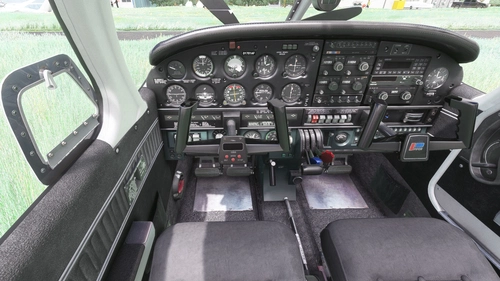
So with the release of the new Turbo Arrow, I was asked to convert my interiors as well.
I packed them together as a Mega Pack.
You can get the most popular one (Grey) as a separate download here:
https://flightsim.to/file/15400/just-flight-piper-pa28r-turbo-arrow-iv-clean-grey-interior
This version will only work with the Turbo Arrow IV. For the Turbo Arrow III for go here:
https://flightsim.to/file/15398/just-flight-piper-pa28r-turbo-arrow-iii-clean-interior-mega-pack
Installation:
Completely remove previous versions!
Then just drop ONE of the folders included into your Community folder. You can always just have one colour installed at the same time.
Each version comes with a choice of tablet colours. In the standard package I have changed the tablet to black.
However, if you prefer the white tablet you can reinstall it:
- Look for the folder "tablet". In it you will find one folder called "black" and one folder called "white".
- Each of those folders contains a file called: "EFB_ALBEDO.PNG.DDS"
- copy the file with the desired colour into "Community/justflight-aircraft-pa28-turboarrow-iii_beigeinterior/SimObjects/Airplanes/JF_PA28_TurboArrow_IV/TEXTURE.VC" and restart MSFS
In addition I changed the colour of the instrument panel to match the interior as well and provided a second complementary panel color with a black base. You can always easily switch back to the colour you prefer
For Installation instructions refer to the respective readme file.
Do not rename the folder or you might get problems with other mods like the "Just Flight PA28 Lighting Improvement" by WeptBurrito2749
Have fun
Best wishes
Archer374
JustFlight Piper PA28 Turbo Arrow IV - Clean Interior MEGA PACK
Transform your flying experience with the JustFlight Piper PA28 Turbo Arrow IV Clean Interior Mega Pack V2.0-SU5, featuring various interior color options and tablet customizations. Easily install the desired interior design into your Community folder. Enhance immersion with matching instrument panel colors and a choice of tablet hues. Fly in style and comfort with this interior upgrade for the Turbo Arrow IV.
Supporters

User Reviews
7 reviews
Version History
reduced file size by 50%
Related
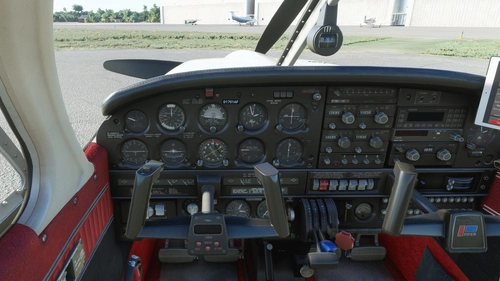
JustFlight Piper PA28 Turbo Arrow III - Clean Interior MEGA PACK
Enhance your JustFlight Piper PA28 Turbo Arrow III experience with the Clean Interior MEGA PACK. This pack includes a variety of interior color options for customization, along with different tablet colors and instrument panel choices. Easily switch between different interior designs to suit your preference and enjoy a refreshed look for your Turbo Arrow III cockpit. Installation is simple - just drop one of the folders included in the pack into your Community folder.
by Archer374
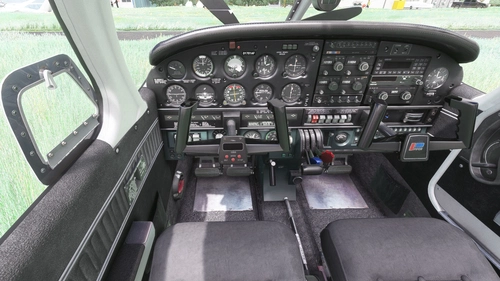
JustFlight Piper PA28 Turbo Arrow IV - Clean Grey Interior
A newly released interior modification for the JustFlight Piper PA28 Turbo Arrow IV, featuring clean grey interior design options. Customize your experience with different tablet and instrument panel colors. Easy installation process included in the package. Enjoy the enhanced visuals and immersive flying experience.
by Archer374
JustFlight Piper PA28 Turbo Arrow III - Clean Grey Interior
Enhance your Piper PA28 Turbo Arrow III experience with a clean grey interior mod, featuring customizable tablet and instrument panel colors. Simply drop the mod into your Community folder for easy installation. Experiment with different color options to personalize your cockpit to your liking.
by Archer374
JustFlight Piper PA28 Turbo Arrow III - Livery "OH-PDG" (new)
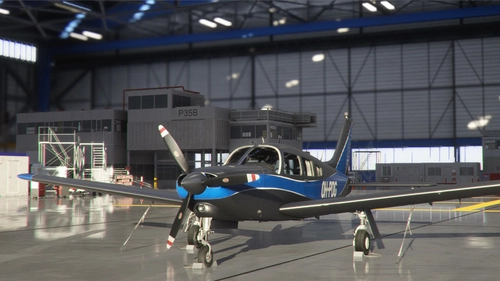
A new livery "OH-PDG" for the JustFlight Piper PA28 Turbo Arrow III, created as a port by Archer374 based on the work of JMAviation. This livery provides a fresh, silvery look as if the aircraft just left the paint shop. Enjoy this realistic livery of a real-world aircraft by simply dragging and dropping the files into your Community folder.
by JMAviation / Archer374
Log in to join the discussion
Log InComments(45)
over 1 year ago
over 1 year ago
I'm currently very busy in real life. Haven't even have had time to try out the 2024 version.
over 1 year ago
over 3 years ago
This is a huge file size reduction, thanks for the continuous improvements.
about 4 years ago
hello
latest 2.6 zip file is invalid
about 4 years ago
Thanks and sorry.
File size is all wrong too. Something must've gone wrong during upload. Uploading new versions for both the Turbo Arrow III and IV
about 4 years ago
Thanks for the updates!
about 4 years ago
Hello. Excellent mod. But I have noticed on all versions of your mod for the Turbo III and IV that the artificial horizon is white where it is supposed to be blue. It makes it very hard to monitor attitude. Could a fix be made for the next version?
about 4 years ago
I'll see what I can do Haven't noticed that before. I'm currently travelling and don't gave access to MSFS. Would you mind writing be a PM with a screenshot, please?
about 4 years ago
I would but believe it or not you can see it in your own screenshots on the filepage. Possibly the texture for the horizon got overwritten?
about 4 years ago
Uploading a new version now.
about 4 years ago
Thank you, you are absolutely awesome!
about 4 years ago
Hate to be a bother. The blue is showing up but it looks like some of the white texture has made it through, the blue doesn't go all the way to the top of the horizon:
https://steamuserimages-a.akamaihd.net/ugc/1815538137432204566/56221DF22353C9AC442CEABBBA287CF89EBBDA1F/?imw=5000&imh=5000&ima=fit&impolicy=Letterbox&imcolor=%23000000&letterbox=false
https://steamuserimages-a.akamaihd.net/ugc/1815538137432204326/5D1EA83A84ECA7A585033729FEEE8F3975027CE1/?imw=5000&imh=5000&ima=fit&impolicy=Letterbox&imcolor=%23000000&letterbox=false
Tested on both versions. For what its worth I used the beige/w black for the Turbo Arrow III and the Black interior on Turbo Arrow IV. The only other thing I changed was choosing the black tablet option. I also made sure to delete the previous version.
about 4 years ago
Hmm. That's quite unsatisfactory.
I'm not sure what's causing that. Have to investigate. Might take a few days though.
about 4 years ago
I went in and compared the JustFlight file to yours and it's almost identical in both (should be a black leaf instead of white). Maybe the light map or UV mask?
about 4 years ago
confirming that the horizon is fixed. However (lol, sorry) there is a broken file in the Turbo Arrow III GREY INTERIOR file. One of the VC files (8, the DDS version) is corrupted. I was still able to extract the beige/red and tested them both successfully.
Thank you for the quick and passionate responses I am very supportive of your work! Have a good one!
about 4 years ago
Try downloading the pack again. Had some problems with corrupted uploads the last two days. Just downloaded the pack again and everything seems in order now.
Thanks for your feedback! :-)
almost 5 years ago
is it possible to mix and match....say i want the red panel with the grey interior seats...is this possible?
almost 5 years ago
Yes that's possible. All packs always come with three panels anyway.
But you can always copy single files manually into the texture folders and mix it the way you like. Easiest is: install the interior seat colour you prefer (let's say blue) and then go into the folder with the beige interior and simply copy only beige tpanel file from the dashboard subgolder over.