

Description
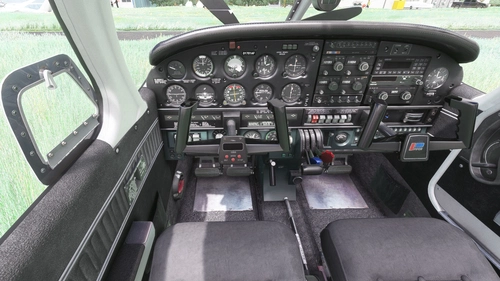
So with the release of the new Turbo Arrow, I was asked to convert my interiors as well.
Installation:
Completely remove previous versions!
Then just drop into your Community folder
This version comes with a choice of tablet colours. In the standard package I have changed the tablet to black.
However, if you prefer the white tablet you can reinstall it:
- Look for the folder "tablet". In it you will find one folder called "black" and one folder called "white".
- Each of those folders contains a file called: "EFB_ALBEDO.PNG.DDS"
- copy the file with the desired colour into "Community/justflight-aircraft-pa28-turboarrow-iv_greyinterior/SimObjects/Airplanes/JF_PA28_TurboArrow_IV/TEXTURE.VC" and restart MSFS
In addition I changed the colour of the instrument panel to grey as well and provided a second black and grey panel, as well as a third black panel with a dark grey bottom. In case you don't like it, you can change it to black and back at any time. The files can be found in the folder "Dashboard/black"
Installation works like with the tablet:
- Look for the folder "Dashboard" and in it for the folder "black".
- you will find two folder "TEXTURE" and "TEXTURE.VC" simply copy the three files "ARROW4T_EXT03_ALBEDO.PNG.DDS", ARROW4TVC_01.PNG.DDS and ARROW4TVC_02.PNG.DDS contained in their respective folders under "Community/justflight-aircraft-pa28-turboarrow-iv_greyinterior/SimObjects/Airplanes/JF_PA28_TurboArrow_IV"
- if you want to revert to the grey panel again simply copy the respective files from the "Dashboard/grey" folder over
Do not rename the folder or you might get problems with other mods like the "Just Flight PA28 Lighting Improvement" by WeptBurrito2749
Have fun
Best wishes
Archer374
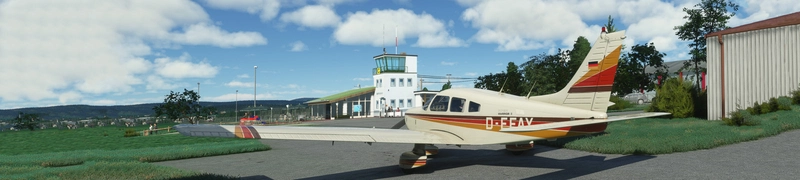
JustFlight Piper PA28 Turbo Arrow IV - Clean Grey Interior
A newly released interior modification for the JustFlight Piper PA28 Turbo Arrow IV, featuring clean grey interior design options. Customize your experience with different tablet and instrument panel colors. Easy installation process included in the package. Enjoy the enhanced visuals and immersive flying experience.
User Reviews
3 reviews
Version History
reduced file size by 50%
Related
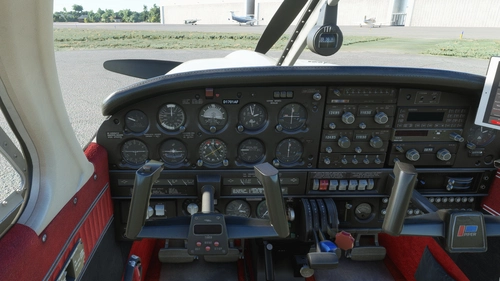
JustFlight Piper PA28 Turbo Arrow IV - Clean Interior MEGA PACK
Transform your flying experience with the JustFlight Piper PA28 Turbo Arrow IV Clean Interior Mega Pack V2.0-SU5, featuring various interior color options and tablet customizations. Easily install the desired interior design into your Community folder. Enhance immersion with matching instrument panel colors and a choice of tablet hues. Fly in style and comfort with this interior upgrade for the Turbo Arrow IV.
by Archer374
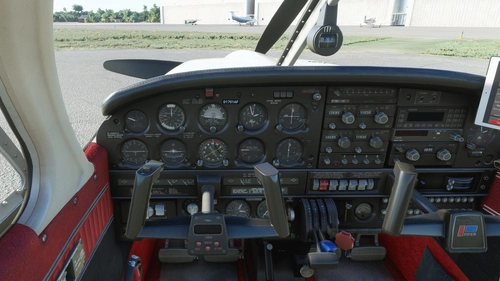
JustFlight Piper PA28 Turbo Arrow III - Clean Interior MEGA PACK
Enhance your JustFlight Piper PA28 Turbo Arrow III experience with the Clean Interior MEGA PACK. This pack includes a variety of interior color options for customization, along with different tablet colors and instrument panel choices. Easily switch between different interior designs to suit your preference and enjoy a refreshed look for your Turbo Arrow III cockpit. Installation is simple - just drop one of the folders included in the pack into your Community folder.
by Archer374
JustFlight Piper PA28 Turbo Arrow III - Clean Grey Interior
Enhance your Piper PA28 Turbo Arrow III experience with a clean grey interior mod, featuring customizable tablet and instrument panel colors. Simply drop the mod into your Community folder for easy installation. Experiment with different color options to personalize your cockpit to your liking.
by Archer374
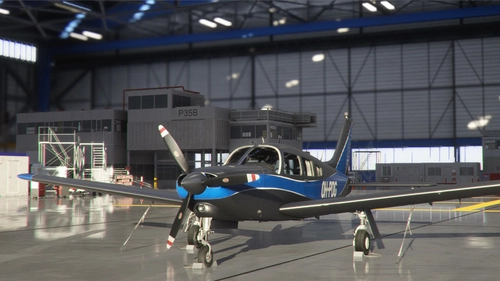
JustFlight Piper PA28 Turbo Arrow III - Livery "OH-PDG" (new)
A new livery "OH-PDG" for the JustFlight Piper PA28 Turbo Arrow III, created as a port by Archer374 based on the work of JMAviation. This livery provides a fresh, silvery look as if the aircraft just left the paint shop. Enjoy this realistic livery of a real-world aircraft by simply dragging and dropping the files into your Community folder.
by JMAviation / Archer374
Log in to join the discussion
Log InComments(9)
almost 2 years ago
i like black interior ~
almost 2 years ago
over 2 years ago
over 2 years ago
about 4 years ago
Thank you very much Archer. I just D\L it and looks awesome! Thank you for all your work. And I downloaded a grey and black livery because it just went too well with your work! Thank you again.
about 4 years ago
Great work. But I'm not getting the grey seats in the Turbo IV. I've tried almost every possible way but no grey interior...the Turbo III works perfectly. Maybe you can help me figure this one out? Thank you.
about 4 years ago
OMG. I just noticed that I accidentally had the blue cockpit files in the grey folder. That must have been the case from the beginning and noone ever complained.
I'll correct that of course and upload a new version.
Thanks for the heads up. Looks like this isn't my week, when it comes to correcting errors :-D
about 4 years ago
Lol...I thought it was just me. I was wondering why nobody was saying anything. Lol. Great work!
about 4 years ago
Every bug found is another bug fixed, you are doing great!