

Description
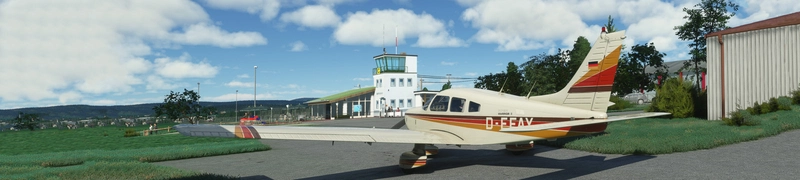
So with the release of the new Turbo Arrow, I was asked to convert my interiors as well.
I packed them together as a Mega Pack.
You can get the most popular one (Grey) as a separate download here:
https://flightsim.to/file/15401/just-flight-piper-pa28r-turbo-arrow-iii-clean-grey-interior
This version will only work with the Turbo Arrow III. For the Turbo Arrow IV for go here:
https://flightsim.to/file/15399/just-flight-piper-pa28r-turbo-arrow-iv-clean-interior-mega-pack
Installation:
Completely remove previous versions!
Then just drop ONE of the folders included into your Community folder. You can always just have one colour installed at the same time.
Each version comes with a choice of tablet colours. In the standard package I have changed the tablet to black.
However, if you prefer the white tablet you can reinstall it:
- Look for the folder "tablet". In it you will find one folder called "black" and one folder called "white".
- Each of those folders contains a file called: "EFB_ALBEDO.PNG.DDS"
- copy the file with the desired colour into "Community/justflight-aircraft-pa28-turboarrow-iii_beigeinterior/SimObjects/Airplanes/JF_PA28_TurboArrow_III/TEXTURE.VC" and restart MSFS
In addition I changed the colour of the instrument panel to match the interior as well and provided a second complementary panel color with a black base. You can always easily switch back to the colour you prefer
This is how it works for the grey interior. All the others work the same way:
I in case of the grey interior I changed the colour of the instrument panel to grey as well and provided a second black and grey panel, as well as a third black panel with a dark grey bottom. In case you don't like it, you can change it to black and back again at any time. The files can be found in the folders "Dashboard/black", "Dashboard/blackdarkgrey" ""Dashboard/grey" and "Dashboard/greyblack"
Installation works like with the tablet:
- Look for the folder "Dashboard" and for example in it for the folder "black".
- you will find two folder "TEXTURE" and "TEXTURE.VC" simply copy the three files "ARROW_EXT03_ALBEDO.PNG.DDS", ARROWVC_01_ALBEDO.PNG.DDS and ARROWVC_02_ALBEDO.PNG.DDS contained in their respective folders under "Community/justflight-aircraft-pa28-arrow-iii_greyinterior/SimObjects/Airplanes/JF_PA28_Arrow".
- you will now have a completely black isntrument panel.
- if you want to revert to the grey panel again simply copy the respective files from the "Dashboard/grey" folder over
Do not rename the folder or you might get problems with other mods like the "Just Flight PA28 Lighting Improvement" by WeptBurrito2749
Have fun
Best wishes
Archer374
JustFlight Piper PA28 Turbo Arrow III - Clean Interior MEGA PACK
Enhance your JustFlight Piper PA28 Turbo Arrow III experience with the Clean Interior MEGA PACK. This pack includes a variety of interior color options for customization, along with different tablet colors and instrument panel choices. Easily switch between different interior designs to suit your preference and enjoy a refreshed look for your Turbo Arrow III cockpit. Installation is simple - just drop one of the folders included in the pack into your Community folder.
User Reviews
3 reviews
Version History
reduced file size by 50%
Related
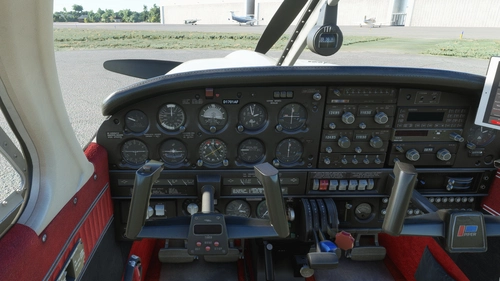
JustFlight Piper PA28 Turbo Arrow IV - Clean Interior MEGA PACK
Transform your flying experience with the JustFlight Piper PA28 Turbo Arrow IV Clean Interior Mega Pack V2.0-SU5, featuring various interior color options and tablet customizations. Easily install the desired interior design into your Community folder. Enhance immersion with matching instrument panel colors and a choice of tablet hues. Fly in style and comfort with this interior upgrade for the Turbo Arrow IV.
by Archer374
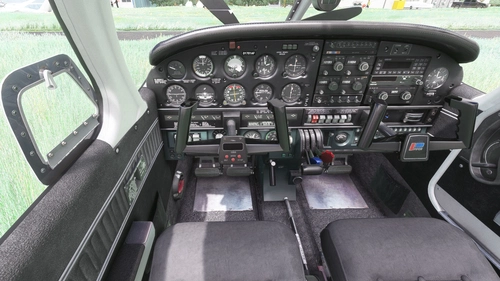
JustFlight Piper PA28 Turbo Arrow IV - Clean Grey Interior
A newly released interior modification for the JustFlight Piper PA28 Turbo Arrow IV, featuring clean grey interior design options. Customize your experience with different tablet and instrument panel colors. Easy installation process included in the package. Enjoy the enhanced visuals and immersive flying experience.
by Archer374
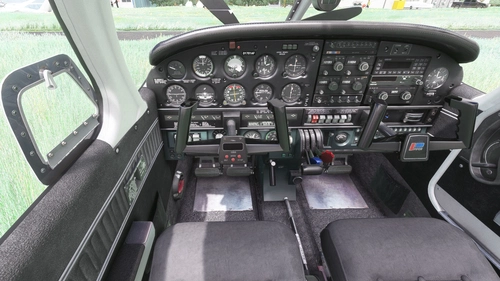
JustFlight Piper PA28 Turbo Arrow III - Clean Grey Interior
Enhance your Piper PA28 Turbo Arrow III experience with a clean grey interior mod, featuring customizable tablet and instrument panel colors. Simply drop the mod into your Community folder for easy installation. Experiment with different color options to personalize your cockpit to your liking.
by Archer374
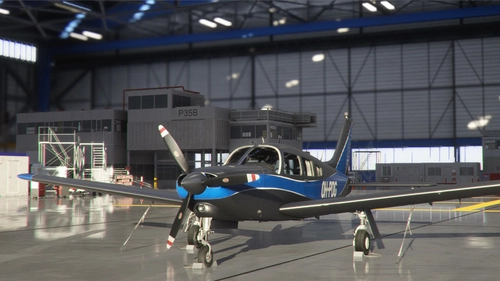
JustFlight Piper PA28 Turbo Arrow III - Livery "OH-PDG" (new)
A new livery "OH-PDG" for the JustFlight Piper PA28 Turbo Arrow III, created as a port by Archer374 based on the work of JMAviation. This livery provides a fresh, silvery look as if the aircraft just left the paint shop. Enjoy this realistic livery of a real-world aircraft by simply dragging and dropping the files into your Community folder.
by JMAviation / Archer374
Log in to join the discussion
Log InComments(24)
6 months ago
almost 4 years ago
i am not able to find the mentioned readme file and am a little bit confused about the installation.
almost 4 years ago
Must have forgotten to include them.
There's a separate zip for each colour: blue, grey, red and beige. If you unzip ONE of those into your Community folder everthing should be ok already.
Nevertheless you CAN chose different tablet colour (white or black) and different instrument panel colours.
This is how it works for the grey interior. The procedure is the same for all the others:
In addition I changed the colour of the instrument panel to grey as well and provided a second black and grey panel, as well as a third black panel with a dark grey bottom. In case you don't like it, you can change it to black and back at any time. The files can be found in the folder "Dashboard/black"
Installation works like with the tablet:
- Look for the folder "Dashboard" and in it for the folder "black".
- you will find two folder "TEXTURE" and "TEXTURE.VC" simply copy the three files "ARROW_EXT03_ALBEDO.PNG.DDS", ARROWVC_01_ALBEDO.PNG.DDS and ARROWVC_02_ALBEDO.PNG.DDS contained in their respective folders under "Community/justflight-aircraft-pa28-arrow-iii_greyinterior/SimObjects/Airplanes/JF_PA28_Arrow"
- if you want to revert to the grey panel again simply copy the respective files from the "Dashboard/grey" folder over
almost 4 years ago
Thanks for this, it was just what I needed.
Bought the Arrow in the sales last week and I really didn't get on with the look of it, to the point I just didn't want to fly the thing.
It's not hyperbole to suggest that these interiors have completely transformed the plane for me. I wouldn't have thought it would bother me that much, especially as I never clean my car and it has vegetation growing in it!
Additionally, in my rigorous scientific tests, I have found a 74% improvement in my flying skills and a 32% increase in my desirability to the opposite sex. (Some, all or none of the above statements may be true).
almost 4 years ago
*LOL*
Thanks and glad to be of service :-)
about 4 years ago
Yep, no red interior. The zip files is seen as corrupt in Windows Explorer and 7Zip reports header errors. Probably a mistake, I'm confident Archer374 is going fix this ;-)
about 4 years ago
reuploading. Don't know what's wrong. Upload seems to work fine, but the files are corrupted afterwards.
about 4 years ago
Unzips fine now. Thanks for the fast fix.
about 4 years ago
No more red interior in the latest version?
about 4 years ago
Sorry about that. Upload was corrupted. Uploaded a new version. Thanks for the heads up!
almost 5 years ago
Must have if you don't like the old&dirty original interiors. Thank you very much!
about 5 years ago
FYI since the latest JF update it looks like some textures are missing in external views.
Love your work btw!
about 5 years ago
Thanks for the heads-up. I'm already working on it. Should be online this weekend
about 5 years ago
Thanks, your interiors are superb, I hope you will make new clean ones for the upcoming JF Piper Warrior also.
about 5 years ago
To be honest I don't plan on buying that one. Sorry.
over 5 years ago
Thanks a lot !
over 5 years ago
Missing TEXTURE folder in the JF_PA28_TurboArrow_III directories
over 5 years ago
Don't know what you're referring to. Just checked. No folder is missing.
over 5 years ago
Please disregard. Winrar failed to exact all files.
over 5 years ago
ok. thanks for clarifying