
Description
MSFS Live Traffic Utility – English Description
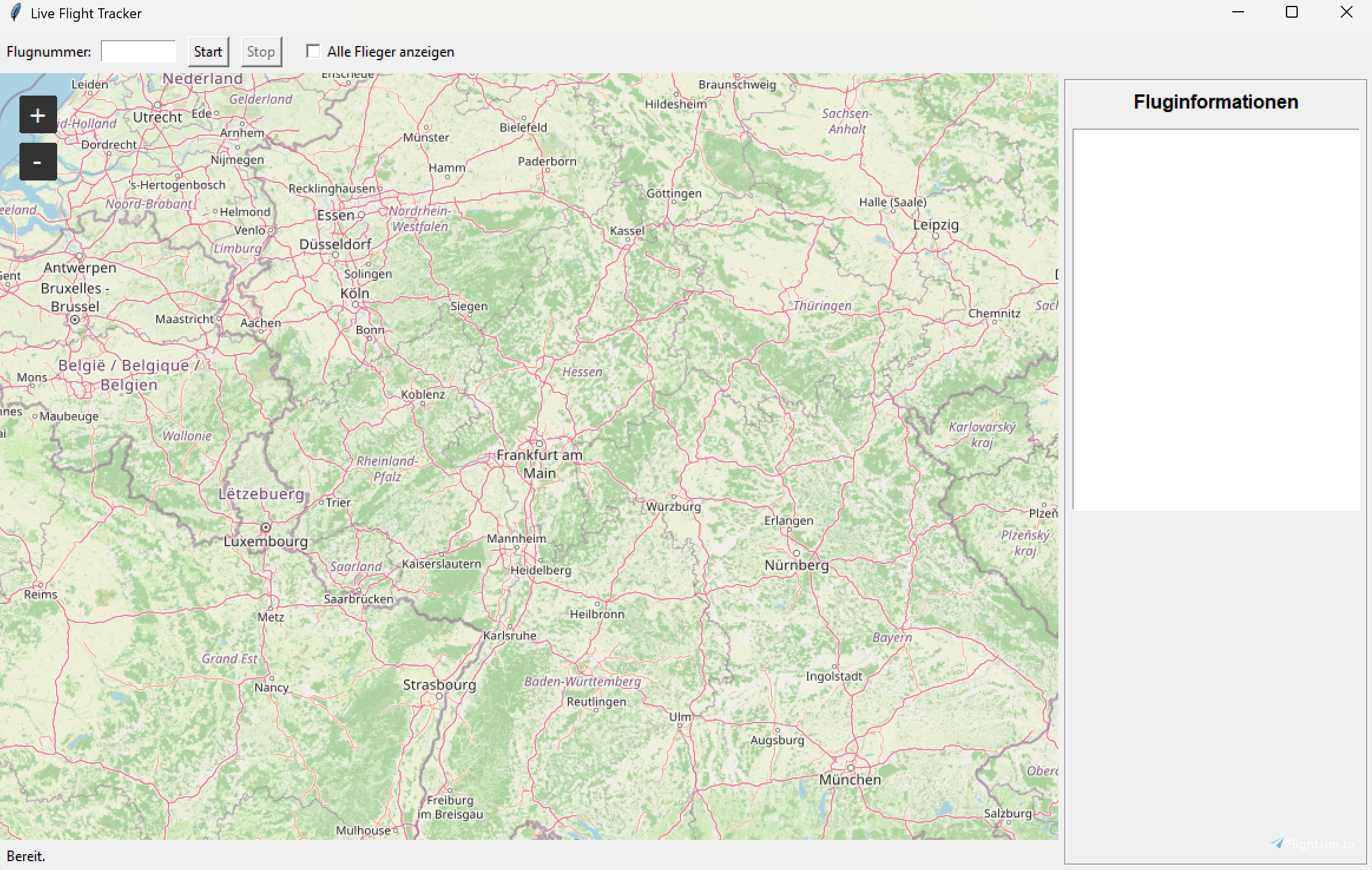
MSFS Live Traffic Utility is a lightweight real‑time ADS‑B traffic viewer for Microsoft Flight Simulator 2020 and 2024.
It displays live aircraft on an interactive map and optionally spawns AI dummy aircraft inside MSFS using SimConnect.
This project is experimental and intended for hobby use only.
✈️ Features
- Real‑time ADS‑B traffic from the free community source adsb.lol
- Interactive map with altitude‑based color markers
- Smooth aircraft movement and trail tracking
- Optional single‑flight tracking mode
- Experimental MSFS dummy‑AI mode (spawns aircraft using SimConnect)
- Requires FSLTL Base Models for AI spawning
- Model mapping is still under development and will be improved in future versions
- Lightweight, fast, and easy to use
🛠 Requirements
- Windows 10 or 11
- Internet connection
- Microsoft Flight Simulator 2020 or 2024 (optional for dummy‑AI mode)
- SimConnect.dll is included in the download — no separate installation required
- FSLTL Base Models installed (mandatory for dummy‑AI mode)
📦 Installation
- Download the ZIP file.
- Extract all files into a folder of your choice.
- Make sure run.exe and SimConnect.dll stay in the same directory.
- Start run.exe.
- The tool automatically detects whether MSFS is running:
If MSFS is running → Dummy‑AI mode
- If MSFS is not running → Map/GUI mode
⚠️ Important Notes
- This tool uses only free ADS‑B data from adsb.lol.
- No data from FlightRadar24, FlightAware, or other commercial services is used.
- SimConnect.dll is bundled with the tool and must remain in the same folder as run.exe.
- FSLTL Base Models are required for AI spawning.
- Model mapping is not final and will be expanded and refined.
- The dummy‑AI mode is experimental and may cause unexpected behavior.
- Use at your own risk.
🧩 Known Issues
- ADS‑B data may be incomplete or delayed
- AI aircraft may jump or move inconsistently
- Trails may occasionally break
- Performance may vary depending on traffic density
- Model mapping may not always match the real aircraft type
📜 License & Usage
This is a private, non‑commercial hobby project.
You may not redistribute modified versions without permission.
No warranty is provided.
German Translation
(This section contains the same information as above. I am a German speaker, so I provide a German version for convenience.)
MSFS Live Traffic Utility – Deutsche Beschreibung
MSFS Live Traffic Utility ist ein leichtgewichtiges Echtzeit‑ADS‑B‑Traffic‑Tool für den Microsoft Flight Simulator 2020 und 2024.
Es zeigt Live‑Flugzeuge auf einer interaktiven Karte an und kann optional Dummy‑AI‑Flugzeuge im MSFS über SimConnect spawnen.
Das Projekt ist experimentell und als Hobby‑Tool gedacht.
✈️ Funktionen
- Echtzeit‑ADS‑B‑Daten von der freien Quelle adsb.lol
- Interaktive Karte mit farbcodierten Höhenmarkern
- Sanfte Flugzeugbewegung und Spurverfolgung
- Optionaler Einzel‑Flug‑Tracking‑Modus
- Experimenteller Dummy‑AI‑Modus für MSFS
- FSLTL Base Models müssen installiert sein, damit AI‑Flugzeuge gespawnt werden können
- Das Modell‑Mapping ist noch in Arbeit und wird in zukünftigen Versionen verbessert
- Schnell, leichtgewichtig und einfach zu bedienen
🛠 Voraussetzungen
- Windows 10 oder 11
- Internetverbindung
- Microsoft Flight Simulator 2020 oder 2024 (optional für Dummy‑AI‑Modus)
- SimConnect.dll wird mitgeliefert und muss im selben Ordner wie run.exe bleiben
- FSLTL Base Models (Pflicht für Dummy‑AI‑Modus)
📦 Installation
- ZIP‑Datei herunterladen
- Alles in einen Ordner deiner Wahl entpacken
- run.exe und SimConnect.dll müssen im selben Ordner bleiben
- run.exe starten
- Das Tool erkennt automatisch:
MSFS läuft → Dummy‑AI‑Modus
- MSFS läuft nicht → Karten/GUI‑Modus
⚠️ Wichtige Hinweise
- Dieses Tool nutzt ausschließlich freie ADS‑B‑Daten von adsb.lol.
- Keine Daten von FlightRadar24, FlightAware oder anderen kommerziellen Diensten.
- SimConnect.dll ist im Download enthalten und muss im selben Ordner wie run.exe liegen.
- FSLTL Base Models sind zwingend erforderlich, um AI‑Flugzeuge zu spawnen.
- Das Modell‑Mapping ist noch nicht final und wird laufend erweitert.
- Dummy‑AI‑Modus ist experimentell und kann Fehler verursachen.
- Nutzung auf eigene Gefahr.
🧩 Bekannte Probleme
- ADS‑B‑Daten können unvollständig oder verzögert sein
- AI‑Flugzeuge können springen oder ruckeln
- Trails können gelegentlich abbrechen
- Performance hängt von der Verkehrsdichte ab
- Modell‑Mapping kann ungenau sein
📜 Lizenz & Nutzung
Dies ist ein privates, nicht‑kommerzielles Hobbyprojekt.
Modifizierte Versionen dürfen nicht ohne Erlaubnis weitergegeben werden.
Es wird keine Garantie übernommen.
MSFS Live Traffic Utility
MSFS Live Traffic Utility is a lightweight tool for Microsoft Flight Simulator 2020 and 2024 that displays real-time ADS-B aircraft traffic on an interactive map using data from adsb.lol. It features smooth aircraft movement, trail tracking, and altitude-based markers. The utility also offers an experimental mode to spawn AI aircraft in MSFS via SimConnect using FSLTL Base Models. This project is intended for hobby use and may have incomplete data or occasional performance issues.


Contributors
User Reviews
2 reviews
Version History
- Über colors.json Konfiguration der Karten-Quelle und des Designs. - Center der Daten wird automatisch auf den Kartenmittelpunkt gesetzt - Dadurch leicht weniger 429 Errors ACHTUNG: Wir haben noch kein offizielles Whitelisting, also kann es vorkommen dass zu Stoßzeiten immer noch sehr viele 429 Errors vorhanden sind. English Translation: - About colors.json Map source and design configuration. - Center of data is automatically set to the map center - This means slightly less 429 errors. ATTENTION: We don't have official whitelisting yet, so it can happen that there are still a lot of 429 errors at peak times.
Related

TFX – Emergency Effects for MSFS (Open Beta)
TFX (Open Beta) is an open-source, freeware add-on for Microsoft Flight Simulator designed to enhance the simulation of emergency scenarios with effects not typically visible in the base game. It includes a variety of visual effects such as fires, sparks, water splashes, and crash animations, and is compatible with both MSFS 2020 and 2024, as well as a range of aircraft. The add-on is actively updated to include new effects and features, aiming to provide a more immersive flight experience.
by TriTriSim
German Airforce Basepack for EUROFIGHTER (BREDOK3D)
Explore a variety of German Airforce bases with this add-on for the BREDOK3D Eurofighter. Includes unique variations such as Boelcke, Laage, Manching, and Neuburg.
by benimix1701

The Gotgravel STOL Academy at Squamish, BC (CYSE)
Explore the back country of British Columbia with the GotGravel Academy at Squamish Airport (CYSE). This add-on offers 40 off-airport landing strips and two dedicated STOL strips for competitive events and practice. Immerse yourself in the art of STOL flying and enjoy custom pylon racing circuits alongside the Squamish river. Join the GotGravel discord for support and make sure to have the recommended libraries installed for the best experience.
by Photosbykev
Smoke a Plane - Aerobatic smokes effects configurator App
Customize your aircraft with aerobatic smoke effects using Smoke-a-Plane, a user-friendly VB.NET application. Easily add smokes to any of the 20 standard planes and toggle effects with cockpit actions. Explore preconfigured aircrafts or create your own signature smokes in the sky. Join the beta to provide feedback and help refine this innovative tool.
by mamu82
Log in to join the discussion
Log InComments(99)
1 day ago
about 4 hours ago
6 days ago
https://1drv.ms/b/c/081c1e798abc9355/IQB6uPzxnM_gRa28Kb2T-EbCAZP4y15J8VGOZN0zjv01KTU
11 days ago
https://flightsim.to/addon/116297/livetraffic
https://flightsim.to/addon/116506/traffic2u
https://flightsim.to/addon/108033/msfs-live-traffic-utility
Why not collaborate?
10 days ago
Thanks for reaching out and for the suggestion. In general, the idea of a collaboration isn't bad. However, I want to be open and transparent with you about why I've been hesitant so far.
* The Connection: According to Traffic2U’s own description, it is based on LiveTraffic. However, my utility (LTU) was out there long before both of them.
* The Background: Since LTU is an open-source project under the GPL license, adapting the code is perfectly legal. That being said, it left a bit of a bittersweet taste when certain core ideas—like utilizing adsb.lol (which was part of my project from the very beginning and mentioned in my GitHub comments) and building the entire logic around the FSLTL Base Models—suddenly appeared in LiveTraffic in an almost identical fashion, which now also forms the foundation for Traffic2U.
Ultimately, this won’t fail because of me. I am not a fan of unnecessary rivalry in the community. If a collaboration brings genuine value to all sides and happens on equal terms, I'm absolutely open to it.
To get things moving, I will reach out to the creator of LiveTraffic directly to see where we stand and how we might move forward together.
Best regards,
Philipp
10 days ago
Thanks once again.
10 days ago
12 days ago
14 days ago
15 days ago
Very good review
14 days ago
about 1 month ago
You can also find evidence in the attached screenshots that the developers have not responded yet.
about 1 month ago
about 1 month ago
about 1 month ago
about 1 month ago