

Description
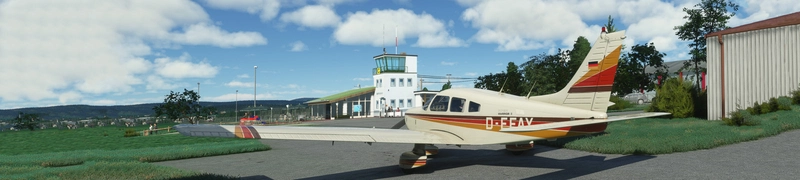
So with the release of the new Turbo Arrow, I was asked to convert my interiors as well.
Installation:
Completely remove previous versions!
Then just drop into your Community folder
This version comes with a choice of tablet colours. In the standard package I have changed the tablet to black.
However, if you prefer the white tablet you can reinstall it:
- Look for the folder "tablet". In it you will find one folder called "black" and one folder called "white".
- Each of those folders contains a file called: "EFB_ALBEDO.PNG.DDS"
- copy the file with the desired colour into "Community/justflight-aircraft-pa28-turboarrow-iii_greyinterior/SimObjects/Airplanes/JF_PA28_TurboArrow_III/TEXTURE.VC" and restart MSFS
In addition I changed the colour of the instrument panel to grey as well and provided a second black and grey panel, as well as a third black panel with a dark grey bottom. In case you don't like it, you can change it to black and back at any time. The files can be found in the folder "Dashboard/black"
Installation works like with the tablet:
- Look for the folder "Dashboard" and in it for the folder "black".
- you will find two folder "TEXTURE" and "TEXTURE.VC" simply copy the three files "ARROW3T_EXT03_ALBEDO.PNG.DDS", ARROW3TVC_01_ALBEDO.PNG.DDS and ARROW3TVC_02_ALBEDO.PNG.DDS contained in their respective folders under "Community/justflight-aircraft-pa28-turboarrow-iii_greyinterior/SimObjects/Airplanes/JF_PA28_TurboArrow_III"
- if you want to revert to the grey panel again simply copy the respective files from the "Dashboard/grey" folder over
Do not rename the folder or you might get problems with other mods like the "Just Flight PA28 Lighting Improvement" by WeptBurrito2749
Have fun
Best wishes
Archer374
JustFlight Piper PA28 Turbo Arrow III - Clean Grey Interior
Enhance your Piper PA28 Turbo Arrow III experience with a clean grey interior mod, featuring customizable tablet and instrument panel colors. Simply drop the mod into your Community folder for easy installation. Experiment with different color options to personalize your cockpit to your liking.
User Reviews
4 reviews
Version History
reduced file size by 50%
Related
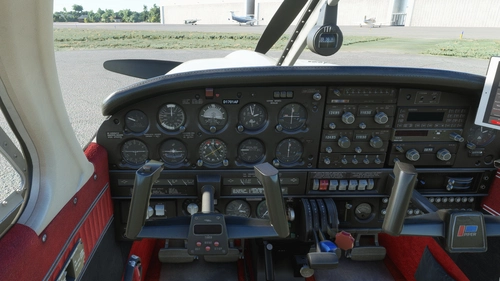
JustFlight Piper PA28 Turbo Arrow IV - Clean Interior MEGA PACK
Transform your flying experience with the JustFlight Piper PA28 Turbo Arrow IV Clean Interior Mega Pack V2.0-SU5, featuring various interior color options and tablet customizations. Easily install the desired interior design into your Community folder. Enhance immersion with matching instrument panel colors and a choice of tablet hues. Fly in style and comfort with this interior upgrade for the Turbo Arrow IV.
by Archer374
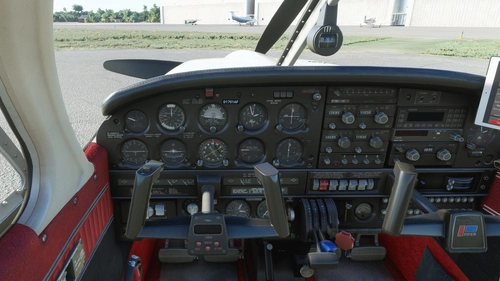
JustFlight Piper PA28 Turbo Arrow III - Clean Interior MEGA PACK
Enhance your JustFlight Piper PA28 Turbo Arrow III experience with the Clean Interior MEGA PACK. This pack includes a variety of interior color options for customization, along with different tablet colors and instrument panel choices. Easily switch between different interior designs to suit your preference and enjoy a refreshed look for your Turbo Arrow III cockpit. Installation is simple - just drop one of the folders included in the pack into your Community folder.
by Archer374
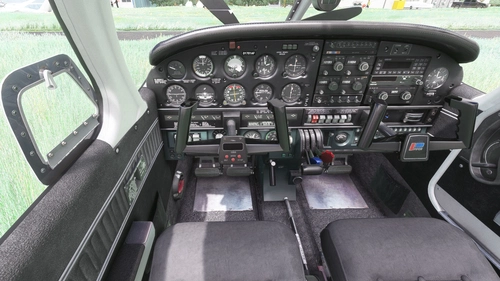
JustFlight Piper PA28 Turbo Arrow IV - Clean Grey Interior
A newly released interior modification for the JustFlight Piper PA28 Turbo Arrow IV, featuring clean grey interior design options. Customize your experience with different tablet and instrument panel colors. Easy installation process included in the package. Enjoy the enhanced visuals and immersive flying experience.
by Archer374
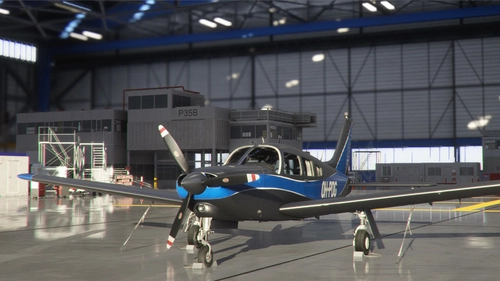
JustFlight Piper PA28 Turbo Arrow III - Livery "OH-PDG" (new)
A new livery "OH-PDG" for the JustFlight Piper PA28 Turbo Arrow III, created as a port by Archer374 based on the work of JMAviation. This livery provides a fresh, silvery look as if the aircraft just left the paint shop. Enjoy this realistic livery of a real-world aircraft by simply dragging and dropping the files into your Community folder.
by JMAviation / Archer374
Log in to join the discussion
Log InComments(19)
over 3 years ago
Big fan of this one too!
over 3 years ago
Thanks very much. It's among my most popular mods :-)
about 4 years ago
Since your last update, I'm unable to start the plane (motor starts but stops working after a few seconds). Removing the mod from the Community folder makes it work again.
about 4 years ago
Sorry, but that can only be a fluke. My only changes are in texture files. It is highly unlikely that they have anything to do with the engine or flight model. Also I cannot reproduce the problem.
However I will upload a new version fixing the upper part of the artificial horizon (which was still white)
over 4 years ago
Nice and clean, thanks.
over 4 years ago
I like the way we are told to, "Completely remove previous versions!" I presume you mean previous versions of this interior.
Installing the different textures. I've identified the files that have to be copied but where do I paste them?
almost 5 years ago
you reminded me to check, is this compatible at the moment buddy?
almost 5 years ago
should be. Haven't found any indication to the contrary. In case you see anything, please let me know.
almost 5 years ago
works great
about 5 years ago
Hey bro, love your work. Means I don't have to create it. I will credit you in any livery I use your panel in. One thing, in this download, you have one file mislabeled. In the blackdarkgrey folder, what should be 'ARROW3T_EXT03_ALBEDO.PNG.DDS', you have labeled 'ARROW4T_EXT03_ALBEDO.PNG.DDS'. Easy enough to me to make the correction on my own, but others may be wondering why it's not working for them.
Still, 5 stars as I know you will review the file names and make any appropriate correction.
about 5 years ago
Thanks man. Uploading the update now.
over 5 years ago
I like the idea of this very much (were I to buy this thing, the first thing I would do is rip and replace the whole interior, but mine looks like this... (with both a default and an addon exterior livery) https://1drv.ms/u/s!Agjs4q22lK4ekfQfQarEdc_kdcBIrQ?e=uOrB7E
EDIT: BTW, I was not hacked, this is not a virus or anything like that, I would post the pic were such a thing possible, and it's an actual screenshot that I took myself. If in doubt, use Windows Sandbox to protect yourself. (Requires Win 10 Pro, and may have to be added manually, AND requires virtualization (I think, if it's not that, it's something) to be enabled in your BIOS). I DO use an addons manager (from here) that creates links, instead of putting mods in my Community folder directly.
over 5 years ago
There must be something wrong with your installation. It loads none of the interior textures. Deinstall the plane and my mod and try again. Only idea I have at the moment
over 5 years ago
You're right. A simple reinstall did the trick. I guess sometimes if you lose the wrong bit, it will byte you in the ass...
over 5 years ago
Indeed ... :-D
over 5 years ago
Beautiful mod, thank you.
over 5 years ago
you're welcome. Thanks :-)
over 5 years ago
Thank you so much man, you're quick!
over 5 years ago
I try. Thanks. Several people contacted me and asked yesterday, so I went to work staight away :-)