
Description
General
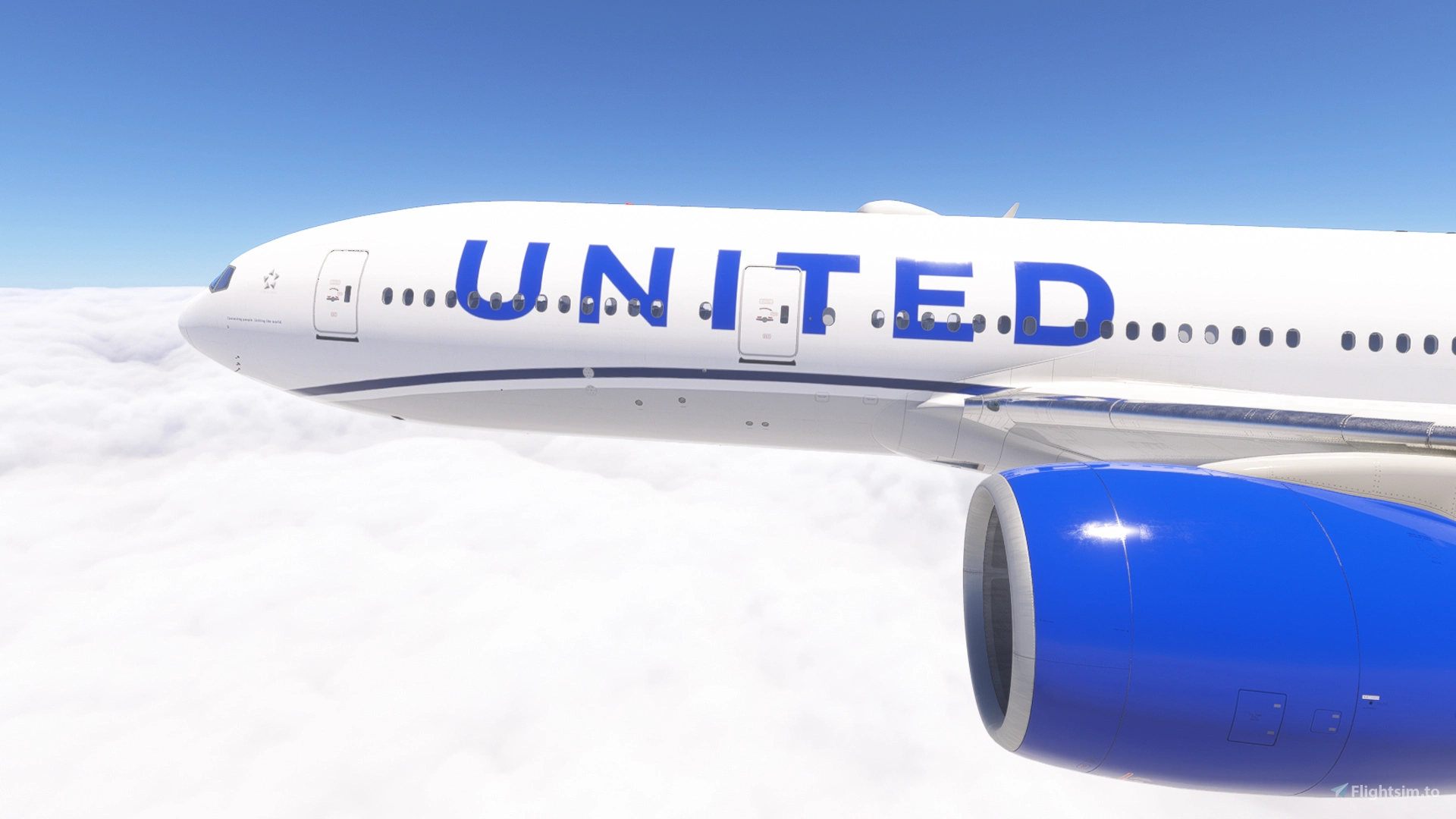
This is a repaint package for the PMDG 777-200ER in colors of United Airlines - Evo Blue.
If you like this livery, please consider leaving a comment and like! This livery is free of use, but you can consider a small donation!
You can request a livery in my discord server: https://discord.gg/arKKpgBvSh
Additional information
Pictures were made with the MSFS 2024 version. MSFS 2020 cabin differs slightly in design.
Due to the size of this pack, I have split it into two parts:
Part 1: N204UA to N781UA
Part 2: N783UA to N79011
This livery comes with a custom tablet background (installation instructions included)
Registrations included
The following 50 registrations are included:
regular:
N204UA, N206UA, N209UA, N210UA, N211UA, N212UA, N213UA, N214UA, N216UA, N217UA, N220UA, N222UA, N223UA, N226UA, N229UA, N769UA, N771UA, N772UA, N775UA, N776UA, N777UA, N778UA, N779UA, N780UA, N781UA, N783UA, N784UA, N785UA, N786UA, N787UA, N788UA, N791UA, N792UA, N793UA, N795UA, N796UA, N798UA, N799UA, N57016, N69020, N77006, N77012, N77019, N78002, N78005, N78013, N79011
Star Alliance:
N77022, N794UA
nose missmatch (Continental):
N78004
older design cabin:
N211UA, N212UA, N213UA, N214UA, N769UA, N771UA, N772UA, N775UA, N776UA, N777UA, N778UA, N779UA, N780UA, N781UA
Installation via OC3
To reduce file size I have added a 'livery' called 'United Airlines Commons'
In MSFS 2020 it doesn't show up in the sim menu intentionally.
In MSFS 2024 it shows up and can be used as N204UA (new design)
Installation via PMDG Operations Center 3:
1: Extract the *.zip file to a temporary location, ie desktop
2: Run PMDG Operations Center 3.
3: Choose the 777-200ER, then Import.
4: Choose the 'ual_commons.zip' folder and at least one of the registrations e.g. 'ual_n204ua.zip' and hit open.
5. After installation was successful, start MSFS, choose the installed livery and enjoy!
6: Leave the 'United Airlines Commons' installed as long as you use this pack, as shared textures are stored there needed for all liveries of this package.
Legal information
It is not permitted to modify the livery or re-upload it to a website without the explict permission of the author. Any violation of this constitutes a breach of applicable copyright law.
PMDG 777-200ER /w cabin United Airlines Evo Blue fleet
This add-on features a repaint package for the PMDG 777-200ER, showcasing United Airlines Evo Blue livery. It includes a total of 50 registrations from the regular fleet, Star Alliance, and older design cabins, with some split into two parts for easier installation. The package also provides a custom tablet background and installation instructions via the PMDG Operations Center 3.


Supporters

User Reviews
1 reviews
Version History
Changelog 1.1 - fixed IFE screens
Related
![United Airlines 'Evo-Blue' [Pack] w/Cabin | PMDG B777-200](https://cdn.flightsim.to/images/27/united-airlines-evo-blue-pack-wcabin--pmdg-b777-200-30161-1746246068-GHCgb.jpg?width=500)
United Airlines 'Evo-Blue' [Pack] w/Cabin | PMDG B777-200
The United Airlines Evo-Blue pack for the PMDG Boeing 777-200/ER features a collection of nine liveries, complete with a custom cabin and accurate UAL-specific stencils. It includes realistic aircraft configurations, custom weathering, and improved textures. This add-on is designed for use in Microsoft Flight Simulator and provides a detailed representation of United Airlines fleet, enhancing the simulation experience with authentic cockpit decals and placards.
by Jviation
![United Airlines 'CO/Merger' [Pack] w/Cabin | PMDG B777-200](https://cdn.flightsim.to/images/27/united-airlines-comerger-pack-wcabin--pmdg-b777-200-30161-1746294497-ufoHZ.jpg?width=500)
United Airlines 'CO/Merger' [Pack] w/Cabin | PMDG B777-200
Experience the United Airlines CO/Merger 9-pack designed for the PMDG Boeing 777-200/ER. This add-on features a custom cabin, accurate UAL stencils, and realistic aircraft configurations. It includes multiple models with improved textures and decals reflecting United Airlines branding. Please note existing limitations with tire pressure information and cabin resolution.
by Jviation
![United Airlines 'Star Alliance' [Pack] w/Cabin | PMDG B777-200ER](https://cdn.flightsim.to/images/27/united-airlines-star-alliance-pack-wcabin--pmdg-b777-200er-30161-1746336183-PmIDS.jpg?width=500)
United Airlines 'Star Alliance' [Pack] w/Cabin | PMDG B777-200ER
This add-on provides a 5-pack of United Airlines Star Alliance liveries specifically designed for the PMDG Boeing 777-200ER. It features a custom cabin, accurate UAL-specific stencils, and realistic aircraft configurations. Improved textures and weathering enhance the overall visual quality, while the package includes detailed cockpit decals and placards. Note that certain known issues remain due to the limitations of PMDGs UV mapping.
by Jviation
![United Airlines 'Battleship Gray' [Pack] w/Cabin | PMDG B777-222](https://cdn.flightsim.to/images/27/united-airlines-battleship-gray-pack-wcabin--pmdg-b777-222-30161-1746965476-ijcKV.jpg?width=500)
United Airlines 'Battleship Gray' [Pack] w/Cabin | PMDG B777-222
The United Airlines Battleship Gray pack includes a collection of six liveries for the PMDG Boeing 777-200/ER, featuring a custom cabin and accurate UAL-specific stencils. Each livery comes with pre-installed realistic aircraft configurations, improved textures, and custom weathering effects. This add-on also provides cockpit decals and placards along with a detailed installation guide for both MSFS 2020 and 2024.
by Jviation
Log in to join the discussion
Log InComments(19)
5 months ago
5 months ago
5 months ago
5 months ago
5 months ago
5 months ago
5 months ago
5 months ago
9 months ago
9 months ago
9 months ago
9 months ago
10 months ago
10 months ago
about 1 year ago
about 1 year ago
about 1 year ago
about 1 year ago
myselves atm. Which sim are you on?
about 1 year ago