
![United Airlines 'Evo-Blue' [Pack] w/Cabin | PMDG B777-200 - Image 1](https://cdn.flightsim.to/images/27/united-airlines-evo-blue-pack-wcabin--pmdg-b777-200-30161-1746246068-GHCgb.jpg)
Description
United Airlines 'Evo-Blue' 9-pack for the PMDG Boeing 777-200/ER
Features:
- Custom United Airlines cabin
- Accurate UAL-specific stencils
- Realistic UAL aircraft/equipment configurations pre-installed
- Custom Weathering
- Improved Textures and Metallics
- United Airlines cockpit decals and placards (Maximum Weights, Airworthiness/Registration Information, etc)
- Paintkit/Base textures improvement in partnership of Atarium Liveries and Henrik
Includes:
-200A | PW
- N210UA
- N779UA
-200ER | PW
- N226UA
- N788UA
- N798UA
-200ER | GE
- N69020
- N77006 | Robert F. Six
- N77019 | Larry Kellner
- N79011
KNOWN ISSUES:
- Tire pressure information for the main gear is flipped backwards on the left main gear door. This cannot be rectified due to PMDG's UV mapping.
- Some elements of the cabin are low resolution. This is due to the small UV mapping by PMDG and I cannot rectify this, either.
INSTALLATION – 2020 AND 2024
- Open the PMDG Operations Center (OC3).
- Navigate to your 777-200ER 2020 or 2024 Installation.
- In the Livery section, click Import and select the provided .ZIP file. PMDG has discontinued .PTP files in lieu of .ZIP files.
- The correct aircraft configurations are pre-installed.
⚠️ Important Note:
- PMDG sometimes fails to save aircraft configurations correctly, despite best efforts. To address this, I’ve included a folder titled “.ini configuration file” containing the configuration files. You can manually drag and drop a .ini file into the appropriate folder to automatically apply the correct real-world aircraft configuration.
- For aircraft configurations to properly load in MSFS2024, make sure to select the custom registration of the aircraft in the MSFS2024 main menu livery selection. You may also select the configuration through the FMC.
Feel free to join the Canvas Corner discord server where you can download other liveries from myself and good friends of mine: https://discord.gg/W2gFugg2ka
If you like my work and would like to support me, you can donate via this link: My PayPal
Please do not modify, redistribute, or reupload this livery or contents of this livery without permission.
United Airlines 'Evo-Blue' [Pack] w/Cabin | PMDG B777-200
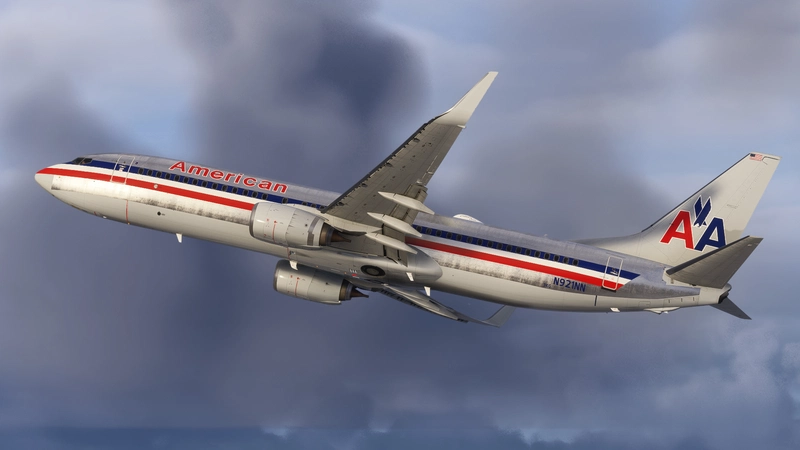
The United Airlines Evo-Blue pack for the PMDG Boeing 777-200/ER features a collection of nine liveries, complete with a custom cabin and accurate UAL-specific stencils. It includes realistic aircraft configurations, custom weathering, and improved textures. This add-on is designed for use in Microsoft Flight Simulator and provides a detailed representation of United Airlines fleet, enhancing the simulation experience with authentic cockpit decals and placards.

Supporters

User Reviews
22 reviews
Version History
- FS2024 Tail Texture Fix
Related
![United Airlines 'CO/Merger' [Pack] w/Cabin | PMDG B777-200](https://cdn.flightsim.to/images/27/united-airlines-comerger-pack-wcabin--pmdg-b777-200-30161-1746294497-ufoHZ.jpg?width=500)
United Airlines 'CO/Merger' [Pack] w/Cabin | PMDG B777-200
Experience the United Airlines CO/Merger 9-pack designed for the PMDG Boeing 777-200/ER. This add-on features a custom cabin, accurate UAL stencils, and realistic aircraft configurations. It includes multiple models with improved textures and decals reflecting United Airlines branding. Please note existing limitations with tire pressure information and cabin resolution.
by Jviation
![United Airlines 'Star Alliance' [Pack] w/Cabin | PMDG B777-200ER](https://cdn.flightsim.to/images/27/united-airlines-star-alliance-pack-wcabin--pmdg-b777-200er-30161-1746336183-PmIDS.jpg?width=500)
United Airlines 'Star Alliance' [Pack] w/Cabin | PMDG B777-200ER
This add-on provides a 5-pack of United Airlines Star Alliance liveries specifically designed for the PMDG Boeing 777-200ER. It features a custom cabin, accurate UAL-specific stencils, and realistic aircraft configurations. Improved textures and weathering enhance the overall visual quality, while the package includes detailed cockpit decals and placards. Note that certain known issues remain due to the limitations of PMDGs UV mapping.
by Jviation
![United Airlines 'Battleship Gray' [Pack] w/Cabin | PMDG B777-222](https://cdn.flightsim.to/images/27/united-airlines-battleship-gray-pack-wcabin--pmdg-b777-222-30161-1746965476-ijcKV.jpg?width=500)
United Airlines 'Battleship Gray' [Pack] w/Cabin | PMDG B777-222
The United Airlines Battleship Gray pack includes a collection of six liveries for the PMDG Boeing 777-200/ER, featuring a custom cabin and accurate UAL-specific stencils. Each livery comes with pre-installed realistic aircraft configurations, improved textures, and custom weathering effects. This add-on also provides cockpit decals and placards along with a detailed installation guide for both MSFS 2020 and 2024.
by Jviation
![United Airlines 'Blue Tulip' [Pack] w/Cabin | PMDG B777-222](https://cdn.flightsim.to/images/27/united-airlines-blue-tulip-pack-wcabin--pmdg-b777-222-30161-1747292617-zUfFQ.jpg?width=500)
United Airlines 'Blue Tulip' [Pack] w/Cabin | PMDG B777-222
This add-on features a pack of eight United Airlines Blue Tulip/Rising Blue liveries for the PMDG Boeing 777-200ER, complete with a custom cabin and accurate UAL-specific stencils. It includes detailed aircraft configurations, improved textures, and custom weathering for a realistic presentation. Additional cockpit decals and placards enhance the authenticity, while a user-friendly installation process is provided for both MSFS 2020 and 2024.
by Jviation
Log in to join the discussion
Log InComments(116)
2 months ago
This comment has been deleted
6 months ago
This comment has been deleted
8 months ago
9 months ago
9 months ago
I do include a custom pen texture (it is not United’s, but a generic Canvas Livery pen). However, if you feel this is important, I’d recommend submitting a ticket to PMDG so they can review the UV mapping on the FS2024 777 model, as this is where the issue originates.
I hope you’ll reconsider your review. Cheers.
10 months ago
Navigate to your 777-200ER 2020 or 2024 Installation. Went to my 2024 777-200 install
In the Livery section, click Import and select the provided .ZIP file. Pointed to the 2024 .zip and OC3 gives me an error it doesnt like the zip file. WTF your instructions seam easy enough but they dont work
9 months ago
Here's what worked for me:
- Download the .zip for MSFS24 from this page
- Extract the .zip to new folder
- Open OC3, go to 777-200ER, and click "Import" in the livery section
- In the popup, open the extracted folder (step #2), and you'll see a collection of .zip files in there (one for each livery)
- Click on the livery .zip file you want--OC3 should recognize it after that.
Hope that helps!
6 months ago
This comment has been deleted
6 months ago
10 months ago
about 1 year ago
about 1 year ago
about 1 year ago
about 1 year ago
about 1 year ago
3 months ago
over 1 year ago
over 1 year ago
over 1 year ago