

Description
CYRIL E. KING AIRPORT UPDATED SCENERY PROJECT
[UPDATED AS NEW INFO IS DISCOVERED] ATTENTION!IF YOU NO LONGER HAVE CRASH-TO-DESTOP ERRORS WHEN YOU LOAD MY SCENERY SINCE ALL THE RECENT SIM UPDATES, PLEASE LET ME KNOW. I PREVIOUSLY UPLOADED A 'LITE VERSION' AT THE FOLLOWING LINK BELOW SOME TIME IN 2021 TO CORRECT THAT, HOWEVER IT IS NOT UPDATED TO V1.5 AND I WOULD LIKE TO REMOVE IT:
https://flightsim.to/file/17288/cyril-e-king-airport-tist-updated-scenery-project-lite-version
COPY AND PASTE THE LINK INTO YOUR BROWSER IF YOU STILL ENCOUNTER THE ERRORS UPON LOADING AND TELL ME IF YOU STILL WANT IT UPDATED AS WELL. THANK YOU.
Also, check out this video link of the airport in action by 'Finite Flying':
https://youtu.be/g3asTJgX1r8
DEPENDENCIES:
NEW LIGHTING EFFECTS AND ITEMS ADDED: In order to see some of the new lighting effects, additional sail boats and some 3d people used in this scenery, you will need to download and save in your community folder some required files. Check "Dependencies" section for link to download.
DESCRIPTION:
The Cyril E. King Airport is the largest international airport in the U.S. Virgin Islands and one of the busiest hubs in the eastern Caribbean. The Airport is a public airport located at No. 70 Lindbergh Bay on the southwestern side of St. Thomas, U.S. Virgin Islands - approximately four miles east of the capital city, Charlotte Amalie. South-West of Beef Island, Tortola and North of St. Criox. It's one of the busiest airports in the eastern Caribbean. Many direct flights are available for international travelers arriving from the U.S., with non-stop service to St. Thomas from Atlanta, Boston, Chicago, Dulles, Fort Lauderdale, Miami, Newark, and New York. It was known as Harry S Truman Airport until 1984, when it was renamed to honor Cyril Emmanuel King, the second elected governor of the U.S. Virgin Islands. A new airport opened in November 1990 and retained the name.
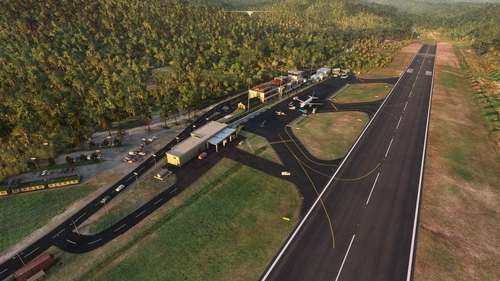
This is my first US based airport i've done, so obviously there were some differences to this than with previous airports while constructing and putting this scenery together. I put most of the effort in the layer of ground texturing and the variety of object details especially for the main terminal parking area as much as I could to make this look at least 90% accurate.
While almost completing this, I learned there was a payware version to this out. If I had knew about it before, I wouldn't have taken up the task of doing this, but I continued on anyways since I reached that far. I do hope you will enjoy regardless!
INSTALLATION:
Open and extract ''lexpro-St Thomas_updated_scenery_project_v1.0'' (or the version name you choose to download) to your prefered location on your PC, then unZip and open the folder and copy "Cyril_E_King_Updated_Scenery_Project" folder into where your Community folder is located, then start the sim and go to TIST - Cyril E. King Airport. That's it!
Each time I upload an updated version here, just replace the same "Cyril_E_King_Updated_Scenery_Project" folder in your Community folder to update the scenery. Make back ups to the old folders if necessary.
DETAILED UPDATED FEATURES TO DEFAULT SCENERY (V1.0) - TIST:
- - Started from scratch and deleted everything except the default terminal building and a few surrounding buildings.
- - Stratigically placed very specific scenery objects from the sim library around the default building to try match the design structure IRL.
- - Made some corrections to the surrounding terrain and elevation of the Airport. A bit challenging but managable in the end.
- - Added runway/lights, PAPI lights, aprons, taxi lights [despite the fact that by default they were already there, editing the elevation made them dissapear, so I had to replace them again :\ ], taxi ways, taxiway signs,[A few might not be too accurate] ''wear n' tear'' textures, ground markings and a couple dark painted color lines exactly like IRL.
- - Edited airport taxiway data so ATC properly directs you to and from your parking location.
- Added and created heavily detailed 'wear n' tear' and layered textures to main apron of terminal building as well as some extra layered textures to taxiways to give a more 'used' feel.
- Recreated all 'Hold short' numbering designs and markings as well as 90% of the runway markings with layered 'wear n' tear' textures.
- - Corrected location of Windsocks
- - Edited service vehicle data so they drive on the designated roads they are to drive on and not all over the taxiways and runway. [I cannot stop them from parking in your parking space as the creators pre-programed them by default to do so. I can only re-rout their way]
- - Added a light above the Windsocks
- Added 4 anntenas with red beacons on the Northern moutainside of the island.
- -Added a small circular stone structure design around the base of one windsock like IRL
- - Added the control tower with a beacon light.
- - Replaced a few default buildings with some from the library to keep up to date with whats there presently
- - Added Airport lights around the airport.
- - Added extra lighting under the Airport terminal roofing that was added. Also added lighting to any surrounding buildings in the area including the firestation building which I replaced with a generic building and other buildings add. Also lighting on a few boats, yachts and a cruiseship. [Remember to check Dependencies for required files to see them]
- - Added static aircraft\service vehicles with some animated Marshalls\Workers surrounding them.
- - Randomly placed Marshalls/Workers and other animated people around the Airport in general. [Some of these are additional 3d people. Again, check Dependencies section to see them]
- - Added barbwire fencing around parts of the Airport like IRL. Also added additional fencing in certain areas within the airport.
- - Added many vehicles in the area including the main parking lot [work in progress]. Also added some animated vehicles on the road.
- - Added and placed a lot of stones to simulate the stone structure design in front of Runway 10 like IRL - corrected 1 or 2 beach areas surrounding the airport.
- - Added many more trees/plants/grass, auto-gen trees in general areas close to and surrounding the Airport.
- - Added lots of boats, yachts and ferries in the surrounding area like IRL. [Some of these are new files added. Again, check Dependencies section to see them]
- - Recreated and added the wall thats behind the main terminal building leading to the cargo section.
- - Added a small red and white checkered building with antennas near by with a red light on the large one close to Runway 10 like IRL
- - Added many other scattered scenery objects around the airport in general.
Thats all for now. More to come in every version update. Do enjoy this on going project which takes a great deal of time and effort. Feel free to leave any comments after you've flown around. Have fun flying and see you in the Sim world :)
Dependencies
Location
Cyril E. King Airport (TIST) Updated Scenery Project v1.5
The Cyril E. King Airport is the largest international airport in the U.S. Virgin Islands and one of the busiest hubs in the eastern Caribbean. The Airport is a public airport located at No. 70 Lindbergh Bay on the southwestern side of St. Thomas, U.S. Virgin Islands - approximately four miles east of the capital city, Charlotte Amalie. South-West of Beef Island, Tortola and North of St. Criox. It's one of the busiest airports in the eastern Caribbean. Many direct flights are available for international travelers arriving from the U.S., with non-stop service to St. Thomas from Atlanta, Boston, Chicago, Dulles, Fort Lauderdale, Miami, Newark, and New York. It was known as Harry S Truman Airport until 1984, when it was renamed to honor Cyril Emmanuel King, the second elected governor of the U.S. Virgin Islands. A new airport opened in November 1990 and retained the name.

User Reviews
20 reviews
Version History
[Since Sim update 5, my Sim was literally broken and couldn't create any more scenery mods. Some scenery objects that were used also got changed without warning after the updates. Thankfully many Sim updates later, i'm now able to create again. Thanks for your patience :) ] - Replaced back all taxiway lights. They now light back up again at night. - Upgraded entire main apron taxi markings for all gate parking like IRL. (Note: Some markings may not be totally accurate in arrangement, so I had to improvise as there is a minimum size limit to the gate parking in the sim in order see the stairs and baggage carts for large aircrafts (A320, B777), making the space less to work with. Each parking space has to be a diameter of 19 and above, otherwise you will only get the ground unit truck and the small pushback guy only) - Made some adjustments to the parking spots data and upgraded all gates to a larger space to accommodate large aircraft. - Added some more static vehicles in the area. - Added one extra parking space gate that was inadvertently omitted in the first release. Because of where its situated, it's not enough space to put a large gate. So it will only be for medium to small aircraft parking. - Changed all airport lighting and main terminal lighting to a warm color type as they are IRL. [I prefer the cold type to be honest :) ] -Added an extra roof overhang to the main terminal building close to the South-West side that was inadvertently omitted in the first release. - Added flashing runway end lights at the end of runway 10 like IRL. - Made some terra-forming adjusts to the right side at the end of runway 28 where a hill is supposed to be. - Added some large tanks on the right side hill slope of runway 28. - Added a Localizer antenna and a small red checkered building at the end of runway 28. - Added a few more street lights and extended the street along side and beyond runway 28. - Applied a stoney-like texture on the south end of the rocky/stoney area beyond the cargo section to give a little more detail.
Related
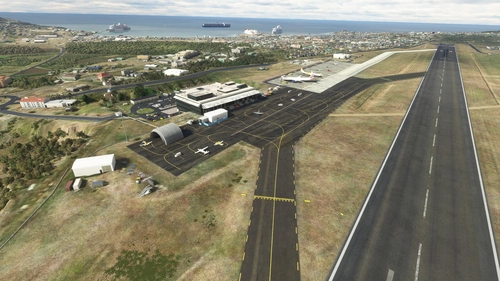
R. L. Bradshaw Int.(TKPK) & Vance Amory Int.(TKPN) Updated Scenery Pack Project 2.5
This is a scenery combo pack project for the R. L. Bradshaw International and Vance W. Amory International Airports on the Islands of St. Kitts & Nevis located in the Caribbean North-West of Antigua. Being a local on the Island of St. Kitts and a frequent Sim flyer since 2002 and after flying around in the default scenery for MSFS2020, I decided to take up the task of using/learning Developer Mode and update the Airport scenery and its surroundings close to IRL. It's still a work in progress here and there. I'm still sorting out any bug/terrain formation issues I get from time to time after compiling. It's not perfect and I'm not 100% accurate but I try for at least 95%. :)
by lexuz2020 (LexPro)
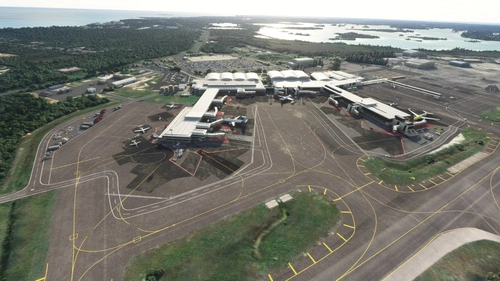
MYNN - Lyden Pindling International Airport Updated Scenery Project
Updated the default airport of Nassau Bahamas for FS2020. Due to the size of this airport, I won't list my usual updated details. Instead i'll show the progress through the first 9 screenshots sequentially from updated to default shots individually. Formerly known as Nassau International Airport, is the largest airport in the Bahamas and the largest international gateway into the country.
by lexuz2020
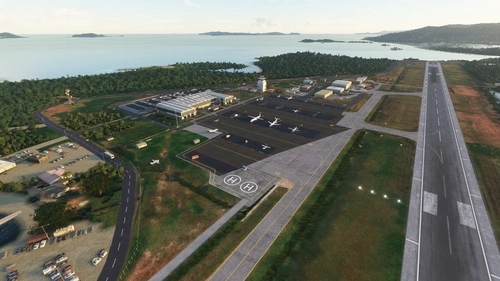
Terrance B. Lettsome International Airport (TUPJ) Updated Scenery Project v1.5
Tortola is the largest and most populated of the British Virgin Islands, a group of islands that form part of the archipelago of the Virgin Islands. The approach to the airport runway on 07 was and still is a tricky one due to the main island's hilly terrain close to Runway. In the past, the runway was much shorter, which made it even more challenging when lining up to land larger aircrafts like the Dash-8 or ATR-72 turbo props. Now it has an extended runway which made it a bit easier for also private small jets to land. There have been talks also to extend it even further sometime in the future. Despite having runway lights, It is advised not to land at night nor take off at Runway 25, due to the terrain close to Runway 07 and also the small hill near Runway 25.
by lexuz2020
Douglas-Charles (TDPD) & Canefield (TDCF) Airports Updated Scenery Project V1.5
Formerly known as Melville Hall International (TDPD), Douglas-Charles located on the East side of the island, is also well known as the airport with a challenging landing going into runway 09 due to the high mountainous terrain approach. At night, Runway 27 is Highly recommended and NOT Runway 09 which is why it's also known as one of the most interesting yet scenic and challlenging airports to land on. Canefield Airport (TDCF) is no exception to this as the small airport is on the West side of the island and due to the placement of the runway, pilots will almost always experience cross wind landings beacause of the near hilly terrain. Only skilled pilots are allowed to land on Runway 19. Runway 01 is either prohibited or rarely used for landing. For me, these two were fun airports to re-create in the sim :)
by lexuz2020 (LexPro)
Log in to join the discussion
Log InComments(104)
11 months ago
6 months ago
over 1 year ago
over 2 years ago
almost 2 years ago
about 3 years ago
almost 4 years ago
Apron and RWY textures look good and the airport has got a nice flair!
almost 4 years ago
Payware Quality. Textures, Runway, Surrounding area, terminal details... Amazing!
But PLEASE, make it so the front part of the terminal isn't solid, so GSX profiles can be applied well, this defeats the purpose of the pax paths that you spent time on!
almost 4 years ago
Thank you and you're welcome!
?..Front of the terminal solid? Not totally following what you mean but if you mean the model of the terminal, that is actually the default terminal still. I just strategically placed many objects around it to help make it look close to the real building if that clears up any reason why your GSX profiles were not working...? lol. Let me know.
almost 4 years ago
in drone mode, you cant go inside of the terminal or even under the overhang of the terminal and it will teleport you to the top of the building. This means I need to place pax waypoints far out onto the tarmac instead of coming out of the building making it a bit pointless
almost 4 years ago
Oooohhh. Wow. That's a bit unfortunate since Asobo introduced that drone limitation. I do find it annoying because it limits me from going into tight areas to position certain objects while editing the scenery. It's beyond my control at this point once my scenery has in the default buildings still. I'm not too familiar with the pax addon you're using, but thanks for letting me know so now i'm aware of what others who use a pax addon will be experiencing. Looks like i'll have to start learning to do some real modeling. lol.
about 4 years ago
Looks great, works great. Seems to work fine w/SU10. Nice work!
about 4 years ago
Thanks for the huge update! Appreciate your hard work :)
about 4 years ago
You're welcome!
about 4 years ago
man your sceneries are amazing!! for us virgin island lovers, if possibe can you do scenery for vieques, and isla grande please? these air ports are badly needed in this region!
about 4 years ago
Thanks. I can look into it. :)
about 4 years ago
This scenery is coming out better than the payware version! Just one thing though maybe two lol Can you paint the roof of the airport burgundy like the real airport and add the ST.Thomas Cryil E king lettering on the building like the real one. That is the only major detail you are missing from this awesome scenery!
about 4 years ago
Thanks Maverick. Check your private messages. I sent a reply before seeing your comment.