

Description
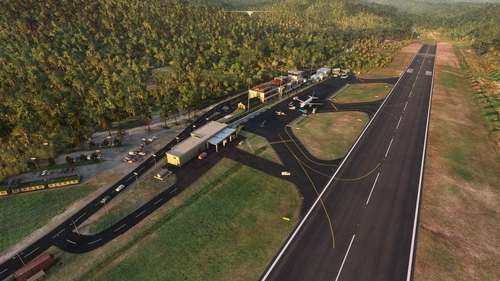
TERRANCE B. LETTSOME INTERNATIONAL AIRPORT UPDATED SCENERY PROJECT
[WORK IN PROGRESS]DESCRIPTION:
This is a custom scenery update to the small airport on the island known as Beef Island, which is located East of the larger main Island: Tortola, located in the British Virgin isands (North-East of St.Thomas [US Virgin Islands], South-West of Virgin Gorda.
Tortola is the largest and most populated of the British Virgin Islands, a group of islands that form part of the archipelago of the Virgin Islands. The approach to the airport runway on 07 was and still is a tricky one due to the main island's hilly terrain close to Runway. In the past, the runway was much shorter, which made it even more challenging when lining up to land larger aircrafts like the Dash-8 or ATR-72 turbo props. Now it has an extended runway which made it a bit easier for also private small jets to land. There have been talks also to extend it even further sometime in the future. Despite having runway lights, It is advised not to land at night nor take off at Runway 25, due to the terrain close to Runway 07 and also the small hill near Runway 25.
This airport, despite being small, was challenging because of the details within and also the surrounding the area. A couple of parking lots including the main one which is the largest IRL is beautifully designed judging from pics and videos i've seen off the internet. I will up date it in time until completed. The airport is also near a beach with many MANY boats IRL.
Warning: Possible framerate drop for lower-end PC users due to the amount of boats, ships and yachts of different sizes I scattered around the area. If this affects any of you, let me know and i'll try to make some adjustments.
INSTALLATION:
Open and extract ''lexpro-Tortola_Beef Island_updated_scenery_project_v1.0'' (or the version name you choose to download) to your prefered location on your PC, then unZip and open the folder and copy "Terrance_B_Lettsome_Updated_Scenery_Project" folder into where your Community folder is located, then start the sim and go to TUPJ Terrance B. Lettsome International. That's it!
Each time I upload an updated version here, just replace the same "Terrance_B_Lettsome_Updated_Scenery_Project" folder in your Community folder to update the scenery. Make back ups to the old folders if necessary.
DETAILED UPDATED FEATURES TO DEFAULT SCENERY (V1.0) - TUPJ:- - Started from scratch and deleted everything except the default terminal building and a few surrounding buildings.
- - Stratigically placed very specific scenery objects from the sim library around the default building to try match the design structure IRL.
- - Made some corrections to the surrounding terrain and elevation of the Airport, especially at the end of Runway 07 which was challening to get right. By default, that area was completly flat.
- - Added runway/lights, PAPI lights, aprons, taxi lights [despite the fact that by default they were already there, editing the elevation made them dissapear, so I had to replace them again :\ ], taxi ways, taxiway signs, ''wear n' tear'' textures, ground markings and different painted color lines exactly like IRL.
- - Edited airport taxiway data so ATC properly directs you to and from your parking location [Something I just learned to do. Some parking location names may not be too accurate due to editor limitations but are very close to real life]
- - Corrected location of Windsocks
- - Added a light above the Windsocks
- -Added a small circular stone structure design around the base of each windsock like IRL
- - Added the control tower with a beacon light and added two small red lights on top the antennas. [The stucture of the tower is different IRL]
- -Added red beacon lights on top each airport light.
- - Added a small building next to the control tower with a small parking lot and a center peice design with cars etc.
- - Added Airport lights around the airport.
- - Added extra lighting under the Airport terminal roofing that was added. Also added lighting to any surrounding buildings in the area including the firestation building which I replaced with a generic building. Also lighting on a few boats.
- - Added static aircraft\service vehicles with some animated Marshalls\Workers surrounding them.
- - Randomly placed Marshalls/Workers and other animated people around the Airport in general.
- - Added barbwire fencing around entire Airport. Also added additional fencing in certain areas within the airport.
- - Added many vehicles in the area including the main parking lot [work in progress], and 3 other parking lots in the area. Also added some animated vehicles on the road.
- - Added and placed a lot of stones to simulate the stone structure design in front of Runway 25 like IRL.
- - corrected and added a few beach sand areas surrounding the airport.
- - Added many more trees/plants/grass, auto-gen trees in general areas close to and surrounding the Airport.
- -Added some large underground pipes that simulate the drainage system under the airport. [Have to look real closely to see these hidden in the some of the bushes along side some of the taxiways and the runway]
- - Added MANY boats, yachts and ferries in the surrounding area like IRL. [Possible framerate drop for low-end PC users. Let me know if it affects anyone]
- - Added small white poles to replicate the yachts' sails. [let me know if you can't see these]
- - Added 2 animated flags where actual flags are supposed to be behind the concrete wall sign stucture.
- - Added a concrete wall structure to replicate where the airport sign is located and added spot lights shining on it.
- - Added a small red and white barrier around each airport light like IRL
- - Added many other scattered scenery objects around the airport in general.
Thats all for now. More to come in every version update. Do enjoy this on going project which takes a great deal of time and effort. Feel free to leave any comments after you've flown around. Have fun flying and see you in the Sim world :)
Location
Terrance B. Lettsome International Airport (TUPJ) Updated Scenery Project v1.5
Tortola is the largest and most populated of the British Virgin Islands, a group of islands that form part of the archipelago of the Virgin Islands. The approach to the airport runway on 07 was and still is a tricky one due to the main island's hilly terrain close to Runway. In the past, the runway was much shorter, which made it even more challenging when lining up to land larger aircrafts like the Dash-8 or ATR-72 turbo props. Now it has an extended runway which made it a bit easier for also private small jets to land. There have been talks also to extend it even further sometime in the future. Despite having runway lights, It is advised not to land at night nor take off at Runway 25, due to the terrain close to Runway 07 and also the small hill near Runway 25.

User Reviews
11 reviews
Version History
[Since Sim update 5, my Sim was literally broken and couldn't create any more scenery mods. Some scenery objects that were used also got changed without warning after the updates. Thankfully many Sim updates later, i'm now able to create again. Thanks for your patience :) ] - Replaced all taxiway lights. They all light back up again at night. - Removed some cargo boats that were placed in unnecessary locations. - Added some lights to one cruise ship and a large cargo ship placed in the ocean. - Added an extra dirty layer to the taxiways. - Removed static Cessna longitude aircraft and will replace that with a default aircraft in the next update.
Related
R. L. Bradshaw Int.(TKPK) & Vance Amory Int.(TKPN) Updated Scenery Pack Project 2.5
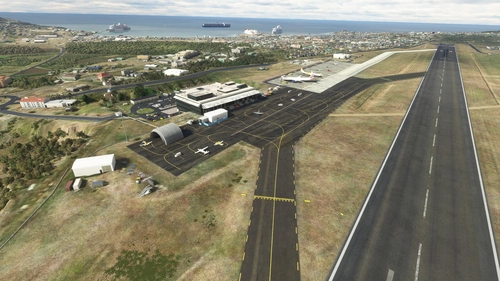
This is a scenery combo pack project for the R. L. Bradshaw International and Vance W. Amory International Airports on the Islands of St. Kitts & Nevis located in the Caribbean North-West of Antigua. Being a local on the Island of St. Kitts and a frequent Sim flyer since 2002 and after flying around in the default scenery for MSFS2020, I decided to take up the task of using/learning Developer Mode and update the Airport scenery and its surroundings close to IRL. It's still a work in progress here and there. I'm still sorting out any bug/terrain formation issues I get from time to time after compiling. It's not perfect and I'm not 100% accurate but I try for at least 95%. :)
by lexuz2020 (LexPro)
Cyril E. King Airport (TIST) Updated Scenery Project v1.5
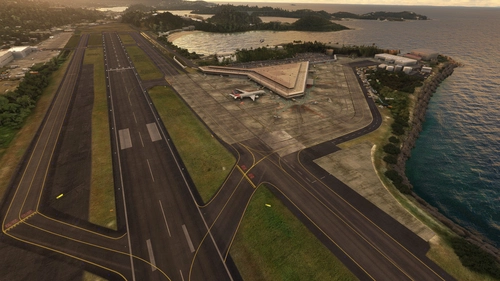
The Cyril E. King Airport is the largest international airport in the U.S. Virgin Islands and one of the busiest hubs in the eastern Caribbean. The Airport is a public airport located at No. 70 Lindbergh Bay on the southwestern side of St. Thomas, U.S. Virgin Islands - approximately four miles east of the capital city, Charlotte Amalie. South-West of Beef Island, Tortola and North of St. Criox. It's one of the busiest airports in the eastern Caribbean. Many direct flights are available for international travelers arriving from the U.S., with non-stop service to St. Thomas from Atlanta, Boston, Chicago, Dulles, Fort Lauderdale, Miami, Newark, and New York. It was known as Harry S Truman Airport until 1984, when it was renamed to honor Cyril Emmanuel King, the second elected governor of the U.S. Virgin Islands. A new airport opened in November 1990 and retained the name.
by lexuz2020
MYNN - Lyden Pindling International Airport Updated Scenery Project
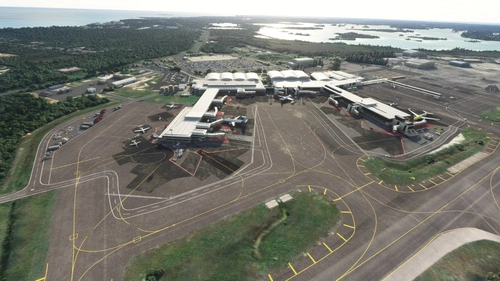
Updated the default airport of Nassau Bahamas for FS2020. Due to the size of this airport, I won't list my usual updated details. Instead i'll show the progress through the first 9 screenshots sequentially from updated to default shots individually. Formerly known as Nassau International Airport, is the largest airport in the Bahamas and the largest international gateway into the country.
by lexuz2020
Douglas-Charles (TDPD) & Canefield (TDCF) Airports Updated Scenery Project V1.5
Formerly known as Melville Hall International (TDPD), Douglas-Charles located on the East side of the island, is also well known as the airport with a challenging landing going into runway 09 due to the high mountainous terrain approach. At night, Runway 27 is Highly recommended and NOT Runway 09 which is why it's also known as one of the most interesting yet scenic and challlenging airports to land on. Canefield Airport (TDCF) is no exception to this as the small airport is on the West side of the island and due to the placement of the runway, pilots will almost always experience cross wind landings beacause of the near hilly terrain. Only skilled pilots are allowed to land on Runway 19. Runway 01 is either prohibited or rarely used for landing. For me, these two were fun airports to re-create in the sim :)
by lexuz2020 (LexPro)
Log in to join the discussion
Log InComments(30)
almost 4 years ago
Very scenic, thank you.
almost 4 years ago
Really well done! I'm going there in January. It was fun to do a tour with this as a starting point.
about 4 years ago
Looks like the scenery has not be compiled with the latest SDK, as it still contains a shape file. Could you pls comment or re-compile it?
about 4 years ago
I think its safe to say you can ignore the shape file as I compiled the update in the same folder from when I first did it. All it was doing was updating the bgl file. Newer scenery from me will be using the latest SDK with just the bgl file only. Thanks for your feed back :)
almost 5 years ago
5 stars really not enough for this amazing work.
about 5 years ago
My absolute absolute favorite airport. Fantastic work. Thank you so so much. Please continue to develop other Caribbean airports as well!
about 5 years ago
Thanks man and you're welcome. Unfortunately, since update 5 and 6, developing and loading scenery objects into the Sim has been broken for me. So until they finally fix my Sim in some way, I can't create or update any airports.
...That's since July. :/
about 5 years ago
This scenery is too good not to get recompiled for SU5/WU6 ! One Thousand Thanks in advance, I hope it comes soon but I will still try it ! :)
over 5 years ago
Thanks for sharing your work! :)
over 5 years ago
You're welcome!
over 5 years ago
OMG! Thank you SO much for this one. Very grateful!. 10 STARS!
over 5 years ago
Lol wow...you're welcome and thanks for the extra 5 stars! :D
over 5 years ago
You crushed it out of the park. Thanks again!
over 5 years ago
Lol you're most welcome!
over 5 years ago
Great scenery - thanks for sharing it here for free !
over 5 years ago
You're very welcome!