
Description
R. L. BRADSHAW INTERNATIONAL & VANCE W. AMORY INTERNATIONAL AIRPORT UPDATED SCENERY PACK PROJECT
[WORK IN PROGRESS]
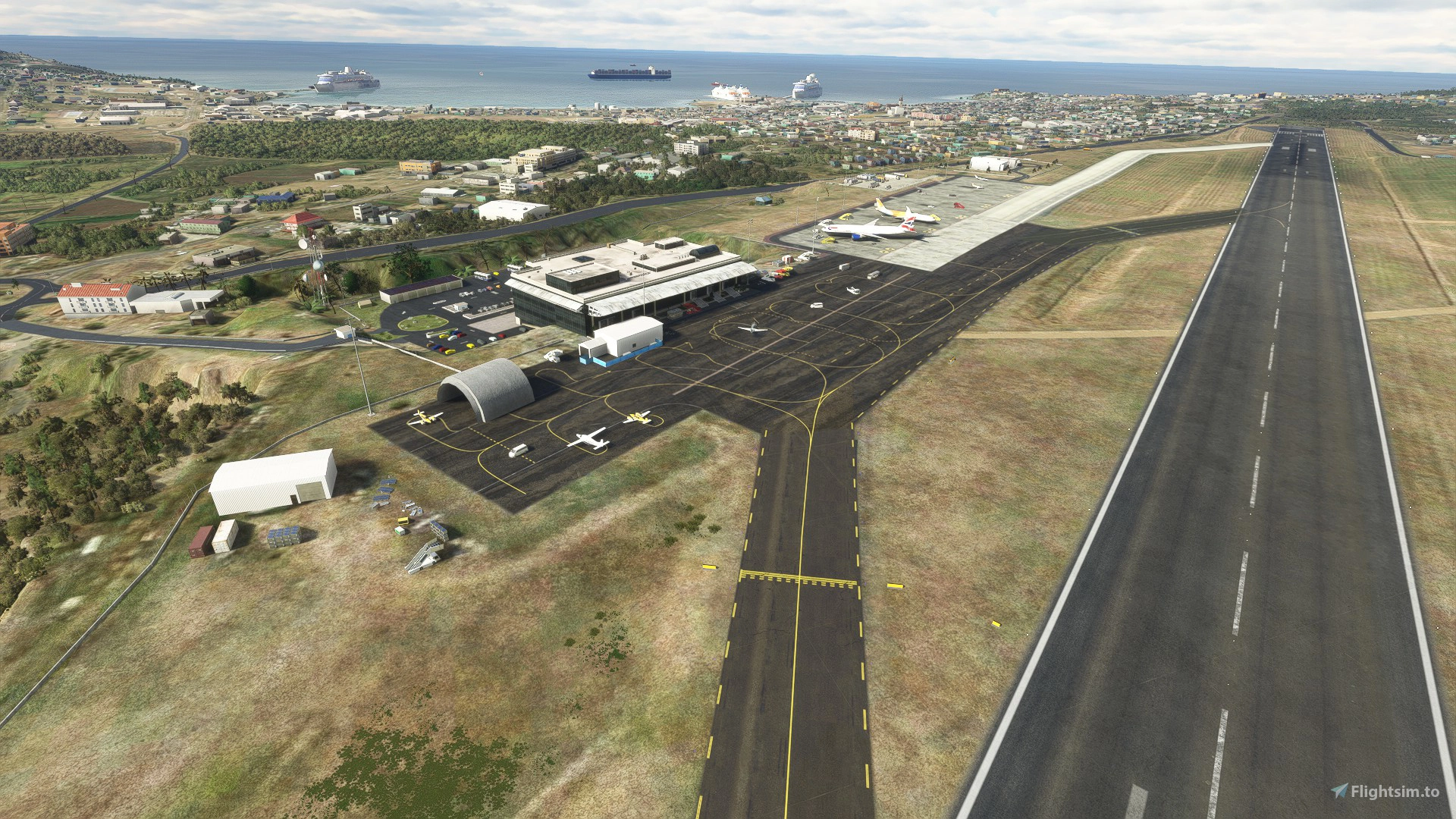
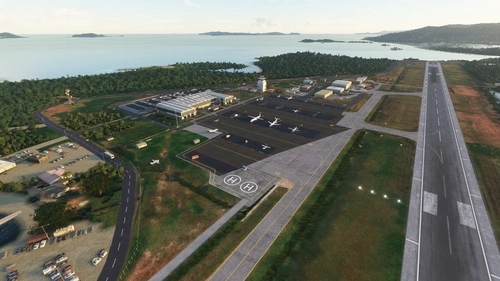
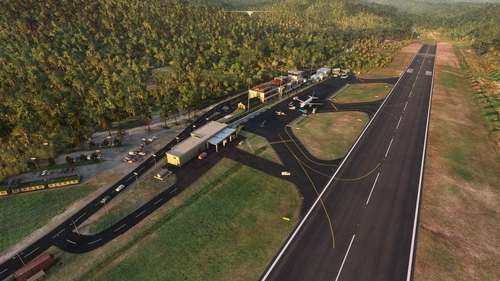
DESCRIPTION:This is a scenery combo pack project for the R. L. Bradshaw International and Vance W. Amory International Airports on the Islands of St. Kitts & Nevis located in the Caribbean North-West of Antigua. Being a local on the Island of St. Kitts and a frequent Sim flyer since 2002 and after flying around in the default scenery for MSFS2020, I decided to take up the task of using/learning Developer Mode and update the Airport scenery and its surroundings close to IRL.
It's still a work in progress here and there. I'm still sorting out any bug/terrain formation issues I get from time to time after compiling. It's not perfect and I'm not 100% accurate but I try for at least 95%. :)
I've updated Nevis (TKPN - Vance W. Amory International Airport) as well after reaching some good headway with St.Kitts (TKPK). Though, still a work in progress as TKPN's parking lot behind has yet to be completed.
If anyone who downloads these (specifically locals like myself who are frequent flight simmers or real life pilots who know the islands well) have any issues/comments/suggestions on how/where certain things are placed (or missing) feel free to connect with me here. I'm open to any suggestions to anything I may have missed while doing this project.
INSTALLATION:
For previous users who downloaded earlier versions of this mod before v2.0, I recommend deleting the entire old folder from your Community folder before installing this version as to prevent seeing double objects in the scenery. This version now includes Nevis and thus the folder name had to be changed.
Open and extract ''lexpro-tkpk_tkpn-updated-scenery-pack-project-v2.5.0zip'' (or the version name you choose to download) to your prefered location on your PC, then unZip and open the folder and copy both "R L Bradshaw Int_Updated_Scenery_Project" and "Vance W Amory Int_Updated_Scenery_Project" folders into where your Community folder is located, then start the sim and go to TKPK Bradshaw International or TKPN Vance Amory International. That's it!
Each time I upload an updated version here, just replace the same "R L Bradshaw Int_Updated_Scenery_Project" folder or "Vance W Amory Int_Updated_Scenery_Project" folder in your Community folder to update the scenery. Make back ups to the old folders if necessary.
(Please note, when choosing a parking space for departure, don't choose any single digit parking spaces numbered by themselves. Those are for the service vehicles to drive to if you have them enabled in your settings. You will be spawned in locations not meant for Airplanes. This is also the only way I found to manipulate these vehicles from annoyingly taxi on the same taxiway as the player but unforunately still park in your parking space)
DETAILED UPDATED FEATURES TO DEFAULT SCENERY (V2.5) - TKPN:
[COMING SOON]
DETAILED UPDATED FEATURES TO DEFAULT SCENERY (V2.5) - TKPK:
- - Updated and corrected taxiway markings and data for all aprons to how they look IRL [present day]
- - Updated taxiway Alpha textures to a concrete look [IRL they recently repaved taxiway Alpha]
- - Corrected terraforming and elevation for taxiway Alpha [IRL it's not completely flat and not on the same level as the runway]
- - Corrected actual position of windsock
- - Added extra anntenas where they are located IRL
- - Added an extra row of PAPI lights [IRL there are 2 different sets of the lights. My guess is that they upgraded them and left the old ones behind the new ones.]
- - Added some additional scenery details here and there.
- - Added the words "Welcome to SKB" in the middle of the solar panels like they are IRL.
- - Added back taxiway lights that were removed because of previous sim/world updates.
- - Corrected threshold markings for Runway 07/25 to present day look.
- - Added a building and a few scenery objects together that simulates where our covid-19 testing station is presently on the main apron
- - Started from scratch and deleted everything except the default terminal building.
- - I havn't used Blender in very long while, so I stratigically placed very specific scenery objects from the sim library around the default building to try match the design structure IRL.
- - Made some corrections to the surrounding terrain of the Airport [This was somewhat challenging to get it right]
- - Added runway/lights, PAPI lights, aprons, taxi lights, taxi ways, ''wear n' tear'' textures and ground markings. [The parking names/letters may not be accurate so I just used my imagination]
- - Corrected location of Windsock
- - Added a light above the Windsock
- - Added the control tower with a beacon light [Had to use another default tower that had a built-in beacon attached and inserted it inside this one as the one I added from the sim was not showing for some reason?]
- - Added Airport lights around the airport to give it some life at night.
- - Added extra lighting under and above the Airport terminal roofing that was added and around the sides.
- - Added static aircraft\service vehicles with some animated Marshalls surrounding them.
- - Randomly placed Marshalls and other animated people around the Airport in general.
- - Added barbwire fencing around entire Airport, including a concrete wall that's South of the control tower that's literally built from a single brick :)
- - Added many more trees/plants/grass, auto-gen trees in general areas close to and surrounding the Airport
- - Added 1 boat where they are usually located at by the dock. [Work in progress]
- - Added street lights to light up the road and additional lamp posts with lights along the Northern side of the runway.
- - Added the approach red lights behind runway 10
- - Cleared default parking lot behind terminal building to recontruct it [work in progress]
- - Started from scratch and deleted everything except the default terminal building.
- - Still havn't used Blender in very long while, so I stratigically placed very specific scenery objects from the sim library around the default building to try and match the design structure IRL :)
- - Made some corrections to the surrounding terrain of the Airport and raised "Booby Island". MSFS had it flat by default (The extremely tiny island in the channel between St.Kitts and Nevis)
- - Added runway/lights, PAPI lights, aprons, taxi lights, taxi signs, taxi ways, textures and ground markings. (The parking names/letters and taxi sign letters may not be accurate so I just used my imagination)
- - Corrected location of Windsock and added the small red and white checkered building next to it
- - Added the control tower with a beacon light (Had to use another default tower that had a built-in beacon attached and inserted it inside this one as the one I added from the sim was not showing for some reason?]
- -Added the Airport's solar panels near the runway and removed the auto generated buildings that were in their place.
- - Replaced the default building they had as the hanger which is normally on the East apron with one thats close enough to the real thing (in shape and color that is)
- - Added Airport lights around the airport to give it some life at night.
- - Added extra lighting under the Airport terminal roofing that was added
- - Added static aircraft\service vehicles with some animated Marshalls surrounding them.
- - Randomly placed Marshalls and other animated people around the Airport in general. (Take the drone and have a look around if you like :-] )
- - Added barbwire fencing around entire Airport (and the section of land behind Runway 07)
- - Added many scenery objects/details/markings to the Airport parking lot to match close to IRL as possible (work in progress)
- - Added many more trees/plants in general areas close to the Airport
- - Added cruiseships, boats and docks where they are usually located at sea.
- - Added tall lights to both Cricket stadiums
- - Added street lights to light up the Bypass road and Kim Collins Highway and additional lamp posts along the road
- - Added paved roads to the Bypass road and Kim Collins Highway and some near the Airport (work in progress)
- - Added extra animated traffic on the bypass road to give it some life. (By default the sim has the US standard traffic rules and not Europe standards which we do adapt IRL) I may add some more later on in areas that are usually busy
- -Added traffic lights in their current locations around Basseterre (Again, fly around with the drone if you'd like to see them.)
- - Added the approach red lights behind runway 07 and additional scenery objects to replicate the real life scenery behind there
- - Added an animated flag where our national flag pole is supposed to be (I'm not sure if everyone can see this or if it's a default in the library. Anyone who can't see it let me know right away)
Thats all for now. More to come in every version update here. Do enjoy this on going project which took a great deal of time and effort. Feel free to leave any comments after you've flown around. Have fun flying and see you in the Sim world :)
Location
R. L. Bradshaw Int.(TKPK) & Vance Amory Int.(TKPN) Updated Scenery Pack Project 2.5
This is a scenery combo pack project for the R. L. Bradshaw International and Vance W. Amory International Airports on the Islands of St. Kitts & Nevis located in the Caribbean North-West of Antigua. Being a local on the Island of St. Kitts and a frequent Sim flyer since 2002 and after flying around in the default scenery for MSFS2020, I decided to take up the task of using/learning Developer Mode and update the Airport scenery and its surroundings close to IRL. It's still a work in progress here and there. I'm still sorting out any bug/terrain formation issues I get from time to time after compiling. It's not perfect and I'm not 100% accurate but I try for at least 95%. :)

User Reviews
14 reviews
Version History
TKPK: - Updated and corrected taxiway markings and data for all aprons to how they look IRL [present day] - Updated taxiway Alpha textures to a concrete look [IRL they recently repaved taxiway Alpha] - Corrected terraforming and elevation for taxiway Alpha [IRL it's not completely flat and not on the same level as the runway] - Corrected actual position of windsock - Added extra antennas where they are located IRL - Added an extra row of PAPI lights [IRL there are 2 different sets of the lights. My guess is that they upgraded them and left the old ones behind the new ones.] - Added some additional scenery details here and there. - Added the words " Welcome to SKB" in the middle of the solar panels like they are IRL. - Added back taxiway lights that were removed because of previous sim/world updates. - Corrected threshold markings for Runway 07/25 to present day look. - Added a building and a few scenery objects together that simulates where our covid-19 testing station is presently on the main apron
Related
Cyril E. King Airport (TIST) Updated Scenery Project v1.5
The Cyril E. King Airport is the largest international airport in the U.S. Virgin Islands and one of the busiest hubs in the eastern Caribbean. The Airport is a public airport located at No. 70 Lindbergh Bay on the southwestern side of St. Thomas, U.S. Virgin Islands - approximately four miles east of the capital city, Charlotte Amalie. South-West of Beef Island, Tortola and North of St. Criox. It's one of the busiest airports in the eastern Caribbean. Many direct flights are available for international travelers arriving from the U.S., with non-stop service to St. Thomas from Atlanta, Boston, Chicago, Dulles, Fort Lauderdale, Miami, Newark, and New York. It was known as Harry S Truman Airport until 1984, when it was renamed to honor Cyril Emmanuel King, the second elected governor of the U.S. Virgin Islands. A new airport opened in November 1990 and retained the name.
by lexuz2020
MYNN - Lyden Pindling International Airport Updated Scenery Project
Updated the default airport of Nassau Bahamas for FS2020. Due to the size of this airport, I won't list my usual updated details. Instead i'll show the progress through the first 9 screenshots sequentially from updated to default shots individually. Formerly known as Nassau International Airport, is the largest airport in the Bahamas and the largest international gateway into the country.
by lexuz2020
Terrance B. Lettsome International Airport (TUPJ) Updated Scenery Project v1.5
Tortola is the largest and most populated of the British Virgin Islands, a group of islands that form part of the archipelago of the Virgin Islands. The approach to the airport runway on 07 was and still is a tricky one due to the main island's hilly terrain close to Runway. In the past, the runway was much shorter, which made it even more challenging when lining up to land larger aircrafts like the Dash-8 or ATR-72 turbo props. Now it has an extended runway which made it a bit easier for also private small jets to land. There have been talks also to extend it even further sometime in the future. Despite having runway lights, It is advised not to land at night nor take off at Runway 25, due to the terrain close to Runway 07 and also the small hill near Runway 25.
by lexuz2020
Douglas-Charles (TDPD) & Canefield (TDCF) Airports Updated Scenery Project V1.5
Formerly known as Melville Hall International (TDPD), Douglas-Charles located on the East side of the island, is also well known as the airport with a challenging landing going into runway 09 due to the high mountainous terrain approach. At night, Runway 27 is Highly recommended and NOT Runway 09 which is why it's also known as one of the most interesting yet scenic and challlenging airports to land on. Canefield Airport (TDCF) is no exception to this as the small airport is on the West side of the island and due to the placement of the runway, pilots will almost always experience cross wind landings beacause of the near hilly terrain. Only skilled pilots are allowed to land on Runway 19. Runway 01 is either prohibited or rarely used for landing. For me, these two were fun airports to re-create in the sim :)
by lexuz2020 (LexPro)
Log in to join the discussion
Log InComments(113)
about 1 month ago
over 1 year ago
over 1 year ago
over 2 years ago
over 3 years ago
Thank you for your work.
over 3 years ago
I am trying to use Amory only, because I use Bradshaw from another developer. Unfortunately, the "Balcony" on the Amory Building is missing and people are walking through the air...
over 3 years ago
Is there any update planned for your sceneries?
almost 4 years ago
Color of the ground both at the airport and outside of it changes to a darker colour when flying over it at low altitude. doesnt happen on the mountain, just nearby the sea and the airport :( it changes tile by tile when you come closer to it.
Uploaded a user pic
almost 4 years ago
Yes i'm aware of this, but unfortunately that's beyond my control. The Sim uses Bing Maps for the ground textures in all the sceneries when you're online. When they update the Bing maps, sometimes they are not accurate and either the ground texture may shift a little from the previous location or the image quality is not uploaded correctly so it's glitching with the old image. Even the default scenery will have that glitch. If anything, I could try somehow to replace with a google maps image but if I can't do that, we'll just have to wait until Bing maps fixes it.
almost 4 years ago
Thanks for your answer :) Really like your sceneries!
over 3 years ago
If you like it, maybe you should correct your 1-star review then?
Giving such a scenery a 1-star rating just because MSFS does something wrong is completely wrong.
almost 4 years ago
Hi, thanks for your scenery! I use it a lot, but unfortunatelly had to uninstall it as it causes the checkered box in MYNN issue. If possible to fix it would very appreciated!
almost 4 years ago
Hi, Thanks and you're welcome.
But, from my understanding from other users of my work, my other scenerys don't conflict with others or with themselves. Check other downloads that you may have, remove them and try mines again. Anything to do with MYNN has nothing to do with my scenery. I have ALL my custom scenery installed and have NEVER had any issues with either the "checkered texture'' or the "big 11 sign" issue that everybody has been talking about. Let me know if you try that and it works.
about 4 years ago
hello sir is it possible that you want to do tvsa and tvsb?it has been done but for a freeware it's not even close to yours that guy rendition of tvsa and tvsb even tvsu is way way of track i don't know why he did them if he didn't really wanted too.
about 4 years ago
Hi, I was trying to start one of them recently, but since Sim update 10, I have some bugs and errors in the SDK compiler that i'll have to sort out unfortunately. So until then, i'm not able to create any scenery for a while. I'll let you know when its fixed.
almost 4 years ago
thank you kindly!!!
over 4 years ago
Amazing work! There are youtube videos of a local planespotter - https://www.youtube.com/watch?v=XRfUzsO7Pk0
over 4 years ago
Yeah I follow him on youtube. I pass his location many times. Hopefully we may meet up someday :)