

Description
"Shift+Z Stats" brings back the classic compact flight statistics know from FSX and earlier titles of Microsoft Flight Simulator.
A very handy tool that shows you information like:
- Coordinates
- Wind speed and direction
- Airspeed
- Altitude
- Heading
- Fuel remaining
- FPS (Frames per second)
- Simulation rate
No matter if you're flying a Piper Cub, an Airbus A320 or any other aircraft, "Shift+Z Stats" comes in handy any time.
📖 Instructions
- Download the latest release of "Shift+Z Stats"
- Extract the zip file into the community folder
- Press the Icon in the Flight Simulator Toolbar or press "shift + z" to toggle and cycle through the statistics
- In case the stats are not displayed, click the toolbar cog and select "Reset Panels"
- Note: The master autopilot toggle key ("Z" key by default) no longer interferes with the shift+z shortcut as of add-on update version 1.1.1.
- Enjoy!
- Bonus: Press "<" or ">" key to hide / show the external HUD
📢 New update available: Version 1.1.4!
Update "1.1.4" of Shift+Z Stats is available now. See the changelog and readme file for details.
NOTE: When updating, make a backup of your userconfig.ini file in case you customized it. Check the new userconfig.ini for added and changed parameters. Then re-enter your custom values from your backup.
🤝 I need your support !
I am AmbitiousPilots, passionate developer, student and creator of add-ons such as Toolbar Pushback and Shift+Z Stats. Next to my studies I'm working on my freeware projects. Support me so I can keep maintaining and creating software you can't live without! Thank you.
https://www.buymeacoffee.com/AmbitiousPilots
https://www.patreon.com/AmbitiousPilots
Remember, freeware is free to use but not free to create.
🥽 VR Mode
You can move the stats around in VR mode! Simply press and hold the ctrl key, click on the stats, then click again and this time hold the left mouse button to drag around. The background of the stats will change to indicate the drag mode is enabled. Simply release ctrl and the mouse button to disable the drag mode. See example: https://i.ibb.co/vJJqfBd/VR-Mode-Drag-Preview.gif
💡 NOTAM
New features will be released in the next add-on updates. Stay tuned. Feature requests are welcome. Send me a PM or let me know in the comments.
⚙️ Customization
Inside the folder of "Shift+Z Stats" you'll find a file called userconfig.ini located in "ambitiouspilots-shiftzstats\html_UI\Data". Open the userconfig.ini file with a text editor. This ini file follows the same principle as the original FSX config file.
Each [TextInfo.*] heading defines a section which you can cycle through every time you press shift+z or click the icon in the toolbar. The number behind the dot defines the order in which the section should appear like 1, 2, 3 and so on. You can define as many sections as you want.
The variables below these headings such as Longitude=1,2 define what should be read out in that specific section. The numbers, in this case 1 and 2, define the line (1) and the order on that line (2). So if you set Latitude=1,1 and Longitude=1,2 the Latitude is shown first followed by the Longitude. You can populate up to 6 lines. Other than available screen space there is no limit on how many statistics are shown per line.
With TextColor.1 you set the text color for every line of that specific section you add this entry to. The format is in rgb (red,green,blue). For example, TextColor.1=0,0,255 would make the first line show up in a blue color. TextColor.2=255,255,0 would make the second line yellow. The same works for background colors by adding BackGroundColor.1=0,0,0,128. This is also an rgb color but with an alpha value (in this case 128 which is 50% transparent, you can also use a value between 0 and 1 like 0.5). To make things easy, use a color picker.
The entries below the [Main] heading are custom settings for this add-on. With EnableShiftZShortcut you can enable or disable the shift+z keybind. TextSize sets the size of the font in either px (fixed size) or em (relative to current font size set by Flight Simulator). LatLonFormat defines the shown coordinate format: You can use Degrees, Minutes or Seconds. FractionalLatLonDigits allows you to set the amount of decimal places to show.
🛠️ Developer Mode partially hiding stats text
In case you're using the developer toolbar and it's partially hiding the stats text, simply enable "Auto-hide" in the "[DevMode]" menu. This automatically hides the dev toolbar when not in use and reveals the stats text. Click here to view a screenshot of this setting in FS in case you cannot find it.
👉 Feature Requests
For any questions or feature requests, feel free to send me a PM.
📰 Microsoft Flight Simulator Forums
You can also find and discuss this project on the official Flight Simulator forums.
✔️ Reviews
A huge shout out to the awesome people that review "Shift+Z Stats" and spread the word!
If you covered or made a review of "Shift+Z Stats" on your blog, YouTube, twitch or elsewhere, leave a comment or send me a PM. Then I’ll add it here in the description.
👍 Thanks a lot for all your ratings, comments and spreading the word!
Shift+Z Stats
"Shift+Z Stats" brings back the classic compact flight statistics known from FSX and earlier titles of Microsoft Flight Simulator. A very handy tool that shows you information like: FPS (Frames per second), Simulation rate, Coordinates, Wind speed and direction, Airspeed, Altitude, Heading, Fuel remaining

Supporters


User Reviews
119 reviews
Version History
Remember, freeware is free to use but not free to create. Your support is important. Thank you. https://www.buymeacoffee.com/AmbitiousPilots https://www.patreon.com/AmbitiousPilots --- # Version 1.1.4 * FIXED: Autopilot master switch now working correctly. * FIXED: Compatibility adaptations for Sim Update 8. * FIXED: Wind direction now reading magnetic instead of true. * FIXED: Toolbar arrow now fading out. * FIXED: Metar icon no longer visible in toolbar. * FIXED: HUD minimal mode now working correctly. * FIXED: Missing HUD instruments restored. * IMPROVED: Statistics panel no longer blocking mouse clicks in VR mode. * IMPROVED: Third party toolbar mod compatibility. * IMPROVED: Dimensions handling of statistics panel. * IMPROVED: "Shift + z" keybind handling rewritten.
Featured in Collections(1)

Related
Toolbar Pushback
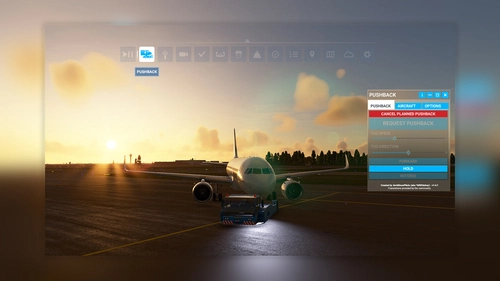
"Toolbar Pushback" offers complete control over pushback operations in Microsoft Flight Simulator. Whether you prefer automated pushback procedures or manual guidance using your rudder pedals or keyboard, this add-on allows you to smoothly adjust the tug speed to your preference. With simple integration into the simulator toolbar, enjoy seamless ground service interactions with a variety of aircraft.
by AmbitiousPilots
LittleNavmapOFMTheme
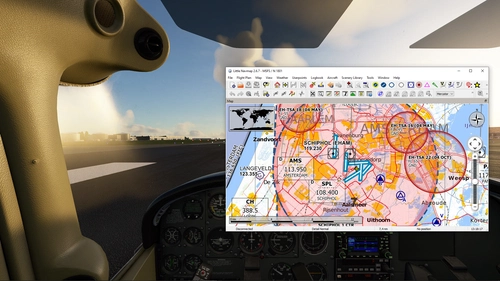
Enhance your VFR flight planning and navigation in Little Navmap with LittleNavmapOFMTheme, allowing you to utilize open flightmaps VFR maps seamlessly. Simply follow the instructions to integrate this open source project, providing high-quality VFR maps for Western Europe, into your flight simulator experience.
by AmbitiousPilots
Log in to join the discussion
Log InComments(589)
over 4 years ago
⭐ Update 1.1.4 available now
This update makes the add-on compatible with SU8 and brings several improvements. Please see the changelog for details. When installing this update, please remove the previous version from you community folder first. Enjoy 😉
🤝 Your Donation
Freeware is free to use but not free to create. Support me so I can keep maintaining and creating software you can't live without! Buy me a coffee or become my patron. Thank you:
https://www.buymeacoffee.com/AmbitiousPilots
https://www.patreon.com/AmbitiousPilots
3 months ago
5 months ago
5 months ago
This comment has been deleted
8 months ago
8 months ago
TextColor.1=255,255,255
" 255,255,255 " is the RGB code for white. You can change the color codes to any RGB values.
The " .1 " is the line number. In the example above, all values on line 1 will be colored white. You can have a different color for each line.
10 months ago
Bizarre !
10 months ago
11 months ago
about 1 year ago
[TextInfo.1]
FrameRate=1,1
GForce=1,2
FuelPercentage=1,3
SimulationRate=1,4
;Latitude=1,1
;Longitude=1,2
;Altitude=1,3
;Heading=1,4
;Airspeed=1,5
WindDirectionAndSpeed=1,6
over 1 year ago
;==========================================================
; AVAILABLE PARAMETERS
;==========================================================
;Latitude
;Longitude
;Altitude
;AltitudeAgl
;AltitudeBaro
;BaroPressure
;QNHSetting
;Heading
;HeadingTrue
;Airspeed
;TrueAirspeed
;AirspeedGround
;WindDirectionAndSpeed
;WindDirection
;WindSpeed
;OutsideAirTemp
;ISATemp
;FuelPercentage
;FuelRemainingGallons
;FuelRemainingPounds
;VerticalSpeed
;AngleOfAttack
;FrameRate
;GForce
;SimulationRate
;TimeUTC
;TimeLocal
;TimeSystem
over 1 year ago
over 1 year ago
over 1 year ago
over 1 year ago
Thanks
over 1 year ago
Fonctionne parfaitement avec FS2024
almost 2 years ago
almost 2 years ago
almost 2 years ago
almost 2 years ago