Flightsim.to

    UtilitiesApplications

    Browse freeware applications for MSFS 2020 and 2024. Community tools for add-on management, ATC audio, flight tracking, virtual crew, CPDLC, performance and more. Browse 556 addons uploaded by our community.

    Last updated
    View all utilities
    About

    This section collects freeware application add-ons for Microsoft Flight Simulator 2020 and 2024, developed by community creators from around the world. Applications extend the simulator experience beyond what is available in-sim — ranging from desktop companions, add-on managers, and flight tracking tools to ATC audio enhancers, landing analysers, moving map displays, virtual crew systems, and AI-powered training assistants. Well-known examples include MSFS Addons Linker for Community folder management, Auto FPS for dynamic performance optimisation, Toolbar Pushback for realistic ground handling, and LiveCrew for immersive copilot callouts and cabin announcements. Other tools cover niche but valuable functions such as CPDLC clients for VATSIM, soaring task managers, texture converters for livery creators, and MobiFlight integration for cockpit hardware. Whether you are looking to streamline your workflow, deepen your immersion, or solve a specific technical challenge, this growing library of community applications offers a wide range of solutions at no cost.

    VFR Flight Tour Guide Assistant

    VFR Flight Tour Guide Assistant

    VFR Flight Tour Guide Assistant is a companion application for Microsoft Flight Simulator 2024 that provides real-time landmark and cultural information based on your in-sim aircraft position. It connects through SimConnect and uses Google Gemini to offer sightseeing recommendations and detailed guides, accessible via both a Windows desktop app and the simulator's Electronic Flight Bag. The assistant supports multiple languages and includes speech recognition and narration features. Installation requires a Google Gemini API key and the .NET 10 Desktop Runtime.

    WesleyG
    MSFS2024
    0.0(0)
    14
    940.2 KB
    4 hours ago
    MSFS 2024 EXE Toggler

    MSFS 2024 EXE Toggler

    This standalone application allows users to manage which external executable applications are launched with MSFS 2024 via a simple checkbox interface. It removes the need to manually edit the exe.xml file, offering options to enable or disable entries easily. Additional features include quick access to the exe.xml file in a text editor and a fast-launch option for the simulator. Note that it requires the Windows .NET 10.0 Desktop Runtime and users are advised to exercise caution to prevent potential file corruption.

    FlyingTitan
    MSFS2024
    0.0(0)
    5
    153.6 KB
    4 hours ago
    Flightline Backup Tool

    Flightline Backup Tool

    Flightline Backup Tool is a utility for Microsoft Flight Simulator that enables users to back up and restore their Community folder, settings file, and exe.xml with a single click. It supports both MSFS 2020 and 2024, including Steam and Microsoft Store versions. The tool auto-detects install locations and offers customizable backup options. No files are deleted during backup or restore, and the application runs only when manually launched.

    0.0(0)
    31
    63 MB
    12 hours ago
    Boarding Pass Flight Info for Streamers

    Boarding Pass Flight Info for Streamers

    Boarding Pass Forge is a Windows application designed for flight simulator streamers. It allows users to create customizable boarding passes by setting airline names, routes, background, and text colors. The app auto-generates details like flight number and gate, with options for manual editing and randomization. Completed passes can be exported as transparent PNGs for use in OBS overlays or thumbnails.

    6581
    MSFS2020/24
    0.0(0)
    10
    105.9 MB
    12 hours ago
    MSFS 2024 bHaptics Flight Haptics

    MSFS 2024 bHaptics Flight Haptics

    This add-on is an external SimConnect utility that provides tactile feedback for bHaptics TactSuit devices in Microsoft Flight Simulator 2024. It translates live flight telemetry into a variety of haptic effects, including engine vibration, wind feedback, runway texture, touchdown impacts, and control surface cues for both fixed-wing and rotorcraft. Users can adjust intensity settings and enable or disable roll and yaw cues through a configuration file. Automatic haptic pausing is included during non-flight activities and menu screens.

    Wesley
    MSFS2024
    0.0(0)
    9
    674 KB
    Yesterday
    AirbornePick | Random Real Flights generator

    AirbornePick | Random Real Flights generator

    AirbornePick is a standalone utility that generates real-world flight routes currently in progress for Microsoft Flight Simulator and other platforms. Users can filter searches by distance, duration, airline, and aircraft type to find live flights that match their preferences. The tool provides flight number, airline, departure and destination airports, and displays the live aircraft's route and status. An internet connection is required to access real-time flight data.

    RealKubaaRealKubaa
    MSFS2020/24
    5.0(3)
    152
    6.8 MB
    21 hours ago
    Panel State Switcher – Fenix A320 & PMDG 737/777

    Panel State Switcher – Fenix A320 & PMDG 737/777

    Panel State Switcher is a portable Windows tool allowing users to set the default startup state for the Fenix A320 and PMDG 737 or 777 directly from the desktop. It supports various panel states such as Cold and Dark, Turnaround, and custom states saved in the simulator. The tool automatically detects installed variants and simulator versions, requiring no configuration or installation. Configuration files are edited precisely, and no traces are left after use.

    Gunman5
    MSFS2020/24
    0.0(0)
    11
    141.8 KB
    3 days ago
    TCAEngTo737 — Thrustmaster TCA Engine 1&2 → PMDG 737 Mapper

    TCAEngTo737 — Thrustmaster TCA Engine 1&2 → PMDG 737 Mapper

    This utility provides automatic mapping of the Thrustmaster TCA Engine 1 and 2 Quadrant controls to the PMDG 737 series in Microsoft Flight Simulator. It enables seamless integration of key features such as gear, engine switches, autobrake, mode selectors, and parking brake without the need for configuration or external tools. The software connects directly via SimConnect and requires no additional dependencies. Compatible with all PMDG 737 variants in MSFS 2020/24 and designed for a plug-and-play user experience on Windows 10 and 11.

    copson
    MSFS2020/24
    0.0(0)
    147
    577.1 KB
    13 hours ago
    HDG → Autopilot → Simbrief

    HDG → Autopilot → Simbrief

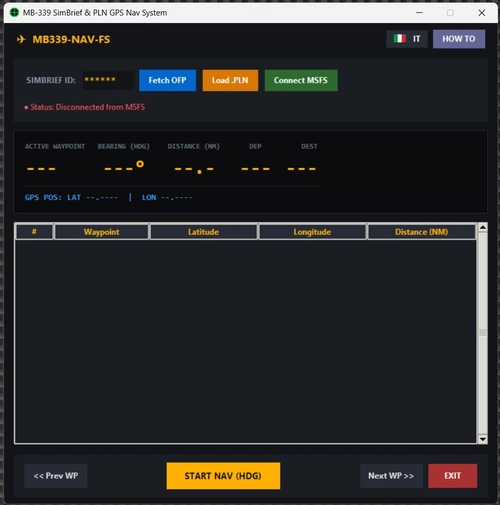
    This navigation tool integrates SimBrief flight plans with Microsoft Flight Simulator through SimConnect. It calculates and sets the correct heading bug to follow waypoints using the autopilot in heading mode. Only lateral navigation is automated, requiring manual control of altitude and speed. The tool is ideal for aircraft lacking a modern FMS or LNAV capability.

    5.0(2)
    44
    11.9 MB
    6 days ago
    MSFS PROfile Editor

    MSFS PROfile Editor

    This standalone utility enables quick selection and management of multiple graphic profiles for Microsoft Flight Simulator. Users can store and access different UserCfg.opt files to easily switch between settings optimized for different flight types, such as VFR or IFR. The program streamlines the process without manual file renaming or constant adjustments. It is designed to simplify graphics configuration changes based on flight scenarios.

    Mrsauga
    MSFS2024
    0.0(0)
    40
    43.6 MB
    6 days ago
    Logitech / Saitek Pro Flight Radio Panel

    Logitech / Saitek Pro Flight Radio Panel

    This add-on is a lightweight Windows application for full control of the Logitech Saitek Pro Flight Radio Panel in Microsoft Flight Simulator. It supports all radio types including COM, NAV, ADF, DME, and XPDR, with advanced tuning and live display functionality. The app communicates with the simulator via SimConnect and features a customizable on-screen dashboard modeled after the real device. It is compatible with default and add-on aircraft and is provided as a free, open-source solution.

    aresakaresak
    MSFS2020
    0.0(0)
    48
    93.9 MB
    1 week ago
    Showing 1 - 12 of 556 results
    234...50