


This week's roundup of Microsoft Flight Simulator add-on updates leans heavily on realism tools that work in the background: Ground handling for AI traffic, cockpit taxi cameras, free airport mapping data, flight planning integration and a reworked traffic sound engine. Together, these releases illustrate a broader trend in the community toward utilities that enhance immersion without replacing core simulator content — services, data feeds and audio processing that slot in alongside existing aircraft and scenery addons. Below is a closer look at what's new.
Apron Life - Ground Service for AI Traffic
🔆 Apron Life has become one of the most actively developed freeware utilities on the platform, and its latest update, version 1.4.4, continues a string of releases focused on performance and realism around AI traffic. The tool brings full ground handling turnarounds to AI aircraft parked at gates — jet bridges, ground power units, fuel trucks, baggage handling, catering, marshallers and passenger movement — provided you are running an AI traffic injector such as Beyond ATC, SayIntentions, or VATSIM traffic alongside FSLTL or AIG aircraft models. GSX Pro integration is optional but expands the feature set considerably, adding GSX liveries, remote stand buses, container loaders and passenger barriers.

Version 1.4.4 focuses on lightening the load that jet bridges place on MSFS 2020, bringing that platform in line with the lighter-weight helper aircraft system already used in MSFS 2024. This reduces the amount of data the simulator needs to load at busy airports. The update also calibrates GSX baggage carts and container dollies more precisely, fixes passenger and crew pathing at remote stands so they no longer cross through barriers, and resolves several bugs including vehicles spawning on grass, airports with minimal vehicle roads being skipped entirely, and incorrect stair heights on the A319 and A321.
This builds on recent versions that introduced bubble mode for FPS optimization, freighter-specific turnarounds, local fuel company liveries, and smart apron traffic routing that keeps vehicles from colliding with aircraft, jet bridges or each other. The project has clearly benefited from sustained community feedback, and the developer continues to refine details down to the exact stopping point of a belt loader. Apron Life is freeware. If it improves the atmosphere at your airports, consider supporting continued development via Buy Me a Coffee. 👉 Download Apron Life - Ground Service for AI Traffic
Taxi Cam - MSFS 2024 PFD Taxi Cameras
Taxi Cam addresses a specific gap in cockpit realism: the ability to see nose wheel and tail camera feeds directly on the Primary Flight Display while taxiing, as is possible on several real-world widebody aircraft. The tool overlays live camera views on the upper portion of the PFD, complete with reference guides and ground speed readouts, and supports activation through the aircraft's own EFIS TAXI button where implemented, or through configurable keyboard shortcuts. Compatibility currently extends to the FlyByWire A380X, iniBuilds A350 (900, ULR and 1000) and A380, the PMDG 777 family, the Aerosoft A340-600, and the iniBuilds A340-300, though button integration varies by aircraft and some rely on keybinds only.
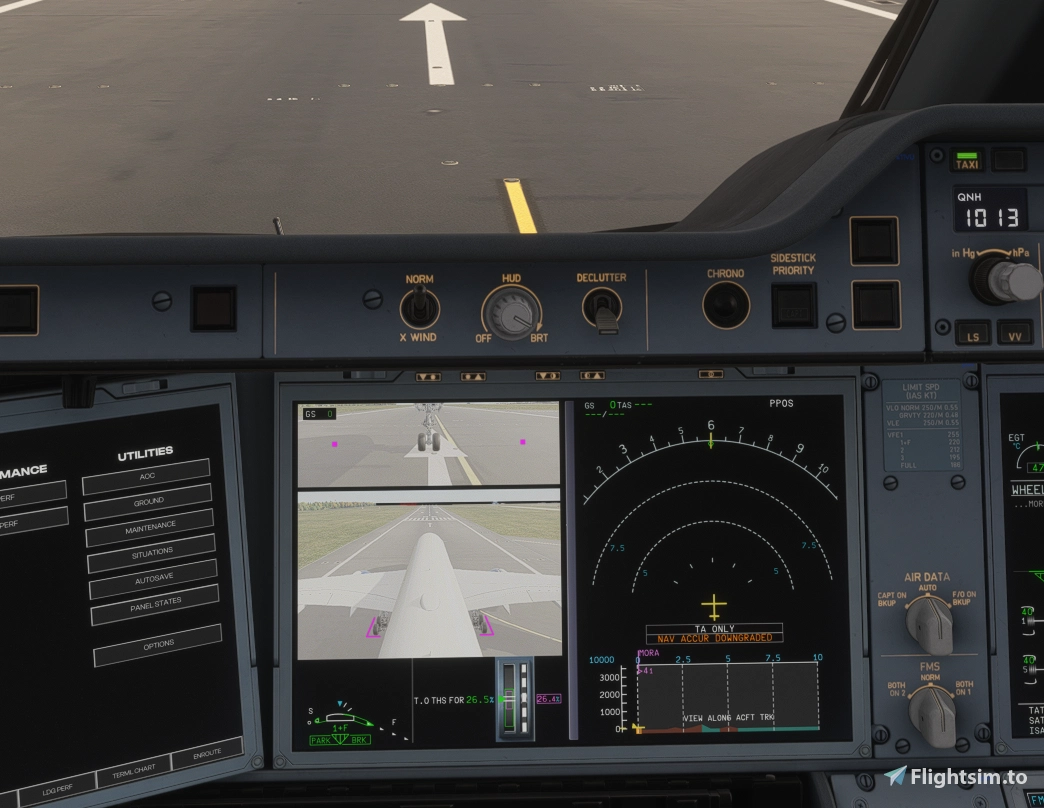
Version 1.0.0 represents a significant step for the add-on, moving the camera views away from a separately rendered feed and aligning them with the main view's actual weather, lighting and runway/taxiway lighting. Clouds, haze and sky now render consistently between the main and camera views, exposure and tone curves are shared rather than calculated separately, and lighting glitches such as lights hidden behind nonexistent haze have been resolved. The update also removes several settings that are no longer necessary now that the camera feeds inherit the main view's lighting model, and changes the installer so it no longer relies on Windows PowerShell, addressing antivirus false positives reported with earlier versions. As an experimental integration with the simulator, Taxi Cam carries some caveats — performance cost from additional camera rendering, occasional display detection issues on the iniBuilds A380, and sensitivity to simulator or aircraft updates.
The developer actively tracks issues through an in-app bug report tool and a GitHub issue tracker. Taxi Cam is free and open source under GPLv3. Donations are optional; if you find it useful, supporting the developer helps sustain ongoing compatibility work.👉 Download Taxi Cam now on Flightsim.to.
Free OANS/ANF/BTV And Airport Charts
This utility targets pilots who want onboard airport moving map functionality — OANS, ANF or BTV, depending on the aircraft — without a Navigraph subscription. It builds a full airport mapping database from the X-Plane Scenery Gateway and OpenStreetMap, covering runways, taxiways, aprons, stands, signage and lighting across 45 data layers, then serves it to compatible aircraft using the same method Navigraph's AMDB service uses. This means the aircraft systems themselves require no modification. It has been tested with the FlyByWire A380X (OANS and BTV), the iniBuilds A350 (ANF) and the GM5 A220 Airport Moving Map, with broader compatibility claimed for the Fenix A320 and PMDG 737/777 series. The package also generates Jeppesen-style airport diagrams in PDF form. Setup involves running a local bridge application that answers for Navigraph's data requests, requiring administrator rights since it redirects a hostname locally.
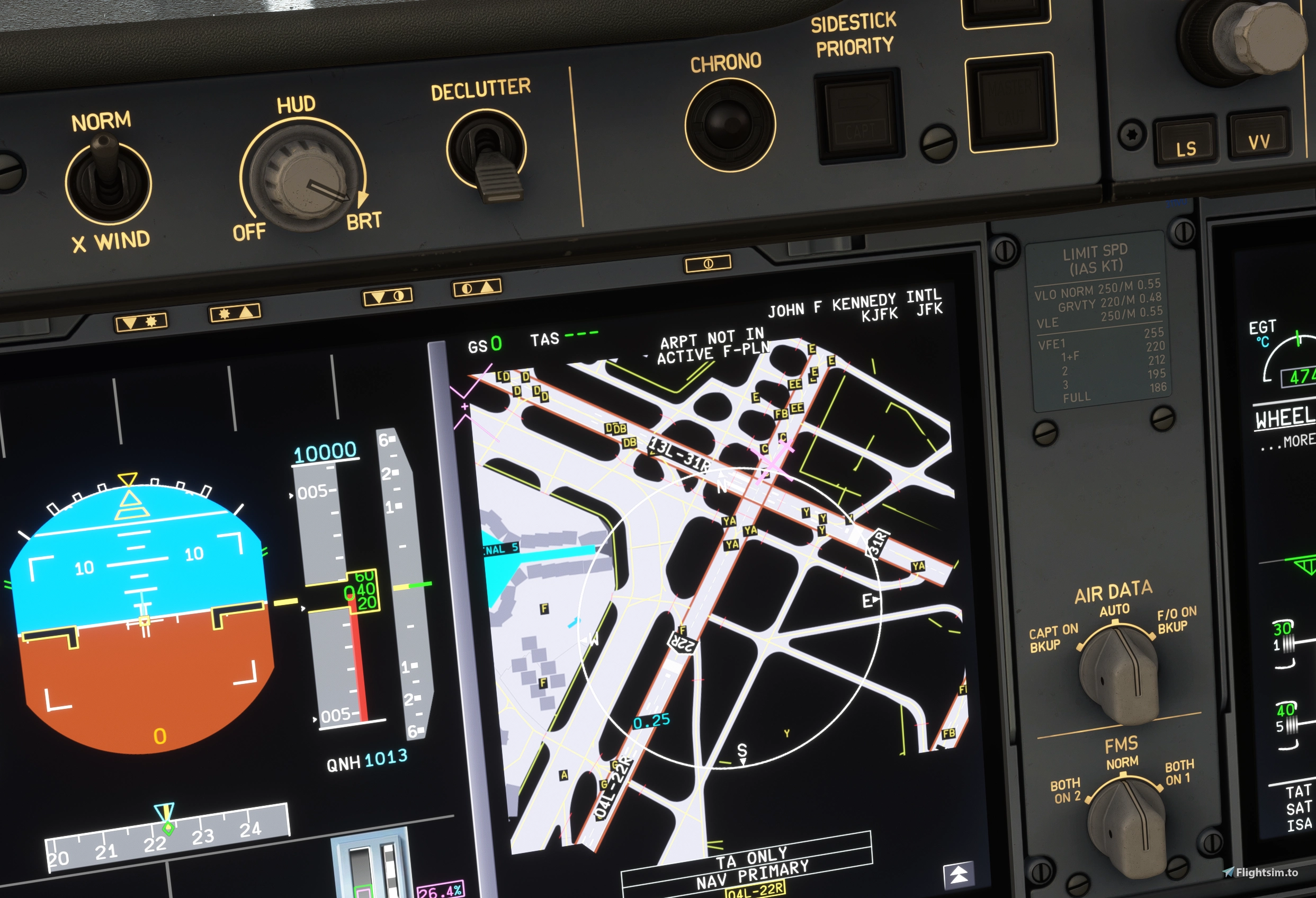
Airports generate on first use and are cached afterward, with a prefetch option that can build an entire route in advance from a SimBrief flight plan. The developer is explicit that this tool is incompatible with an active Navigraph subscription and should not be used alongside one. The latest update, version 1.2.10, focuses on stability, preventing crashes when large airports are cached, and adds work-in-progress support for the Headwind A330.
The community feedback has flagged some rough edges, including a reported conflict where the bridge's hostname redirect interfered with access to Navigraph and SimBrief websites — users experiencing this should check their Windows hosts file. This is a freeware, open-source project released under the MIT license. If you make use of it, the developer welcomes feature suggestions through the GitHub repository, and following the creator's profile helps surface future updates. 👉 Download Free OANS/ANF/BTV And Airport Charts.
Briefing Panel
Briefing Panel remains one of the most widely used flight planning companions for MSFS, with over 120,000 total downloads. The add-on pulls your SimBrief operational flight plan directly into a panel inside the simulator's toolbar, displaying fuel figures, aircraft weights, route information and plan weather without needing to alt-tab out to a browser or PDF viewer.
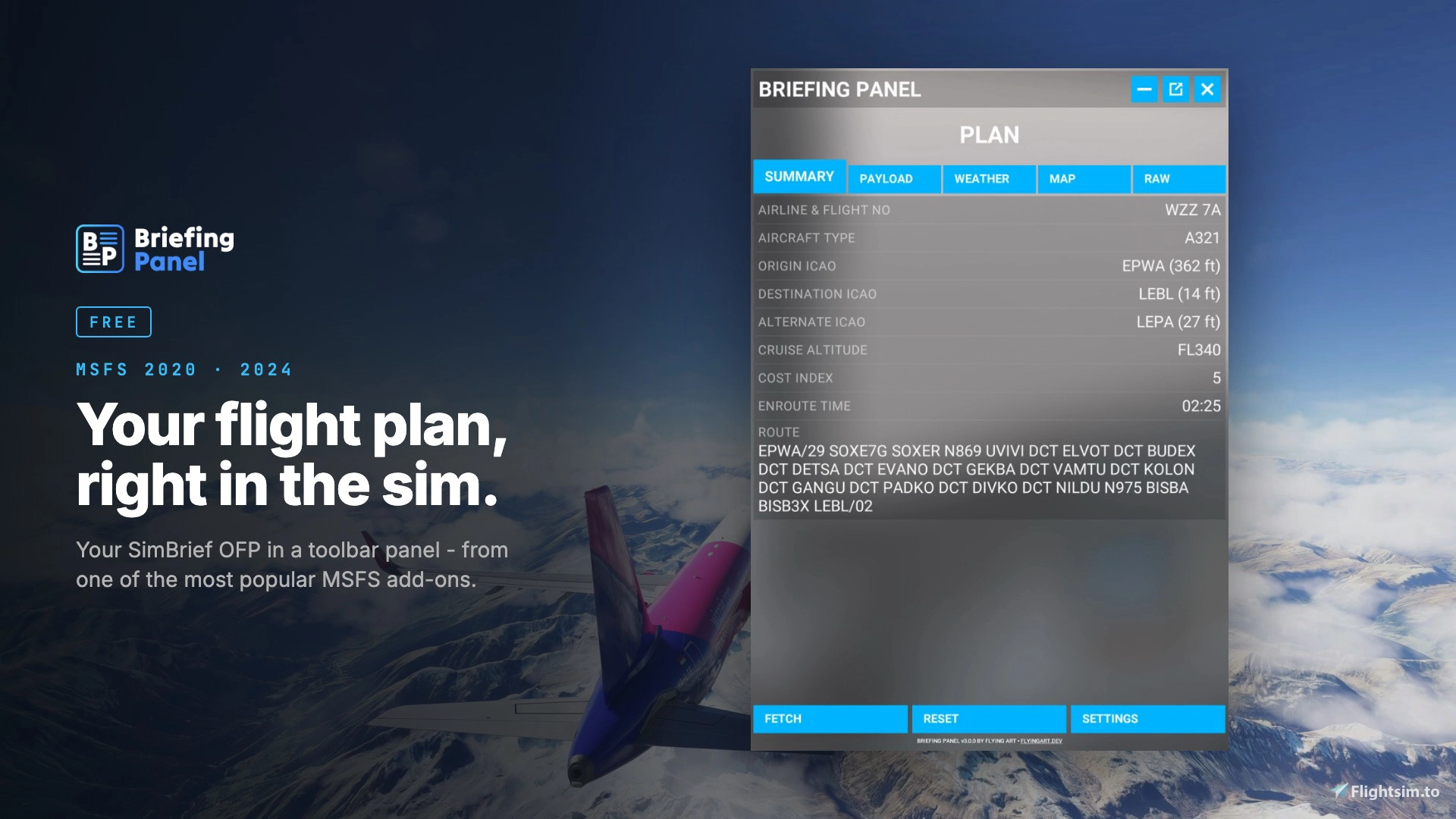
Version 3.0.0 marks a substantial rebuild of the tool, expanding it from a toolbar panel into a connected platform spanning the simulator, a web interface, and mobile devices. A new web panel at allows flight plans to be fetched and accounts managed outside the sim, while a new account system keeps plans and settings synced in real time across every connected device. An iOS app is now available for pairing a phone or tablet using a simple six-digit PIN, with Android support planned. The plugin also now updates itself automatically rather than requiring manual reinstallation. Beyond the platform expansion, this version introduces VATSIM ATC integration, showing online controllers along your route grouped by station, and replaces the previous OpenAIP key requirement with airspace, airport and navaid data built directly into the Briefing Panel server.
A new optional one-time purchase, 🔆 Briefing Panel Pro, adds per-aircraft layout profiles, live weather and runway wind data, a TAF timeline, COM frequency tuning from VATSIM ATC data, live position tracking on web and mobile, and toolbar theming. The core Briefing Panel functionality remains free. Given the scope of this rebuild and the infrastructure now supporting it, users who rely on the tool regularly may wish to consider a donation to support its continued development. 👉 Download Briefing Panel.
tebs Traffic Audio
Addressing a long-standing criticism of MSFS 2024's default AI traffic sound, Traffic Audio replaces the simulator's built-in engine audio for other aircraft with multi-layer real engine recordings, positioned in 3D space and mixed live at a reported 20 times per second. The tool silences the leftover MSFS traffic engine noise and substitutes it with recordings that vary by engine angle relative to the listener — distinguishing between the inlet and fan noise heard from the front, a sideline mix at roughly 90 degrees, and a rear exhaust cone rather than a simple rear-facing speaker effect.

The sound model applies physical principles rather than simple distance-based volume scaling: it follows ISO 9613 outdoor sound propagation standards for spherical spreading, air absorption and ground effect, factors in the simulator's own temperature, pressure and humidity for high-frequency attenuation over distance, and calculates the speed of sound so that distant aircraft are heard with an appropriately delayed, Doppler-shifted signal. Engine start-up, running and shutdown states are read from the simulator and smoothed to avoid flickering, and interior cabin views apply a low-pass filter to simulate the muffling effect of the aircraft hull. The tool works alongside any traffic model library, including FSLTL and AIG, and is compatible with MSFS 2024 only.
Version 1.0.13 fixes an "Audio engine timed out" error that could appear after roughly 45 seconds of operation, caused by the settings window and audio engine blocking on each other; commands now run in the background to keep the interface responsive. This release also clarifies in-app guidance for ChasePlane users regarding which camera views should be saved as internal versus external to get correct muffling behavior, and ensures that dismissing this notice persists across sim restarts. Traffic Audio is freeware. If the improved traffic soundscape enhances your flights, consider supporting the developer through the project's Discord community, where bug reports and feedback are also welcomed. 👉 Download tebs Traffic Audio on Flightsim.to.
30 days ago