

Description
Free Airport Mapping DB (amdbgen + amdb-bridge)
Free airport moving-map data for aircraft with OANS, ANF or BTV. No Navigraph subscription, no API keys, any airport in the world.
DO NOT USE THIS IF U HAVE A NAVIGRAPH SUBSCRIPTION!Strictly Incompatible!
What it does
- Builds a full airport mapping database (45 layers: runways, taxiways, aprons, guidance lines, holding positions, stands, terminals, signs, lights) from the X-Plane Scenery Gateway and OpenStreetMap.
- Serves it to your aircraft exactly the way Navigraph's AMDB service does, so the aircraft code is untouched. Tested with the FlyByWire A380X (OANS + BTV), the iniBuilds A350 (ANF) and the GM5 A220 Airport Moving Map.
- Also makes Jeppesen-style airport diagrams as PDF.
- Compatible with the FBW A380, Inbuilds A350, Synaptic A220, PMDB 737/777 Series and Fenix A320
- Note: Charts may not be perfect/convey as much information as Jeppesen Charts!
- To use the retrofitted map tick the required option in the installer, Go to the aircraft and rotate the zoom knob below 10NM.Then select a runway and taxiway as usual, click anywhere on the map to bring up the map data menu and click Arm BTV. After this BTV will be armed.
How to use
- Unzip, run
amdb-bridge serveand answer three storage questions on the first start. - Load your aircraft. Airports are generated on first use (20 to 40 s) and cached after that.
amdb-bridge prefetch --simbrief YOURNAMEbuilds your whole route ahead of time. - Unlink navigraph and relink it to unlock charts capability!
- Close the bridge with Ctrl+C when you're done; it cleans up after itself.
- Please suggest more features and follow my profile!
Requires administrator rights while running (it redirects one hostname on your PC). Data is for simulation only, not for real-world navigation
Open source, MIT: github.com/Vihaan2012-cmyk/Free-Airport-Mapping-DB
Not affiliated with, endorsed by or connected to Navigraph in any way; all data comes from free open sources.,vibecoded
Free OANS/ANF/BTV And Airport Charts For MSFS2020 And MSFS2024
This add-on provides a free, open-source airport mapping database for aircraft equipped with OANS, ANF, or BTV systems in MSFS 2020 and 2024. It generates detailed airport maps using data from X-Plane Scenery Gateway and OpenStreetMap, without requiring a Navigraph subscription or API keys. Supported aircraft include FBW A380, iniBuilds A350, and Synaptic A220. The tool also produces Jeppesen-style PDF airport diagrams and caches maps for future use.The Tool Also generates free Airport Charts Using Inbuild MSFS Navdata!


User Reviews
49 reviews
Version History
Prevent Crashes With Large Airports Cached! Add Headwind a330 Support(WIP)
Related
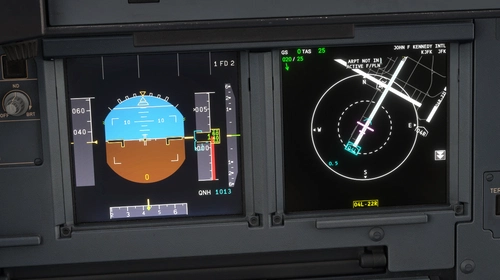
OANS/BTV For Fenix A320/21/19
This addon implements the Onboard Airport Navigation System and Brake to Vacate functionality for the Fenix A320, A321, and A319 in Microsoft Flight Simulator. It enables advanced taxi and landing features, allowing for navigation displays and runway exit planning. The addon uses freely available navigation data sources without a Navigraph key requirement. Installation is managed through a setup script included in the package.
by Royale2072

Free OANS/BTV For Headwind A330
This add-on introduces the Onboard Airport Navigation System and Brake to Vacate technology to the Headwind A330 in Microsoft Flight Simulator. It allows pilots to utilize airport navigation features and manage runway exits more efficiently. The add-on operates using freely available navigation data sources. Installation requires running a setup script before launching the simulator.
by Royale2072
Log in to join the discussion
Log InComments(254)
about 18 hours ago
about 17 hours ago
about 18 hours ago
about 2 hours ago
2 days ago
6 days ago
6 days ago
8 days ago
Thankfully I caught this immediately but this is a very aggressive measure and not everyone has the skills to play around important windows files.
You should disable this feature before it makes more damage and find another way to make it work, plus add a script that removes the blocked domains from the hosts file
10 days ago
11 days ago
11 days ago
13 days ago
15 days ago
19 days ago
19 days ago
20 days ago
22 days ago
21 days ago