
Flightsim.to
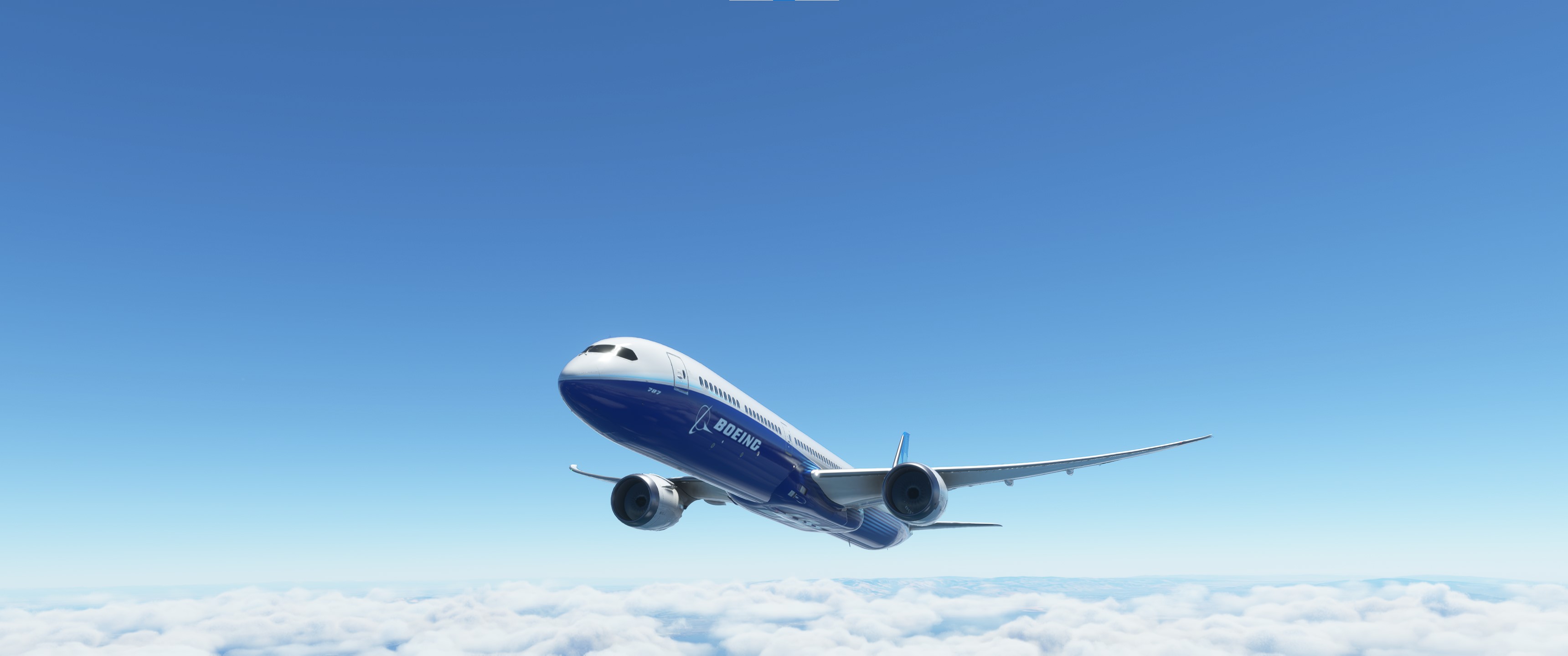
    Asobo B787-10 Realism Mod - Image 1

    Description

    This is a modification to the MSFS 2020 default Asobo Boeing 787-10 aircraft and is primarily aimed at improving the aircraft flight model to make its overall performance more closely match the actual aircraft, providing a much closer experience to flying the real aircraft.  Although the flight model on this default aircraft is already pretty good, some significant improvements have been made to the flight model parameters, which are detailed in the Change log.

    This is Boeing's latest advanced technology passenger jet, and it is unlike any previous generation Boeing airliner.  It includes a highly flexible, high performance, carbon fiber wing and a modern fly-by-wire flight control system.  It also has an ultra-modern glass cockpit with six large multifunction displays, and a fully functional flip down HUD.

    This mod is easily installed by simply unzipping the download file and copying the mge-asobo-aircraft-b787-10 folder to the MSFS Community folder.  It will then replace the existing default Boeing B787-10 aircraft in the MSFS aircraft selection screen, and will also continue to utilize all of the existing available Liveries.  To uninstall the mod and return to using the MSFS default aircraft, simply remove it from the Community folder.

    Microsoft Flight Simulator © Microsoft Corporation.  Asobo B787-10 Realism Mod was created under Microsoft's "Game Content Usage Rules"  using assets from Microsoft Flight Simulator, and it is not endorsed by or affiliated with Microsoft.  

    Comments(239)

    Log in to join the discussion

    Log In
    F

    7 months ago

    Hi! Sorry, I've put the folder mge-asobo-aircraft-b787-10 in comunity folder, with MSFS 2024. I have the Asobo 787-10 installed and working. But when I check on WEIGHT AND BALANCE page on CDU I can't see this values FORWARD BAGGAGE = 15,000 lb.
    REAR BAGGAGE = 5,000 lb.
    CARGO = 3,000 lb. , to understand if the mod is correctly installed...I have to do something else? Thx!!!
    M
    MGouge425Author

    7 months ago

    This mod is only compatible with MSFS 2020... I have not tested to see if it will work in MSFS 2024. The changes to the Baggage and Cargo weights only appear on the WEIGHT AND BALANCE screen of MSFS 2020, not on the CDU.
    a

    8 months ago

    i don't know why but the pitch speeds are way too fast, can you adjust it, or is it based irl? great mod tho love it
    a

    7 months ago

    What do you mean?
    a

    8 months ago

    Thanks man! How do I know that I have this new b787-10 now in use?
    M
    MGouge425Author

    8 months ago

    To confirm that the mod is installed, open the WEIGHT AND BALANCE screen and verify these weights...

    FORWARD BAGGAGE = 15,000 lb.
    REAR BAGGAGE = 5,000 lb.
    CARGO = 3,000 lb.
    a

    9 months ago

    Hey. I saw you have worked with horizon sim 787-9 flight model, so is this kind of same as it, but only for bigger 787-10? Or do these flight models have fundamentla differences (other than different plane) :)
    M
    MGouge425Author

    9 months ago

    Unfortunately, every aircraft in MSFS performs differently, and requires different flight model settings...
    a

    10 months ago

    How Do I know I have the mod activated? I just extracted the whole folder to community.
    M
    MGouge425Author

    10 months ago

    Don't install the top-level folder into COMMUNITY... Copy only the "mge-asobo-aircraft-b787-10" subfolder and paste it into COMMUNITY, as described in the installation instructions above.
    B

    11 months ago

    Good afternoon, sorry again, two questions and I won't bother you anymore, I say again that your work on the 787-10 is simply wonderful, the two questions are: 1) Is it possible if I download the Kuro 787-8 Mod instead of taking the original Asobo 787-10 as a parameter, since I have yours installed, take it as a base and discard the original? and 2) In the 787, the "Elapsed time", (Total flight time) is cut off as soon as it lands, not so in the original Asobo 747-8, can you tell me what I have to change and where so that it is not cut off when landing and continues to show the time of that specific flight? is for my daily time book in my excel file. Thank you very much!
    M
    MGouge425Author

    11 months ago

    1) This mod is only for the default 787-10 and will not work with any other aircraft. 2) I cannot change the functionality of the Clock. But you should be able to easily see the Total Flight Time for each flight you complete by pressing [ESC] to end the flight and return to the MAIN MENU, then open PROFILE / LOGBOOK to view the logbook entry for the current flight, as well as for previous flights, which includes the flight time. Since the logbook is stored only online, it is not very responsive so be patient when using it. It can take a very long time to respond and may appear like it is hung.
    B

    11 months ago

    Perfect, with the wonderful 787-10 mod, it's enough. Regarding the "Elapsed Time," I took a print screen just before landing, and it recorded the exact flight time. Anyway, what you told me is also there. Now, thank you very much for your time and work on the Dreamliner!
    B

    11 months ago

    MGouge425: First of all, the latest version 2.5.1 of the 787-10 is excellent. Congratulations on your work. Some questions: 1) Is it possible to add COMM parameters even if they are read-only? 2) How can I make the font size on the HUD smaller so that all the information fits when it's displayed? And finally, I know it's very difficult, but: 3) Is it possible to develop the VSD for the 787-10? Thank you very much, as always, for your time.
    M
    MGouge425Author

    11 months ago

    Thanks for this feedback... 1) What do you mean by "Comm parameters"? 2) I don't know of any way to change the font size on the HUD display. But, the text all fits if you use the default Pilot viewpoint position. The text will be shifted to match the Pilots eye level if you change the viewpoint position, and it may not fit on the screen. 3) I cannot add any new functionality to the aircraft.
    B

    11 months ago

    The COMM parameters are next to the autopilot, where they are also: SYS - CDU - INFO and below are: CHKL - COMM - ND, as for the HUD ok, I will try to get it to enter but it is a problem with the MFS2020, it should let you zoom in so that all the info enters, and with respect to the VSD ok, the LittleNavMap does it, it just would have been nice if Asobo had done it in the 787. Again, thank you very much for your great work.
    ...
    MSFS 2020MSFS 2024

    Asobo B787-10 Realism Mod

    Enhance the flight model of the default Asobo Boeing 787-10 in MSFS 2020 with this realism mod. Experience improved performance closely aligned with the actual aircraft, featuring a flexible carbon fiber wing, modern fly-by-wire system, and advanced glass cockpit. Enjoy effortless hand flying with additional artificial stability and perfectly coordinated turns. Install easily and explore the unique experience of flying this new generation high-performance aircraft.

    Downloads21K
    Version2.5.1
    File Size9.21 MB
    Published2 years ago
    Updated12 months ago

    User Reviews

    4.9

    20 reviews

    5
    90%
    4
    10%
    3
    0%
    2
    0%
    1
    0%

    More Information

    Simulator
    MSFS2020
    Sub-CategoryRealism Mods
    Affiliation
    Boeing 787

    Version History

    Version 2.5.1 ⦁ The Default Cargo Weight has been reduced by 10,000 lbs. to increase the max allowable fuel load and range with the default 100% passenger loading. ⦁ The new "B787 Cold and Dark Pre-Flight Setup" guide under the DOCUMENTATION folder has been updated.

    Related

    Asobo C172SP AS1000 Realism Mod

    Asobo C172SP AS1000 Realism Mod

    Enhance the flight dynamics of the Asobo C172SP AS1000 aircraft with this mod, which also includes the FLOATS and SKIS variant. This modification aims to provide a more realistic flying experience by adjusting engine and flight model parameters, weight, and balance. Detailed documentation and real-world training guides are included for easy installation and compatibility with other mods.

    by MGouge425
    4.9
    Asobo Baron G58 Realism Mod

    Asobo Baron G58 Realism Mod

    Enhance the realism of the Asobo Baron G58 in MSFS 2020 with this mod. Improvements to the flight model provide a more authentic flying experience, closely matching the performance of the actual aircraft. Easily install the mod by copying the folder to the Community folder, and enjoy the detailed changes listed in the documentation. Note: Only compatible with MSFS Deluxe Edition and Premium Deluxe Edition.

    by MGouge425

    4.8
    Asobo B747-8i Realism Mod

    Asobo B747-8i Realism Mod

    Enhance your Boeing 747-8i experience with this realism mod for the MSFS 2020 default aircraft. This modification focuses on improving the flight model to closely match the actual aircrafts performance. Detailed changes can be found in the included documentation, addressing bugs like the landing gear failure. Easily installed by transferring files to the Community folder, this mod aims to provide a more authentic flying experience.

    by MGouge425

    4.7
    Asobo Icon A5 Realism Mod

    Asobo Icon A5 Realism Mod

    Enhance your flying experience with the Asobo Icon A5 Realism Mod for MSFS 2020. This mod focuses on adjusting the flight model and performance of the default Icon A5 to align it more closely with the real aircraft. From improved flight parameters to enhanced weight and balance, this mod offers a more authentic and satisfying flight experience. Easily install this mod to enjoy a more realistic flying experience with the iconic and versatile Asobo Icon A5 aircraft in Microsoft Flight Simulator.

    by MGouge425

    4.9