
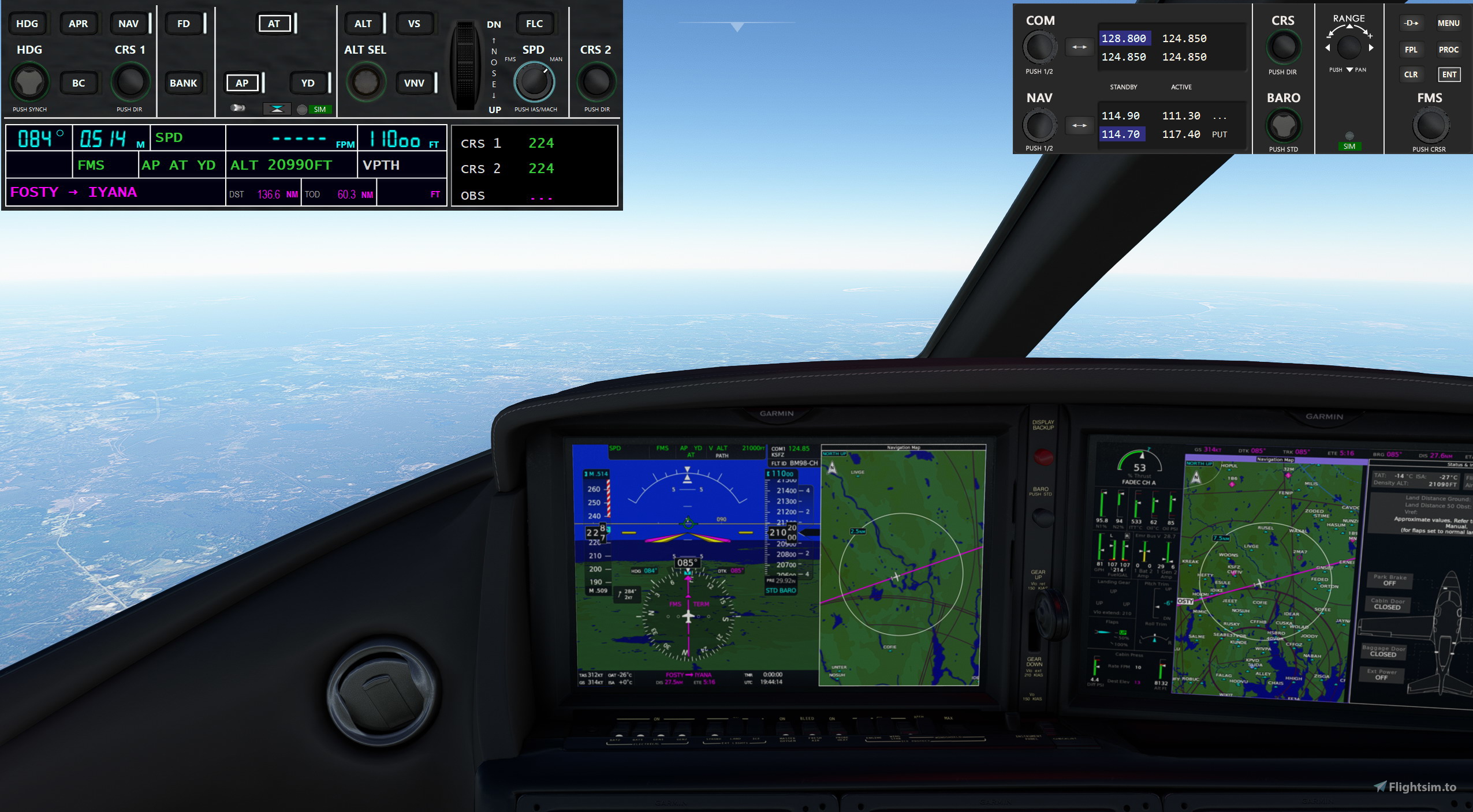
Description
- – be prepared for oddities and hiccups… - let me know when something goes south.
MSFS Panel Replicas
Re MSFS2024:
This addon also provides a native MSFS2024 WASM module and it adds the ability to load streamed facilities from MSFS2024 to enhance GPS waypoint tracking where the native aircraft does not synch properly with the Sim GPS (applies to Garmins only).
Please see the Quickguide for more installation and data capturing information.
The capturing process is not flawless and it takes about 15 Minutes - be patient.
You need to install the WASM module in the 2024 Community folder in order to access most interactions.
Some aircraft modules have been crafted others may or may not work - too many to test and review (sorry)
Please let me know if you encounter issues in order to improve the addon.
Updated for V0.12
--> PLEASE read the included short guides for an easy and successful start.
- RERUN the included FacilityDataLoader !!! should fix MSFS2024 issues and collects TACAN information
- Install WASM module Vx.9 for 2020 and/or 2024 if not done so
- Added GTC570/580 bezels for Garmin G3000 suite
- Added GNS430/530 bezels for Garmin GNS suite
- Added MCDU bezel for A320, Citation X, CJ4
- Added KFC150 AP panel
- Added KMC321 AP panel
- Added Century IV AP panel (experimental ...)
- Added generic AP001
- Added Standalone ComPanel V3 (Airbus RMP input style, supporting TACAN channels)
- Added ARC210 Standalone ComPanel
- Added Touchscreen support (Optional, enable in Config tab)
- Added Option to have the Starter Panel hiding in the Systemtray (enable in Config tab)
- Added Commandline to start panels directly
- Updated Starter Panel for new items - NEW layout
- Updated RAM (memory) optimizations
- Fix Some issues found on the way..
- Updated Quickguides
Replicates some often used functionality into an easy accessible window.
Windows App to be used with the MSFS 2020 Flight Simulator. Works mostly with 2024 but no new native functions.
- A320NX (FlyByWire) – latest development version
- A380NX (FlyByWire) – COM display and tuning is limited until fully implemented by FBW
- A350 (iniBuilds)
- A320 (Fenix), other Fenix variants may or may not work, not tested
- A310 (IniBuilds, MS default) - no custom IniBuilds variants are supported, each one is different…
- B747-8 (MS stock), B787-10 (MS stock) - panels
- G1000nxi (WT) based aircrafts – AP panels, GCU002, G1000 bezel, mostly working
- GNS430/530 (WT) based aircrafts e.g. C172 – GCU002 (limited)
- KAP140 for C172 steam gauge version
- SR22 (MS stock) – AP panels, GCU479
- KingAir350 (MS stock + G1000 mod) – AP panels, GCU477
- Kodiak 100 (SWS) – AP panel GMC715
- Longitude, TBM930 (MS stock) – AP panel GMC715, support in GCU002 (limited)
- CJ4 (MS default) – AP panel GMC715, GCU002 (limited)
- Vision Jet (Ffx) – AP panel GMC715, support in GCU002 (limited)
- H420 Jet (Ffx) – AP panel GMC715, support in GCU002 (limited)
- C172 (MS stock steam gauge) – KAP140 AP
- Blacksquare Bonanza and Baron
MSFS 2024 features:
- G1000nxi (WT) based aircrafts – AP panels, GCU002, G1000 bezel, mostly working
- A350 (iniBuilds)
- KAP140 for C172 steam gauge version
- Vision Jet (MS stock) – AP panel GMC715, support in GCU002 (limited)
- Vision Jet (Ffx) – AP panel GMC715, support in GCU002 (limited)
- PC12 and PC24 (MS stock) – AP panel GMC715
- SR22 (MS stock) – AP panels, GCU479
The NAV/COM panels can be shown either alone or together with an AP panel.
Known shortcomings:
- ALT hold does sometimes not display the correct number but close, the nxi does not communicate the AP state so we need to guess what it really attempts to hold.
- AP armed states may not exactly match the one in the acft. Display, same reason as above.
- Transponder / TCAS is not selectable for some aircrafts - limited by the availability of the acft cockpit builder functionality
May I ask you to report findings with suggestions to improve here or via PM – Thank you!
Installation:
- Drop all files from the Zip into a new folder on your disk (Network shares may cause some protection issues depending on your computer settings).
- Read the quick guide :-)
- Install the WASM Modules in the Community folder(s) as per Quick guide to be able to use all functionality.
- Start FS20_Panels.exe and go from there…
MSFS Panel Replicas
Windows App to be used with the MSFS 2020 Flight Simulator. Replicates some often used functionality into an easy accessible window. Current support for FlyByWire A320NX, Headwind A339X, AP for Garmin G1000Nxi equipped aircrafts. Also included a NAV, COM, ATC/XPDR, TCAS Panel as independent App. Please read the included Guides for an easy start to use them.


Supporters
User Reviews
13 reviews
Version History
V 0.12-B17 - Updated WASM Module V 0.9 / 4.9 (see documentation) - Updated FacilityDataCollector, should fix MSFS2024 issues - Add GTC570/580 bezels for Garmin G3000 suite - Add GNS430/530 bezels for Garmin GNS suite - Add MCDU bezel for A320, Citation X, CJ4 - Add KFC150 AP panel - Add KMC321 AP panel - Add Century IV AP panel (experimental ...) - Add generic AP001 - Add ComPanel V3 (Airbus RMP input style, supporting TACAN channels) - Add ARC210 ComPanel - Add Touchscreen support (Optional, enable in Config tab) - Add Option to have the Starter Panel hiding in the Systemtray (enable in Config tab) - Add Commandline to start panels directly - Update Starter Panel for new items - Update RAM (memory) optimizations - Update Quickguides
Related
MSFS HudBar
Configurable display for more than 100 essential Information items as Bar, Tile or Window. Supports 1 to 4 engine aircrafts (Prop/Engine RPM, FuelFlow for each); Provides 5 different content profiles which are fully configurable; The pilot can directly activate Autopilot commands Auto Elevator Trim on a click; Bottom Bars work best with wide screen monitors; AutoSave of the Flight (FLT file) at 5 Min intervals Flight; Recording to KML File
by bm98ch
MSFS FlightBag
Flight bag providing Shelf, Map, METAR; Shelf for image documents either JPG, PNG or GIF images for reference, Mapping with OSM, Stamen and OpenTopo, METAR retrieval; Please visit the included Quickguide for installation and usage. Map includes route, navaids, airports, runways and airport comm frequencies
by bm98ch
Log in to join the discussion
Log InComments(47)
8 months ago
7 months ago
The functionality usually depends on the aircraft and needs mostly customization if the dev goes further than MSFS basic functionality. So if you also include the intended acft(s). No promise but it sounds feasible.
9 months ago
1. My gamepad stops working when I click on the replica panel. Scrolling seems to work but not the buttons. Interestingly clicking on scrollable items works and doesn't affect gamepad functionality.
2. The panel selector window gets in the way, would be great if I could directly open the panel I need, maybe from command line.
3. Need keyboard hotkey to open and close the panel, so that I can hide the panel when I don't need.
4. Would be nice to have .75 or .5 scales also. It'll be good for small monitors.
9 months ago
and I give it back to Sim when the mouse pointer is outside of any action control- this affects keyboard and it seems gamepads as well.
I don't know if this should be an option to choose for the user??
for 2: I have to see if I can hide the main panel as I connect to SimConnect from the main panel and not each of the panels separately
for 3: Have to see if all works together ...
for 4: smaller caused distorted panels - tried it once... I just could make the 1:1 smaller for some offending ones (do you have some in mind?)
9 months ago
over 1 year ago
over 1 year ago
re Overhead panel - technically maybe possible. I went with the most likely used controls for the time beeing and tried to still fit them into a reasonable space.
If you have controls which are used more often and hard to access/look at while piloting the aircraft let me know. My piloting experiences are rather small hence I don't really know where the pain points are.
But I don't think that I ever will build a complete one.
over 1 year ago
over 1 year ago
over 1 year ago
as it is an app that connects via SimConnect it should be able to be run on a remote Windows computer but the SimConnect.cfg file needs to be setup in order to do so. I don't have experience neither used it.
Doc is here:
https://docs.flightsimulator.com/html/Programming_Tools/SimConnect/SimConnect_CFG_Definition.htm?rhhlterm=simconnect%20cfg&rhsearch=simconnect.cfg
over 1 year ago
5 or 10 euro to pay no problem
over 1 year ago
with regards to the OVH, as it is huge.. what are the items you think would help the pilot mostly beyond the ones available?
For the FBW I have to check if commands have changed (again) for the next version anyway.
over 1 year ago
Solution: temporarily lower the Windows screen resolution, but only to restore the image to the center.
Great work, thanks
over 1 year ago
over 1 year ago
over 1 year ago
Je vous souhaite de nombreux vols réussis avec le petit outil
over 1 year ago
I see potential in this addon.
over 1 year ago
over 1 year ago
Let me know if it does not what it should do..