
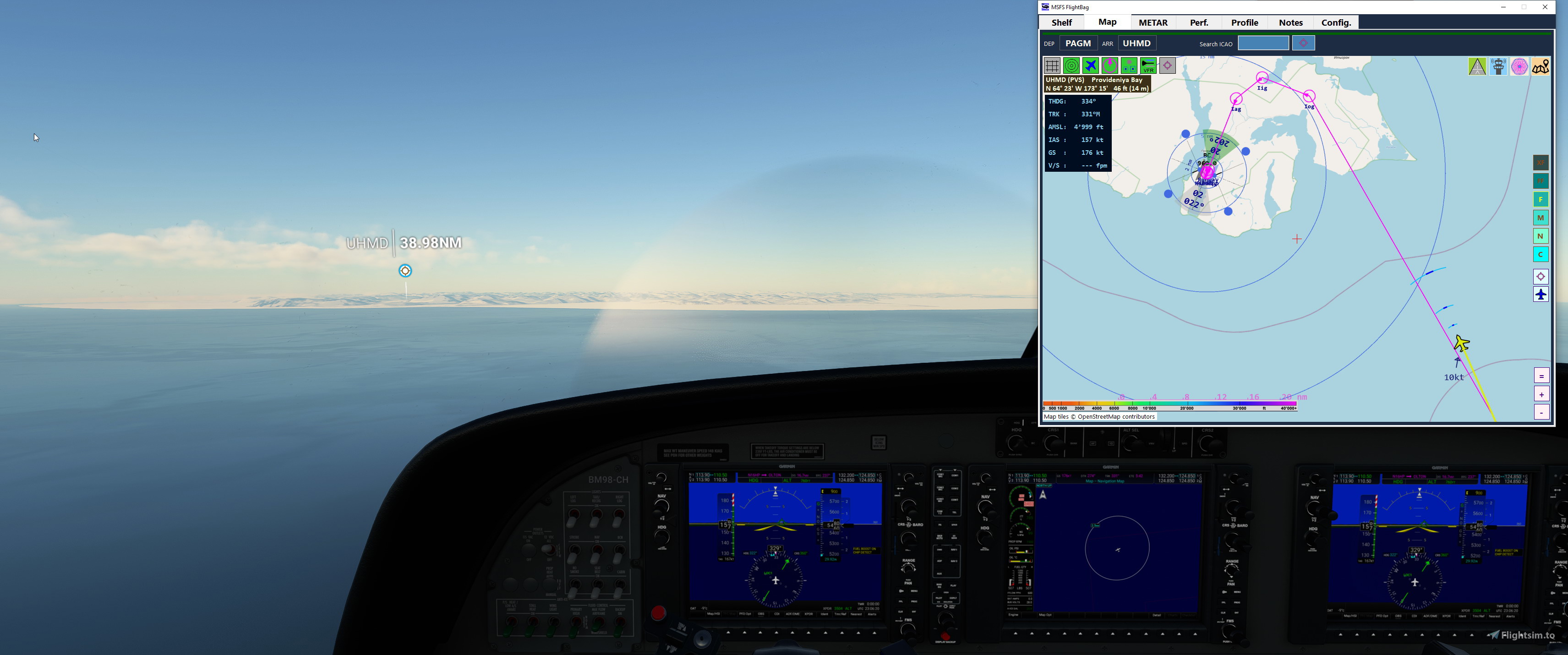
Description
FlightBag is updated to v 0.72
- Update To select only Airports with Helipads in FlightBag-Config Runways
- Update Stamen 3D Terrain default URL extended with parameter {r}
- Fix MapProvider for Stamen sometimes not having the key read properly
PLEASE NOTE
the FlightBag Standalone version is no longer supplied separately
please head over and bookmark HudBar at this site:
and get it there - it was and is essentially the same application and you may just start the FlightBag app on it's own.
It shares the same features and resources so I decided to merge the two into only one distro.
I may remove this page in the future to avoid any confusion :)
Please let me know on how to improve - or what's missing - THANK YOU
MSFS FlightBag
Flight bag providing Shelf, Map, METAR; Shelf for image documents either JPG, PNG or GIF images for reference, Mapping with OSM, Stamen and OpenTopo, METAR retrieval; Please visit the included Quickguide for installation and usage. Map includes route, navaids, airports, runways and airport comm frequencies


Version History
V 0.70-B70 - Please UPDATE the WASM Module (from BM98CH_DataConnector_Wasm-V0.5.zip) !!! - Add VProfile display in FlightBag - Maps Tab - Add Download the original Simbrief Flightplan PDF (@.FlightPlan), omit image download - Update FlightPlan Table is now a PDF (@.FlightTable) - Update Improved Flightplan decoding from ext. formats - Update PDF Converter for Shelf replaced with WkHtmlToPDF application - Update WASM Module to V0.5 (according to SDK advice) - Update QuickGuides
Related
MSFS HudBar
Configurable display for more than 100 essential Information items as Bar, Tile or Window. Supports 1 to 4 engine aircrafts (Prop/Engine RPM, FuelFlow for each); Provides 5 different content profiles which are fully configurable; The pilot can directly activate Autopilot commands Auto Elevator Trim on a click; Bottom Bars work best with wide screen monitors; AutoSave of the Flight (FLT file) at 5 Min intervals Flight; Recording to KML File
by bm98ch
MSFS Panel Replicas
Windows App to be used with the MSFS 2020 Flight Simulator. Replicates some often used functionality into an easy accessible window. Current support for FlyByWire A320NX, Headwind A339X, AP for Garmin G1000Nxi equipped aircrafts. Also included a NAV, COM, ATC/XPDR, TCAS Panel as independent App. Please read the included Guides for an easy start to use them.
by bm98ch
Log in to join the discussion
Log InComments(12)
about 2 years ago
about 2 years ago
And no it does not import charts as they are $$. The Flightbag uses Streetmap and overlays information taken from the Sim nav. database (use the DataLoader to collect all needed data once). If you are interested you may download the App - there are Quickguides included in the distribution which may help to decide if you want to give it a try.
over 3 years ago
Need a way for this to build a flight plan, and a button to import it into your GPS, otherwise it's not going to beat Sky4Sim. I realize it might not be compatible with all GPS's due to current MSFS limitations, but at least match the capability of Sky4Sim.
over 3 years ago
Hi, I was not aware of this Addon... thanks for mentioning it.
As my flightbag is not an MSFS Addon but an independent Windows App using SimConnect I do not have write access to the GPS of MSFS - there is no interface I found so far which allows to inject FPs from the outside while the Sim is running.
Would be a nice feature but unfortunately not possible at the moment.
(Or someone knows how to achieve this.. - there is little documentation available)
over 3 years ago
2 Questions: Why the OSM is so blurry when zoomed in and also What is the "valid" Pilot ID format. My SB ID only have 5 digits. not 6. Beside, this app can have potential. Thanks.
over 3 years ago
The map zoom is based on zooming of the image, range buttons will reload the map at a different level - this is intentionally to reduce the loading from the server, OSM is usually fast but e.g. using Stamen or Topo would create a lot of waiting for updates when zooming in and out as those servers are rather slow (at least here).
For the Pilot ID I was reading that the ID is 6 digits but it seems to be not the case (there is no official doc I found...) May be try with a 0 as first digit I don't know if this works with SimBrief - I will update the App so it accepts 1..7 digits. But this may take a day or two to get there.
Hope it helps and thank you for reporting
Regs
over 3 years ago
Thanks Regs.
almost 4 years ago
Does it work in Vr ?
almost 4 years ago
Unfortunately not. It is just a Windows App and not an MSFS addon
almost 4 years ago
You are correct. tks
almost 4 years ago
Great app with a lot of potential. Any idea why the app opens for a second or two and then shuts down?
almost 4 years ago
I see this happen when you do not run the DataLoader i.e. when the FlightBag is started but no database is found.
The installallation extracted contains a folder dataLoader and there you find FacilityDataLoader.exe
Pls. run this one to gather the needed facilities from the SIm and then the FlightBag should no longer just vanish. The next version will tell you that....
Hope this works - let me know.