
Description
This profile is part of the NERIKENAUT Flight Companion Hub that will be released later this year.
Important noticeTo use this profile on your Stream Deck, you need to download and install “Flight Tracker”. Don't forget to give your thanks to Hy (the creator of Flight Tracker). Make sure to buy him a coffee or two.
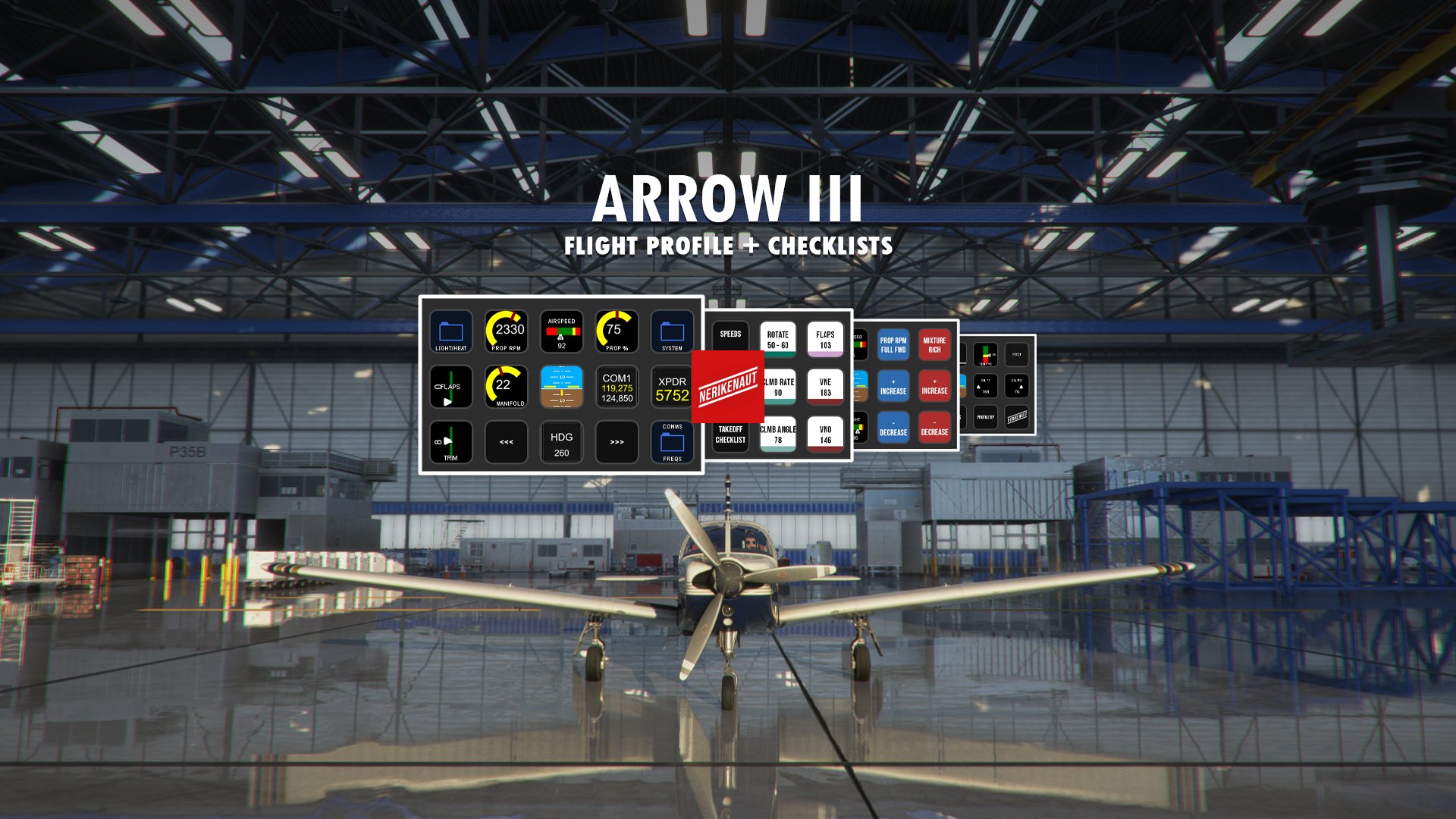
About the NERIKENAUT Flight CompanionThe Flight Companion turns your StreamDeck into an interactive controller that allows you to control your aircrafts different systems and gives you an overview of your most crucial gauges. Every profile comes with a startup and takeoff checklists.
Features- Get full control over your comms and frequencies - Hold the COM/NAV/XPDR buttons down on your StreamDeck to change your frequencies and squawk code. Push to switch between your standby and active frequencies.
- Control your aircrafts autopilot through the StreamDeck – In the navigation folder you’ll find your aircrafts autopilot functions.
- Checklists - Easy to follow startup, takeoff, landing and shutdown checklists to follow.
- Overview of your systems - Have an eye on your Ts and Ps to get to where you are going in the safest way possible.
- Full control of your lights - In the "Lights" folder you can easily access your lights panel without having to look around in the cockpit.
The profile is regularly updated when new features are added to “Flight Tracker”. If you want to see certain features implemented – don’t hesitate to reach out.
Piper PA-28R Arrow III (JustFlight) Stream Deck Profile & Checklists
Elevate your flight experience with the NERIKENAUT Flight Companion for the Piper PA-28R Arrow III by JustFlight. This Stream Deck profile offers full control over communication, autopilot functions, checklists, system overviews, and lights panel. Stay tuned for regular updates and enjoy a seamless flying experience with this interactive controller.


User Reviews
3 reviews
Version History
The NERIKENAUT Flight Companion Hub is released. Make sure to download it here: https://flightsim.to/file/31923/nerikenaut-flight-companion-hub-build-your-own-profiles-for-the-stream-deck-addon-flight-tracker This profile is part of the Companion Hub, if you wish to use it separately - make sure to download the latest version here on Flightsim.to. Thank you! <3
Related
Kodiak 100 Stream Deck Profile & Checklists
Elevate your flight simulation experience with the Kodiak 100 Stream Deck Profile & Checklists from NERIKENAUT Flight Companion. This interactive controller allows you to manage aircraft systems, frequencies, autopilot functions, and lights effortlessly. With easy-to-follow checklists and system overviews, enhance your virtual flights with this comprehensive tool. Regular updates ensure compatibility with new features, making it a valuable addition to your flight setup.
by NERIKENAUT
Twin Otter Stream Deck Profile & Checklists
Elevate your flight experience with the NERIKENAUT Flight Companion Stream Deck Profile & Checklists. This interactive controller allows full control over aircraft systems, autopilot, frequencies, and lights. Stay organized with easy-to-follow checklists for startup, takeoff, landing, and shutdown procedures. Regular updates ensure compatibility with "Flight Tracker" and continuous enhancement of features.
by NERIKENAUT

NERIKENAUT Flight Companion Hub - Build your own profiles for the Stream Deck addon Flight Tracker
Welcome to the NERIKENAUT Flight Companion Hub – a tool that lets you build your own profiles for the Stream Deck addon Flight Tracker to make your flights more immersive. To use this profile on your Stream Deck, you need to download and install “Flight Tracker”. Don't forget to give your thanks to Hy (the creator of Flight Tracker). Make sure to buy him a coffee or two.
by NERIKENAUT
Piper PA-28R Turbo Arrow Stream Deck Profile & Checklists
Transform your Stream Deck into a powerful flight controller with the Piper PA-28R Turbo Arrow Stream Deck Profile & Checklists in the NERIKENAUT Flight Companion. Access interactive controls for communication, autopilot functions, checklists, and system overviews right at your fingertips. Stay up-to-date with regular updates and enjoy a seamless flying experience with this comprehensive tool.
by NERIKENAUT
Log in to join the discussion
Log InComments(21)
over 4 years ago
Thank you for all of these! What can you tell me about the NERIKENAUT Flight Companion Hub that will be released later this year? Not sure what that is going to be.
almost 5 years ago
Is there way to use this with a StreamDeck XL. I'm new to streamdeck, so when I try to import, it does not show up in my profiles. Thanks.
about 5 years ago
Hi,
Im very new to Stream Deck and I'm about to install FS 2020 onto my home theater set up (with the Cessna Flight System from Logitech). I did download your profile for P28AIII and I have open it in stream deck. However, I miss the icons, which btw looks amazing. How do you get them as well?
/emil.
about 5 years ago
Hi this is brilliant, I especially love the XPDR button which makes changing it on VATSIM much faster. One question if I may, how would I add temp an pressure gauges? Thank you
over 5 years ago
this is great, love the Stream Deck and what you have created - been using since last year. One small problem I am having - there is no "next profile" button on the "number pad" for comms and I cant add one as I usually do as it seems to be locked for editing. Otherwise loving your work here (I have adapted it for the XL model and works great)
over 5 years ago
over 5 years ago
over 5 years ago
More profiles are coming in the future, the Carenado CT 128T Skylane would be fun to create on for, I'm adding it to the list.
over 5 years ago
over 5 years ago
over 5 years ago
over 5 years ago
over 5 years ago
over 5 years ago
over 5 years ago
You will need this so the icons/features will work properly in sim. https://flightsim.to/file/3178/flight-tracker-streamdeck-plugin
After that is installed, you can click the Stream Deck Profile file in this download and the profile will be added to your Stream Deck. From there you can select the profile manually or set it to automatically switch to it when you start MSFS.
Hope this helps.
over 5 years ago
Looking forward to the NAV/COM updates in the future, whenever they come.
over 5 years ago
over 5 years ago