

Description
Welcome to the NERIKENAUT Flight Companion Hub – a tool that lets you build your own profiles for the Stream Deck addon Flight Tracker to make your flights more immersive.
Important noticeTo use this profile on your Stream Deck, you need to download and install “Flight Tracker”. Don't forget to give your thanks to Hy (the creator of Flight Tracker). Make sure to buy him a coffee or two.
InstallationStep 1 - Open the “Official Profiles” folder and install every profile by simply double clicking on them.
Step 2 – Install the NERIKENAUT FLIGHT COMPANION HUB
(Step 3 – If there’s an issue with the linking of the profiles, you can simply relink the profiles under “Official Profiles” after you completed step 1)
About the NERIKENAUT Flight Companion
The Flight Companion turns your StreamDeck into an interactive controller that allows you to control your aircrafts different systems and gives you an overview of your most crucial gauges. Every profile comes with a startup and takeoff checklists.
Features- Get full control over your comms and frequencies - Hold the COM/NAV/XPDR buttons down on your StreamDeck to change your frequencies and squawk code. Push to switch between your standby and active frequencies.
- Control your aircrafts autopilot through the StreamDeck – In the navigation folder you’ll find your aircrafts autopilot functions.
- Checklists - Easy to follow startup, takeoff, landing and shutdown checklists to follow.
- Overview of your systems - Have an eye on your Ts and Ps to get to where you are going in the safest way possible.
- Full control of your lights - In the "Lights" folder you can easily access your lights panel without having to look around in the cockpit.
- Profiles by NERIKENAUT - The FLIGHT COMPANION HUB comes with nine profiles by me, these can be used as an inspiration for your profiles or simply to fly the Kodiak 100, Turbo Arrow, Twin Otter, Arrow III, Fox2, Seminole, RV-14, Skymaster II or the C310R.
- Create your own profiles - In the "Assets" folder you'll find all the readings you need to create your own profile for your very own aircraft.
- The profile is regularly updated when new features are added to “Flight Tracker”. If you want to see certain features implemented – don’t hesitate to reach out.
NERIKENAUT Flight Companion Hub - Build your own profiles for the Stream Deck addon Flight Tracker
Welcome to the NERIKENAUT Flight Companion Hub – a tool that lets you build your own profiles for the Stream Deck addon Flight Tracker to make your flights more immersive. To use this profile on your Stream Deck, you need to download and install “Flight Tracker”. Don't forget to give your thanks to Hy (the creator of Flight Tracker). Make sure to buy him a coffee or two.


User Reviews
3 reviews
Version History
No version history available.
Related
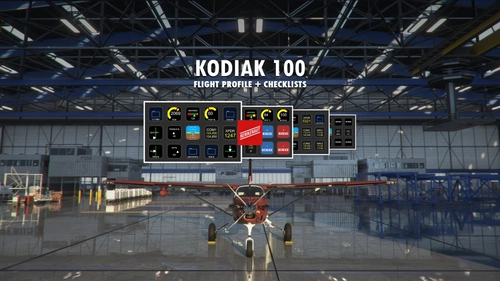
Kodiak 100 Stream Deck Profile & Checklists
Elevate your flight simulation experience with the Kodiak 100 Stream Deck Profile & Checklists from NERIKENAUT Flight Companion. This interactive controller allows you to manage aircraft systems, frequencies, autopilot functions, and lights effortlessly. With easy-to-follow checklists and system overviews, enhance your virtual flights with this comprehensive tool. Regular updates ensure compatibility with new features, making it a valuable addition to your flight setup.
by NERIKENAUT
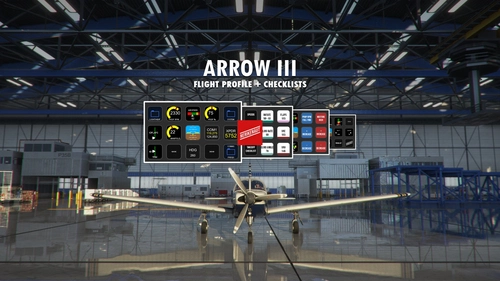
Piper PA-28R Arrow III (JustFlight) Stream Deck Profile & Checklists
Elevate your flight experience with the NERIKENAUT Flight Companion for the Piper PA-28R Arrow III by JustFlight. This Stream Deck profile offers full control over communication, autopilot functions, checklists, system overviews, and lights panel. Stay tuned for regular updates and enjoy a seamless flying experience with this interactive controller.
by NERIKENAUT
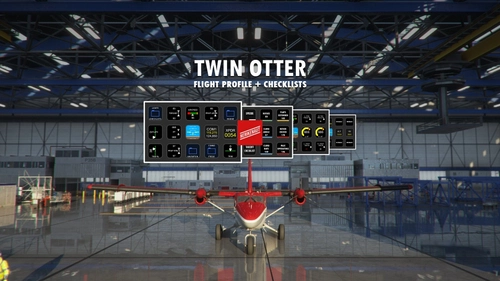
Twin Otter Stream Deck Profile & Checklists
Elevate your flight experience with the NERIKENAUT Flight Companion Stream Deck Profile & Checklists. This interactive controller allows full control over aircraft systems, autopilot, frequencies, and lights. Stay organized with easy-to-follow checklists for startup, takeoff, landing, and shutdown procedures. Regular updates ensure compatibility with "Flight Tracker" and continuous enhancement of features.
by NERIKENAUT
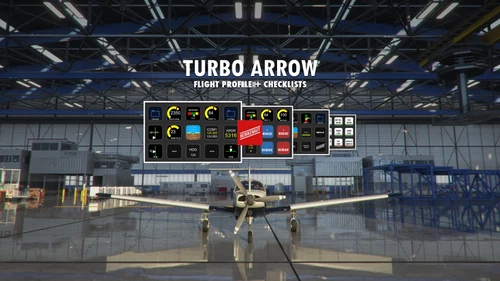
Piper PA-28R Turbo Arrow Stream Deck Profile & Checklists
Transform your Stream Deck into a powerful flight controller with the Piper PA-28R Turbo Arrow Stream Deck Profile & Checklists in the NERIKENAUT Flight Companion. Access interactive controls for communication, autopilot functions, checklists, and system overviews right at your fingertips. Stay up-to-date with regular updates and enjoy a seamless flying experience with this comprehensive tool.
by NERIKENAUT
Log in to join the discussion
Log InComments(14)
about 3 years ago
over 2 years ago
We are many SD+ users!
1000 thanks ;)
about 3 years ago
almost 4 years ago
It works Great! I hit the ground running with the Steam Deck. and an using your Flight hub for my own aircraft layouts. Thanks
about 4 years ago
bro, you are a genius. thx a lot.
can you make it for cessna planes too and a320 ? 3x5 ?
about 4 years ago
Great work, but where do I find the "Assets" folder ?
about 4 years ago
Eureka I found it !
about 4 years ago
Hi NERIKENAUT, many thanks for your work. Most Profiles I find are for SD XL an I cannot use them, as I don´t know how to convert them for my 5x3. I am glad having found your Profiles. And even before I try them, I say thank you very much. Greetings from Germany.
over 4 years ago
Hi, thank you for your work! In the video, it looked like when you completed various checklist items for startup, the color of the buttons would change from red to green as you completed them. But that isn't happening for me (C310R). I installed the Flight Tracker software beforehand. Am I missing a step somewhere?
Thank you again!
Roger
over 4 years ago
How will these work on the Stream Deck XL
over 4 years ago
If we were using your single profiles on their own previously, should we remove them if we switch to this Hub? And Thanks
over 4 years ago
This is up to you. I will continue to update the stand alone profiles so if you don't want to use the Flight Companion Hub, you can just download the specific profile you need. All the profiles have been updated to match the ones that come with the Flight Companion Hub and I am totally fine with people don't feeling the need to have an entire tool to access one or two profiles. However if you want to use the Flight Companion Hub and access the profiles that way, I would remove all the profiles and simply download all at once from her. That way you get them in one folder and can access them easily.
Make sure to keep a copy of an old one if you made any changes that you'd like to take with you to the new ones. You can simply copy certain actions or changes over from the old one into the new.
over 4 years ago
You said you were going to do this, AWESOME and Thank You!!!!
over 4 years ago
Thank you! Hope you enjoy it, let me know if there are any changes you'd like to see! :D