Flightsim.to
    MSFS Pop Out Panel Manager 2024 - Image 1

    Description

    Pop Out Panels in MSFS

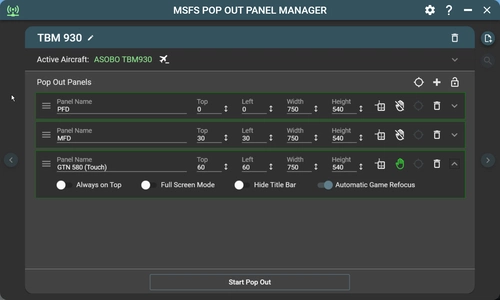
    MSFS Pop Out Panel Manager is an application for MSFS 2024 which helps pop out, save and position pop out panels to be used by utilities such as Sim Innovations Air Manager or to place pop out panels onto your screen or another monitor at predetermined locations automatically. In MSFS, by holding RIGHT ALT + LEFT CLICKING some instrumentation panels, these panels will pop out as floating windows that can be moved to a different screen location or different monitor. But this needs to be done every time you start a new flight. 

    How to Pop Out

    Video showing how to create a new aircraft profile using the new panel selection method

    Video showing how to update existing aircraft profile to use the new panel selection method

    In addition, a new floating panel feature which allows you to show and hide pop out panel with customizable keyboard binding has also been added.

    Video showing how to manage floating panel

    Touch Enabled Panel

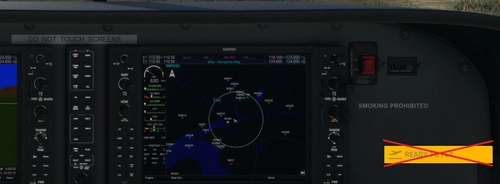
    Currently, MSFS lacks touch capability for pop out panels which are being used on touch screen or on tablet. If you're using pop out panel such as GTN750, KingAir PFD/MFD, or other in game touch screen capable panel (panels that can be operated with a mouse), or built-in panels such as ATC, checklist, you can add touch capability to these panels.

    Application Features

    • Display resolution independent. Supports 1080p/1440p/4k display and ultrawide displays.
    • Support multiple user defined aircraft profiles to save panel locations to be recalled later.
    • Intuitive user interface to defined location of panels to be popped out.
    • Added automatic game refocus capability when using pop out. (MSFS bug where flight control is disabled when mouse is on the pop out)
    • Enable touch support for pop outs on touch capable display (direct connected monitor or on tablet using tool such as SpaceDesk).
    • Auto Pop Out feature. The application will detect active aircraft and activate the corresponding profile when starting a new flight session.
    • Fine-grain control in positioning of panels down to pixel level.
    • Panels can be configured to appear always on top, with title bar hidden, or stretch to full screen mode.
    • Auto disable Track IR when pop out starts.
    • Auto activate Active Pause when pop out starts.
    • User-friendly features such as application always on top, auto start, minimized to tray with keyboard shortcuts.
    • Auto update feature. Application can auto-update itself when new version becomes available.
    • A virtual NumPad feature for touch panel screen.
    • Floating panel option to show/hide pop out panel as needed.

    How to Install 

    Just unzip the package to a folder of your choice on your computer and run "MSFS Pop Out Panel Manager 2024.exe". This application uses x64 version of SimConnect and you maybe require to install Microsoft VC++ 2015-2022 redistributable x64 on your computer.

    Forum Discussion

    Please follow forum thread at Flightsimulator.com for ongoing discussion regarding this project. Also please feel free to suggest or recommend features or fixes that will make this tool even better!

    Reporting Issue

    If you have any issue regarding this tool, please report it in my GitHub page with information for troubleshooting such as screenshots and attach the error.log in the installation folder.
    https://github.com/hawkeye-stan/msfs-2024-popout-panel-manager/issues

    Donation

    If you like this tool and would like to support the development, please consider donating via PayPal by clicking here.

    Comments(421)

    Log in to join the discussion

    Log In
    k

    about 4 hours ago

    extremely useful program appreciate so much to author @hawkeyesk
    First I got significant frame drop from 60 to 16 after some work around I recommend people who experiencing frame drop try do set Nvidia shader cache to unlimited (NVIDIA App > Graphics > Global Settings > Shader Cache Size) or use manually the amazing application https://flightsim.to/addon/92765/msfs2024-cache-removal-tool Hope this solution works for you guys
    R

    about 19 hours ago

    Tested it in SU6 Beta and it works flawless. Such a nice little program.
    h

    19 days ago

    Title:

    MSFS 2024 SU5.1 (1.7.35.0) - CTD / Freeze after auto pop-out (Cockpit displays turn black)

    Description:

    Environment

    - Microsoft Flight Simulator 2024
    - Sim Update 5.1
    - Version: 1.7.35.0
    - Pop Out Panel Manager: v1.0.4

    Issue

    After updating to Sim Update 5.1, the simulator freezes and eventually crashes after using Pop Out Panel Manager.

    How to reproduce

    1. Start MSFS 2024.
    2. Load into a flight.
    3. Run Pop Out Panel Manager v1.0.4.
    4. Auto pop out PFD and MFD to an external tablet/display.
    5. Wait a few minutes.

    Result

    - The cockpit PFD/MFD displays suddenly become completely black.
    - External popped-out panels may still be visible.
    - MSFS freezes and stops responding.
    - GlassOut reports:
    "Can't reach MSFS panels"
    "GlassOut can't talk to MSFS's Coherent panel system right now."

    Additional testing

    I isolated the problem by testing each component separately.

    - MSFS only → Stable (30+ minutes)
    - GlassOut only → Stable (30+ minutes)
    - GlassOut + Pop Out Panel Manager → Freeze / CTD

    This appears to be related to Pop Out Panel Manager or a compatibility issue with Sim Update 5.1's Coherent panel system.

    Please let me know if you need logs or additional information.
    h
    hawkeyeskAuthor

    19 days ago

    Unfortunately, there is nothing POPM can do to fix MSFS CTD since POPM does not interact with Coherent which renders pop out screen. There is a misconception that POPM is responsible for rendering pop out, but it only emulates keystrokes to pop out instrumentation panels and manages their placements. In your test, GlassOut is stable is probably because it does not use MSFS pop out mechanism to render instrumentation but instead streams the instruments directly. With SU5.1, there could be a new MSFS bug that is causing pop outs to crash with Coherent error. Since you're able to get pop out to crash consistently, you may need to wait until MSFS fix this issue in future SU updates. My advice for now is to switch over to GlassOut since it is stable on your system until Microsoft can identify and fix the issue.
    b

    10 days ago

    Try to run without framegen or dlss. It worked for me
    C

    24 days ago

    Hi, love this software, I have noticed I've started getting pop ups from Windows Smart App Control trying to block the app from loading.
    h
    hawkeyeskAuthor

    24 days ago

    Since POPM is an open source app released under public GNU license, it is not being digitally signed by a valid Code Signing Certificate, you may get security error by Windows Defender.

    Search for instruction in google ".net app not signed and how to disable SmartScreen warning" and it should provide steps to bypass the error manually. If you're worry about security issue, you can look at the source code itself in my github page. https://github.com/hawkeye-stan/msfs-2024-popout-panel-manager
    v

    about 1 month ago

    me too i bought a 12 by 23 portable for pop out, now i cant use it, due to issue of FPS with RTX5080 and 9800Xrd, FPS drops by more than half makes the sim unfliable
    g

    12 days ago

    Just switch to Glassout app!
    C

    about 1 month ago

    I have bought a portable screen to increase my Flightsim experiance. Unfortunately the moment you use Pop out manager the FPS drop from 64 solid to 13 fps with a CTD in the end. Dont know how other get this to work. I have a beasty 7800X3D, 64gb ram, and a RTX 4070 TI Super with 16gb vram but it seems POPM hurts the system really hard.

    Edit: Vsync is off both in msfs settings and Nvidia control panel
    h
    hawkeyeskAuthor

    about 1 month ago

    POPM has no control over FPS drop. It is an issue with MSFS itself. There are a lot of discussion on the internet regarding FPS drop when using pop outs. Maybe one of the solutions from the affected user may resolve your issue.
    C

    about 1 month ago

    Edit: Reshade was the issue. When switching it off my fps was 64 with the popout. But i discoverd glassout software which streams the screens without the issue of using reshade.
    v

    about 1 month ago

    i have been using the new version of this for msf2025 and pop out to 12 by 9 screen, i just noticed that 3/4 of my fps drops when this is running, how is that possible, if i turn it off, my fps goes to 108 and then when i launch it goes to 17 fps,
    h
    hawkeyeskAuthor

    about 1 month ago

    This is an issue affecting certain users or PC setup in MSFS when using pop out. There is nothing we can do unless Asobo look into it but this is not a high priority for them.
    H

    about 1 month ago

    Just swell! Realsimgear equipment works like a charm!
    V

    about 1 month ago

    Hi,
    I’m using v1.0.4 with Msfs2024 and chase plane (enabled). I can get the pop outs to go on the Rowsfire A108v2 and all checks out ok. I’m using the PMDG 737

    I am having constant crashes to the desktop and can not use this software at this time

    Thanks

    Edit: I think I found the cause of crashing. It is when I use reshade 6.73. Reshade seems to load in each pop-out window, and then the game will crash. If I don't use reshade, the game doesn't crash.

    Anybody know how to use reshade while using the pop-out manager?
    Y

    about 2 months ago

    Bonjour à tous,
    Tout fonctionnait bien jusqu'à aujourd'hui... Pendant les "POP OUT" je n'ai que des "FAILED" donc plus de report des écrans... Besoin d'aide svp.
    K

    about 1 month ago

    I have the same issue, it's sad to see that no documentation is given by the author. For now I'm very disappointed by the software...
    ...
    MSFS 2020MSFS 2024

    MSFS Pop Out Panel Manager 2024

    The MSFS Pop Out Panel Manager 2024 is a utility designed for Microsoft Flight Simulator 2024, allowing users to efficiently pop out, save, and position instrument panels on their screens. Key features include support for creating aircraft profiles, configuring panel settings, and enabling touch functionality on compatible displays. The application also introduces simple auto pop-out capabilities, although some functionalities from the previous version may not yet be operational in this beta release.


    Downloads30K
    Version1.0.4
    File Size66.1 MB
    Published1 year ago
    Updated1 month ago

    User Reviews

    4.7

    63 reviews

    5
    83%
    4
    6%
    3
    5%
    2
    2%
    1
    5%

    More Information

    Simulator
    MSFS2024
    CategoryUtilities
    Sub-CategoryApplications

    Version History

    * Fixed - Panel identification and panel location configuration failure (color circles failed to appear) when application is configured to minimize on start.

    Featured in Collections(1)

    Related