
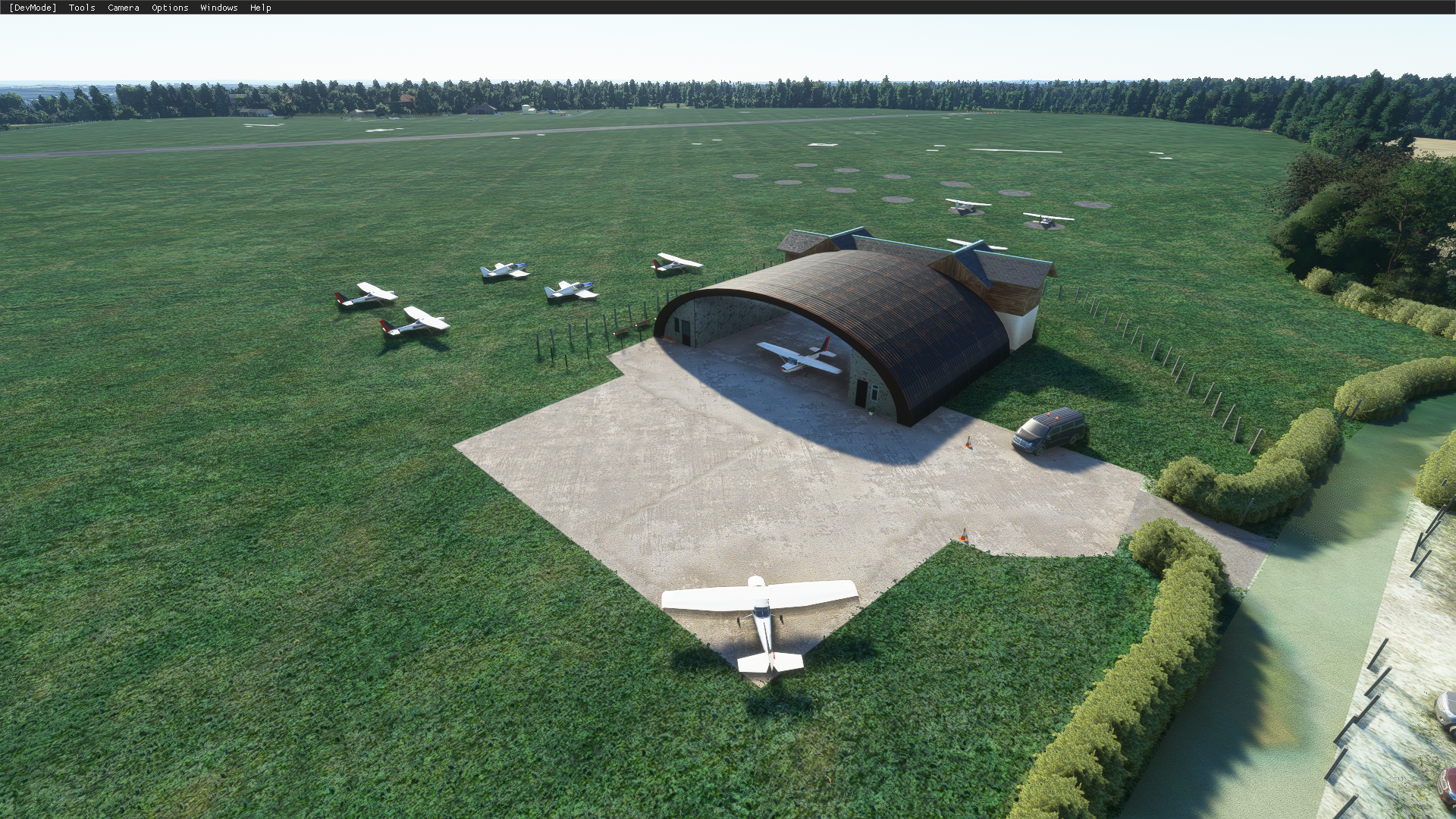
Description
Update June 2022 - If you want an exceptionally realistic, highly detailed rendition of Denham, click here and purchase the Payware EGLD from Burning Blue Design - it's stunning!
https://burningbluedesign.com/product/denham-aerodrome/
Denham Aerodrome
ICAO Code: EGLD
https://youtube.com/britishavgeek
A small airfield to the North of London Heathrow, and within the London TMA - Denham Aerodrome is found just next to the golf course and was originally known as RAF Denham and was used in both World Wars!
Operating Hours:
Daylight
Winter - 0800 - 1800Z
Summer - 0800 - 2000Z
Circuits
Runway 24 - Right Hand
Runway 06 - Left Hand
Runway 12/30 - Variable
VFR Entry and Exit points are via Maple Cross (CHT) and St. Giles Church. Entry lanes and circuit height are at 1,000ft QNH or 750ft QFE
Charts:
https://www.aurora.nats.co.uk/htmlAIP/Publications/2021-01-28-AIRAC/html/index-en-GB.html
*for simulator use only and within the NATS terms of use*
Denham has one paved runway - 24/06 and a grass runway alongside side it too in addition to a grass runway aligned at 30/12.
Plenty go to Denham to learn to fly and obtain their PPL so it's a great place to start from in MSFS. For a nice VFR trip, depart Denham and fly up towards Coventry using the M40 as a reference - it'll take you almost all the way there!
This is my FIRST ever airfield scenery - and I've developed it for a mate who flies out of the airfield regularly but want to share it with everybody too. Naturally, it's not particularly polished AND uses mostly default Asobo scenery objects found in the SDK including a few from the UK World Update.
Added:
- Changed the field to the north from grass to dirt to reflect it's real use as best as I can
- Added APAPIs angled at 4.5 degrees as per real life on each side of the asphalt runway
- Removed the Radar tower and windsock in the middle of the airfield
- Removed all autogen buildings and replaced them with the nearest possible matches from the SDK
- Bordered the roads around the airfield with hedgerow as close as I could to reflect real life
- Added various statics around the airfield
- Added Fuel Points at each place as they are in real life (but don't spawn AT a fuel point)
- Added multiple spawn points on the North and South sides as per real life
- Re-textured and added cars into the car park on the north side
- Added wire/wood fencing wherever relevant
- Added the Grass runway 30/12 as a real runway that can be spawned at and used
Added in v1.1
- Green Beacon by the "radio room" though the position is too high yet can't be changed
- Some hangar lighting (I think)
- Low intensity runway edge lights
- Green wing bars at thresholds
- Red runway end lights
- Removal of incorrect runway markings on both runways
- Amended Runway configuration to highlight the correct circuit pattern directions as per real life
Added in v1.2
- I've began to try and work with Blender and have made the north "hollow" hangar complete with 2K PBR textures and basic emissives and the North Office Hangar type building too... Let me know if you prefer the generic Asobo Assets or these hand made assets!!
- Re-faced the concrete spots all around the airfield properly and moved the spawn locations to align better with them
- Rotated all the aircraft to face West as they do in real life
- Added the "sand bunkers" around the entire golf course and the sandy area in the stables to the east
- Filled the runway texture arrows to match real life AND stamped fresh hand made texture arrows and markings for the Grass Runway too
Location
Denham Aerodrome EGLD
Denham Aerodrome (EGLD) is a small airfield located north of London Heathrow, steeped in history from its RAF days in both World Wars. This add-on offers a detailed rendition of the airport with accurate runway configurations and VFR entry points, making it an ideal starting point for pilots in Microsoft Flight Simulator. Dive into this realistic scenery featuring paved and grass runways, along with various enhancements like static objects, fuel points, and accurate surroundings like hedgerows and fencing.


User Reviews
2 reviews
Version History
- I've began to try and work with Blender and have made the north "hollow" hangar complete with 2K PBR textures and basic emissives and the North Office Hangar type building too... Let me know if you prefer the generic Asobo Assets or these hand made assets!! IF the majority prefer the generic assets, I'll remove the handmade ones. - Re-faced the concrete spots all around the airfield properly and moved the spawn locations to align better with them - Rotated all the aircraft to face West as they do in real life - Added the "sand bunkers" around the entire golf course and the sandy area in the stables to the east - Filled the runway texture arrows to match real life AND stamped fresh hand made texture arrows and markings for the Grass Runway too
Related
Full VATSIM AIG Beta Model Matching
AIG Model Matching covering hundreds of airlines and operators around the world and hundreds of hours of work. After installing all of the required Airlines in AIG's OCI you need THIS to bring it to life in VATSIM. It has taken many many hours so I hope you enjoy it!
by BritishAvgeek

MSFS vPilot Modelmatching
Create a custom VMR model matching file for Microsoft Flight Simulator, tailored to the contents of your own community folder. This comprehensive tool covers a wide range of major airlines for use with VATSIM, including recent Aerosoft CRJ liveries. Easily edit the file to suit your specific liveries and aircraft, with ongoing updates to keep pace with new additions to MSFS. Support the creator by donating or subscribing to their YouTube channel for more aviation content.
by BritishAvgeek on Youtube
PMDG 737NG Summarised Normal Checklist
A Summarised Normal Operations Boeing 737NG Checklist covering all the important checklist items needed during each stage of flight with the PMDG 737-600, PMDG 737-700 and PMDG 737-800 for Microsoft Flight Simulator, created free for all to use and enjoy by British Avgeek.
by BritishAvgeek
ATR 42/72-600 Normal Checklist
A comprehensive Normal Operations checklist for the ATR 42/72-600 in Microsoft Flight Simulator, designed to assist with "Hotel Mode," takeoff, and landing procedures. Ideal for those looking to familiarize themselves with this new aircraft in the MSFS Expert Series. Stay tuned for future updates and improvements to streamline the checklist process.
by BritishAvgeek
Log in to join the discussion
Log InComments(23)
about 5 years ago
I can confirm your EGLD works in SU6!
about 5 years ago
This is great. Many thanks.
On a Trivia point; this is the aerodrome that was used to represent Woodley in the film Reach For The Sky - in which Kenneth Moore as Douglas Bader has his fateful accident resulting in the loss of his legs.
See Capture 8 here:
https://www.reelstreets.com/films/reach-for-the-sky/
about 5 years ago
nice trivia!
over 5 years ago
over 5 years ago
over 5 years ago
over 5 years ago
over 5 years ago
over 5 years ago
over 5 years ago
over 5 years ago
over 5 years ago
over 5 years ago
over 5 years ago
over 5 years ago
over 5 years ago
over 5 years ago