
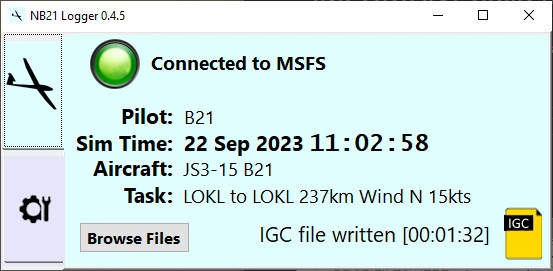
Description
NB21 Logger version 1.2.9 for MSFS 2020 and 2024
Brought to you by Unbe + B21.
This application creates secure IGC-format tracklog files from your flights inside Microsoft Flight Simulator. The IGC format is the internationally standardised logfile format for glider flights which works equally well for any aircraft. The IGC-format files can be displayed in the B21 Task Planner, or any other application that supports IGC files. The NB21 Logger can exchange data directly with the B21 Task Planner to load the current task into the planner and show you plane live on the map.
Features
- Stores time / latitude / longitude / altitude just like every other logger.
- Automatically records a tracklog from takeoff to landing, or when you quit the flight, or when the sim crashes, or when you close the logger
- Uses the 'standard' IGC format as much as possible so the tracklog can loaded into any IGC-supporting analysis software.
- The B21 Task Planner has been updated to display additional data available in the file (like flap setting, netto vario reading, engine status, slew)
- Time is a complicated subject for logging data from a simulator where the sim time can be paused, sped up, slowed down, or moved forwards or backwards. Unlike any other logger, the NB21 Logger records both the real-world UTC time and the in-sim local date/time in the tracklog. This has a variety of benefits including fewer 'broken' tracklogs plus the ability to relate the flight to the simulated date/time which affects the weather. This issue particularly triggered the need for a new logger.
- The logger creates 'validity' checksums so any changes in the tracklog or the loaded flight model can be noted. Some details of the weather are recorded in the tracklog also.
- The usability of the NB21 Logger is particularly designed for our gliding use-case, i.e. the UI displays the in-game date and time (this is surprisingly useful) and it is absolutely clear when the logger is recording and when the tracklog is ready. Drag-and-drop is provided for the tracklog from the Logger to Discord or the B21 Task Planner, as well as each tracklog being stored in a folder of your choosing.
- 1.2.9 weather preset logging for capable planes (initially the CalVR JS3)
- 1.2.9 added access to a console window for problem debugging
- 1.2.8 small bugfix for the IGC "I" record element count, improved compatibility with OrangeBox Recorder.
- 1.2.6 window position saved, weather info recorded for gliders with support, tidyup of Madolo/GF AS33 discrimination.
- 1.2.3 discriminates variants based on wingspan if multiple planes in single 2024 'modular' package (i.e. GF AS33). Can load 2024 'EFB format' PLN files, Better error reporting if Logger web api is being blocked.by Windows Defender. Collects SSC Weather series/version/preset info from capable aircraft (currently the DG808S B21 mod.
- 1.2.1 fixes for some bugs in MSFS2024
- 1.1.9 bugfix for some flightplan airport elevation feet/meters mixup. Improved (non)logging behaviour in main menu / world map.
- 1.1.7 bugfix for 'Ballast+' error for some tracklogs displayed in B21 Task Planner
- 1.1.6 improved soaring task support for 2024 with drag-drop and select of PLN's. Support for B21 Task Planner to send/receive PLN
- 1.1.4 updated for MSFS2024. Additional checks for sim crash. Soaring task PLN file support as a fallback for MSFS2024.
- 0.7.7, the NB21 Logger can now communicate with the B21 Task Planner (howto in usage below).
- 0.7.7, there is a 'Autostart with Windows' option in Settings.
Installation
Unzip the download file, and drag-and-drop the NB21_logger folder anywhere convenient (other than the Windows Program Files folders which is unsuited to drag & drop install). E.g. you can test the logger even with the unzip in your Downloads folder. Note your Browser and Windows will give you numerous prompts "Do you really want to download / unzip / run this unknown program" but you should not see any warnings of actual threats.
Usage
Start NB21 Logger by double-clicking NB21_logger.exe. To pick up the aircraft and task info you should start the logger before starting your flight. First step is to click the wrench icon and enter the three simple settings of (1) Player name (anything you like), (2) Player ID (some SHORT id, preferably 3 letters, maybe 4) this will be used when your tracklog is displayed on a map perhaps with many others, and writing your full name out would clutter the map. (3) pick a folder to store your tracklogs in.
The UI is designed to be fairly minimalist in terms of options/settings/actions i.e. in the main it 'just works'.
To connect the NB21 Logger and the B21 Task Planner (https://xp-soaring.github.io/tasks/b21_task_planner) click the link at the bottom of the NB21 Logger 'Settings' tab. Equally, you can simply type that URL (i.e. http://localhost:54178/b21_task_planner) directly into your browser to launch the Planner and have it automatically connect to the Logger. To connect the logger to the B21 Task Planner on another PC or tablet you must start the NB21 Logger in 'Admin mode' - to do this you right-click NB21_logger.exe in your install folder and choose "Run as Administrator" - you will get the usual prompt to confirm this is what you want and also on the first run your PC will probably ask to permit this program to go through the 'firewall'. On your remote PC you can then enter the URL given in the logger Settings but using the IP address that is listed there rather than 'localhost' (i.e. http://:54178/b21_task_planner)
Hopefully you will get used to what the NB21 Logger displays. When recording, the green 'recording light' will blink. The numbers in square brackets e.g. [13:04:27] are running-times, i.e. the length of the recording in hh:mm:ss - this gives you a healthy clue that the recording is what you think it is e.g. if you land and take off during a session the logger will store one tracklog and start another.
There's a lot of tech in the logger to record useful stuff and be robust with a variety of glitches coming from the sim (such as time going backwards, or the sim crashing, whatever) but my favorite tech feature is the yellow file icon displayed for the most recent tracklog is draggable straight into another app, e.g. Discord or the B21 Task Planner.
NB21 Logger
Track, log, and analyze your flights in Microsoft Flight Simulator with NB21 Logger. This application creates IGC-format tracklogs compatible with glider flights or any aircraft, featuring real-world UTC time recording and advanced data capabilities. Connect directly to the B21 Task Planner for seamless task loading and live map display. Enjoy streamlined usability, validity checksums, and drag-and-drop functionality for easy access to your tracklogs.

Version History
* will log Weather Preset detalis from compatible planes (starting with the CalVR JS3) * a debugging console is now accessible to help resolve issues
Related

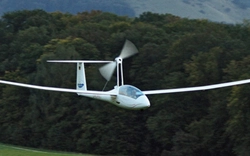
SSC Robin DR400 Towplane mod v0.0.6 for MSFS2024
This mod enhances the stock Robin DR400 aircraft in MSFS 2024, converting it into a functional towplane ideal for launching gliders. It has been tested for efficient aerotows, including the fully ballasted JS3-18 glider from a 1600-foot runway with no wind. This modification addresses the limitations of existing towplanes in the simulator, providing a more reliable launch mechanism for gliding enthusiasts. Users can easily select this towplane as a launch option for improved gliding experiences.
by B21
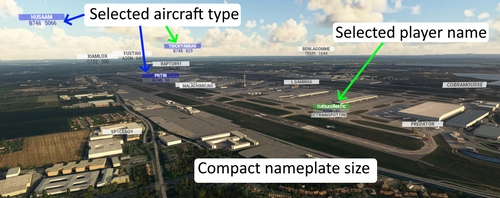
B21 Better Nameplates
A mod offering compact and customizable nameplates for aircraft and player names. Easily adjust colors and styles via the included README and settings file. Originally popular in the soaring community, now available for wider use on flightsim.to. Special emphasis on glider aircraft types.
by B21
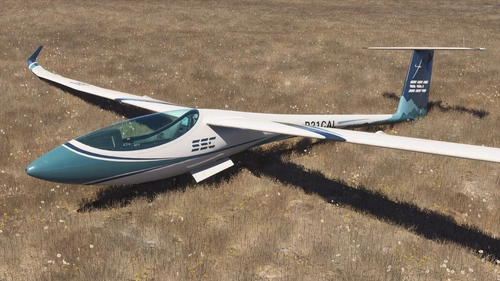
Jonker JS3-18 for MSFS2024 by CalVR and B21
The Jonker JS3-18 is a high-performance racing glider add-on for MSFS2024, featuring a meticulously detailed 18-meter model. It includes a highly accurate flight model with competitive glide ratios suited for cross-country flying. The cockpit boasts a fully-functional LX competition panel and attention to realistic animations and controls. Future updates will expand the package to include both 18m and 15m variants.
by CalVR & B21
SZD-30 Pirat Glider MOD 1.3.6 for 2020/2024
Enhance your SZD-30 Pirat Glider experience with this optional mod offering new liveries, improved instrument displays, updated sound effects, and cockpit camera adjustments.
by B21
Log in to join the discussion
Log InComments(3)
36 minutes ago
This comment has been deleted
over 2 years ago
almost 3 years ago