

Description
This is a modification to the MSFS 2020 default Asobo Cessna 152 aircraft. This mod is primarily aimed at improving the flight model and realism of this aircraft, providing a more realistic flying experience that is much closer to the actual aircraft, and more suitable for actual flight training. This mod does not add any new functionality to the aircraft. If you are looking for additional functionality, I highly recommend checking out the excellent JPLogistics C152 improvement mod.
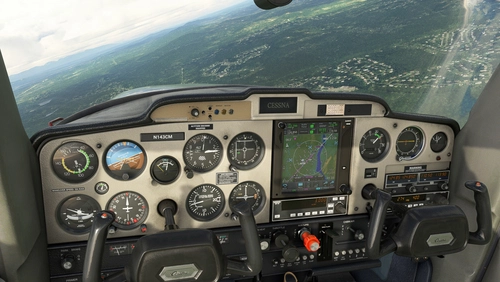
This aircraft was originally designed for one primary purpose, basic flight training, and since it was introduced in 1977 it has been used to successfully train over 250,000 new pilots. To make it easier for new pilots to learn and operate, the aircraft was designed to be very stable and easy to fly, with a relatively simple unclutered instrument panel, that includes only the basic necessary standard flight instruments, and no GPS or Autopilot. But, it does include dual COM/NAV radios, and all of the required instrumentation for successfully learning the basics of VOR and ADF navigation, as well as full IFR flight training and certification.
Multiple changes have been made to the engine and flight model parameters, and the aircraft weight and balance, which are all detailed in the Change Log file included under the Documentation folder. A full PDF copy of the actual Cessna 152 POH is also included under the Documentation folder, along with a PDF copy of the FAA Flying Handbook comprehensive flight training guide.
This mod is easily installed by simply unzipping the download file and copying the mge-asobo-aircraft-c152 folder to the MSFS Community folder. It will then replace the existing default Cessna 152 aircraft in the MSFS aircraft selection screen, and will continue to use all previous aircraft Liveries. To uninstall the mod and return to using the MSFS default aircraft, simply remove it from the Community folder.
Microsoft Flight Simulator © Microsoft Corporation. Asobo C152 Realism Mod has been created under Microsoft's "Game Content Usage Rules" using assets from Microsoft Flight Simulator, and it is not endorsed by or affiliated with Microsoft.
Asobo C152 Realism Mod
Enhance realism and flight training experience with this modification for the Asobo Cessna 152 in MSFS 2020. Improvements focus on the flight model, providing a more realistic and accurate flying experience without adding new functionality. Includes changes to engine parameters, weight balance, and detailed documentation for a complete learning experience. Easily install by copying the folder to the Community folder, offering a seamless replacement for the default aircraft selection.


User Reviews
4 reviews
Version History
Version 1.1.0 ⦁ The default Pilot (VFR) viewpoint has been updated to improve the visbility of the panel instruments. The default Copilot and Landing viewpoints have also been updated. ⦁ The engine Max Oil Pressure has been increased to match the actual aircraft specs. ⦁ The engine Max Oil Temperature has been increased to match the actual aircraft specs. ⦁ The Prop Pitch has been increased to more closely meet the actual aircraft Static Runup Max RPM specs. This also improves the engine Idle RPM.
Featured in Collections(1)


Related

Asobo C172SP AS1000 Realism Mod
Enhance the flight dynamics of the Asobo C172SP AS1000 aircraft with this mod, which also includes the FLOATS and SKIS variant. This modification aims to provide a more realistic flying experience by adjusting engine and flight model parameters, weight, and balance. Detailed documentation and real-world training guides are included for easy installation and compatibility with other mods.
by MGouge425

Asobo Baron G58 Realism Mod
Enhance the realism of the Asobo Baron G58 in MSFS 2020 with this mod. Improvements to the flight model provide a more authentic flying experience, closely matching the performance of the actual aircraft. Easily install the mod by copying the folder to the Community folder, and enjoy the detailed changes listed in the documentation. Note: Only compatible with MSFS Deluxe Edition and Premium Deluxe Edition.
by MGouge425

Asobo B747-8i Realism Mod
Enhance your Boeing 747-8i experience with this realism mod for the MSFS 2020 default aircraft. This modification focuses on improving the flight model to closely match the actual aircrafts performance. Detailed changes can be found in the included documentation, addressing bugs like the landing gear failure. Easily installed by transferring files to the Community folder, this mod aims to provide a more authentic flying experience.
by MGouge425

Asobo Icon A5 Realism Mod
Enhance your flying experience with the Asobo Icon A5 Realism Mod for MSFS 2020. This mod focuses on adjusting the flight model and performance of the default Icon A5 to align it more closely with the real aircraft. From improved flight parameters to enhanced weight and balance, this mod offers a more authentic and satisfying flight experience. Easily install this mod to enjoy a more realistic flying experience with the iconic and versatile Asobo Icon A5 aircraft in Microsoft Flight Simulator.
by MGouge425
Log in to join the discussion
Log InComments(50)
6 months ago
6 months ago
12 months ago
about 1 year ago
about 1 year ago
about 1 year ago
about 1 year ago
Thank you
over 1 year ago
over 1 year ago
over 1 year ago
over 2 years ago
over 2 years ago
over 2 years ago
over 2 years ago
over 2 years ago
almost 3 years ago
almost 3 years ago