

Description
!!!!!THIS SCENERY IS INCOMPLETE!!!!!
I have no experience creating 3D models so this scenery was created using the default MSFS/ASOBO buildings.
Features:
- 2022 Layout of the airport.
- All taxi signs and taxiways were renamed and realigned (use this mod to fix the unreadable deault taxi signs https://flightsim.to/file/30487/too-bright-taxiway-sign-fix).
- Added night lighting to the terminal building.
- Added some GA parking (the ones mainly used by ATP flight school). More will be added in the future
Please note that gate numbers will only show a yellow circle on the ground unless you use TurtleTank's Scenery Developer Objects and Material Library https://flightsim.to/file/13290/turtletank-s-scenery-developer-objects-and-material-library.
If you want darker and more realistic taxi lines and taxiway ground marking, use https://flightsim.to/file/42958/better-taxiway-marker.
Comments(11)
Log in to join the discussion
Log Inover 3 years ago
I was departing KSDF for KPIE in the CJ4, and I discovered that if I pod the star and/or approach into KPIE, the FMC stops following my plan, and direct to doesn’t work anymore…..
20 days ago
over 3 years ago
I'm already grateful for everything you did, it's basic stuff and it works well.. I'm sure with the help of the community and your own effort this beautiful scenery will be PERFECT in the future, thank you.
over 3 years ago
When using this mod, the NXi will not load the approaches for KPIE. Strange behavior because if I remove this mod, then the NXi will load up the default KPIE approaches.
Other than that issue, this definitely has potential.
over 3 years ago
Thanks for commenting on that! I've been trying to investigate a similar issue on my own sceneries. It looks like something is broken in the sim. What I'm finding is that airports being developed within the last few months that have an ILS associated with them are breaking the nav data. If the airport doesn't have an ILS, the nav data is fine.
over 3 years ago
Hope others are reporting this on the forums. Definitely an issue that needs to be resolved. Thanks for the heads up.
over 3 years ago
I read on the forums something about the fact that you had to include the ILS in the airport metadata otherwise it wouldn't show up. Asobo is supposedly emphasizing that in the airport builder.
over 3 years ago
If i knew how to help i would. this is my home airport
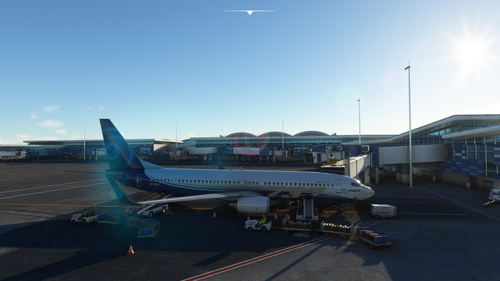
KPIE St Pete-Clearwater International Airport
Enhance KPIE St Pete-Clearwater International Airport with this mod featuring a 2022 layout, realigned taxi signs, night lighting, and added GA parking. Note: This scenery is created using default MSFS/ASOBO buildings and may require additional mods for optimal experience.

User Reviews
3 reviews
Location
More Information
Version History
No version history available.
almost 3 years ago