
Description
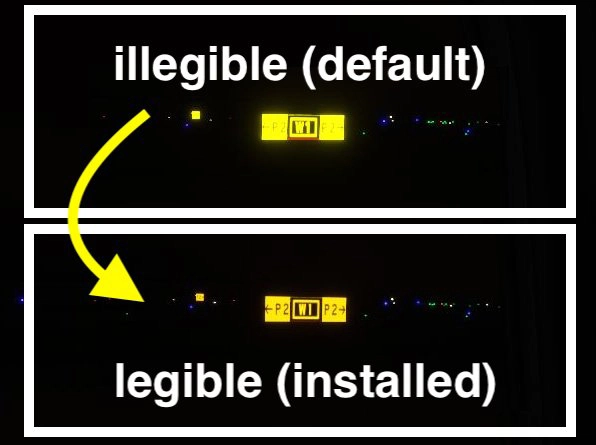
Makes too bright & unreadable default taxiway signs globally readable.
Background
As discussed in Taxiway Sign Contrast / Glare Makes Them Illegible [WAY too bright!], default taxiway signs at night are difficult to read due to the too bright bloom effect, useless for navigation. This is especially noticeable in VR because there is no zoom option.
I looked for add ons to fix that, but could not find any freeware.
So I created this add on, replacing the default with a darker taxi sign texture for less bloom effect. In addition, the font similar to real world is used for realism and visibility. You may feel them a little too dark in the daytime, but they can't be better since the same texture is apparently used for both day and night.
Installation
0. Download this package (make sure the original name is too_bright_taxiway_sign_fix(compressed)_KjJm4.zip) and decompress to obtain TAXI_SIGN_SYMBOL.PNG.DDS,
1. Navigate to the directory depending on which edition you installed:
- Microsoft:
X:\[YOUR INSTALLATION DRIVE/FOLDER]\Official\OneStore\ - Steam:
C:\Users\[Your User Name]\AppData\Roaming\Microsoft Flight Simulator\Packages\Official\steam\ - or Official\[Your edition]\ folder in your custom directory if you chose a custom installation destination
2. Then continue to
fs-base\scenery\Global\Asobo_Props\TEXTURE under above,
3. Find default TAXI_SIGN_SYMBOL.PNG.DDS and copy (or rename) it somewhere else so that you can revert installation,
4. And replace TAXI_SIGN_SYMBOL.PNG above with the one included in this package.
Notes
Unfortunately, it does not work under Community folder, hence it will not survive Sim Updates; you have to reinstall. If anybody knows how to make it work that way, please comment below.
If you find similar or better add-on(s), I also strongly appreciate hearing from you.
I have compressed the file size from 69 MB to 17 MB, which is the same as the official one. There should be no performance hit.
Note for the last version: Default DDS file size is 17 MB, while this replacement is 69 MB. This may cause performance hit. If it is true in your environment, please let me know quantitatively (like '5 FPS drop').
Enjoy.
Q. Why it does not work under Community folder?
A. As far as I know, It is possible to replace default texture (MaterialLib) from Community folder with correctly created Library.xml specifying mapping between a GUID and a texture. This has been done by an amazing work to replace weirdly yellow default taxiway line. I tried to create mine in the same way, however, I finally got to know that taxiway signs are 3D models which implemented as a BGL, not a XML. I do not have skill to code or decode a BGL, or virtually replacing arbitrary texture through VFS, or using (unknown) GUID of a material called from the BGL. So I decided to publish as this is. I would also so much appreciate if some of you have such a skill and implement it under Community folder.
---- for Japanese ----
背景
Taxiway Sign Contrast / Glare Makes Them Illegible [WAY too bright!]でも議論されていますが、夜間の誘導路標識が明るすぎて文字が潰れて見えてしまい、判読できずナビゲーションに使えない問題が指摘されています。VRだとズームできないので特に顕著です。
これを修正するアドオンを探したところ見つけられなかったので、このアドオンを作りました。
デフォルトの標識のテクスチャを暗めのものに置き換え、潰れを防止しています。ついでに現実に用いられているのに近いフォントへ置き換えましたので、視認性とリアル感が増します。昼間は少し暗すぎるように感じるかもしれませんが、昼と夜で同じテクスチャを表示する仕様らしいので、これは改善できません。
インストール方法
0. 本アドオン(元のファイル名too_bright_taxiway_sign_fix(compressed)_KjJm4.zip)をダウンロード・解凍し、TAXI_SIGN_SYMBOL.PNG.DDS を取り出してください。
1. エクスプローラで、インストールしているエディションに応じて以下いずれかのディレクトリに移動してください。
- Microsoft:
X:\[YOUR INSTALLATION DRIVE/FOLDER]\Official\OneStore\ - Steam:
C:\Users\[Your User Name]\AppData\Roaming\Microsoft Flight Simulator\Packages\Official\steam\ - カスタムインストールした場合はそのディレクトリにあるOfficial\[Your edition]\ フォルダ
2. さらに、その下にある steam\fs-base\scenery\global\asobo-props\texture に移動してください。
3. アンインストールする時にそなえ、TAXI_SIGN_SYMBOL.PNG.DDSを見つけ、コピーするなりリネームするなりバックアップしてください。
4. 本パッケージのTAXI_SIGN_SYMBOL.PNGでデフォルトテクスチャを置き換えます。
お願い
残念ながら、現時点では技術不足により、Communityフォルダの下に配置する方法が取れていません。なので、Sim Updateのたびにインストールし直す必要があります。方法をご存知の方がいらっしゃいましたらコメントをいただけますと幸いです。
また、同様のことができる他のアドオンなどがございましたら、教えていただけるとさらにうれしいです。
ファイルサイズを69 MBから公式のものと同じ17 MBへ圧縮しました。FPS低下等の問題は生じないと思います。
前バージョンの注意書き:デフォルトの画像が17MBなのに対して、本アドオンは69MBあり、FPS低下を招く可能性があります。実際に確認できましたら、どの程度FPSが低下したか等、コメントをいただけますと助かります。
Q. なぜCommunityフォルダーで動作しないの?
A. 調べた限りでは、Community配下に置いた自作テクスチャ(MaterialLib)からGUIDへのマッピングを記述したLibrary.xmlを作成することで、グローバルにシーナリー(のマテリアル)を置き換えることは可能のようです。これは、誘導路ラインを置き換えるアドオンの実装方法です。しかし、誘導路標識はXMLではなくBGLで実装されている3Dモデルなので、BGLを置き換える必要がありそうです。BGLをコーディングしたり、BGLが呼んでいるテクスチャのGUIDを調べる方法がわからず、またVFSでファイルをオーバーライドする方法も探しましたが不明なため断念し、このまま公開することにしました。もしCommunityフォルダからデフォルトのBGLを部分的にオーバーライドする方法・技術をお持ちの方がいらっしゃるなら、自作していただくか、方法を教えていただけると非常に助かります。
Too bright taxiway sign fix
Fix the global issue of too bright and unreadable default taxiway signs with this add-on. Replacing the default texture with a darker version and a realistic font for improved visibility, this add-on ensures better readability at night. Installation is straightforward, although it does not work under the Community folder.


User Reviews
7 reviews
Version History
fixed broken file (wrong compression format)
Log in to join the discussion
Log InComments(35)
almost 3 years ago
almost 3 years ago
xxx :\Microsoft Flight Simulator\HLM_Packages\Official\Steam\fs-base\scenery\Global\Asobo_Props\TEXTURE
almost 3 years ago
about 3 years ago
about 4 years ago
congratulations for this improvement. a curiosity? is there a way to increase the intensity of the lights papi?
over 4 years ago
Your installation instructions are TERRIBLE, man! Just TERRIBLE! The directories aren't correct for the installation path.... Gave it 5 stars anyways - GREAT little fix!
Here is the correct installation path for Microsoft Store Edition:
[installationDrive]:\Users\[userFolder]\AppData\Local\Packages\Microsoft.FlightSimulator_8wekyb3d8bbwe\LocalCache\Packages\Official\OneStore\fs-base\scenery\Global\Asobo_Props\TEXTURE
over 4 years ago
The correct file location for the MS Store version is:
C:\user\YOURNAME\AppData\Local\MSFSPackages\\Official\OneStore\fsbase\scenery\Global\asobo_Props\TEXTURE
and then replace your downloaded file.
FYI it works fine
Best regards and have a great day.
over 4 years ago
all seeing is some png.dds file?
over 4 years ago
Yes, png.dds file compressed into zip file(s). Pick the newest one and decompress it prior to install and use.
over 4 years ago
Sorry for uploading a broken file as v2.0. Now I have uploaded v3.0. Please make sure you downloaded the one with the original file name too_bright_taxiway_sign_fix(compressed)_KjJm4.zip .
over 4 years ago
Thank you for the update! These are just perfect for realism!
over 4 years ago
question: for some reason the file turned all the taxiway signs into a white sign with nothing on it and like an idiot, i didnt save the original file. anyone able to share the original file or if they know whats wrong with my installation
over 4 years ago
Please try the new version uploaded today. I guess that issue was caused by large file size of the last version without proper compression. If the problem persists, you may fix it by updating the sim or reinstall it.
over 4 years ago
Awesome!! Now i can read Taxiway sign!!
over 4 years ago
i dont have fs base under my steam lib
over 4 years ago
I have updated the description. Sorry for inconvenience.
over 4 years ago
For Microsoft users the path is:
X:\[YOUR INSTALLATION DRIVE/FOLDER]\Official\OneStore\fs-base\scenery\Global\Asobo_Props\TEXTURE
over 4 years ago
Thank you so much for your kind advice. I have updated the description.
over 4 years ago
Absolutely great! Now night flights are are much more fun with the better readable taxi signs. Thank you so much.