
Description
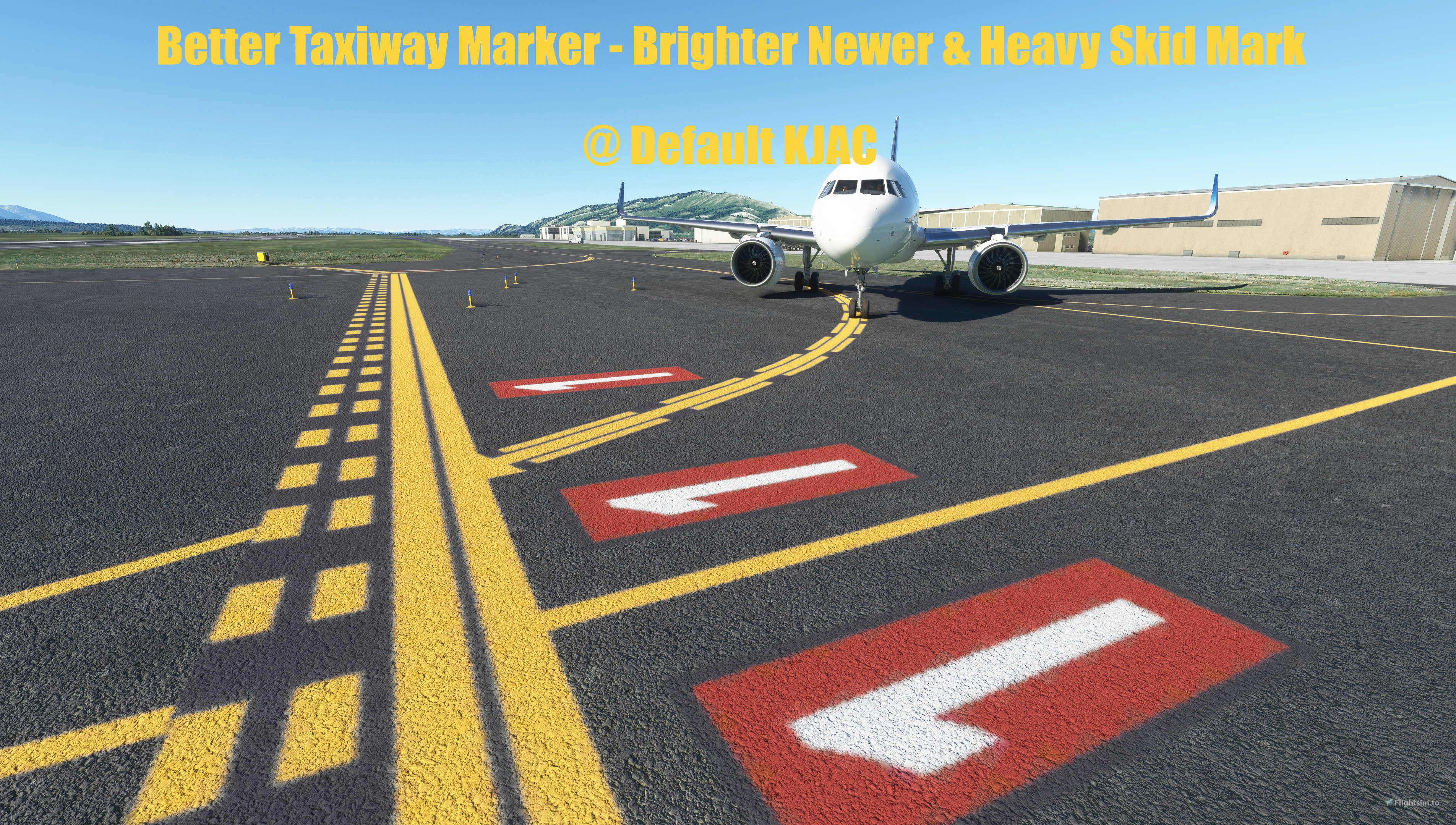
Better Taxiway Marker is a simple modification to the ground marking paint colours to make them look better and more realistic. It has two styles to choose from:
1: Better Taxiway Marker - Brighter Newer: Same brightness and saturation as default ground marking, but has an orange-yellow colour and a smooth solid non-faded look.
2: Better Taxiway Marker - Darker Subtler: Lower brightness and saturation than default ground marking, an orange-yellow colour and a smooth solid non-faded look.
Please see screenshots for comparison.
To install, choose one of the two styles and place its folder into your community folder. Please ensure only ONE of the two styles is inside your community folder at any one time.
Heavy Skid Mark is an optional modification to replace default skid mark texture with a new one to resemble heavy skid marks on busy runways.
To install, simply place "flyergaia-materiallibs-heavyskidmark-optional" into your community folder. If you do not want the Heavy Skid Mark texture, simply remove or leave out "flyergaia-materiallibs-heavyskidmark-optional" from your community folder.
No other airport ground textures are modified.
I hope you will enjoy it and have a great flight!
Better Taxiway Marker and Heavy Skid Mark
Simple modification to the ground marking paint colours to make them look better and more realistic. Optionally replaces default skid mark texture with a heavy skid mark. No other ground textures are modified. Simply unzip and place "flyergaia-materiallibs-bettertaxiwaymarker" into your community folder.


User Reviews
5 reviews
Version History
New skidmark texture for the Heavyskidmark mod which looks slightly narrower and has better detail than previous version. Taxiway yellow line colour slightly less red than previous version because the overall environment lighting in game appears slightly warmer and less green since the latest sim update.


Log in to join the discussion
Log InComments(19)
7 months ago
about 1 year ago
about 1 year ago
over 1 year ago
about 2 years ago
When using custom airport does it give it priority or it like messes with it?
about 2 years ago
over 2 years ago
over 2 years ago
over 2 years ago
over 2 years ago
almost 3 years ago
almost 4 years ago
I love this job man, these little tweaks can make our experience much better every day.
I'm just sad that Asobo does not create and found a creative group hiring guys like you on surface tweaks.
almost 4 years ago
It is maksing heavy skidmarks on gras taxways as well. I never seen that in real life.
almost 4 years ago
Heavy Skidmark only replaces default skid mark texture with a new one. It doesn't affect where default MSFS applies skid mark texture. If it is happening at a default airstrip, then It must be default MSFS applying skid mark texture on the said grass taxiway for whatever reason under its algorithm. I suggest remove Heavy Skidmark mod from your community folder if you frequently fly from this strip or any other small airfields where there are no heavy skid marks on the runway in reality.
almost 4 years ago
It's interesting that you are able to model the taxiways in a different pattern that are leading into a gate from the rest of the taxiways!
almost 4 years ago
Hm...I did not modify any taxiway modeling, only the ground painted line colours. Any taxiway modeling you see is default MSFS.
almost 4 years ago
Oh I see. Got it. Thank you!
almost 4 years ago
Oh I think i see the problem with this airport here. MSFS uses the same dashed line on the runway hold short marking for the taxiway marking leading into a gate in this airport. I added a black background to the runway hold short marking, resulting in these taxiway dashed lines also having black background between the dashes, which would be incorrect here. Unfortunately, a compromise has to be made here as having a black background on runway hold short marking seems popular for people looking into modding default taxiway lines and it looks better in most other default airports without dashed lines leading into gates, I will keep the black background on hold short marking. I tested out other airport environment and taxiway paint line mods and they also have the same problem. On the other hand, default MSFS paint lines without black background provides a more accurate alternative for this airport.
almost 4 years ago
Bonjour sa marche pour tout les aéroport merci