

Description
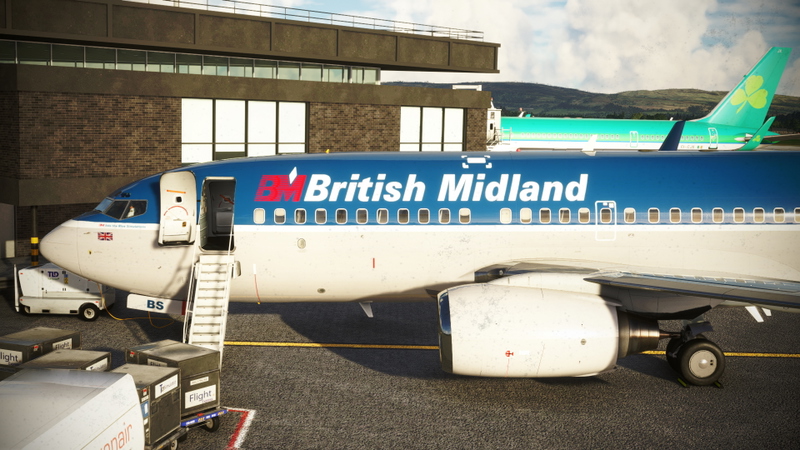
British Midland (G-BMAA) | Leonardo MD-82 "Maddog" | Into the Blue Simulations
Installation instructions:
Download the livery
Unzip and place the main file into your Community folder
Launch Microsoft Flight Simulator and enjoy!
British Midland / Into the Blue Simulations:
British Midland was a UK-based carrier, founded in 1964; Midland operated under various guises over the years, finishing up operations as British Midland International or bmi in 2012. Throughout its history, the airline operated a whole host of different aircraft, including many British classics and at its peak operated some 30 aircraft, primarily from its London Heathrow and East Midlands bases. British Midland served destinations all over Europe and indeed further afield, at one point holding some 13% of all takeoff and landing slots out of London Heathrow. Sadly, bmi ceased trading in October of 2012 and the last vestige of the airline "Flybmi" was closed down just a couple of years ago in 2019.
I have commissioned this beautiful BD livery for the Leonardo MD-82 "Maddog", created masterfully by Mr Mach2 (a big thank you to him!). Hopefully, a few of you will join me in getting Midland back in the skies once again!
Enjoy! : )
British Midland (G-BMAA) | Leonardo MD-82 "Maddog" | Into the Blue Simulations
Relive the nostalgia of British Midland with this meticulously crafted livery for the Leonardo MD-82 "Maddog" by Into the Blue Simulations. Pay homage to the UK-based carriers rich history and iconic aircraft as you soar through the virtual skies of Microsoft Flight Simulator.

Version History
File updated to correct installation issues.
Related

Into the Blue Simulations - TrackIR Profile
Enhance your flight simulation experience with this TrackIR profile by Into the Blue Simulations. Copy and paste the file into your TrackIR profiles folder to use the settings optimized for Track Clip Pro or Hat Track Clip. Please note that you may need to adjust the "Speed" and "Smooth" settings in the TrackIR app to your liking. Happy flying!
by Intotheblue
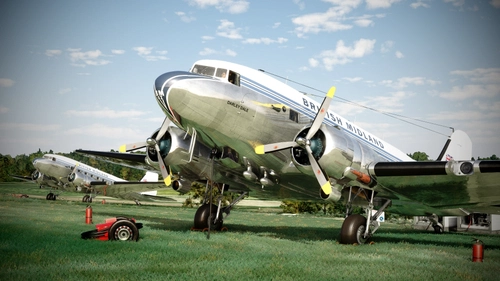
British Midland (G-AOGZ) | Asobo Douglas DC-3 | Into the Blue Simulations
Relive the glory days of British Midland with this Asobo Douglas DC-3 livery by Into the Blue Simulations. Commissioned to honor the legacy of the UK-based carrier, this livery represents G-AOGZ, an airframe with a special history once owned by Field Marshal Bernard Montgomery. Install the livery, launch Microsoft Flight Simulator, and take to the skies in this nostalgic tribute to a bygone era of aviation.
by Into the Blue Simulations / Jamespejam
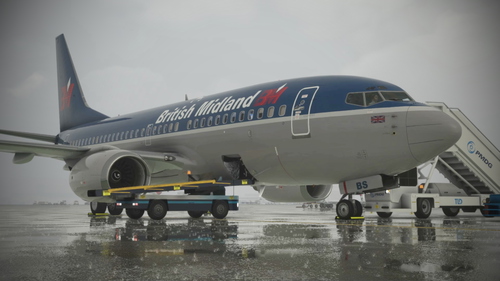
British Midland (G-OBMA) | PMDG 737-700 | Into the Blue Simulations
Relive the history of British Midland with this meticulously crafted G-OBMA livery for the PMDG 737-700 by Into the Blue Simulations. Explore the legacy of the UK-based carrier, which operated a variety of aircraft from London Heathrow and East Midlands bases. Commissioned by the creator Mr Mach2, this livery is a nostalgic tribute to the airline that ceased operations in 2012.
by Into the Blue Simulations / MrMach2
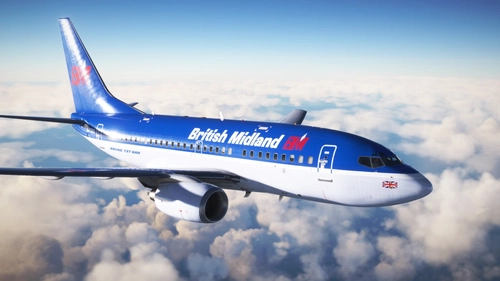
British Midland (G-OBMZ) | PMDG 737-600 | Into the Blue Simulations
Fly back in time with the British Midland (G-OBMZ) livery for the PMDG 737-600 by Into the Blue Simulations. Relive the history of the UK-based carrier that operated a variety of British classics and served destinations all over Europe. Commissioned by a dedicated fan, this livery is a tribute to the legacy of British Midland.
by Into the Blue Simulations / Whopperator
Log in to join the discussion
Log InComments(5)
over 1 year ago
over 3 years ago
wont load for me either. Is there a work around?
over 3 years ago
Hi vAer007,
The livery is designed to be put straight into the Community folder (and can then be selected within the sim). Is that what you were trying to do?
Let me know if you're still having issues. All the best : )
Edit: I've just uploaded V3. There was indeed an issue with the precious version - apologies.
over 3 years ago
It doesn't seem to show up for me in the Load Manager for some reason?
over 3 years ago
Apologies for the very slow reply (I've only just seen your comment).
I'm not sure with regards to the livery manager, but the livery itself is designed to be put straight into the Community folder (and can then be selected within the sim). Is that what you were trying to do? I do hope you managed to get things figured out.
All the best : )
Edit: I've just uploaded V3. There was indeed an issue with the previous version - apologies.