

Description
An upload of my TrackIR profile, used in most of my videos.
Simply copy and paste the file into your TrackIR profiles folder (Users /User Name / App Data / Roaming / Natural Point / TrackIR 5 / Profiles). Be aware that the "Speed" and "Smooth" settings (found in the TrackIR app) may not carry through as part of the profile, so you may still need to adjust those to your own liking (I use Speed = 1 and Smooth = 15 personally). The profile has been designed around the Track Clip Pro, but should work OK with the Hat Track Clip as well.
Enjoy!
Into the Blue Simulations - TrackIR Profile
Enhance your flight simulation experience with this TrackIR profile by Into the Blue Simulations. Copy and paste the file into your TrackIR profiles folder to use the settings optimized for Track Clip Pro or Hat Track Clip. Please note that you may need to adjust the "Speed" and "Smooth" settings in the TrackIR app to your liking. Happy flying!

Supporters

User Reviews
2 reviews
Version History
No version history available.
Related
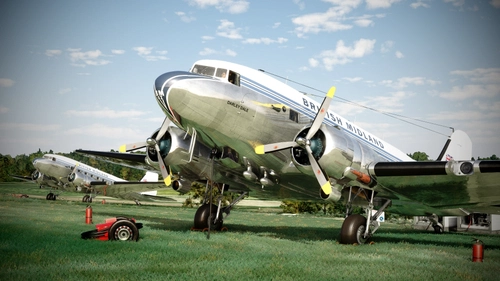
British Midland (G-AOGZ) | Asobo Douglas DC-3 | Into the Blue Simulations
Relive the glory days of British Midland with this Asobo Douglas DC-3 livery by Into the Blue Simulations. Commissioned to honor the legacy of the UK-based carrier, this livery represents G-AOGZ, an airframe with a special history once owned by Field Marshal Bernard Montgomery. Install the livery, launch Microsoft Flight Simulator, and take to the skies in this nostalgic tribute to a bygone era of aviation.
by Into the Blue Simulations / Jamespejam
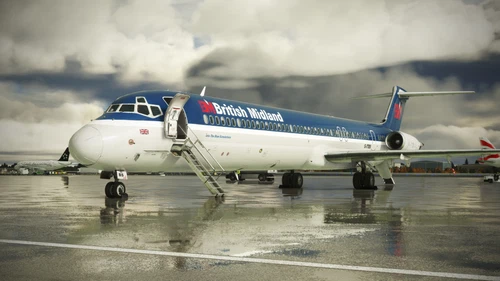
British Midland (G-BMAA) | Leonardo MD-82 "Maddog" | Into the Blue Simulations
Relive the nostalgia of British Midland with this meticulously crafted livery for the Leonardo MD-82 "Maddog" by Into the Blue Simulations. Pay homage to the UK-based carriers rich history and iconic aircraft as you soar through the virtual skies of Microsoft Flight Simulator.
by Into the Blue Simulations / MrMach2
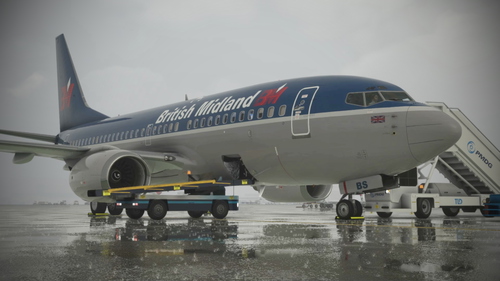
British Midland (G-OBMA) | PMDG 737-700 | Into the Blue Simulations
Relive the history of British Midland with this meticulously crafted G-OBMA livery for the PMDG 737-700 by Into the Blue Simulations. Explore the legacy of the UK-based carrier, which operated a variety of aircraft from London Heathrow and East Midlands bases. Commissioned by the creator Mr Mach2, this livery is a nostalgic tribute to the airline that ceased operations in 2012.
by Into the Blue Simulations / MrMach2
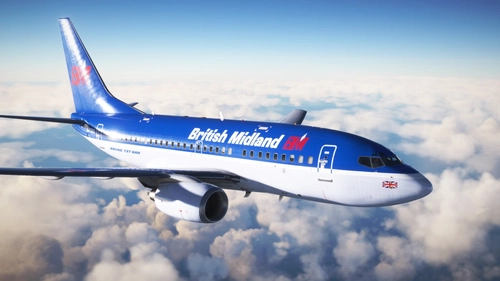
British Midland (G-OBMZ) | PMDG 737-600 | Into the Blue Simulations
Fly back in time with the British Midland (G-OBMZ) livery for the PMDG 737-600 by Into the Blue Simulations. Relive the history of the UK-based carrier that operated a variety of British classics and served destinations all over Europe. Commissioned by a dedicated fan, this livery is a tribute to the legacy of British Midland.
by Into the Blue Simulations / Whopperator
Log in to join the discussion
Log InComments(32)
4 months ago
just a question:
I copied your xml file in the profiles folder but I can´t find it in TrackIR Profiles List.
Can you help me?
Regard Uwe
2 months ago
9 months ago
almost 2 years ago
about 2 years ago
about 2 years ago
Yes, that's the one! : )
over 2 years ago
over 2 years ago
almost 3 years ago
almost 3 years ago
Hmmm, I'm not really sure why you might be having an issue. I just re-downloaded and unzipped the file (to test) and had no problems with the process. Have you tried downloading the file again? Which tool are you using to unzip?
All the best!
almost 3 years ago
about 3 years ago
To those having trouble locating it after placing it in the right folder, I think you may be getting confused by the profile name. The file is called into the blue, but the profile within Trackir is called "Flight"
about 3 years ago
Same issue, the profile is not recognized by Track IR when placed in the C drive track IR profiles folder with the other profiles.
about 3 years ago
Hello Gooselives,
Are you sure you're placing the profile into the correct location? I've updated the download description, to point you in the right direction: (users/user name/app data/roaming/Natural Point/TrackIR 5/Profiles).
Let me know how you get on with that. All the best : )
over 3 years ago
Hi I follow your steps to copy your file for Trackir and is not showing up in the Trackir profile ? for FS2020
over 3 years ago
hi for me its says corrupted profile :/
over 3 years ago
Hi Yatomic,
Have you tried downloading again? I haven't come across anyone else with the same issues, but if you try again and it's still not working, I'll happily take a look. Just be advised also, this is a TrackIR profile, not suitable for the Tobii Eye Tracker (I know that's probably obvious, but it does seem to cause some people a little bit of confusion).
Let me know how you go. Cheers : )