
![GSX Profile for LVFR's [KBDL] – Bradley International Airport - Image 1](https://cdn.flightsim.to/images/24/gsx-profile-for-lvfr-s-kbdl-bradley-international-airport-A7_bD.jpg)
Description
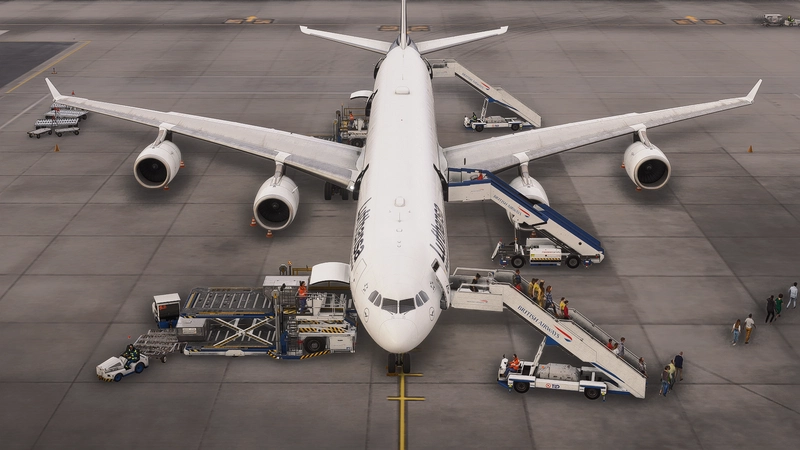
Here's the GSX Profile for '[KBDL] – Bradley International Airport' by LVFR.
Bradley International Airport is a public international airport in Windsor Locks, Connecticut.. The airport operates two runways, 9510 ft & 6847 ft. Coords are 41.9400821852105, -72.68596075075334
Close airports are Logan Intl (KBOS), Kennedy Intl (KJFK) & Stewart Intl (KSWF)
GSX profile includes:
- Custom vehicle positions, marshaller positions, cargo vehicles and cargo loaders on every stand.
- Military parking for fighter jets.
- Good cargo parking
Parking Information:
Parking A
Medium to Large aircrafts
All Jetways except A1 (crap)
Parking B
Medium to Large aircrafts
No Jetways
All PAX arrive by Bus
Parking N
Medium to Large cargo aircrafts
All Cargo parking
N4 is located a long way for main airport
Gate 38 & 39 Cargo. Can cater for Heavy
General Parking
Is a collection of different aircraft type include small GA, fighter jets, Military Cargo
Installation:
Extract the zip file and move the .ini file to %APPDATA%\Virtuali\GSX\MSFS
Get into the habit:
When the airport loads, it's recommended to reposition the aircraft at the same location. The aircraft won't always load at the GSX position so going to GSX menu, hitting "Reposition Aircraft" and then selecting "Reposition here at current gate" will put the aircraft in the right position where GSX was told to put it. hopefuly it gets fixed one day.
As always, I smart not so there may and errors or small changes needed. Just let me know.
Gav
MSFS username: CAPTPANPAN
GSX Profile for LVFR's [KBDL] – Bradley International Airport
GSX Profile for LVFRs [KBDL] – Bradley International Airport enhances the airport with custom vehicle positions, marshaller placements, and cargo features. With detailed military parking for fighter jets and good cargo parking options, this add-on provides a realistic airport experience. Parking information includes specifics for different aircraft sizes and types, making it convenient for various flights. Install the profile easily by following the provided instructions for an improved ground handling experience at Bradley International Airport.

Version History
No version history available.
Related
Full GSX Profile - MK Studios - Dublin Airport (EIDW)
Enhance your Dublin Airport experience with this GSX Profile for MK Studios EIDW from Orbx or simMarket. Customized parking stands, pushback options, and passenger walkways for a more realistic simulation. Note: a current SU9 issue affects Pier 2 jetways, with a fix expected in SU10. Simply extract the files and follow the installation instructions for an improved airport experience.
by Crazy88
GSX Profile for '(KLGA) La Guardia Int'l' - by FeelThere
Enhance your airport experience with FeelTheres GSX Profile for (KLGA) La Guardia Intl. This add-on features custom vehicle positions, marshaller positions, cargo vehicles, pushbacks with multiple waypoints, and mostly jetways for a realistic ground handling simulation. Follow the simple installation instructions to enjoy a more immersive airport environment at one of the busiest airports in the United States.
by Crazy88
GSX Profile Impulse Simulations Adelaide International Airport (YPAD) Terminals1-4
This GSX Pro profile is for Adelaide International Airport (YPAD) by Impulse Simulations. This profile covers T1-4 terminal stands. Gates 27-29 don't have jetways. Also has custom pushback profiles to quickly select te correct runway. If there's anything wrong, let me know.
by Crazy88
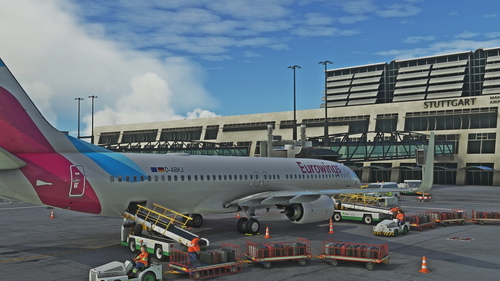
Full GSX Profile for 'Stuttgart International Airport (EDDS)' by FeelThere.
Enhance your ground handling experience at Stuttgart International Airport with this complete GSX Profile by FeelThere. Featuring custom vehicle and marshaller positions, cargo vehicles, pushbacks with multiple waypoints, and visual docking guidance systems at specific stands. Ensure to install the correct GSX script for the corresponding airport version and follow the installation instructions for optimal performance.
by Crazy88
Log in to join the discussion
Log InComments(2)
almost 4 years ago
Thanks for creating this profile! Is it just me or are the jetways way to close to the aircraft they are like glitched into my cockpit because they are that close. Is there anything I can do about changing that?
almost 4 years ago
Hey mate, can you give me the details of what gateway? Also did you exclude the airport in GSX settings?