
Description
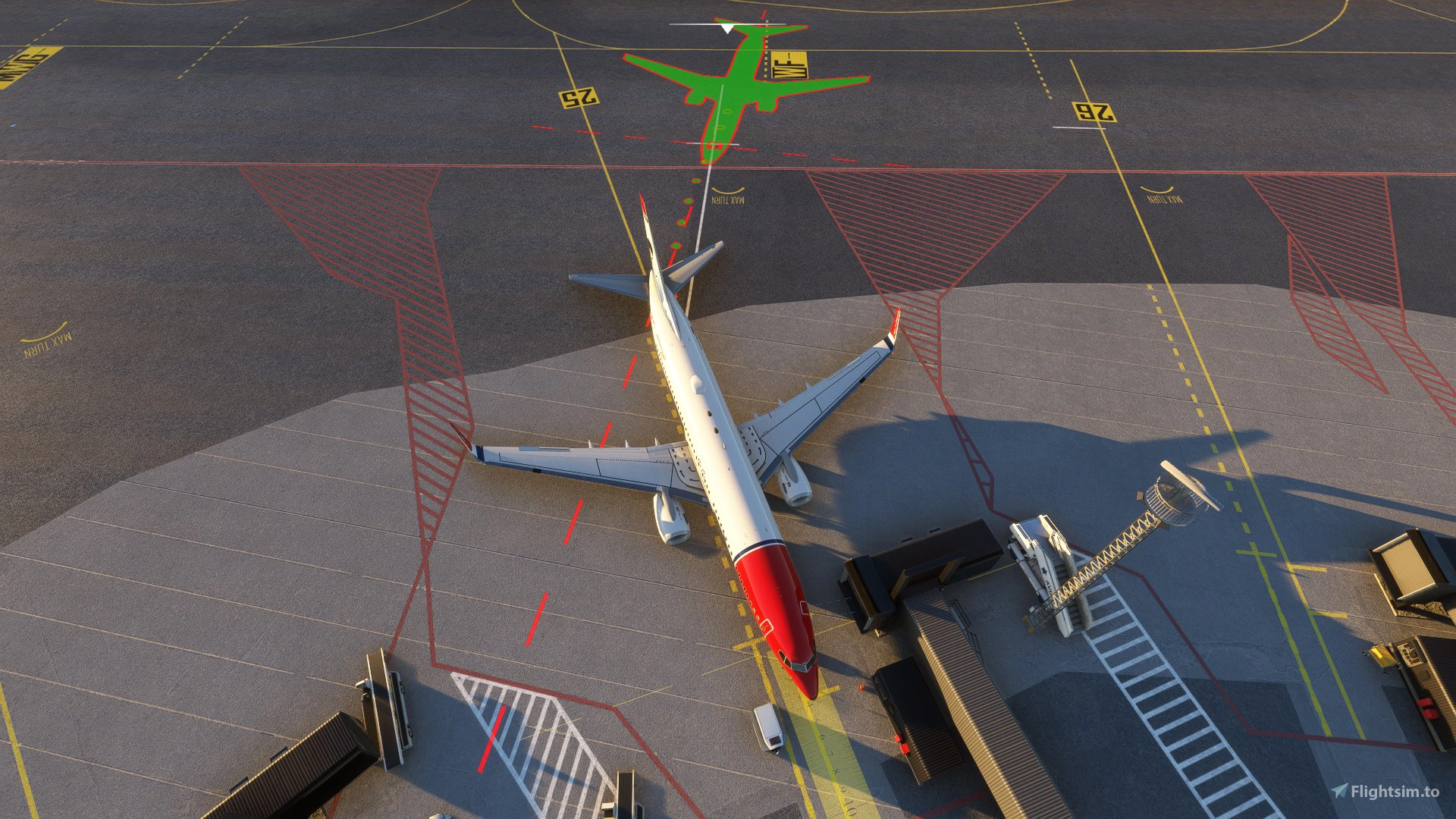
This GSX profile was made for freeware Bergen airport found on flightsim.to
Commercial terminal, all ground support equipment moved to realistic positions and all stands comes with custom pushback procedures with reference to real world procedures. This has been tested by real world pilots and ground crew to ensure accuracy
For proper use refer to ground charts to find the correct pushback point for your gate.
This profile has been made to reflect real life procedures.
There is one version that uses docking guidance system from Noolaero, which is freeware and highly recommended, https://flightsim.to/file/39576/msfs-visual-docking-guidance-system.
There is also a version with GSX docking system installed.
Remote stands 41, 43, 46, 47 and 48 are made to go with CRJ-family and the dash 8 100/200/300/400.
This has been confirmed to work with the latest GSX version as of 01. October
Version 1.2 changelog
Remote De-ice platforms has been added.
Installation:
Extract the .zip file and move the .ini file to %APPDATA%\Virtuali\GSX\MSFS
If you still have problems try this:
1. open MSFS and go to a random gate at ENBR.
2. open GSX airport configurator
3. move some of the ground vehicles somewhere, do this to create a ini file at %APPDATA%\Virtuali\GSX\MSFS.
4. go to %APPDATA%\Virtuali\GSX\MSFS en find ENBR.ini file.
5. open ENBR.ini file and copy the AFCAD-path of your file ENBR.ini file
6. paste this AFCAD path into the ENBR.ini file that comes with this package
7. save and exit
8. restart MSFS and you are good to go
GSX profile - Bergen Airport ENBR
Custom GSX PRO profile for ENBR Bergen Airport, all ground equipment moved to realistic positions and custom pushback for all gates and remote stands. Remote stands 41, 43, 46, 47 and 48 are made to fit the CRJ-family and the dash 8 100/200/300/400 family.


User Reviews
2 reviews
Version History
Version 1.2 now include De-ice platforms
Related
GSX profile - Helsinki Airport EFHK (MK-STUDIOS)
Custom GSX PRO profile for EFHK, all ground equipment moved to realistic positions and custom pushback for all gates and remote stands. Commercial terminal and cargo apron, all ground support equipment moved to realistic positions and all stands comes with custom pushback procedures.
by Northwind
GSX profile - Gran Canaria Airport GCLP (Aerosoft/SimWings)
Custom GSX PRO profile for GCLP, all ground equipment moved to realistic positions and custom pushback for all gates and remote stands. All ground support equipment moved to realistic positions and all stands comes with custom pushback procedures....
by Northwind
GSX profile - Oslo Airport Gardermoen ENGM
Custom GSX PRO profile for ENGM, all ground equipment moved to realistic positions and custom pushback for all gates and remote stands. Commercial terminal and cargo apron, all ground support equipment moved to realistic positions and all stands comes with custom pushback procedures.
by Northwind
GSX profile - Keflavik Airport BIKF V1 (MK-STUDIOS)
Custom GSX PRO profile for BIKF, all ground equipment moved to realistic positions and custom pushback for all gates and remote stands. Commercial terminal and cargo apron, all ground support equipment moved to realistic positions and all stands comes with custom pushback procedures.
by Northwind
Log in to join the discussion
Log InComments(12)
3 months ago
about 3 years ago
about 3 years ago
over 3 years ago
With the current scenery the profile doesn't seem to work properly. GSX shows 3 parking spots that are not available in the scenery, stairs are spawning on top of static vehicles (gate 31) and neither of the profiles shows the GSX VDGS at gat 31.
over 3 years ago
Hello,
Thank you for making me aware of this, I will look at it soon!
over 3 years ago
Maybe it would be helpful, if you can refer to which ENBR freeware this is related. Thx :-)
over 3 years ago
This GSX profile was made for this freeware scenery https://flightsim.to/file/1946/enbr-bergen-airport-flesland
over 3 years ago
Thx a million
over 3 years ago
Hi! Could you make version 1.2 with noolaero VDGS available? It looks like its only the version with GSX VDGS thats available as version 1.2. Thanks!
over 3 years ago
Hello,
are you also working on a version for 1.1 of RDpresets ENBR Bergen airport with remote deicing?
Thank you!
over 3 years ago
Hello
Yep, that is coming sometime today
over 3 years ago
Thank you