
Description
This profile has been discontinued as I am unable to provide any future fixes or updates.
This SPAD.neXt profile is designed for Logitech/Saitek panels, including multi, switch, and radio panels, to make them compatible with the PMDG Boeing 737. If you come across any bugs, mistakes, or have suggestions, please don't hesitate to reach out to me!
This profile requires a SimConnect connection, LVAR Bridge to be installed and PMDG SDK enabled.
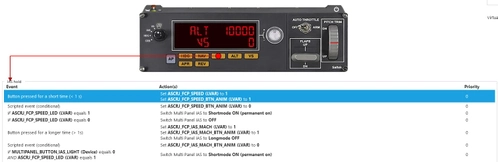
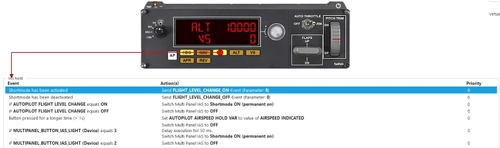
I recommend using a lower multi panel tuner pollrate. You can change it in settings > devices > multipanel (image)
Lower values will give you a smoother experience. If you experience problems with stuck knob animations, increase its value.
PMDG SDK:
You need to enable PMDG SDK in add-on files. Video about it (not mine)
Make sure to enable PMDG 737 support in SPAD.neXt options as well (image)
Installation:
Put "PMDG B737 Logitech Panels (current version) by Pollot.xml" into your SPAD.neXt profiles folder.
[Default location: C:\Users\[your name]\Documents\SPAD.neXt\profiles]
Displays work - I have used LVAR variables for them, so the refresh rate is slower like in the CRJ's case
FO version is made for first officer setups (CRS for NAV 2, QNH on FO side etc.)
Description of profile functions (also located in the .zip file):
PMDG B737 Logitech Panels SPAD.neXt Profile - version 1.1 / created by Pollot (don't copy my work without my permission)
Changelog:
1.1:
- Fixed radio panel not displaying selected barometric pressure in inHg
- Separated radio panel decimal point location function from REV button on multi panel
/////////////////////////////////////////////////////////
Switch Panel:
Master Battery [BAT] - Turns battery ON/OFF
Master Alternator [ALT] - Starts APU / Turns APU OFF
Avionics Master - Turns IRSes to NAV position / Turns IRSes OFF
Fuel Pump - Turns all fuel pumps ON/OFF
De-Ice - Turns both engines de-ice ON/OFF
Pitot Heat - Turns pitot and window heats ON/OFF
Close Cowl - Turns dome light DIM/OFF
Panel Lights - Turn panel and floodlights ON/OFF
Beacon Lights - Turn beacon lights ON/OFF
Navigation Lights [NAV] - Turns navigation lights STEADY/OFF
Strobe Lights - Turns strobe lights POS STROBE & STEADY/OFF
Taxi Lights - Turns runway turnoff and nose taxi Lights ON/OFF
Landing Lights - Turn landing lights ON/OFF
Magnetos - Autobrake
Gear Lights:
Green - Fully extended
Yellow - Fully extended, but with airspeed equal to or greater than 200 knots
Red - Not fully extended
Off - Retracted
Landing Gear Lever - Controls landing gear lever position (UP/DOWN, no OFF position)
/////////////////////////////////////////////////////////
Multi Panel: value after "/" is used when the REV button is pressed
Alt tab:
- Displays selected altitude and selected vertical speed
- Knob changes selected altitude by 100ft / 500ft
VS tab:
- Displays selected altitude and selected vertical speed
- Knob changes selected vertical speed by 100ft / 250ft
IAS tab:
- Displays selected autothrottle speed
- Knob changes selected speed by 1kt / 5kt
HDG tab:
- Displays selected heading
- Knob changes selected heading by 1° / 5°
COURSE tab:
- Displays left course (for NAV1)
- Knob changes selected course
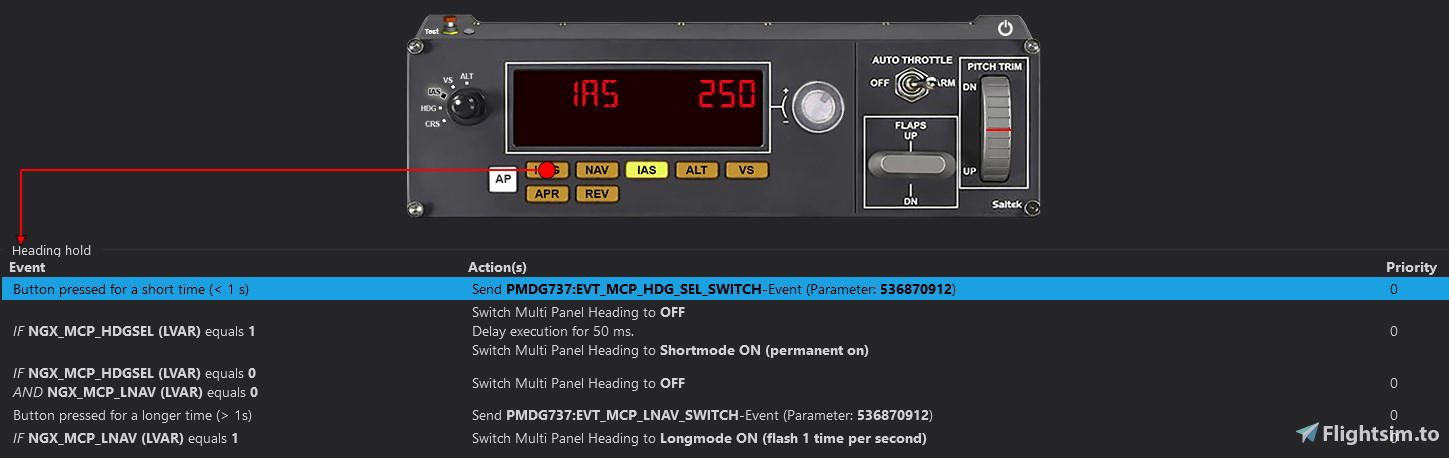
function after "//" is activated when you press and hold a button for longer than one second
Autopilot [AP] - Turns CMD A ON/OFF // Turns CMD B ON/OFF
Heading [HDG] - Turns heading mode ON/OFF // Turns LNAV mode ON/OFF
Navigation [NAV] - Turns vertical navigation mode [VNAV] ON/OFF
Indicated Airspeed [IAS] - Turns speed mode ON/OFF // Turns N1 mode ON/OFF
Altitude [ALT] - Turns altitude hold ON/OFF // Turns flight level change [LVL CHG] ON/OFF
Vertical Speed [VS] - Turns vertical speed mode ON/OFF
Approach [APR] - Turns approach mode ON/OFF // Turns LOC/VOR mode ON/OFF
Reverse Course [REV] - Changes increment and decrements by multiplying them by 5 and enables faster frequency changes on the radio panel
Auto Throttle - Turns autothrottle ON/OFF
Flaps - Flaps up/down by a 1 notch / Flaps full up/full down
Pitch Trim - Changes selected vertical speed
/////////////////////////////////////////////////////////
Radio Panel:
The inner knob changes COM1/2 frequency by 0.005 MHz and the outer by 1 MHz
The inner knob changes ADF1/2 frequency by 1 MHz and the outer by 10 MHz
With REV ON inner knob changes COM1/2 frequency by 0.025 MHz and the outer still by 1 MHz
With REV ON inner knob changes ADF1/2 frequency by 10 MHz and the outer by 100 Mhz
ADF tab shows active ADF1 and standby ADF1 frequencies. However, you can only change active one
DME shows a distance from NAV1 on the left side and the NAV2 on the right side
In the XPDR tab, you can change your QNH using the outer knob, and squawk using the inner (press the transfer button to change between squawk numbers)
Holding the transfer button in the XPDR tab for longer than one second will set QNH to a standard value
/////////////////////////////////////////////////////////
That's all, fly safe!
PMDG B737 Logitech Panels SPAD.neXt Profile
This SPAD.neXt profile by Pollot is tailored for Logitech/Saitek panels, enhancing compatibility with the PMDG Boeing 737. The profile necessitates SimConnect connection, LVAR Bridge installation, and PMDG SDK activation. Included are detailed instructions for installation and profile functions such as multi, switch, and radio panel capabilities for an optimized flight simulation experience.

User Reviews
13 reviews
Version History
- Fixed radio panel not displaying selected barometric pressure in inHg - Separated radio panel decimal point location function from REV button on the multi panel
Related
FBW A32NX Logitech Panels SPAD.neXt Profile
Enhance your FBW A32NX experience with this discontinued Logitech Panels SPAD.neXt profile. Designed for Logitech/Saitek panels, this profile offers compatibility with the Airbus A320neo. It requires a SimConnect connection and LVAR Bridge for optimal performance. Installation is simple – just place the file in your SPAD.neXt profiles folder. Fly safe with improved functionalities and added Honeycomb Alpha support.
by Pollot
Fenix A320 Logitech Panels SPAD.neXt profile
Enhance your Fenix A320 experience with this SPAD.neXt profile designed for Logitech/Saitek panels, including multi, switch, and radio panels. Ensure SimConnect connection and LVAR Bridge are installed for full compatibility. Install the profile, make adjustments, and fly safe while enjoying various panel functionalities.
by Pollot
CRJ Logitech Panels SPAD.neXt Profile
Enhance your Logitech/Saitek panel experience with this SPAD.neXt profile designed for the Aerosoft CRJ. Install SimConnect connection and LVAR Bridge for full functionality. Enjoy smoother operation with lower multi panel tuner pollrate settings. Explore various panel functions and improvements in the detailed profile documentation.
by Pollot
TBM930 Logitech Panels SPAD.neXt Profile
Enhance your TBM930 cockpit experience with this SPAD.neXt profile designed for Logitech/Saitek panels, offering seamless compatibility and functionality adjustments. The profile includes detailed functions for Switch Panel, Multi Panel (with REV enabled), and Radio Panel, optimizing your flight controls for a smoother simulation. Installation is simple - just place the provided file in your SPAD.neXt profiles folder to unlock the full potential of your Logitech/Saitek panels with the TBM930 aircraft.
by Pollot
Log in to join the discussion
Log InComments(46)
over 1 year ago
over 1 year ago
over 2 years ago
about 3 years ago
over 3 years ago
Hi thanks for you exceptional work on this.
I have an issue. Hopefully you can assist me. Sometimes I don't use any button on the Pro Switch Panel until I'm airborne and then I use it for the first time with the gear lever. When the buttons are incorrectly set at the beginning and do not correspond with the pmdg buttons, this makes all electronics on the pmdg to switch off inflight. So I first need to set all buttons to "off" and only then start a flight. But as I forget this usually, can you think of a way to bypass this problem?
over 3 years ago
for the number values on the screen of the logitech panel, it works on some liveries on the 737 but not on others, I noticed that pmdg has 2 types of autopilots which have different knobs and textures, and on one of them the numbers work and on the other they do not, other than that, it was a very good profile and I had actually reprogrammed the magnetoes to start the engines
over 2 years ago
almost 4 years ago
Many thanks for the profile. the panels work
about 4 years ago
Works like a charm. Thanks for your efforts!
There´s one thing that is not working on my Multipanel: When I'm using VS mode while descending I can control the descent rate with the knob but the display shows "0" instead of the negative value. On a climb the positive rate is being displayed correctly.
about 4 years ago
It's a known issue on the PMDG site (the same problem happens with MobiFlight as an example) and I am unable to do anything about it at the moment. I'll update this profile as soon as their SDK values for MCP displays will work correctly (I'm using LVAR variables instead)
about 4 years ago
Hi there! Thanks for this config! I have one problem, whatever I do, the number on display does not change. they stay at "0"
about 4 years ago
Make sure that you have the LVAR bridge installed. If you do, try to reinstall it. It works fine for me (running the latest version of B737 and B738)
about 4 years ago
Thanks for the tip :-) Works like charm!
about 4 years ago
Hey, I just bought pro switch panel, but I have a little problem. It looks like all the switche only want to shut off lights etc... but I can not turn on anything with buttons, or set autobrake. The only thing working properly is Landing gear.
about 4 years ago
Hey Pollot - thanks for yet another great config! I have one minor issue in that the HDG light on my multipanel seems to constantly flash on and off every second or so with the a/p engaged. This is with LNAV/VNAV engaged.
about 4 years ago
It's used for LNAV because the NAV button is already reserved for VNAV. It can be annoying, so I'm up to any ideas of rebinding it
about 4 years ago
Ah - ok - tbh I don't use the panel buttons atm - quite happy to click on the sim FCU. The way I have it on my desk the buttons are masked by my k/b so just use the mouse. Realise most others would prefer to use the hardware buttons so don't worry.
Having looked at the code, I'm thinking I could just clone a new profile and modify the LIGHT=longmode ON to longmode OFF and see what happens :-)
Again thanks - I've use your profiles for a long time now and they're so helpful.
Cheers