
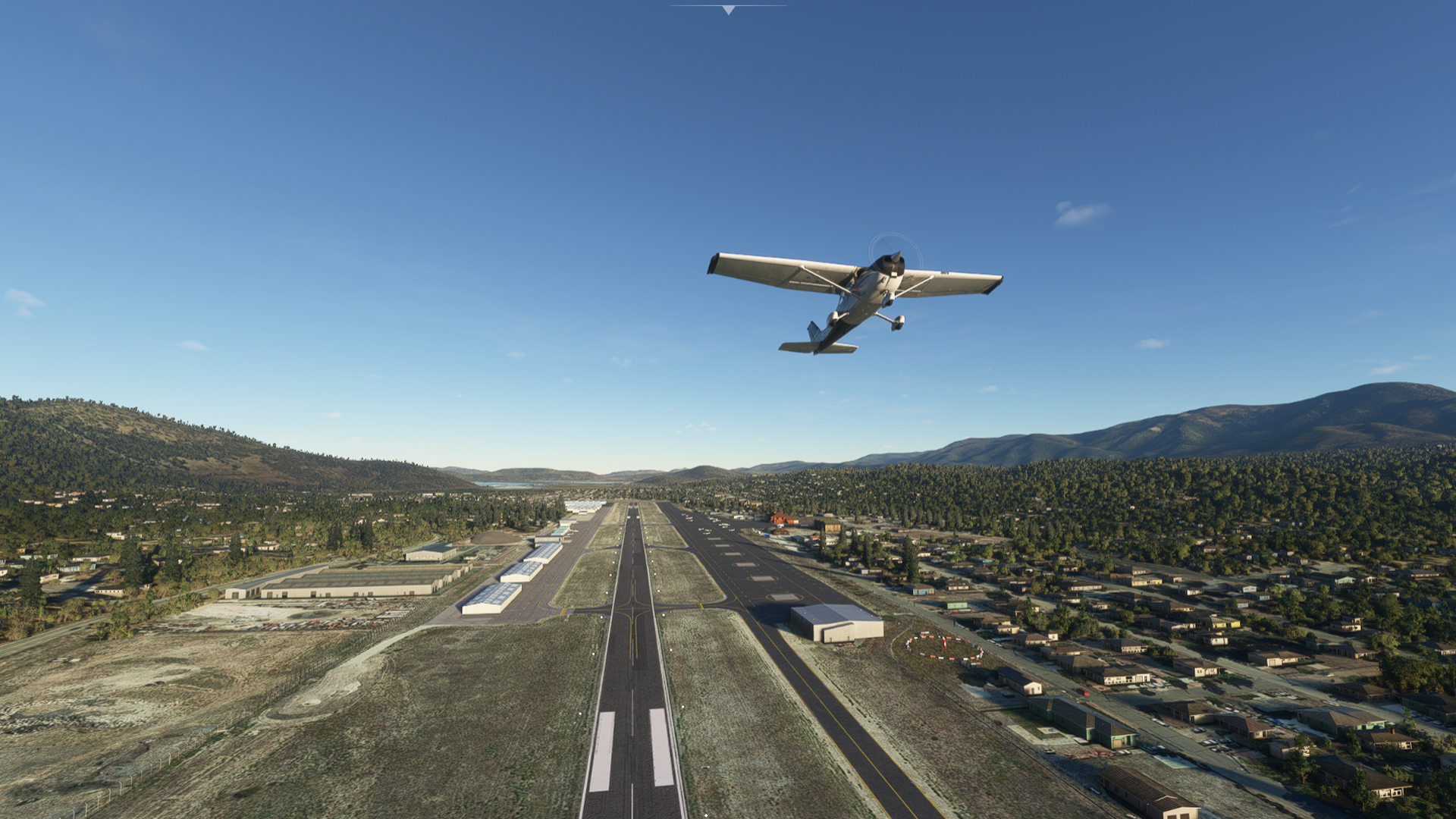
Description
As all my mods, this one is not 100% accurate nor does it include every detail and building (This area is not a photogrammetry area currently). My attempt is to get these airports closer to their real world locations and to include some of the bigger landmarks pilots use and know when flying here. Please enjoy!
Mod includes:
(foxtrot-bigbear-l35 Folder)
- Custom Terminal (Big Bear Airport/Barnstormer Restaurant) with parking lot.- Various custom hangars.- Repaved aprons.- Repaved Runway and updated markings (with patch marks)- Custom Rotating Beacon.- Custom Segmented Circle.- Custom Cellular Antenna SW of the airport.- Added parking spots.- Changed ALL trees to pine trees around airport and surrounding mountains..-Added Perimeter fence.- Added a few photogrammetry style buildings around the airport at lower detail. - Added a few misc items to make it look more interesting. - Added updated fuel island.
(l35-aerial Folder) OPTIONAL
- Replaces Bing Maps imagery with Google Earth Imagery on terrain around airport.
**UPDATE**
v1.4 is a hotfix to update the modelib.bgl so that it does not conflict with other files that may cause crashes.
Few minor clean up items.
**NOTICE**
Update 1.4 only contains the "foxtrot-bigbear-l35" folder, and does not contain the Aerial folder (which is optional) and will need to be downloaded from previous version v1.3b if not already in your community folder.
This Mod is compatible with the Big Bear, California Mod created by flightsimdude. which greatly improves the area around the airport and the lake shoreline, including fixing the submerged bridge! I recommend it and it can be found here: Big Bear, California
L35 Big Bear Airport
Fly into the challenging L35 Big Bear Airport, situated next to the lake at 6752.4 ft elevation. Remember the 3 Hs (High, Hot, Humid) for successful take-offs and landings. Explore custom terminals, hangars, and updated markings, along with optional Google Earth imagery for a more immersive experience.


User Reviews
17 reviews
Version History
v1.4 is a hotfix to update the modelib.bgl so that it does not conflict with other files that may cause crashes. Few minor clean up items. Update 1.4 only contains the "foxtrot-bigbear-l35" folder, and does not contain the Aerial folder (which is optional) and will need to be downloaded from previous version v1.3b if not already in your community folder. **NOTICE** This Mod is compatible with the Big Bear, California Mod created by flightsimdude. which greatly improves the area around the airport and the lake shoreline, including fixing the submerged bridge! I recommend it and it can be found here: https://flightsim.to/file/6334/big-bear-polys
Featured in Collections(1)

Related
KAVX Catalina Airport (ACE Clearwater Airfield)
Experience the transformed KAVX Catalina Airport with this add-on, featuring a realistic sloped runway, Google Earth textures, custom buildings, and even a hidden wildlife surprise.
by JosueMejia
KEMT El Monte Airport (San Gabriel Valley Airport)
Experience a revamped KEMT El Monte Airport in Microsoft Flight Simulator! This add-on brings a realistic touch to the beloved airport, featuring custom buildings, FBOs, and unique details around the area. Explore the custom terminal, restaurant, control tower, and more in this upgraded version of the San Gabriel Valley Airport.
by JosueMejia
Log in to join the discussion
Log InComments(64)
almost 3 years ago
over 4 years ago
Absolutely love this scenery but it breaks the AI and taxi ribbon in ALL airports. Is there anyway you can fix this? I would love to continue to use it but its a no go for me if it breaks other airports. I know it probably wont be updated but it is worth a shot to ask.
over 4 years ago
Hey! unfortunately I myself wont be able to get any updates on my sceneries. However I have handed this mod over to another scenery creator who is aware of the missing taxiways and may merge this scenery with one of his, so look out for that. I'm not sure though that this scenery should affect any other airport, so not sure what's going on with anything outside of this scenery area.
over 4 years ago
Thank you for the reply and the great work!!! I will definitely keep an eye out for it! Yeah I'm not sure why the taxi and ground traffic at other airports, and the ones you created are affected by the scenery and stop it all from animating, but I have tested this scenery and your other scenery (Catalina Island, Ca.) and they both cause the issue. I've tested it after each sim update and it still happens. Again thank you for the quick response and the great work!! I hope that the new creator that you handed it off to can fix it.
over 4 years ago
Hi, any plans on further development and SU7/8 compatability ? I have this installed but am uncertain now about instability :D Many Many thanks for your great work :)
about 5 years ago
The tall trees that you seem to have placed around the airport unfortunatelly shimmer quite odd from some angles. Maybe that can be fixed?
Other than that: wonderful scenery!
about 5 years ago
Maybe he's using snowy trees when surrounding area is not snowy in summer?
about 5 years ago
No the trees are green but they seem to have a very reflective material on them. Or SimUpdate 5 renders them differently... no idea.
about 5 years ago
Just tested with SU5, works fine.
over 5 years ago
Yep, I believe the latest MSFS update (1.16.2.0) has broke this scenery? I have had it loaded for quite some time but now if I try to load a flight the sim craps to the desktop consistently. Isolated it using MSFS Linker to turn scenery off and on until the sim started working again. As a matter-of-fact the update broke more than one. Had to do some serious troubleshooting to locate all packages affected. After removal sim is running fine. Hope to see this scenery back in the saddle soon.
over 5 years ago
Yes its strange, will see if I can look into what it was about the update that broke so many sceneries.
over 5 years ago
I hope you can figure it out and fix the issue so I can reinstall your scenery.
over 5 years ago
This is and was great scenery. However, I had to remove it as it was causing too many CTD's....I installed it and removed it many times to discern if it was in fact causing CTD's......It was.....I hope you can look at it to see if I am missing something or maybe it is just my machine......Thank you!
over 5 years ago
Thanks for letting me know, Unfortunately I haven't had much time to dedicate to sceneries for a few months but I'll try to look into it to see if it is something with the scenery setup or if the update changed a requirement that our older sceneries are missing. This one loads fine for me, but my KAVX scenery CTD's me every time.
over 5 years ago
over 5 years ago
Here is an image showing this...
https://i.imgur.com/nl5rI1n.png
over 5 years ago
over 5 years ago
Are you interested in this Density Altitude indicator* and Departing procedure sign which exist at holding points ? See this pic https://i.imgur.com/1sJ3GzH.jpeg
It's free, of course, to get compiled into your scenery ;)
* It's static and out of order as I see it (in real) last october'19.