
Description
About the addon:
- Bare bones navigation from the dawn of commercial aviation…
- Flying really low and slow in all weathers, day and night, no autopilot required…
- Following in the slipstream of Leon D. Cuddeback & Elrey B. Jeppesen…
If this sounds like your kind of flying, then we might have something for you.
“Arrows Across America” recreates the visual navigation system developed to support the growth of the US Air Mail system between 1926 and 1934.
This involved building 51’ long concrete arrows, painted yellow with flashing beacons on masts, every ten miles along 34 Contract Air Mail (CAM) routes.
About Version 4.0:
So far we have recreated
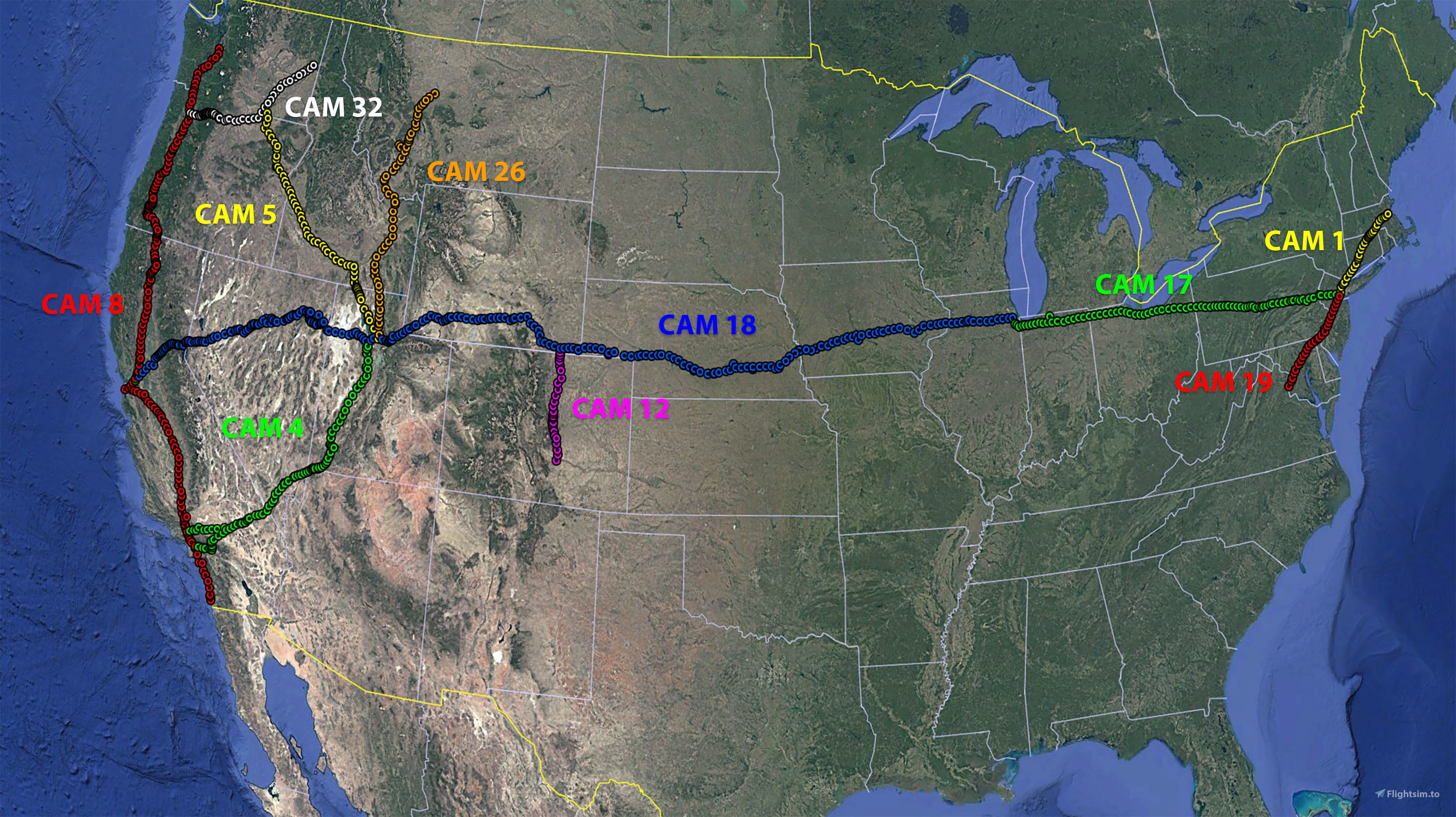
- 10 CAM routes
- 868 individually placed beacons
- 88 custom ILFs
- Arrows and the beacon towers with their rotating beacons
- Generator sheds including the identifier text and the fuel tanks
- 20 custom hangers, with animated hangar doors
- Custom items to add life to the fields, like cars, trucks, furniture, posters, fuel pumps, radio installations,
animated flags and wind socks, water towers and airfield watch towers, boundary lights and runway markers
Brought to you by Dave James, Richard Blows and Rob Cappers.
Installation:
V4.0 completely replaces versions V1, 2 & 2.1 and V3.0 These should be deleted before adding V3.0 to your Community Folder.
Don't forget that Arrows Across America Varney Airlines liveries for the DC Designs Stearman PT17 are also available at the following link at Flightsim.to Stearman PT17 VarneyAirMail
Another set of Airmail liveries is available for the GAS Stearman, from easyraider1960 also on Flightsim.to Stearman PT-17
Background:
Inspired by a discussion on a MSFS forum thread we have been recreating an original US Air Mail airway for the sim.
In 1926 the US Postal Service & Department of Commerce began contracting air mail routes that would eventually criss-cross the USA.
Each route was marked approximately every 10 miles by a path of 51' long yellow concrete arrows with flashing rotating beacons mounted on 51’ towers, interspersed with landing fields.
The beacons have a generator shed and a fuel tank, and the Airway and Beacon number on the roof of the shed. The arrow points in the general direction of where the next beacon is.
Some surviving arrows are visible on Bing Maps, meaning that they are also visible in the sim, if you know where to look.
So, we have decided to recreate the whole 485 mile Contract Air Mail 5 (CAM5) route from Salt Lake City UT to Pasco WA, using original maps and research by aviation historians.
The route is mapped, 51 individually numbered beacon sites have been built to scale, with a animated rotating beacon, positioned precisely using the original sectionals & surviving remains.
If you want to find out more about the airway system, then these sites are a great place to get started:
Arrows Acros America
thesurveystation
And for an account of how low you need to go to fly the mail check this interview with Elrey Jeppesen
Jeppesen interview
See you on the Airway! We would love to hear your feedback and see screenshots of your air mail runs.
Acknowledgements:
- Megadyptes7635: research, route mapping and creation of CAM4, CAM8, CAM18, CAM26 & CAM32
- RobCap1966: 3D modelling & lighting; CAM5 & CAM8 lead
- MrsC.: decal creation and logo design
- PipsPriller: original concept & research, CAM5 & CAM 32 route mapping & ILFs, documentation
- Mamu, Rhumba Flappy and the community at FSDeveloper.com: support in building and animating our custom models
- YouTube videos by Flying Theston, Federico Pinotti, MyPhysical World: help in with understanding Blender and the MSFS SDK
- Stearmandriver2: beta testing
- WaldoP3pper: beta testing
- The many enthusiasts, researchers and historians who have documented the air mail service and the CAM system, allowing us to reconstruct it for MSFS.
Disclaimers
- Not yet compatible with MS2024. We need to check all items for visibility and mesh issues. Also the beacon effect is not working during the day in MSFS2024
- Textures and effects for the beacons are stock MSFS but for the ILFs to display all buildings fully you should have the C53 Lower Loon Creek airfield from World Update 10 installed..
- MSFS bugs may mean that
the beacons 8, 9A and 10 on CAM5 do not show properly once Beacon 9A has been passed
Similarly, Beacon 3A (Beacon Rock) on CAM32 may not always show.
On CAM 18 the lights all vanish when you cross a point between the 31D Aux beacon and the 32 ILF, reappearing after flying 20 or 30 miles - Beacon 3A (Beacon Rock) on CAM32 may not always show. These seem to be an intermittent problem and we will continue to
look for a fix as the SDK is updated. - Some of the generator shed and hangar decals may flicker from certain angles and in certain lights. Again, we will keep working on this and issue a fix as when we can.
- In a tribute to the skills of the airway surveyors, many of the original beacon sites are now occupied by modern aerials and mobile phone masts. To avoid doubling up, we recommend disabling Puffin’s “We Love VFR” add-on whilst flying the airways.
- Don’t use the Dynamic LOD mod. The beacon lights will not show from a distance.
- You might want to turn off grass, we can’t always exclude these from the arrows.
Legal Stuff
This scenery is released as FREEWARE. You may use it for your personal enjoyment, but you may NOT use it in any kind of money-making endeavor, you may NOT modify it and you may NOT publicly distribute any copies of it, whether modified or not, without my permission.
Rob Cappers
Location
Arrows Across America: fly the US Air Mail routes 1926
A recreation of the Contract Air Mail routes routes #1, #4, #5, #8, #12, #17, #18, #19, #26 and #32 from 1926, finding your way via 51' concrete arrows with flashing lights on 51' beacon towers. Fly the old way, bare bones navigation from the dawn of commercial aviation… Flying really low and slow in all weathers, day and night, no autopilot available.


User Reviews
24 reviews
Version History
Related
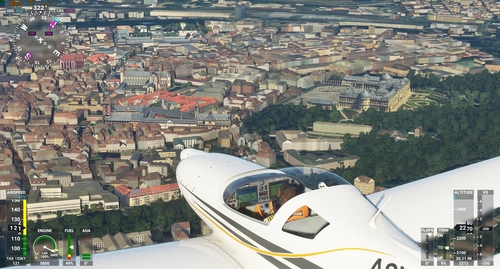
Wurzburg Castle , POI Landmarks Germany
Explore the iconic landmarks of Wurzburg, a city in Bavaria, Germany, including Wurzburg Residence, a UNESCO World Heritage site and the starting point of the Romantic Road. Discover the cultural and historical significance of this enchanting city along the Main river. Install this POI landmark add-on in your Community Folder and enhance your virtual flying experience.
by legofun1974 and Archer374
Philippine Ships Minor Scenery Enhancement
Enhance your simulator experience with the Manila Bay Minor Scenery Enhancement add-on, which introduces additional ships to Manila Bay in the Philippines. It also features Google Photo Scenery showcasing the ongoing construction of Bulacan International Airport and Pasay Land Reclamation. This add-on is compatible with both FS2020 and FS2024. Ensure to download the required dependencies for optimal performance.
by TurtleTank1997

Rarotonga, Cook Islands Coral Reef (Pacific Islands) | MSFS Water Mask
This add-on provides a custom water mask for Microsoft Flight Simulator, enhancing the visual representation of the coral reefs surrounding Rarotonga in the Cook Islands. The mod aims to improve clarity and vibrancy of the underwater scenery, offering a more immersive experience while exploring the area. An upcoming airport scenery add-on for NCRG Rarotonga International Airport is also anticipated, promising additional detail for pilots. Please note that the reef elevation may affect low-flying maneuvers due to simulator restrictions.
by KiwiFlightSim
Essen Werden/Heidhausen update & waterfix
This add-on provides an update for the Essen Werden-Heidhausen scenery in Microsoft Flight Simulator 2024, enhancing the visual quality of the surroundings. The update features improved shorelines, optimized textures, and better terrain integration for nearby bodies of water. Additionally, key roads have been added to enhance urban detail and authenticity. It is designed for VFR flights and exploration over the Ruhr region.
by Kroxen
Log in to join the discussion
Log InComments(105)
about 1 month ago
about 1 month ago
2 months ago
3 months ago
3 months ago
7 months ago
10 months ago
10 months ago
In parallel we'll work on beavon light effects and model updates in 2024.
about 1 year ago
about 1 year ago
You can load all beacons into Little Nav Map, and find the route you eant to follow.
In FS2020, you can follow the flashing beacons during day and night.
over 1 year ago
over 1 year ago
The old airmail routes were first flown along known routes, untill better navigation aids became available (radios/beacons) and planes that were capable to fly further and higher, and capable to carry the navigation equipment.
over 1 year ago
over 1 year ago
Love this add-on!
When extracting the latest update (4), I get an error message while extracting the downloaded file.
It says that the path for some (json ) files (couple of 4 or so...) is too long.
Anybody familiar with this error message?
Thanks in advance!
Regards,
Lars
over 1 year ago
Not realy sure what the issue could be. Could you try to extract in a different location and see if the 'too long path name' error persists? Or maybe the path to your community folder is long?
Can you let us know if it works?
Cheers, Rob
over 1 year ago
Now, I extracted to a new folder on my desktop, and now I didn't see that error message.
After that, I copy/paste that A.A.A. folder to Community folder and that worked.
I guess it's solved now... :-)
over 1 year ago
over 1 year ago
I do have a question. In the first set of routes, the airfields that were part of the original postal routes in the CSV file were marked with a white circle with 4 lines. The most recently added routes unfortunately lack those user points. The PDF describes that you have added a lot of nostalgic landing strips. How can I find them in the landscape or on the map?
over 1 year ago
We'll post a download soon.