

Description
NOT COMPATIBLE WITH SU14's NEW ASOBO SR22T G6 MODEL
ONLY WORKS WITH THE ORIGINAL ASOBO SR22 G2 MODEL not currently available
2020 Cirrus SR22-G6 Turbo - Carbon Edition with US registration N666AJ. V1.5
Version 1.5 Corrected the size of the Cirrus logo in the sides of the cowling.
Uses the "square" style logo with no text".
Version 1.4 Removed the "Pink interior" when seen from far away and further reduced the extra metallic shine to get the correct "Satin" look.
Version 1.3 Added the missing window trim and reduced the extra metallic shine introduced with update 5.
Version 1.2 Fixed compatibility issues with "Working Title" Garmin G1000 and Garmin G1000NXi mods not showing Eingine information.
Includes accurate exterior and propeller markings as well as custom interior.
Note that if in the selection screen the variant name (serial) is followed by (SVT) means that the real aircraft has "Sinthetic Vision Technology". This applies to all my SR22's.
In order to mantain accuracy as much as possible the serial number in the proper font is painted on the fuselage texture and therefore cannot be changed.
I hope you will enjoy flying this SR22 with a realistic look.
IIf you like my work and want to see more of it please consider a small donation. Click the PayPal.me button or just Buy me a Coffee, Thank you.
Sincerely.
Juan Alcala (RAV707 on flightsim.to)
2020 Cirrus SR22-G6 Turbo - Carbon Edition with US registration N666AJ. V1.5
Explore the 2020 Cirrus SR22-G6 Turbo - Carbon Edition with US registration N666AJ in this mod. Version 1.5 brings corrections, including adjustments to the Cirrus logo and interior details. Enjoy accurate exterior and propeller markings, as well as a custom interior for a realistic flying experience. (Note: Not compatible with SU14s new Asobo SR22T G6 model.)


Version History
Version 1.5 Corrected the size of the Cirrus logo in the sides of the cowling.Version 1.5 Corrected the size of the Cirrus logo in the sides of the cowling.
Related
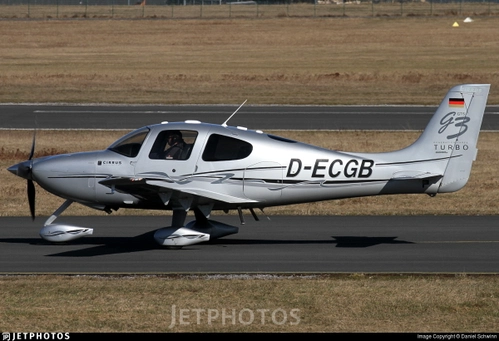
German Registered Cirrus SR22-GTS Turbo D-ECGB.
Fly the German Registered Cirrus SR22-GTS Turbo D-ECGB with this add-on, featuring accurate exterior and propeller markings, as well as a custom interior. Please note it is only compatible with the original ASOBO SR22 G2 model.
by rav707
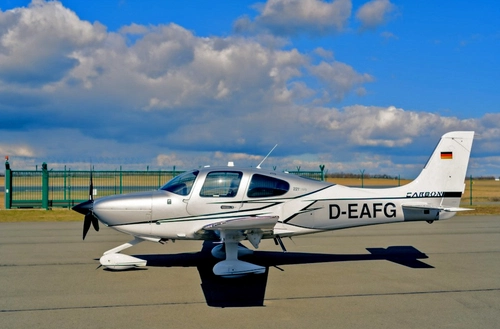
2018 Cirrus SR22-G6 Turbo - Carbon Edition with German registration D-EAFG. V1.3
Enhance your Microsoft Flight Simulator experience with the 2018 Cirrus SR22-G6 Turbo - Carbon Edition add-on featuring German registration D-EAFG. This mod includes accurate exterior and propeller markings, a custom interior, and various updates for realism, such as corrected logos and textures. Please note compatibility details and enjoy the detailed craftsmanship by Juan Alcala (RAV707).
by rav707
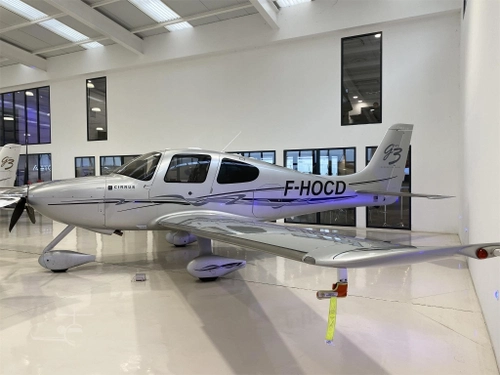
2007 Cirrus SR22 G3 with French registration F-HOCD.
Experience the detailed 2007 Cirrus SR22 G3 with French registration F-HOCD in Microsoft Flight Simulator. This add-on features accurate exterior markings and a custom interior for a realistic flying experience. Please note that it is only compatible with the original ASOBO SR22 G2 model. Fly with precision and immerse yourself in the world of flight simulation.
by rav707
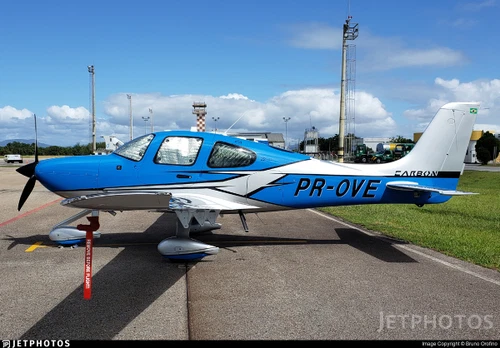
2018 Cirrus SR22-G6 Turbo - Carbon Edition with Brazilian registration PR-OVE. V1.6
Dive into the realistic world of aviation with the 2018 Cirrus SR22-G6 Turbo - Carbon Edition add-on, featuring Brazilian registration PR-OVE. Version 1.6 brings a fix for graphic issues near the wings leading edge, enhancing your flight experience with accurate exterior and propeller markings, custom interior, and more. Please note the compatibility details and enjoy your flight!
by rav707
Log in to join the discussion
Log InComments(12)
about 5 years ago
I cant get these liveries to work without displaying two tail numbers. When I turn off the "show tail number" option in the aircraft customization, it still shows on the aircraft. If I leave the tail number section blank, it shows anyway. If I leave the tail number section blank, AND ALSO have "show tail number" turned off, it shows anyway.
about 5 years ago
Hi SlowPokem, I can not understand why you're getting duplicate serials. The panel.cfg is set to not display the serial, the one in the "Aircraft.cfg is there just for ATC and cockpit display. The one outside the aircraft is painted on the texture. See my screenshots and check your installation. Also make sure you have installed version 1.2
about 5 years ago
Yeah, I had just downloaded the paints. I'll try again. I'll PM you a screenshot if it shows again.
about 5 years ago
I think I figured it out. If I had a tail number assigned, and typed into the tail number field on the aircraft customization page, it would show up, superimposed on top of the texture. even if I selected "show tail number" as "OFF". weird. But then I typed the tail number into the tail number field, but before closing the customization page i would use backspace on the tail number to clear it. For some reason this worked to allow ATC to use the tail number, but it did not show on top of the one included in the texture. I have no Idea why it works this way.
about 5 years ago
I don"t get it, but I,m glad you worked it out. As I said before the "Panel.cfg" had the size value for the exterior number set to 0 so no number other than the one in the texture should show?
about 5 years ago
Never mind... It stopped working as soon as I tried to get it to stop appending "heavy" to my callsign. First off, it won't stop doing it, second, as soon as I did that, I now get two tail numbers on the aircraft. using the aforementioned method to make it invisible does not work any more. I'm beyond fed up... Its such a shame, these repaints are really nice, but the fact I can't get them to work without some other nuisance is extremely frustrating. [EDIT] OK, I finally got that worked out as well at least for now LOL. I had to go into the CFG file and manually change the line "atc_heavy = 1 ; heavy?" to "atc_heavy = 0 ; heavy?" That seems to have worked for now. who knows about next time. Thanks for the help anyway, and these paints are really great if you can get them to display right and have ATC address you right at the same time. [EDIT again] So I restarted the sim, (and by the way this whole time I'm flying the yellow one, but each of these liveries does the same) After restarting the sim, I'm only getting one tail number visible which is good, but now my pilot and ATC refer to the aircraft as "En-two twenty-five-tee-el November two two five tango lima" - - It calls you by the tail number twice. once using improper phraseology, and once using proper phonetic alphabet. This is weird, and I don't know how to fix that. anyway, I'll just deal with it the way it is. lesser of the evils I guess.
about 5 years ago
I'm very sorry SlowPoke, I can not imagine what the problem may be. It should not be possible to have 2 registrations when the game registration size is set to "0" in the panel.cfg.
about 5 years ago
No worries. I like the paints enough to work with them to get then to display right and have ATC call them right. it just involves some work sometimes, but once its right its nice to fly with them. Admittedly though, I'm as puzzled as you. No one else seems to mention having these issues as far as I can see.
about 5 years ago
Love this. Great work! However, the interior turns pink when viewing from the exterior camera.
about 5 years ago
Thank you YESIMWHITE as per your comment on the interior I can only thinkh that there is something wrong with the installation?. The screenshots that I included were taken just an hour ago on an update 5 installation. They work perfectly with me, I hope you get it working.
about 5 years ago
Just finished a flight in N726DG. Looks like I have another option now, looks great!
about 5 years ago
Very nice work on these turbo editions! I'm looking forward to your future projects, thanks for sharing!