
Description
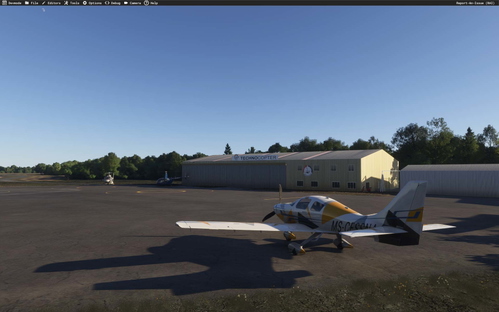
Total reconstruction of Angers-Marcé airport (LFJR) - Department 49 - FRANCE
The default version of MSFS is totally offset by more than 20 metres to the north and a few metres to the east!
This is due to the fact that the BingMap texture in this area of the Maine-et-Loire department is also offset.
Version 1.2:
Update of new locations and markings for parking spaces, taxiway lines and the Dash8 Civil Protection Zone.
Ageing decals in the parking area and main runway.
Complete fencing of the airport area.
Creation of a new aircraft parking area in the north-east zone and its associated hangar.
Correctly sized airport services for commercial car parks only.
Overhaul of the SSSI truck.
Complete renovation of the Espace-Air-Passion museum, the adjoining reserve hangar and the flying school's Algeco buildings.
Modelling of the interior of the museum.
Transparent glazing in the terminal.
Modelling of the interior of the terminal.
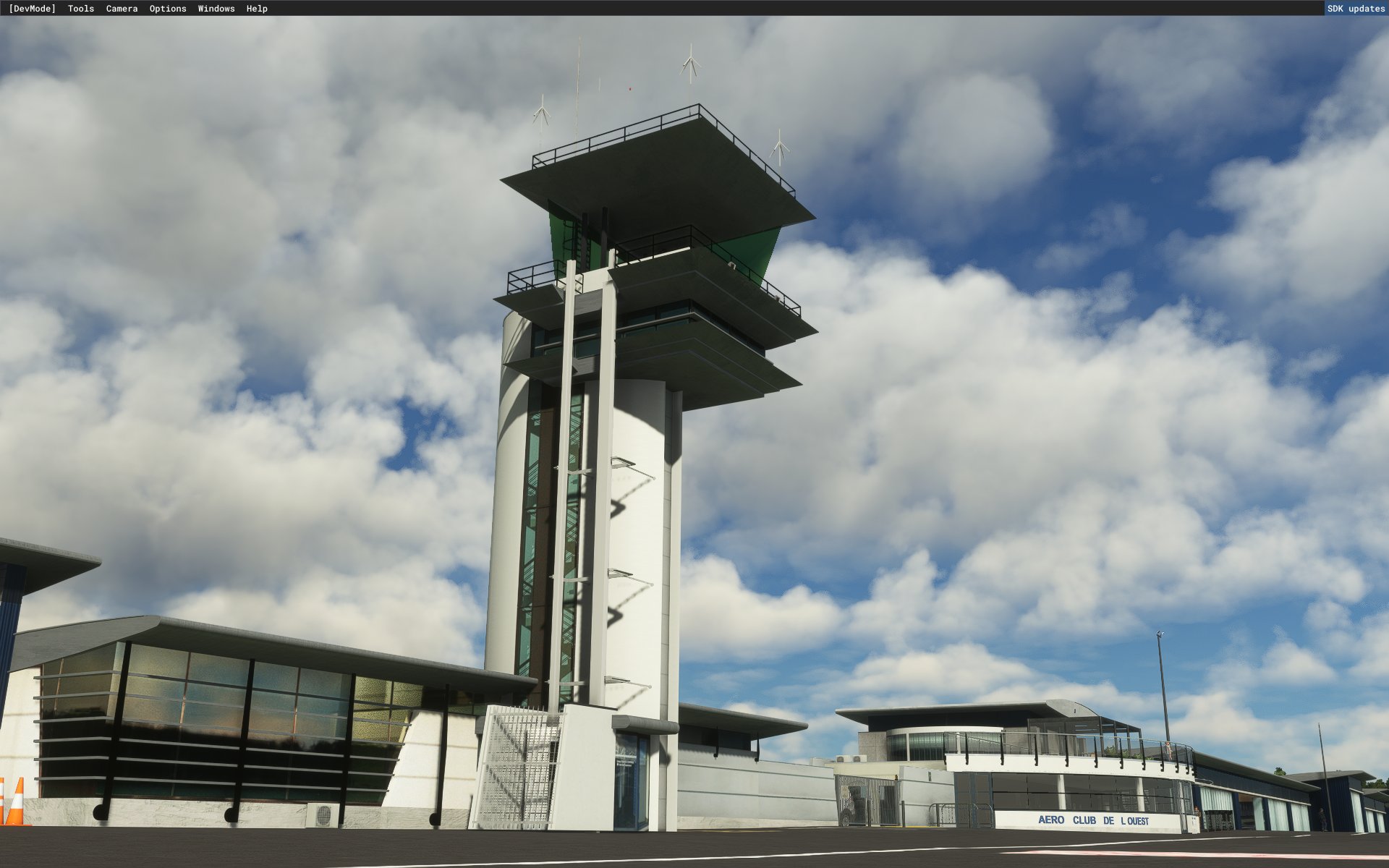
Transparent glazing in the control tower.
Modelling of the control tower interior.
Transparent glazing in the Club-House.
Modelling of the Club-House interior.
Optimisation and various corrections to the refuelling area.
Vector vegetation data for the photorealistic zone, corrected and processed according to IGN data.
Hangar doors open and close between 08:00 and 19:00 with variations for:
Espace Air Passion Museum.
Espace Air Passion taxiway access gate.
SSSI hangar + SIDES truck exit.
Vigie lift.
Aero Voltige Stampe Hangar doors.
ACAM hangar doors.
The mobile doors of these hangars or of the "Espace Air Passion" taxiway gate can also be opened by switching on the navigation lights.
Thanks to Denis Bouvet for the measurements of the club-house and his realization of the refueling area.
The download of "LFJR - ANGERS/Marcé - Aerial HR-01" is not optional.
The download of "LFJR - ANGERS/Marcé - Aerial HR-02" is not optional.
Installation:
Delete the directories previously installed in your "Community"
Unzip and install the new directories in your "Community".
Thanks to :
Microsoft
Asobo
Arno Gerretsen
MSFS Toolkit by Nool Aerosystems
Copyright: ftsxlw
ftsx.free.lw@gmail.com
Exclusively for free distribution and subject to the express authorization of the author.
Libraries to download:
https://fr.flightsim.to/file/17983/totof-helicopter-library-v1
https://fr.flightsim.to/file/17182/totof-aircraft-library-v1-1
https://fr.flightsim.to/file/17179/totof-library-object-v1-1
https://fr.flightsim.to/file/16930/pascal-s-library
https://fr.flightsim.to/file/12386/camper-library
https://fr.flightsim.to/file/5452/dave-s-3d-people-library
https://fr.flightsim.to/file/18392/vintage-aircraft-collector-library-v-1-0
https://fr.flightsim.to/file/12466/balisage-des-aerodromes-avec-pistes-en-herbe-marking-of-aerodromes-with-grass-runways
https://fr.flightsim.to/file/13290/turtletank-s-scenery-developer-objects-and-material-library
https://fr.flightsim.to/file/14024/windy-things
========================================================================================================================================================================================================================================================================================================================
LFJR - ANGERS/Marcé - Airport
Reconstruction totale de l'aéroport d'Angers-Marcé (LFJR) - Département 49 - FRANCE
La version par défaut de MSFS est totalement décalée de plus de 20 mètres vers le Nord et quelques mètres vers l'Est !
La cause étant due au décalage identique de la texture de BingMap dans cette zone du département du Maine-et-Loire.
Version 1.2:
Mise à jour des nouveaux emplacements et marquages des places de parking, lignes de taxiway, Zone Sécurité Civile Dash8.
Décals de vieillissement en zone parking et piste principale.
Clôturage total de la zone aéroportuaire.
Création du nouveau parking avion en zone nord-est et de son hangar associé.
Services aéroport dimensionnés correctement et uniquement sur les parkings commerciaux.
Refonte du camion SSSI.
Rénovation complète du musée Espace-Air-Passion, du hangar de réserve attenant et des Algeco de l'école de pilotage.
Modélisation de l'intérieur du musée.
Vitrages de l'aérogare traités en transparence.
Modélisation de l'intérieur de l'aérogare.
Vitrages de la tour de contrôle traités en transparence.
Modélisation de l'intérieur de la tour de contrôle.
Vitrages du Club-House traités en transparence.
Modélisation de l'intérieur du Club-House.
Optimisation et diverses corrections sur la zone avitaillement.
Données vectorielles de la végétation sur la zone photoréaliste, corrigées et traitées selon les données de l'IGN.
Ouverture et fermeture des portes de hangars entre 08h00 et 19h00 avec des variations pour:
Musée Espace Air Passion.
Ouvertures Portail d'accès taxiway Espace Air Passion.
Hangar SSSI + sortie du Camion SIDES.
Ascenseur de la Vigie.
Portes Hangar Stampe Aero Voltige.
Portes Hangar ACAM.
Les portes mobiles de ces hangars ou du portail du taxiway "Espace Air Passion" peuvent aussi être ouvertes par la mise sur marche des feux de navigations.
Merci à Denis Bouvet pour les prises de mesure du club-house et sa réalisation de la zone d'avitaillement.
Le téléchargement de "LFJR - ANGERS/Marcé - Aerial HR-01" n'est pas optionnel.
Le téléchargement de "LFJR - ANGERS/Marcé - Aerial HR-02" n'est pas optionnel.
Installation :
Supprimer les répertoires précédemment installer dans votre "Community"
Décompresser et installer les nouveaux répertoires dans votre "Community"
Merci à :
Microsoft
Asobo
Arno Gerretsen
MSFS Toolkit by Nool Aerosystems
Copyright : ftsxlw
ftsx.free.lw@gmail.com
Exclusivement pour diffusion gratuite et soumise à autorisation expresse de l’auteur.
Librairies à télécharger:
https://fr.flightsim.to/file/17983/totof-helicopter-library-v1
https://fr.flightsim.to/file/17182/totof-aircraft-library-v1-1
https://fr.flightsim.to/file/17179/totof-library-object-v1-1
https://fr.flightsim.to/file/16930/pascal-s-library
https://fr.flightsim.to/file/12386/camper-library
https://fr.flightsim.to/file/5452/dave-s-3d-people-library
https://fr.flightsim.to/file/18392/vintage-aircraft-collector-library-v-1-0
https://fr.flightsim.to/file/12466/balisage-des-aerodromes-avec-pistes-en-herbe-marking-of-aerodromes-with-grass-runways
https://fr.flightsim.to/file/13290/turtletank-s-scenery-developer-objects-and-material-library
https://fr.flightsim.to/file/14024/windy-things
Dependencies
Location
LFJR - ANGERS/Marcé - Airport
Total reconstruction of Angers-Marcé airport in France, correcting the default MSFS offset issue. Version 1.2 features updated locations, markings, and revamped airport structures including the museum, terminal, and control tower. Explore the enhanced details and realistic features of LFJR - ANGERS/Marcé - Airport.


User Reviews
7 reviews
Version History
Change Log - 1.16.0: Relief of the airport area from MNT-LIDAR HR-0.50 m/IGN 2025 Open Data. Addition and conformal modeling of the two new hangars in the eastern zone. Shelter and ILS antennas removed. Change of AFIS and A/A frequency to 124.705 mhz. This update for MSFS 2020 is the last one. MSFS 2024 is becoming very mature. The double and full compatibility, 2020 and 2024, requires too much time for a small freeware author while some payware studios only make small fixes... in other words...patches!!! I'm migrating all my scenes to MSFS 2024 with full compatibility. Change Log - 1.16.0: Relief de la zone de l'aéroport issue des données MNT-LIDAR HR-0.50 m/IGN 2025 Open Data. Ajout et modélisation conforme des deux nouveaux hangars en zone Est. Suppression des Shelter et antennes ILS. Changement de la fréquence AFIS et A/A: 124.705 mhz Cette mise à jour pour MSFS 2020 est la dernière. MSFS 2024 devient très mature. La double et pleine compatibilité, 2020 et 2024, demande trop de temps pour un petit auteur freeware alors que certains studios payware ne font que des petits fix... autrement dit...Des rustines !! Je migre toutes mes scènes vers MSFS 2024 en pleine compatibilité.
Related
LFOT - TOURS Val de Loire AB
Enhance your virtual flying experience with LFOT - TOURS Val de Loire AB add-on for Microsoft Flight Simulator. This detailed recreation brings to life the historic Tours Val de Loire airport, once home to the renowned "Christian Martell" fighter school. The latest version 0.9.6 includes ground, turn, and approach radio frequency corrections, taxiway markings, parking lights, static aircraft, road signs, and more enhancements. Explore this unique airbase and immerse yourself in its rich aviation history.
by ftsxfreelw
LFJR - ANGERS/Marcé - Aerial HR-01
Aerial High resolution add-on for LFJR - ANGERS/Marcé airport including 20 cm detail for the runway and surroundings. Features data sources from BD, ORTHO®, OpenData, IGN. Make sure to download the main file only due to a bug preventing deletion of old secondary files. Special thanks to Microsoft, Asobo, Arno Gerretsen, and MSFS Toolkit by Nool Aerosystems.
by FtsxfreeLW
LFOC - Base Aérienne 279 de Chateaudun
Explore the now closed Châteaudun Air Base 279, absent in MSFS, with this add-on offering 20cm resolution photo tiles. The ongoing development promises more 3D buildings and fixes for an immersive experience. Utilize the infrastructures of this historical French air base that has permanently shut down. Additional libraries are required for enhanced realism.
by ftsxfreelw
LFOT - TOURS Val de Loire AB for MSFS 2024
The LFOT - Tours Val de Loire add-on for MSFS 2024 provides a detailed recreation of the Tours Val de Loire airport, which previously served as the 705 air base for training French fighter pilots. This initial version includes reconstructed key facilities such as the terminal, Aero Club hangars, and a military control tower, along with updated civil parking markings and various antennas. Future updates are planned to enhance the accuracy of the airport and surrounding structures.
by ftsxfreelw
Log in to join the discussion
Log InComments(52)
over 1 year ago
about 2 years ago
Superbe travail !
Juste une précision : quand vous dites :
Le téléchargement de "LFJR - ANGERS/Marcé - Aerial HR-01" n'est pas optionnel.
Le téléchargement de "LFJR - ANGERS/Marcé - Aerial HR-02" n'est pas optionnel.
vous voulez dire que c'est obligatoire ?
Merci !
about 2 years ago
Exactement, car il s'agit de la texture haute résolution du terrain qui corrige le décalage de la texture bing de MSFS.
about 2 years ago
Merci pour votre réponse rapide !
almost 3 years ago
_ 1er '' \france-dpt-49-ftslw-lfjr-02-airport\scenery\global\scenery'', contient un fichier BGL et une directory texture, ok
_ 2e ''\france-dpt-49-ftslw-lfjr-02-airport\SimObjects\LandMarks'', qui contient cinq autres directories (lfjr-bloc-vigie, lfjr-eap, lfjr-eap-portail ...) contenant chacune : un modèle 3D et une directory texture, et le souci est que l'on retrouve certaines textures identiques (même noms) dans plusieurs de ces directories texture (ex : les textures 4k (base et PBR) ''LFJR_INOX'', se retrouvent dupliquées dans quatre des cinq directories de textures et ce n'est pas les seules textures ainsi dupliquées).
_ 4K ou 2k (LFOQ Blois est composé aussi de 2K 😊 ), chacun applique ce qu'il veut, pas de souci.
_ Perso, je continuerai avec mes textures ''FSX'', tout le monde n'ayant pas le budget pour l'achat d'un PC uptodate et grand écran de plus de 24pouces.
Bonne continuation dans tes réalisation de scènes
almost 3 years ago
almost 3 years ago
Qu'une scène possède plusieurs objets ayant la même textures rien de plus normal, là ou il y aurait un problème se serait si une même texture était dupliquée avec un nom différent, comprends-tu ? Après, pour la taille sur un HD des textures 4K et PBR effectivement c'est plus important, mais bon perso je ne suis plus à la disquette.
Pour les fps qui seraient selon toi implicitement impactées par manque d'optimisation, voici un comparatif vite fait:
LFJR en natif avec chargé le A320 Asobo Vue Extérieur =39 fps; avec ma scène =33 fps; donc, -6 fps pour une qualité en 4K, Aerial HR et Aerial 1m + le CityUpdate II pas loin !
LFOQ une de tes réalisations, en natif MSFS =43 fps, moins d'arbres à Blois et pas de ville en photogrammétrie comme ANGERS; avec ta scène et texture simple 1K voir moins, sans PBR =39 fps donc - 4 fps, voilà qui n'est pas fondamental !
Tu devrais essayer en 4k et PBR, tu verras c'est mieux, surtout pour l'avenir avec les écrans de plus en plus grands et les CG plus puissantes...C'est vrai que sur un 19/24 pouces sans se rapprocher des bâtiments la 1K ça reste convenable, ça reste le choix personnel du créateur.
La résolution de mes textures c'est un choix assumé de précision, et ce depuis longtemps dans toutes mes créations, essaye de faire de même si tu disposes de bonnes textures, car cela n'impacte vraiment que très peu les fps et puis la qualité FSX si tu peux, laisse tomber.
MSFS à un moteur 3D très performant, n'en déplaise aux contradicteurs et esprits chagrins habituels, certains il y a trois ans lui prédisant le pire et maintenant ils en font du commerce, je rigole... il peut simplement être capricieux de temps en temps.
Je suis curieux d'avoir ta démonstration technique sur le calcul d'utilisation des textures, pour l'instant je trouve ça confus, mais des fois que j'aurais loupé quelque chose je suis tout ouï !
almost 3 years ago
Pour mon PC, j'estime avoir une config vieillissante: I7 4790K-16Go/SSD/2060super 8Go.
almost 4 years ago
MAGNIFIQUE, MERCI BIEN!! (I did not know, that I can speak french... :-) The genious programmer with the very interesting name Fftsxfreelw is absolutely right: "Why make it easy, if you can do it also in a complcated way??" Thanks to God / after an hour or so / I succeeded and now I am absolutely happy with that beautiful scenery! Kind regards from Absurdistan (the Ex-Republik of Austria) - Laszlo
about 4 years ago
Bonjour
Procédure d'installation très confuse. Pour une première installation, merci d'indiquer la liste exhaustive des fichiers à installer, dans l'ordre, avec leurs noms complets.
over 4 years ago