
Description
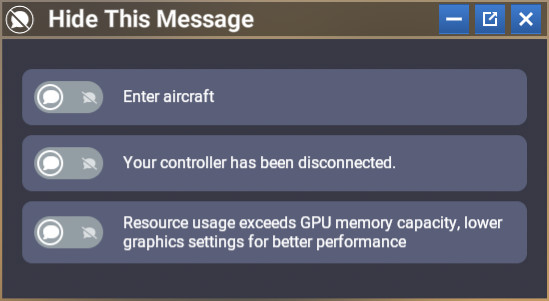
Discover Hide This Message, a custom module designed to enhance your flying experience by allowing you to easily hide annoying or repetitive notifications in the Microsoft Flight Simulator 2024 interface. With a simple and intuitive UI, this module provides a dedicated system to enable or disable specific messages.
- Only hides targeted messages — the original interface remains untouched.
- Once configured, there’s no need to reopen the panel: your messages will be automatically hidden every session.
- Works in free flight as well as in all other activities — configure it once in freeflight, and your preferences will apply everywhere.
- Messages displayed in the panel are automatically translated into your language (as long as the translation exists in MSFS 2024).
This module is designed for users who want to fully customize their HUD and remove unnecessary notifications to enjoy a cleaner, more refined, and more immersive visual experience.
Installation: Extract Deel_HideThisMessage into your Community folder.
And of course, additional messages can easily be added in the future to expand the module’s capabilities.
Even if the messages disappear, you will still get the audio notifications, and unfortunately there’s nothing I can do about that.
So for now, the only way to avoid hearing them is to set the ‘User Interface’ volume to 0 in the audio settings.
New V1.1.0 :
Added support for detecting and hiding 2 new messages:
- “Bandwidth too low, loading times may be extended and world streaming degraded”
- “Error accessing live air traffic data, retrying...”
New field for custom messages
You can now add your own messages to the list of messages to hide.
Simply type the message you are looking for in the new input field. A list of matching messages will appear automatically as you type.
When you see the message you want to hide, simply click on it. It will automatically be added to your list of hidden messages.
You can then:
- remove a message from the list at any time;
- disable hiding for a message without removing it;
- re-enable hiding whenever you want.
Please note: this feature only works with messages that appear as popups on the right side of the screen. Other types of notifications or simulator messages are not affected.
Hide This Message
Hide This Message is a custom module for Microsoft Flight Simulator 2024 that enables users to conceal specific notifications within the interface, enhancing the overall flying experience. It features a user-friendly design that allows for easy activation or deactivation of targeted messages, while keeping the original interface intact. Once configured, the module will automatically hide selected messages in all game modes without needing to reopen the settings. Additionally, it supports automatic translation of messages based on the users language settings.

Supporters

User Reviews
16 reviews
Version History
New messages that can be hidden Added support for detecting and hiding 2 new messages: “Bandwidth too low, loading times may be extended and world streaming degraded” “Error accessing live air traffic data, retrying...” New field for custom messages You can now add your own messages to the list of messages to hide. Simply type the message you are looking for in the new input field. A list of matching messages will appear automatically as you type. When you see the message you want to hide, simply click on it. It will automatically be added to your list of hidden messages. You can then: remove a message from the list at any time; disable hiding for a message without removing it; re-enable hiding whenever you want. ***** Please note: this feature only works with messages that appear as popups on the right side of the screen. Other types of notifications or simulator messages are not affected. *****
Related
Nameplate custom color
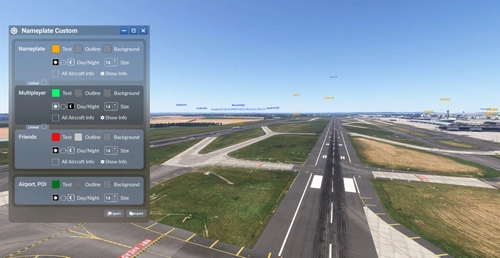
This add-on introduces the ability to customize nameplates in Microsoft Flight Simulator 2024, allowing users to change text colors and backgrounds. It features real-time updates without the need to restart the simulation and can differentiate nameplates for friends or contacts. Additionally, nameplates automatically adjust size for improved visibility when close to other aircraft, with plans for future enhancements based on user feedback.
by GizmoDeel
Launch Any Executable File
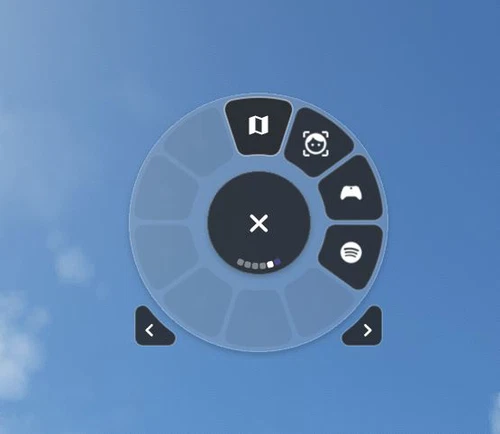
Launch Any Executable File is a convenient widget allowing you to easily launch any executable application on your PC, such as little nav map, open track, or vlc. With the ability to customize the name, path, and icon of the application, this tool provides flexibility and ease of use. Automate the launch process and seamlessly open and close your preferred apps with just a click. Please note that Flow Pro is required for this addon.
by GizmoDeel
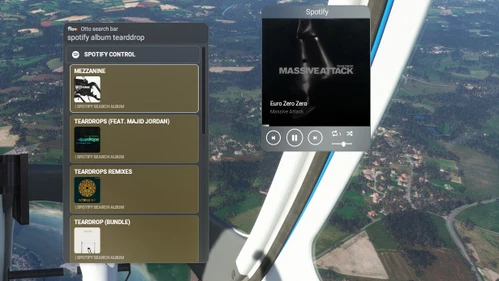
Flow Spotify Control
Control your Spotify music seamlessly while flying with this widget. Premium Spotify account required. Play/pause, skip tracks, adjust volume, and more. Search for artists, albums, playlists, and enjoy your favorite tunes during your flight. Check documentation for setup instructions.
by GizmoDeel
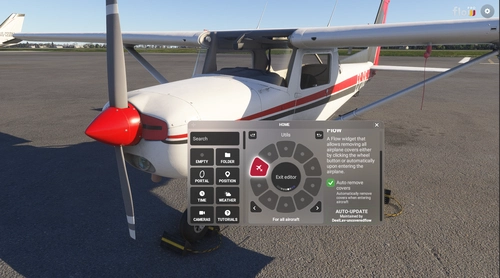
Uncovered Flow
Uncovered Flow is a Flow widget for Microsoft Flight Simulator 2024 that streamlines the management of aircraft protective covers, including pitot covers and engine inlets. It features one-click installation and removal of all covers, with an automatic removal option upon entering the aircraft. The add-on provides clear visual feedback regarding the status of the covers and ensures functionality is limited to compatible aircraft specifically designed for MSFS 2024.
by GizmoDeel
Log in to join the discussion
Log InComments(54)
about 1 month ago
EFB
You can also see the EFB through the panel menu
I did try manually adding it but nothing comes up when I start typing. Thanks
about 1 month ago
Can you send me a screenshot of the message, or at least tell me where it appears?
about 2 months ago
2 months ago
2 months ago
2 months ago
I've tested it on the latest beta version on my end. The message is well hidden. Which version are you using?
about 2 months ago
2 months ago
2 months ago
I've tested it on the latest beta version on my end. The message is well hidden. Which version are you using?
2 months ago
3 months ago
4 months ago
4 months ago
4 months ago
4 months ago
5 months ago
EFB
YOU CAN ALSO SEE THE EFB THROUGH THE PANEL MENU
4 months ago
5 months ago
6 months ago
7 months ago
so for those who face similar issues, remove the other program and only use this..
great job.. hate seeing that message whenever my vr controller goes to sleep..