
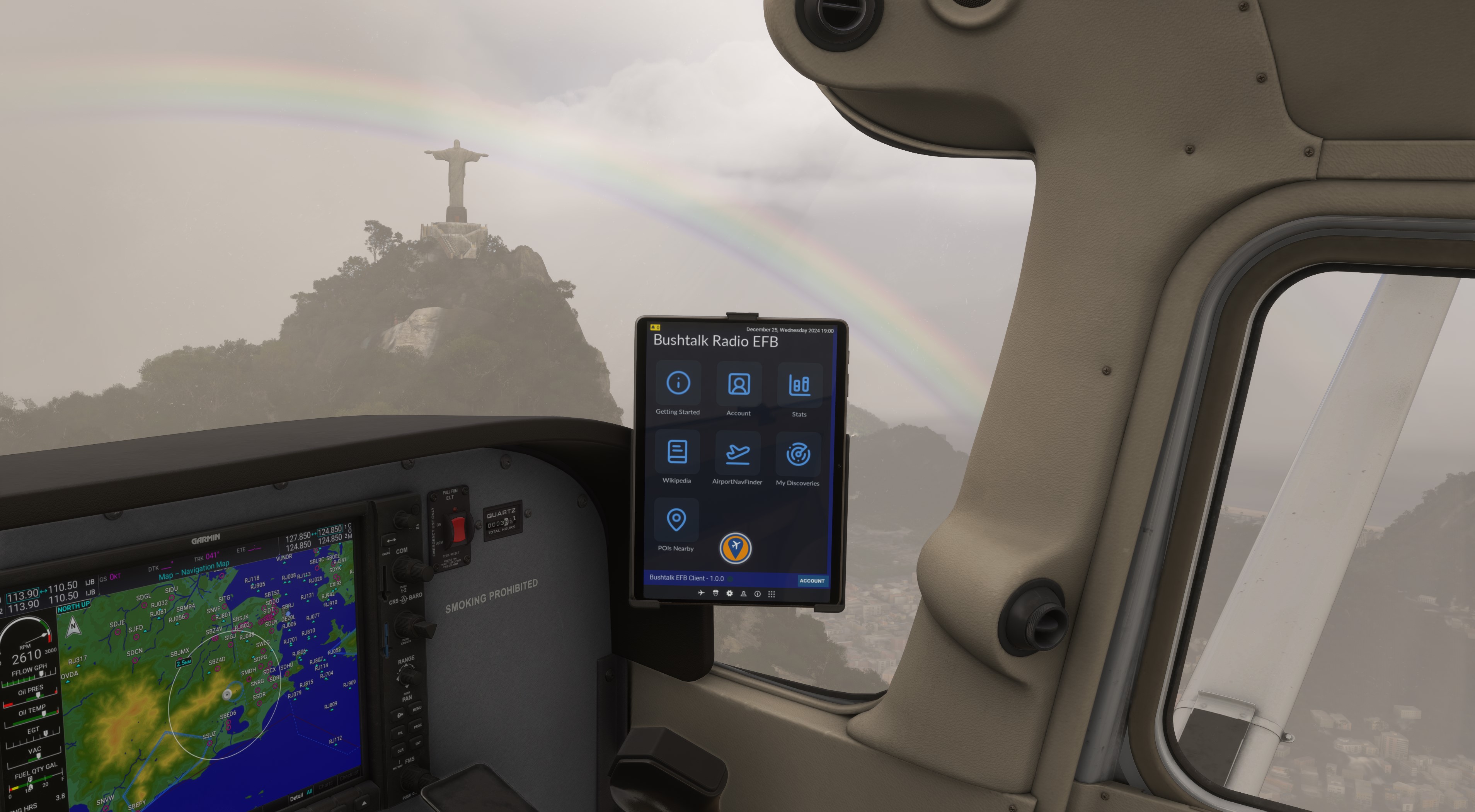
Description
Bushtalk Radio
Transform Microsoft Flight Simulator into a world adventure with Bushtalk Radio – your virtual passport to the world's most fascinating stories, all from the cockpit!
Bushtalk Radio is a community driven project with the aim to fill the world of MSFS 2020/24 with thousands of interesting landmarks, POIs and local radio stations! Each POI has a unique audio tour that is automatically played based on your in-game location. Here's a video of how it works in practice by ObsidianAnt.
Join our Discord to keep up with new features!
Features
- Discover 25,000+ locations each with an audio tour that is automatically played on arrival (English, French, Spanish and German)
- Immerse yourself in local culture by tuning in to 10,000+ radio stations
- Use our scanner to discover new POIs that can be published for others
- Leaderboards to keep track of your explorer and visitor stats
What is it?
Bushtalk Radio is a community driven project with the aim to fill the vast world of MSFS 2020/24 with thousands of interesting locations and local radio stations. Each location will have an audio tour that will automatically play as you approach it. We have audio tours for all 25,000+ in-game POIs (including World Updates) as well as thousands of community submitted content with more being added every day: mountains, skycrapers, volcanoes, historical battles or a random bit of local trivia - there's something for everyone.
Users can submit new locations or discover it using our Discovery Scanner. Once you find a location to submit, just write an interesting, witty script and we'll create the audio tour for you. Not the creative type? Autogenerate one with our Wikipedia Import tool, we won't judge you. We want to introduce players to amazing locations around the world. Add them as part of your next bush trip or fly aimlessly and stumble into something special.
Geting started with Bushtalk Radio
- Make an account at https://bushtalkradio.com and log in. Make sure this browser window stays open (do not minimise it) as the audio tours are played through your browser in the background.
- Download this client and drag and drop the folder into your Community folder
- Download Bushtalk Radio Landmarks pack and drop the folder into your Community folder. This will allow you to see the POIs in-game and will be updated monthly with the latest community submissions. This isn't mandatory but it helps.
- Once in your cockpit, open the Bushtalk Radio client from your EFB (MSFS 2024 only) or your cockpit toolbar (MSFS 2020) and log in. You are now tuned in to Bushtalk Radio. Please note that for MSFS 2020, toolbar windows cannot run in the background so you will have to keep this window open/minimised.
- Look for places you want to explore on our website, we tell you the most convenient airport to depart from, or make your own bush trip! The audio tours will play automatically as you approach a landmark.
I love the idea! How can I support the project?
Help us by creating as many high quality landmarks with well written audio tours. You can also help by promoting the project to fellow flightsimmers. Finally, if you really love what we're doing then help us pay for server costs. Any amount is welcome.
(MSFS 2020 only) Is there a way to remember credentials when I first start the sim?
Navigate to the file: \bushtalkradio-bushtalk-toolbar-client-2020\html_ui\InGamePanels\BushtalkClient\CustomPanel.js
Open in notepad
Add your credentials in between the double quotes as instructed
Once you start the game, open the client from the toolbar. It should login automatically.
Bushtalk Radio EFB Client: Audio tours and local radio from your cockpit
Explore the world of MSFS2020/24 with Bushtalk Radio, offering audio tours for thousands of interesting locations and local radio stations. Connect from your cockpit to discover national parks, islands, volcanoes, and more, with the option to create custom locations and scripts for a personalized experience. Stay tuned in to Bushtalk Radio as you fly, unlocking new adventures and hidden gems in every journey.


User Reviews
43 reviews
Version History
2.0.1 - Includes hotfix for 2024 EFB (1.0.1) to allow usage of Discovery Scanner within the EFB. MSFS 2020 users can ignore this
Featured in Collections(3)








Related
Bushtalk Radio Audio Landmarks: 20000+ POIs for MSFS 2020/24 and LittleNavMap
Discover over 20,000 audio POIs (English, French, German, Spanish and Italian) for Microsoft Flight Simulator with Bushtalk Radio. This community-driven project offers unique audio tours for each point of interest, bringing a virtual tour guide experience to your flights. Easily view custom POI markers in-game and in LittleNavMap, with monthly updates including new submissions from the community. Explore the world like never before with Bushtalk Radio.
by BushtalkRadio

Bushtalk Radio Liveries - Cessna 208 B
This add-on provides a livery pack for the Asobo Cessna 208B Grand Caravan, created for the Bushtalk Radio community. It features seven original designs ranging from clean, classic looks to detailed and rugged appearances with unique decals and retro styling. The liveries cater to different bush flying preferences, including themes such as topographic maps and travel stickers. Compatible with both MSFS 2020 and 2024.
by Bushtalk
Log in to join the discussion
Log InComments(196)
3 months ago
6 months ago
Okay, sorted. Didn't realise I needed to open the EFB tab. Duh!
7 months ago
9 months ago
The new map misses the OpenStreetMap topo layer, I wonder why.
8 months ago
8 months ago
I do still see occasional "EFB Connection Lost" messages on the bushtalkradio windows app. However, upon opening the EFB app, connection is alive. I don't know if has something do do with sim's "stutters", but the message and ding appear even if the game is running smoothly.
Also, the active pause is enabled, the aircraft symbol keeps progressing on the map.
Audio tours are now autoplayed upon entering range, despite the previous one is still playing.
I do miss the street/topo map layers.
8 months ago
8 months ago
9 months ago
8 months ago
9 months ago
8 months ago