Flightsim.toFlightsim.to
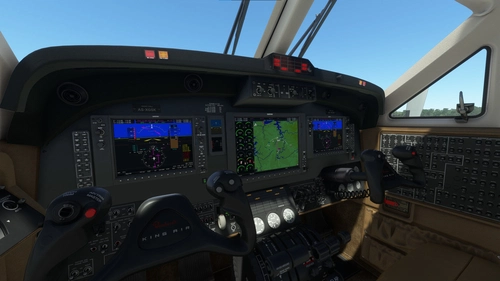
    King Air 350 Pro Line 21 Mod - Image 1

    Description

    A cockpit mod that swaps out the default King Air 350's screens for Working Title's WT21. If you like flying the King Air but hate the default G3x avionics, this mod is for you. Comes with 2 PFDs, MFD, basic RTU radio tuner and FMC

    Installation:

    • Extract zip
    • Copy folder "husk-PL21-kingair" into community folder

    This mod will replace the cockpit model of the default aircraft.

    **WARNING: MOD IS NOT COMPATIBLE WITH G1000 COCKPIT MOD. REMOVE G1000 MOD BEFORE USE**

    Known issues:

    Some add-on liveries are incompatible
     

    Microsoft Flight Simulator © Microsoft Corporation. King Air 350 Pro Line 21 Mod has been created under Microsoft's "Game Content Usage Rules" using assets from Microsoft Flight Simulator, and it is not endorsed by or affiliated with Microsoft.

    Comments(120)

    Log in to join the discussion

    Log In

    4 days ago

    Good day sir, is there a way to have the default, and this one installed at the same time? IE pick a Proline variant or a default variant in the config screen? If I bring the 2020 version into 2024, using the fix below, do I end up with two King Air 350’s?

    about 2 months ago

    otimo mod, devia ser feito para o b200 da carenado!

    3 months ago

    Thank you for your work.
    One question, is there a way to display the V speeds on the pdf's speed band?

    4 months ago

    Is there anyway to integrate TDS GTN into this?

    5 months ago

    I never expressed my great appreciation for the developer of this mod, so - thanks! It's awesome!

    5 months ago

    Tips for those who want to use this mod in MSFS 2024:

    If you simply copy it to the Community folder like other mods, the King Air will look strange, like an airplane from hell.

    However, if you copy MSFSLayoutGenerator.exe into the mod folder and drag the layout.json file onto it, the mod will be updated and become usable in MSFS 2024.

    Ah, I forgot one thing. You need to find the King Air files from 2020 and copy them to the 2024 Community folder. This is because the mod won't work with the King Air built into 2024 by default.

    4 months ago

    How can I do this? Where I find the "MSFSLayoutGenerator.exe" for this specific mod?

    6 months ago

    Thank you for this amazing add on. It takes some time knowing this system, but it contains everything you need. Makes flying wayyyy more realistic

    6 months ago

    Wow this mod makes the King Air 350i much more enjoyable to fly! I would like to be able to download my Simbrief flight plans into the FMS but I'm not finding where or how to do that in the FMS. How can I get to the screen where I can enter my Simbrief Pilot ID (6-digit) number i.e. what sequence of keys to press?

    5 months ago

    IDX->NEXT->SETTINGS
    you can find

    10 months ago

    Any updated comment about FS2024 compatibility.?

    10 months ago

    @AwesomeBlack
    Press the REFS button (1) and use the LSKs (2) to select the corresponding REF. Use the rotary knob (3) to change the value, and press the rotary knob to set the value. On the second REFS page (press REFS again), there are additional settings regarding units, warnings, and the Flight Director.

    10 months ago

    looks amazing! But is it possible to set takeoff and landing refs? cant seem to find an option for that page on the MFD

    11 months ago

    A truly awesome add-on!!! I only fly with it now! It simply feels more realistic – and the ProLine 21 has often been installed in real aircraft.

    What I would really like, though, is a pop-out function for the ND. Reason: It's almost impossible to display the FMS and the ND simultaneously, for example, to check the individual route points one after the other (with MFD ADV-->NEXT WAYPOINT). The view in the attached picture is the best I can do ... but with small buttons and small ND). Interestingly, this popout-function works with the CJ4. Perhaps the effort to implement this is manageable?

    12 months ago

    VERY NICE WORK!!!!! please would be amazing if you do the same wIth CJ3+, turning it into normal CJ3 with pro line!!!! God bless you!!

    11 months ago

    Why not just fly the CJ4? It doesn't make much sense to derive a CJ3+ from the CJ4 and install a G3000 (and add some additional gimmicks) and then install a ProLine 21 again, does it ? The only reasen would be that you like the cabin more...but there is also the very good wooselmod for the cj4 😊

    12 months ago

    Any updated comment about FS2024 compatibility.?

    about 1 year ago

    Is this mod compatible with TDSsim GNTnxi software?

    about 1 year ago

    MSFS2024

    hi all, i get always engine errors after Airstart (L-Oil Press/ R-Oil Press), King Air analog not working with MSFS2024?
    MSFS 2020MSFS 2024

    King Air 350 Pro Line 21 Mod

    Enhance your King Air 350 cockpit experience with this mod by Working Title, replacing default screens with WT21 avionics. Includes 2 PFDs, MFD, RTU radio tuner, and FMC. Note: Not compatible with G1000 cockpit mod.


    Downloads3K
    Version1.0
    File Size22.86 MB
    Published1 year ago
    Updated1 year ago

    User Reviews

    4.9

    38 reviews

    5
    95%
    4
    3%
    3
    3%
    2
    0%
    1
    0%

    More Information

    Simulator
    MSFS2020

    Version History

    No version history available.

    Related