
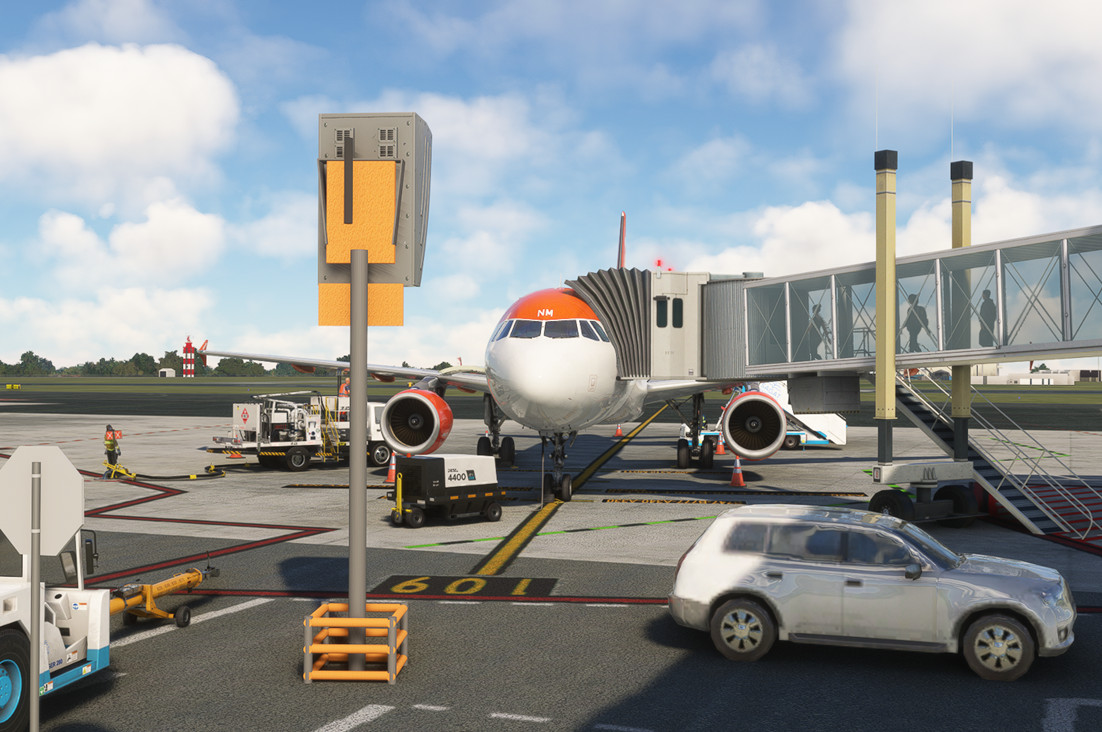
Description
- GSX PRO profile for LIMF Turin Caselle. Scenery from BMA :BMA - https://flightsim.to/product/torino-airport-limf
- Now updated to version 1.3 for the BMA scenery which has completely new gates
As always: When you spawn at a gate go to "Reposition Aircraft" > "Reposition here at current gate" in order to have the correct parking position.
Including:
- Stand 100-113 (108-113 with GSX VDGS APIS)
- Stand 201-203
- Stand 501-507 (self-maneuvering)
- Custom pushbacks at all stands where pushback is required for A/C with wingspan 24m+. Taxiway M only facing south.
- Passenger walking routes visible from terminal through all jetways.
- Stand 106-107 passenger walk-in from terminal, 100-105 and 501-507 buss only.
- Remote De-ice: Located in the south end of Main apron. Stand 204 is configured only as remote de-ice stand ICE1!
Installation: Extract the .zip file and move the .ini file to %APPDATA%\Virtuali\GSX\MSFS
Known issues:
- None so far but please report any issues!
Tested with PMDG 737 and Fenix 320.
Comments(10)
Log in to join the discussion
Log Inabout 1 year ago
about 1 year ago
about 1 year ago
GSX Profile - LIMF Turin Caselle - Barelli
GSX Profile - LIMF Turin Caselle - Barelli provides detailed GSX PRO profiles for Turin Caselle Airport, featuring correct parking positions and passenger walking routes visible from the terminal. This add-on includes custom pushbacks, self-maneuvering stands, and a remote de-ice location. Users can easily install the profiles and enjoy a realistic airport experience, tested with popular aircraft models.

More Information
Version History
New ini-file to match Scenery update 1.3
Related
GSX Profile - LIBR Brindisi - Supersonic
This GSX PRO profile is designed for LIBR Brindisi Casale Airport, featuring a fully updated version 1.4 that accommodates a redesigned main ramp. The add-on includes custom pushback routes for all stands and passenger walking routes to enhance realism. Users are advised to reposition their aircraft upon spawning at a gate for optimal functionality. Installation requires moving the provided .ini file to the specified directory.
by cejoh
GSX Profile - LIRI Salerno Costa d'Amalfi Airport Freeware
This add-on provides a GSX profile for the freeware LIRI Salerno Costa dAmalfi Airport, enhancing ground services for a more immersive experience. It features completed stands 103 and 104 with walk-in passenger services and customized pushback procedures. For proper functionality, users should reposition their aircraft at the designated gates. Installation requires moving the provided .ini file to the appropriate GSX directory.
by cejoh
GSX Profile - EDLW Dortmund - Aerosoft
This GSX Pro profile is designed for the Aerosoft EDLW Dortmund scenery, requiring GSX Pro version 3.9.4 or later. The profile offers a complete overhaul with custom vehicle placements, pushback procedures, and walking routes for all stands. Stands 0-4 feature GSX VDGS APIS integration, while stands 5-12 include tailored push-in operations. The addon is tested with both PMDG 737 and Fenix 320 aircraft.
by cejoh

GSX Profile - LFBI Poitiers - Sierrasim
This add-on provides a GSX PRO profile for LFBI Poitiers - Biard Airport, enhanced by Sierrasim scenery. It features self-maneuvering stands P3-P5 and passenger walking routes for optimized ground handling. The profile supports the scenerys release version and requires specific installation steps to ensure correct functionality. Compatibility has been tested with aircraft such as the PMDG 737 and Fenix 320 in MSFS 2020.
by cejoh

about 2 months ago