
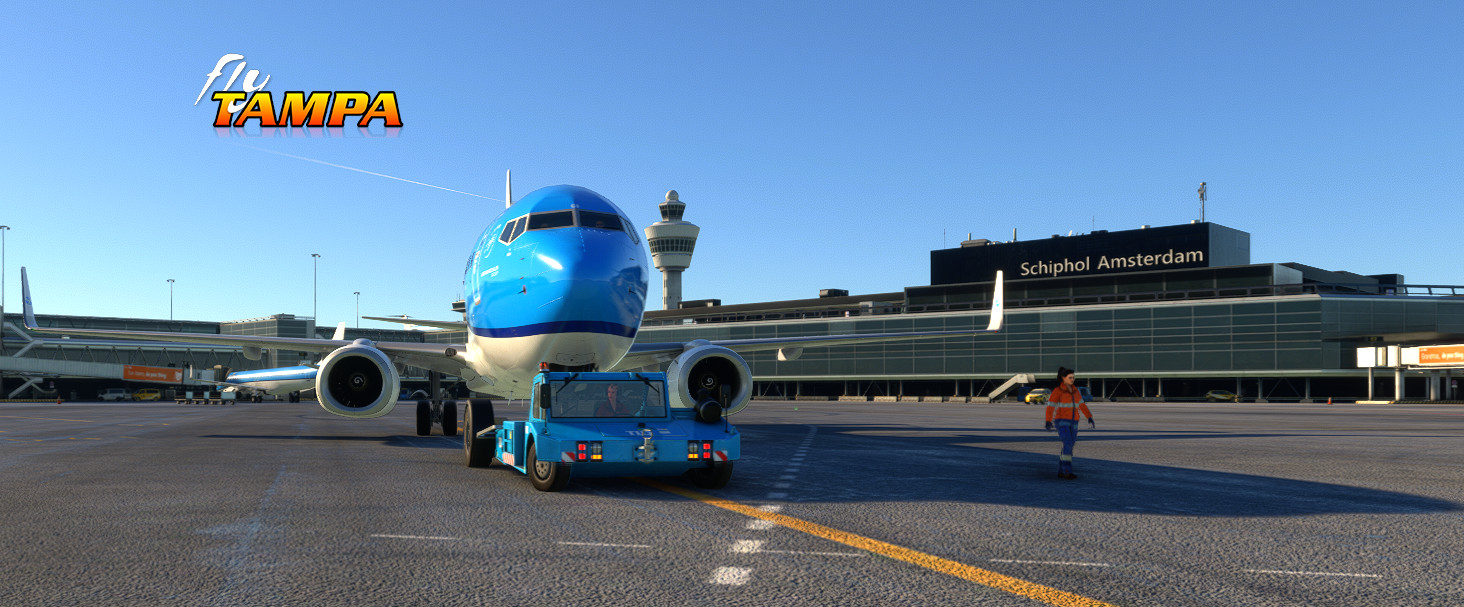
Description
Official Flytampa GSX Pro profile for flyAmsterdam for Microsoft Flight Simulator: https://www.flytampa.org/eham.html
Current version: v1.11 (16 May 24)
- tweaked some pushback routes gates
- added a few K apron stands
- py file coding for faster and robust error handling of wrong aircraft cfg files
Changelog GSX Pro SPL 1.10:
- GSX Pro Push and Pull function: lot of gates and routes changed according real life gates with push and pull
- H gates added push and hold routine to vop G71 stand
- Added taxi line number in pushback or push pull description for ATC convenient
- Added and changed=< Cat4 into Medium and Cat5 into => Heavy into the description
- Added FSS 190/195 and the inibuilds A300 placements at AMS
- Added compatibility drag and drop installer from https://elevatesolutions.live/DDI_pages/DDIOverview/
- Removed Schengen in sorting menu GSX
- More logical and simplified grouping in GSX menu for faster navigation
- Small tweaks
included in this profile
GSX Pro profile for MSFS 2020 flyAmsterdam:
-
Make sure to have updated GSX Pro to version =>2.9.0(update for push and pull)
The profile consist of two files:
- eham-flytampa.ini (GSX profile definition)
- eham-flytampa.py (GSX Python script for complex GSX procedures)
Two methods to use one manual install and a second one via a great drag and drop installer:
- Method one:
easy and fast: https://elevatesolutions.live/DDI_pages/DDIOverview/ - Method two:
copy those two files to the following directory:
%appdata%\Roaming\virtuali\GSX\MSFS
Make sure to remove any other GSX profiles *EHAM*.* in the name from that particular directory.
So you end up with only the two files above with eham-flytampa in the name.
What will you get with eham-flytampa profile:
Almost 99.9 % close to real life.
- logical placement of GSX ground vehicles
- 100% pushback as in real life with correct stop positions and pushback routes
- VDGS TS-24 with Simbrief integration
- agnis papa stands
- airline companies at the correct gates / stands
- handling and catering at the gates / stands as per real world
- custom stop positions per aircraft type at the gates / stands as per real world
- custom naming terminals (pier) and grouping for better navigation at Schiphol
- pax routes in terminals
- pax routes jetways
- remote deicing which are currently located at P10/P12/P14/P16 at Schiphol
- G71 is the remote deicing for the H gates (with special pushback routine)
- wingspan per gates/stands as per real world
Tip: starting at the gate or stand choose via the GSX menu in MSFS reposition aircraft and then reposition at current gate, your aircraft will be placed at the correct stop position at the gate/stand SPL .
Tip: pushback procedure H gates in case of deicing choose no deice at the H gates and choose pushback VOP G71 when arrived finish the push by starting the engines.
Then choose the deicing procedure via the GSX menu.
Which apron and terminals are done:
- A: Platform
- B: Pier
- C: Pier
- D: Pier
- D: Platform
- E: Pier
- E: Platform
- F: Pier
- G: Pier
- G: Platform
- H: Pier
- J: Platform
- R: Platform
- S: Platform
- P: Deicing platform
The following aprons aren’t done because they are used in real life as buffer overflow stands (so only towing and parking allowed at those stands nothing else) now with push and pull to gate later in a GSX Pro update this profile will be updated when available.
U: Platform M: Platform L: Platform K: General aviation and maintenance stands
In general you will see in the pushback description which direction the aircraft is facing and the taxi line number after pushback and if there are multiple options for =< medium (cat 4) aircraft types and => heavy (cat5)
You will see also VOP which means in Dutch “vliegtuigopstelplaats” translate to “aircraft stand”
To help you with the different aircraft types that visit Schiphol on a regular base see below:
- CAT1: Do328, EMB120, Saab340. All AIRCRAFT F/T MAX wingspan 24m
- CAT2: ATR42/72, CRJ100/200, EMB135, Saab 2000
- CAT3: B737-300 F/T B737-500, BAe146-200/300,CRJ700-900, Q400,EMB145, EMB170 F/T 190, F100
- CAT4: A318 F/T A321, B737-600 F/T B737-900, B737MAX8 F/T10, CRJ1000, A220-100/300, EMB195 (E2)
- CAT5: A310-300, B757-200
- CAT6: A300-600, B757-300, B767-300(ER)
- CAT7: A330-200/300, A340-300, B767-400, B777-200(ER), B787-8 F/T.10
- CAT8: A340-600, A350-900/1000, B747-400, B777-200LR/300(ER), A330-900, A330-800
- CAT9: A380, AN124, B747-8
This file is based on the real world with the help of groundcrew and airman.
Special thanks to Filipe for his invaluable information and knowledge of SPL.
Hope this one will do the beauty from Emilios and Yannis Flytampa Amsterdam justice.
Six more tips to share:
- Make sure to check weekly via the FSDT installer if there are GSX updates and after running and update choose always the config option and to exclude jetways for 3e party.
- Before starting, make sure to update GSX to the latest version.
- Great community and discord server regarding GSX Pro and profiles and tips and tricks make sure to check it out : GSX discord community server
- Drag and drop installer (https://elevatesolutions.live/DDI_pages/DDIOverview/)
- Names Schiphol “Platform” is Dutch for Apron and “Pier” for Terminal
- If you want to avoid all VDGS loading but just the active user aircraft change this line disable_static_docks = 0 to 1 in the eham_flytampa.ini file enabled by default
Enjoy the virtual skies fellow simmers with flyAmsterdam for MSFS
GSX files and programming made by virtualstuff
Older version history:
Changelog GSX Pro SPL 1.09
- Handlers and Catering companies adjustments
- D Platform adjustments pushback trucks
- A Platform added stop positions in the PY file for the Ejet family (FSS 170/175)
- A Platform adjusted stop positions
- H Pier Menzies default handler
- Gate letter also added in description of the GSX Menu
- Small tweaks
version: v1.07 (10OCT23)
Changelog 1.07 GSX Profile for Flytampa Amsterdam:
- All gates/stands are adjusted and more tweaked and aligned with the scenery center lines
- Few stop positions also corrected
- Catering KLM_White primary at those gates and KL removed
- Adjusted stop postions for C-Pier and D Pier where missing and added for the PMDG 737-6/7/8/9
- Manual text added and adjusted for the option item tips added
release version: v1.05 (8OCT23)
Official Flytampa Amsterdam (EHAM) GSX Pro profile
Enhance your ground handling in Microsoft Flight Simulator with the official Flytampa Amsterdam (EHAM) GSX Pro profile. This profile offers realistic pushback routes, gates, and stand adjustments for an immersive experience. Included in the profile are GSX profile definition and Python script files, with easy installation methods provided. Experience close-to-real life procedures with precise aircraft type placements, catering services, and logical ground vehicle movements at Schiphol Airport.

User Reviews
5 reviews
Version History
- tweaked some pushback routes / gates - added a few K apron stands - py file coding for faster and robust error handling for wrong aircraft cfg files
Related
Aerosoft Brussels EBBR V2.2 GSX Pro
Enhance your GSX Pro experience with the Aerosoft Brussels EBBR V2.1 update. This version includes custom stop positions, updated push back routes, and new catering and handler options. Make sure to update to GSX Pro version 2.91 for full compatibility with this add-on.
by virtualstuff
FSLabs Modular Profiles for Mobiflight and WinCTRL hardware
Modular profiles for FSLabs A32X and Neo and WinCtrl hardware Update v4 modular profiles for mix and match according your own hardware: Added the possibility to change the terrain button for FO only or CPT only or CPT/FO Cooling function for the NEO PW engines button 7 PAC 32 In case you don't have the hardware tiller you could also use button 5 Just set active or disarm the terrain option or enable all for CPT or FO or Both
by virtualstuff

Mobiflight profiles for Winwing and FSLabs A321CEO and NEO
This add-on provides Mobiflight profiles specifically designed for the Winwing hardware in conjunction with the FSLabs A321CEO aircraft. It includes several custom configurations for the FCU and EFIS systems, ensuring full functionality such as integrated lighting and LCD backlight controls. Users are advised to use the latest firmware for their Winwing devices and to follow specific installation and setup guidelines to ensure compatibility. The profiles enable a streamlined operation within Microsoft Flight Simulator when flying the A321CEO version 11.0.1.29X and above.
by virtualstuff
Log in to join the discussion
Log InComments(74)
about 7 hours ago
Once i am at D2 its empty .... When i press warp me ... it ends up at D12 with all GSX and docking setup
Is this a profile thing ?
1 day ago
Is it possible to adjust it for the Airbus A350-900? Feels like GSX wants me to park waaay to behind or soemtimes way far in, sometimes go past the inner stop bar.
1 day ago
4 days ago
22 days ago
Have tried to FlyTampa forum, but no response there, so I hope I can be helped here.
The first question that I have is:
- can the wing walkers please be disabled for EHAM?
The second question:
Since beginning of 2026 there has been changes in the pushback at the D-pier.
The planes are not pushed back at an angle of the apron taxilane centreline, but they have to be pushed back onto the apron taxilane centreline.
Also the E1 (E175/E190) and the B737 (NG/MAX) are only allowed to start the engines as soon as they are on the apron taxilane centreline and not when the pushback is taking place.
Can these changes be implemented into the GSX profile please?
17 days ago
Will have a look at the updated pushback charts also... but far more things planned....
As for pushback nothing changed in the official Schiphol pushback charts related to what you are saying...
D2, D4: t/m. cat. 4 pushback t.h.v. C7, vanaf cat. 5 pushback naar pb-stopstreep
op rijbaan A5 (naast C11)
D3, D5, E2: pushback op rijbaan A10 t.h.v. D47
D7, D43, E6: t/m. cat. 4 push-pull t.h.v. E6; vanaf cat. 5 pushback op rijbaan A10 t.h.v. D47
D14: pushback op PBLL D12
D23: push-pull t.h.v. D27
D41, E4: push-pull t.h.v. E6
D44: push-pull t.h.v. D52
D28: pushback komt in klaring rijbaan A
17 days ago
Schiphol has made a YouTube Short about this:
https://youtube.com/shorts/09VZVr9kOoo?si=tPKIrDCjmnCQvW5G
16 days ago
As I said Schiphol will receive a huge GSX update....
3 months ago
3 months ago
3 months ago
3 months ago
3 months ago
3 months ago
3 months ago
Just for sanity check tested again and it's correct, you should ask yourself if this one is downloaded so many times could you self have a mis-understanding how the pushback routine works at Schiphol! There are white pushback lines at Schiphol at every gate ;-) This one is done via the official Schiphol information and charts. Hope you learned something new today ;-)
3 months ago
5 months ago
5 months ago
6 months ago
It seems like those classic AgnisPapa guidance stands need to have a very strict placement to work and can't be calibrated to match the actual stop positions. Therefore I'd rather have unrealistic VDGS than these which result in totally wrong stop positions.
I manually replaced them with ApisSmallGround2 which is basic enough but works in terms of stop position :)
6 months ago