Flightsim.toFlightsim.to
    Hide Stock Aircraft From Hangar - Image 1

    Description

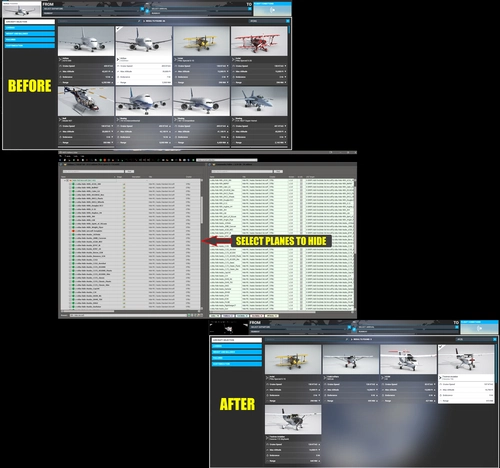
    Are there stock airplanes that you never fly? Ever wish you could hide them from your hangar? Well, now you can! This mod will let you hide stock aircraft from the hangar & aircraft selection menu, reducing clutter while still allowing (many of) them to be seen in multiplayer.

    This package contains folders for the Standard, Premium, Deluxe, and 40th Anniversary aircraft, and several other MS/Asobo Local Legend/Famous Flyers. Some aircraft, like the Shock Ultra, have multiple folders for different variants (wheels, floats, skis) so you can hide them individually.

    Simply put the "z-otbu-hide-*" folder for the aircraft you want to hide in your Community folder (or, better yet, use the Add-On Linker), and the next time you launch the sim, that aircraft won't appear in your hangar.

    Known Issues:

    • 3rd party liveries can cause an hidden aircraft to appear in the hangar anyway, showing the text "airplane.ui_manufacturer" instead of the actual manufacturer name. Please be sure to disable 3rd party liveries, performance mods, etc. for hidden aircraft before launching the sim. Do not attempt to "fix" the issue by edting aircraft configuration files.
    • For some reason, the Aviat S-1 Pitts cannot be hidden, although the two Aviators liveries and the S2 variant can.
    • Encrypted aircraft and others with missing or incomplete aircraft.cfg files may not be visible or show the incorrect model in multiplayer.

    GLIDER PILOTS TAKE NOTE: Hiding the MS/Asobo C172_AS1000 will also hide the C172 towplane from the Launch Method selection screen of gliders.

    Comments(38)

    Log in to join the discussion

    Log In

    about 1 year ago

    Only problem is, if you've hidden any plane that is used in any activity such as a discovery flight or training, it will CTD. We just need them hidden from the hangar and menu, not the whole sim. This probably hides them from any traffic as well which though I haven't checked, it may crash the sim if traffic uses a hidden aircraft.
    OTBUAuthor

    about 1 year ago

    It's an all-or-nothing proposition, there's nothing I can do about that. The key to the hidden aircraft is the isUserSelectable parameter in aircraft.cfg. If it's set to zero, the aircraft is not selectable anywhere in the sim - hangar, discovery, challenges, all of it. AI traffic models are not affected.

    10 months ago

    I took another look at it and decided to use it. Was looking for ways to cut my load time in 2020 and this does help a lot. I've cut it down to under 3 minutes with FSLTL installed (really the culprit for long load times). Close to 2 minutes without it installed. We sure could use an updated list for 2024 to cut out the clutter there. Thanks
    OTBUAuthor

    10 months ago

    In 2024, disabling undesired stock items is done in Content.xml in the LocalCache folder. The MSFS Add-On Linker has a built-in content.xml editor which makes this task easier. You want to change the items you don't want from "Activated" to "UserDisabled" (to hide them) or "SystemDisabled". The main difference is that SystemDisabled items cannot be enabled from within the sim, while UserDisabled items can.

    about 1 year ago

    I just wanted to say I love you for this addon, I loaded up FS2024 the other week while I had GamePass going to check it out and I forgot how cancerous the Asobo Aircraft Select screen is without this mod since I've been using it since you released it in 2023.

    Seriously, thank you! I wish Asobo would have made something like this default.
    OTBUAuthor

    about 1 year ago

    Thank you. Incidentally, there is a way to achieve essentially the same thing in 2024. In the MSFS Add-On Linker for 2024, there is a new feature that allows you edit the sim's content.xml file to activate and deactivate aircraft. It is somewhat less convenient but serves the purpose. Only drawback is a sim update will overwrite content.xml and you'll have to set it up again.

    over 1 year ago

    Well I just used this and they are all gone, including all PITTS.
    There is just one left, the CubCrafters X Cub Red Bull.

    Maybe you missed that one.
    Thank you for this.

    almost 2 years ago

    Great mod, thank you. The Pitts S-1S is however not disappearing even with no liveries installed.
    OTBUAuthor

    almost 2 years ago

    Yes, there is some weird configuration under the hood that prevents the Pitts from being hidden.

    4 months ago

    If you rename the Pitts SimObjects folder it will disappear. I added an unerscore ( "_SimObjects" ).

    almost 2 years ago

    Is it somehow possible to hide the orniopter, the aircraft from the Reno addon (P51,T6)? They are not included yet.
    Nice work with Mod this so far
    OTBUAuthor

    almost 2 years ago

    The "hide" mod only includes planes that can't be managed via the Add-On Linker. I haven't done "hide" mods for any of the expansion packs. The Reno one in particular is problematic, as the full pack includes 40 individual aircraft.

    almost 2 years ago

    I am busy with a total re-install and hopefully this will resolve the issue

    almost 2 years ago

    Mod used to work great. Since U15 it causes issues when activated in the loading of quite a few airports when it is used to hide default aircraft. CTD with not real error information in any of the logs. Fresh install does not change or correct the issue.

    almost 2 years ago

    Used the addon worked but decided to delete all the z-otbu** files from my community folder.
    Now the stock aircraft does not want to re-appear ?
    Hans Brokke
    OTBUAuthor

    almost 2 years ago

    Strange. If the mods have been removed from Community, they no longer have an influence on aircraft visibility. Did you exit and re-start the simulator after removing the files?

    almost 2 years ago

    Since SU15 with this addon I have constant CTD after further loading from the world map.

    I tested it several times by disabling all addons in Addons Linker except this one. As soon as I also disable this addon (so an empty community), MSFS starts without any problems.

    Before SU15 I had no problems with this addon.....
    OTBUAuthor

    almost 2 years ago

    Sorry you're having trouble. To be clear, this add-on contains multiple mods, one for each aircraft to be hidden. The only change to the previous version was the addition of a mod for the Inibuilds A320neo. Try disabling just that one and see if it helps.

    almost 2 years ago

    Please update and provide one for the iniBuilds A320neo :)
    OTBUAuthor

    almost 2 years ago

    Done, available now.
    MSFS 2020MSFS 2024

    Hide Stock Aircraft From Hangar

    Hide Stock Aircraft From Hangar allows you to declutter your aircraft selection menu by hiding specific stock airplanes that you never fly. This mod provides folders for various standard and deluxe edition aircraft, as well as famous flyers. Simply move the designated folders to your Community folder to hide the chosen aircraft. Note some limitations and issues with third-party liveries and certain aircraft variants. Keep in mind that hiding the C172_AS1000 may affect glider pilots by hiding the C172 towplane as well.


    Downloads1K
    Version1.6
    File Size203.62 KB
    Published2 years ago
    Updated1 year ago

    User Reviews

    4.6

    9 reviews

    5
    67%
    4
    22%
    3
    11%
    2
    0%
    1
    0%

    More Information

    Simulator
    MSFS2020
    CategoryAircraft
    Sub-CategoryAircraft Additions

    Version History

    SU15 Update - Added MS/Inibuilds A320neo V2

    Related

    PMS50 GTN GPS Replacements for Older Eyes

    PMS50 GTN GPS Replacements for Older Eyes

    This collection of mods replaces GNS530/430 GPS units with a PMS50 GTN650 in selected aircraft. Over 60 GTN replacements are now available.

    by OTBU
    4.7
    Latecoere 631 Commercial Flight Plans

    Latecoere 631 Commercial Flight Plans

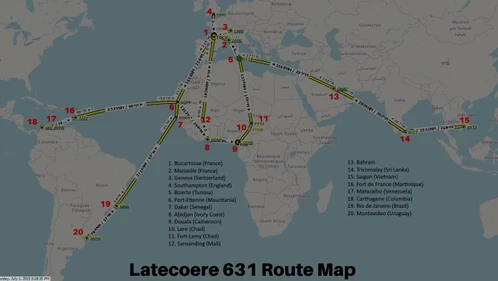
    Fly commercial routes with ease using this collection of round trip flight plans for the Latecoere 631 aircraft. Featuring destinations from the "Commercial Destinations for the Latecoere 631" map, each plan can be customized to suit your preferences. Choose between land airports or water runways specially created for the Latecoere routes by @Skylane.

    by OTBU
    5.0
    Learjet 35 Colder and Darker Start

    Learjet 35 Colder and Darker Start

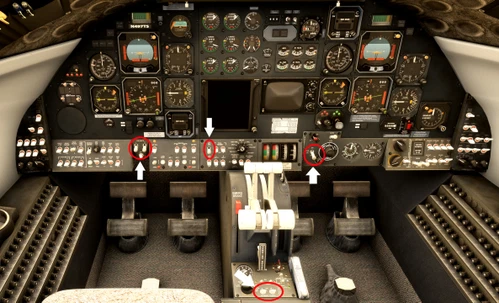
    The Learjet 35 Colder and Darker Start mod enhances the startup experience by loading the aircraft with essential cockpit switches in the OFF position. Key settings affected include Antiskid, Cabin Air Mode, and both Fuel Computer systems, allowing for a more authentic cold-and-dark scenario. This modification is compatible with the Cargo and Medevac variants of the Learjet 35A.

    by OTBU
    0.0
    Dornier Do X 1930-1932 Transatlantic Flight Plans

    Dornier Do X 1930-1932 Transatlantic Flight Plans

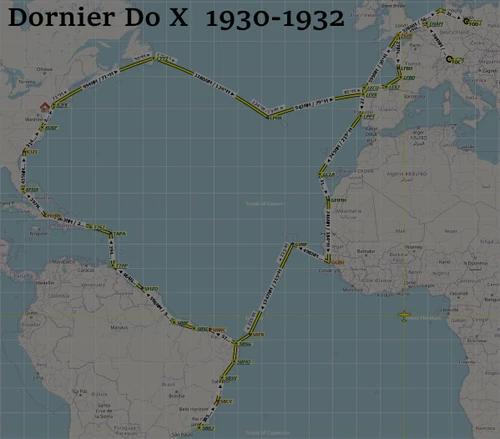
    Relive the historic transatlantic voyage of the Dornier Do X flying boat from 1930-1932 with this set of detailed flight plans. Based on the route map and descriptions from a renowned book, these plans include the full route and specific trips for each year. Explore the journey that took the Do X from Europe to South America, across the Atlantic, and back, complete with key destinations and historical anecdotes. Discover the challenges and triumphs of early aviation with these meticulously crafted flight plans for Microsoft Flight Simulator.

    by OTBU

    0.0