
Description
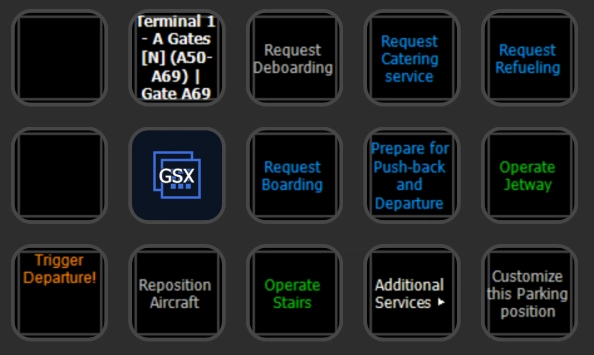
- Full interactive GSX Menu on the StreamDeck! You can do everything now from your StreamDeck - the GSX In-Game Menu can be disabled in the Toolbar.
- Displays current De-/Boarding and Cargo Un-/Loading Progress
- The GSX Automation the previous Versions of the Profile/Script moved to Any2GSX - this Package is now "just" a Menu Frontend
- It can be used with or without Any2GSX
There are both a SD and XL Version in this Package - choose the one for your Setup! Both display the GSX Menu.
Requirements & Setup
Requirements:
- You need to have at least Version 0.9.1 of my PilotsDeck Plugin installed & running.
- Tested with / Designed for GSX Pro 3.9.x and above
Installation:
1) Open the Profile Manager App from the Plugin and drop the downloaded zip-File on the Arrow. Check the Readme for Details.
2) Hit Install and add the Profiles to the StreamDeck Software by the Link presented in the App (choose the correct Deck in the StreamDeck Software)
3) If you had the Profiles installed before (and did not rename them), the Profile Manager will automatically remove the old Profiles and rename the new Ones (removing the Copy from the Name)
Usage
The Usage of the Menu is pretty much the same as with the In-Game Menu: Press 'Open Menu' (the , then select something in the Menu. If GSX has any Question (De-Ice, Direction) directly select the Answer in the Menu.
Since the GSX Menu is now completely on the StreamDeck, you can (and should) disable the In-Game Menu to prevent it popping up! (=Icon not white in the Toolbar)
In the "Gate Menu" the Text will be colored to reflect the Service State (Any2GSX is required): Dark Gray if not available, Blue if available, Orange if being performed (or moving) and Green if completed (or connected).
The other Buttons on the (XL) Profile call the respective GSX Service, but some Notes:
- The "Remote Control" Button displays the current State of that GSX Mode and can enable/disable it on press
- Some Shortcut Buttons to the Edit/Settings Button in the GSX Menu
- The "Jetway" Button just sends the normal TOGGLE_JETWAY to the Sim instead of calling the Jetway through GSX. This is more for troubleshooting (e.g. GSX won't call the Jetway because it is waiting on another Service)
- The "Unfreeze" Button is an "Emergency-Button" only to be used when your Plane does not move after GSX Push-Back. (Like the name suggests it attempts to unfreeze the Plane)
- The "GSX" Folder on the XL is just a copy of the main Folder - it is just there to make it easier to copy everything to an Aircraft Profile ;)
Dependencies
PilotsDeck/StreamDeck Profile for GSX Pro & Any2GSX
Full interactive GSX Menu on the StreamDeck! You can do everything now from your StreamDeck - the GSX In-Game Menu can be disabled in the Toolbar.


User Reviews
7 reviews
Version History
- Moved Automation to Any2GSX ;) - This is "just" a Menu-Frontend now (regardless if being used with or without Any2GSX)
Related
PilotsDeck - A StreamDeck Plugin
PilotsDeck is a StreamDeck plugin that offers the ability to trigger cockpit controls and display control states on your StreamDeck as text, images, or bars/arcs. It is open-source, free, and designed for advanced sim-users across major platforms like MS Flight Simulator, X-Plane, and Prepar3D. The plugin supports various StreamDeck models and simulates connections through FSUIPC or UDP sockets for seamless integration. With predefined profiles available for popular aircraft, PilotsDeck aims to streamline flight operations for a smoother and tailored flying experience.
by Fragtality
PilotsDeck/StreamDeck Profile for Fenix A320
Customize your Fenix A320 experience with PilotsDeck/StreamDeck Profile featuring comprehensive controls for Overhead, MIP/Glareshield, Pedestal, FCU, MCDU, and DCDU. Choose between SD, SD+, and XL profiles designed for specific StreamDeck setups, enhancing your flight operations. Requirements include FSUIPC7, a registered copy of FSUIPC7, and Font installation, ensuring optimal performance with Fenix 2.0.0.407. Explore the detailed installation instructions and set up automatic Lua-Files for seamless integration into your flight simulator setup.
by Fragtality
PilotsDeck/StreamDeck Profile for FBW A32NX
Enhance your piloting experience with PilotsDeck/StreamDeck Profile for FBW A32NX, featuring dedicated buttons for Overhead, MIP/Glareshield, Pedestal, FCU, and MCDU controls. Three profile options cater to different StreamDeck sizes, providing a comprehensive setup for normal flight operations. Custom images, Lua files, and detailed installation instructions are included, ensuring seamless integration with the FBW A32NX. Explore additional functionalities, such as automatic Lua script setup, custom camera mappings, and GSX menu integration for enhanced simulation realism.
by Fragtality
PilotsDeck/StreamDeck Profile for iniBuilds A300
Enhance your iniBuilds A300 experience with the PilotsDeck/StreamDeck profile, featuring buttons and switches for various panels and areas like Overhead, MCU, Radio/ILS, and MCDU. Designed for StreamDeck XL/Plus setups, it includes different profiles for supplementary functions, additional controls, and critical flight phases. Customize your own StreamDeck profile using the provided plugins, lua scripts, and images for private use only. Requirements include PilotsDeck Plugin version 0.7.12, specific fonts, and a registered FSUIPC7 copy for full functionality.
by Fragtality
Log in to join the discussion
Log InComments(72)
about 1 month ago
Sa ouvre bien le profils sur le steam deck mai sa n'affiche pas le request boarding ou refueling, il a juste gsx settings remot control etc
3 months ago
3 months ago
I didn't look into this Invoice shebang tbh, and as long as it doesn't interfere with the Menu Flow/Sequence that won't change unfortunately.
When it is a normal menu option (so no pop-up/question), there is nothing stopping the User from triggering it in the Menu.
(Assuming you use that Profile/Script in conjunction with Any2GSX and the Question therefore is really about Any2GSX. The Profile/Script alone is just a simple alternative Menu Frontend, not doing anything by itself)
3 months ago
3 months ago
3 months ago
Jokes aside, FSDT is constantly throwing Updates out, maybe some Updates did really "improved" something again. But unfortunately I can't give you any real Advice with that little Information :/
(Like if you use that in Conjunction with Any2GSX or just the Profile itself)
3 months ago
3 months ago
3 months ago
What I did observe though is that the GSX Menu just wouldn't open anymore by any means and GSX needed a Restart. Maybe you've encountered a similar Situation?
5 months ago
5 months ago
Yet, the Answer would be "no". Reasons being:
- Including the Menu Title/Open Menu, you need 11 Buttons - but the Plus only has 8. (already excluding the Actions to display Progress and the SmartButton for Any2GSX)
- There is no special Knowledge or Tools required to create (or update) a custom Profile with the GSX Actions - they can be copy & pasted with either StreamDeck's or PiilotsDeck's built-in Functionality to a SD+ Profile. (Also considering there a virtual StreamDecks which can be used as a temporary Place to import Profiles that are "bigger" than the connected Hardware)
5 months ago
I understand that I can start from this profile and try to adapt it myself..., whch I will try.
Can you just give me some clues on how to do it, because I have no idea... ?
How to copy the entries (GSX Actions and their specific code) of your profile (and may be skip some of them) as this profile does not show-up properly in my stream deck +?
Thank you again
5 months ago
Copy an Action (the entire Action) from the GSX Profiles and Paste it to a Profile where you want to have that Action.
This StreamDeck native Functionality works well as long as it is the same Kind of Action, so KeypadKeypad or DialDial.
To copy between different Kinds (KeypadDial) the Plugin builtin Functionality can be used: https://github.com/Fragtality/PilotsDeck#222---common-options
5 months ago
after installation I only see three dots on most of the buttons. When using e.g. the restart button I get a orange triangle displayed. Is there an issue on my side or is it related to SU5?
5 months ago
5 months ago
5 months ago
7 months ago
Is there a way I can reprogram one of the buttons to be a Streamdeck profile switcher? I am finding that I have to tab out of MSFS and switch profiles manually to exit the GSX profile. I have other profiles to manage the cockpit that I'd like to be able to switch back to.
7 months ago
1) There is built-in Action in StreamDeck that allows to switch to a Profile in a static/manual Way.
2) Then the Plugin also has its own hack/workaround to switch Profiles dynamically/automatically on Session Start: https://github.com/Fragtality/PilotsDeck/blob/master/README.md#34---profile-switching
3) And for the given Use-Case, it is arguable if you really need two separate Profiles - you could as-well place the GSX-Stuff in a Folder of the Profile you use for the Aircraft. And then just navigate in and out that Folder.