
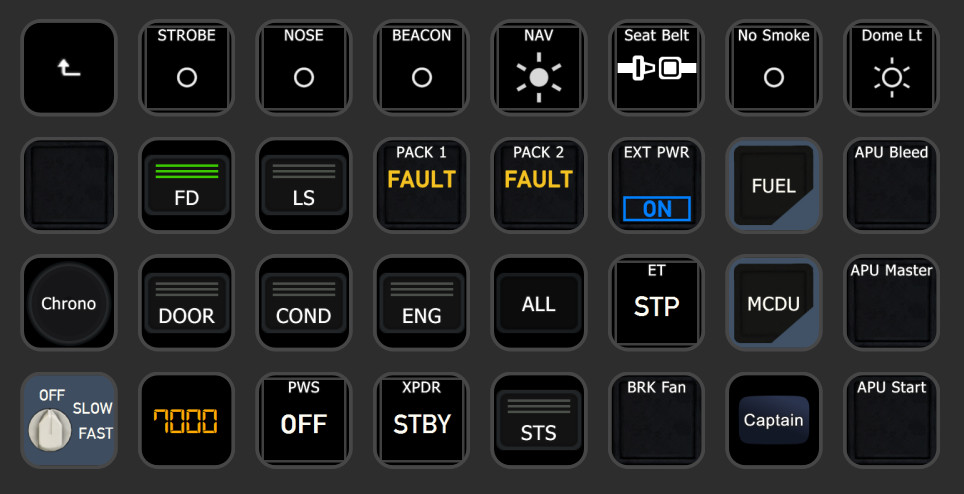
Description
Introduction
DEPRECATION NOTICE
This is the last Release of PilotsDeck supporting MiraBox/HotSpot Devices!
Use the PilotsDock-Fork by JKWTCN for these Devices 👍
PilotsDeck is a Plugin for Elegato's StreamDeck with the Ability to trigger Cockpit-Controls in different Ways and especially reading & displaying a Control's State on the StreamDeck as Text, Image, Bar/Arc or a Combination thereof. It is lean & mean, flexible, completely Open-Source and Free-to-Use.
StreamDeck-wise it behaves like any other StreamDeck Plugin: it runs alongside other Plugins and you can Drag, Drop, Copy, Paste the Actions like any other Action in the StreamDeck Software between your Folders, Pages or even different StreamDecks. The Action Configuration is done through the standard "Property Inspector" of the StreamDeck UI (for the "classic" Actions) or it's own "Action Designer" UI (for the new Composite Action). But regardless of the UI: the Configuration is stored in the StreamDeck Profile - You can create, export and share Profiles with the Plugin's Actions. On Top of the StreamDeck builtin Copy & Paste, it has also it's own Mechanic allowing to share single Actions via Text with someone else.
Installation is done through its own Installer which will check all Requirements and installs them for you if necessary. With the included Profile Manager App you can easily install Profile Packages (containing the Profiles, Images and Scripts) and can map your existing StreamDeck Profiles for specific Airplanes or Simulators so that the Plugin automatically switches the Profile(s) on the StreamDeck(s). You can write Scripts to directly read Values from a Function, or trigger a Function as Command - all in its own internal Lua Engine (Credits to: Neolithos for NeoLua!).
The Plugin supports different StreamDeck Models: Mini, Standard/15-Key, XL, Mobile and Plus. Other Models might work, but an indented Support for Non-Display Models is not planned. The Plugin runs only on Windows. There are no Plans for Linux or macOS Support (the first is not supported by StreamDeck at all, both do not run or support all Sims and some essential .NET Libraries are only available on Windows).
Simulator-wise it supports all major Platforms on Windows - MS Flight Simulator, X-Plane and Prepar3D. Depending on the Sim, it either uses SimConnect, FSUIPC or UDP Connection (remote capable). Either way it will connect automatically as soon as a Simulator is running. All Variables and Commands these Connections allow are usable with the Plugin. You can can directly switch from one Sim to another without reconfiguring anything.
For Prepar3D (and theoretically FSX) FSUIPC is a Requirement, for MSFS it is Optional and for X-Plane not used at all. Either Way: you do not need a registered (bought) Copy of FSUIPC to make the Plugin in Work! (Though some old Profiles may require a registered Copy).
It is designed for advanced Sim-Users which "know how to do Stuff": it does not give you any Lists to select Stuff from. If you know how to read Control-States for your Plane (e.g. which Variables to use) and how to trigger these Controls (e.g. which Command to use), you can quickly define Actions for that on the StreamDeck. Since it does not limit your Selection by a predefined List, you can do everything the Connection/Simulator currently allows 😉
If you don't: be eager to read & learn! 😅 I'll try to give some Background in the Readme, but you have to take it from there!
Note: PilotsDeck is 100% free and Open-Source. The Software and the Developer do not have any Affiliation to Flight Panels. You basically spend Money instead of Time to let a Power-User create the Profile(s) for you. That is totally fine - IF you knew you had the Option. Choose the Approach that suits you best! 😃
Supported Simulator Versions
- X-Plane 12 / 11 / <=10
Requirement: None - does not use XUIPC
- Flight Simulator 2020-2024 / X / 2004
Requirement: MobiFlight WASM & FSUIPC 7 (secondary) / FSUIPC 4 / FSUIPC 3
- Prepar3D v5 / v4 / v1-3
Requirement: FSUIPC 6 / 5 / 4
Supported is understood as "technical and basically supported by the Connection Method". Support in Terms of ensured Compatibility, Fixing Issues and giving Support exists only for the latest Version of the three Major Simulators: X-Plane 12, MSFS2020, P3D v5. I'm happy if it works for older Versions, but I won't make any Effort for them. It is time to go back to the Future! 😅
And yes: the latest Version for Prepar3D is still considered v5, since v6 was just DOA with nearly every Addon-Dev announcing to not support it.
Supported Sim-Commands & -Variables
Here a quick Overview of what you can send to the Simulator ("Command") or from what you can read Values from the Simulator ("Variable"). One of the Things which make the Plugin flexible: Variables can also be used as Commands. For Example to move a Cockpit-Control by writing a different Value to a Variable.
How Commands and Variables are configured and the different Options how they can be executed is described under 2.1 - Defining Commands & Variables.
- MACRO | Command | MSFS, P3D, FSX
Execute any Macro known to FSUIPC
- SCRIPT | Command | MSFS, P3D, FSX
Run any Lua-Code known to FSUIPC
- CONTROL | Command | MSFS, P3D, FSX, FS9
Send any SimEvent defined by its numerical ID (also known as FS-Controls, Control-Codes. Numerical Variant of a K-Variable/K-Event)
- LVAR | Command & Variable | MSFS, P3D, FSX
Read from / Write to any L-Var ("Local Variable")
- OFFSET | Command & Variable | MSFS, P3D, FSX, FS9
Read from / Write to any FSUIPC Offset
- VJOY | Command | MSFS, P3D, FSX
Toggle/Clear/Set a Button of a virtual Joystick from *FSUIPC*
- VJOYDRV | Command | ALL
Toggle/Clear/Set a Button of a virtual Joystick from the known *vJoy Device Driver* (if installed, not required)
- AVAR | Command & Variable | MSFS
Read from / Write to any Simulation Variable (also known as A-Var)
- KVAR | Command | MSFS
Send / Write to any Event-ID (also known as K-Var / SimConnect Event)
- HVAR | Command | MSFS
Trigger any HTML Event in the Simulator (also know as H-Var)
- BVAR | Command (& Variable)* | MSFS
Trigger InputEvents (also known as B-Var) - but only those that MSFS enumerates via SimConnect
- CALCULATOR | Command | MSFS
Run any Calculator/Gauge Code in the Simulator - either direct RPN Code or as Template for Increasing/Decreasing L-Vars
- XPCMD | Command | XP
Send any Command known to X-Plane (as command_once)
- XPWREF | Command & Variable | XP
Read from / Write to any X-Plane DataRef
- LUAFUNC | Command & Variable | All
Run a Lua Function in the Plugin's own Lua Engine
- INTERNAL | Command & Variable | All
Read from / Write to an internal Variable (available everwhere within the Plugin)
* = Per Default, B-Vars treated as Command-only Type - only some B-Var have an actual Value to read.
!! Please mind that the Command Types Script, Macro, Lvar (non MSFS) and vJoy can only work with a registered Version of FSUIPC!
!! Both vJoy Command Types are independent of each other and are two different Things! "VJOY" can only be assigned within FSUIPC (and not in the Simulator). The "VJOYDRV" can be assigned by anything which understands a Joystick Button (Simulator, FSUIPC, Addons, ...).
Available StreamDeck Actions
All Actions work on the Keypads (the normal/square StreamDeck Buttons). The Dial/Touchpad (aka Encoder) on the SD+ is supported by most Actions.
How these Actions can be configured and customized is described under 2.3 - Action specific Options.
- Display Value (Keypad / Encoder)
Display a Sim Variable as Number or Text (display "ON" instead of "1"). You can scale/round/format the Value as needed and customize the Font-Settings.
- Simple Button (Keypad)
Can only send Commands and always shows the same (configurable) Image. Supported in StreamDeck Multi-Actions!
- Dynamic Button (Keypad / Encoder)
This Action dynamically changes the displayed Image based on a Variable (in Addition to sending Commands). Different Values trigger different Images.
- Korry Button (Keypad / Encoder)
Intended for Korry-Switches in the Cockpit: the Action displays two "Sub-Images" independently of each other. They are shown/hidden based on their own Variable, but will not change the Image based on the Value.
- COM Radio (Keypad / Encoder)
Intended for Com Frequencies: the Action shows two different Variables which can be independently scaled/rounded/formatted but share the same Font-Settings.
- Display Gauge (Keypad / Encoder)
This Actions renders the Value dynamically on a Bar or Arc. Size, Color, Position and Font-Settings can be tweaked. It can optionally send Commands.
- Display Gauge (Dual) (Keypad)
As before, but it renders two Values dynamically on the same Bar or Arc.
- Composite Action (Keypad / Encoder)
Not a fixed Template as the other Actions, more a Canvas to draw on: you can add and freely configure different "Elements" (like Text, a Value, an Image) which can be dynamically altered via "Manipulators" on certain "Conditions". Configured in it's own dedicated "Action Designer" UI.
- Profile Switcher (Keypad)
This not a "real" Action like the others, it only serves to enable/disable Profile Switching.
Installation & Requirements
Just [Download](https://github.com/Fragtality/PilotsDeck/releases/latest) & Run the Installer Binary! It will check and install all Requirements and installs/updates the Plugin (or remove it).
On the second Installer Page are some Options to customize your Installation:
- Desktop Icon to the Profile Manager App
- Enable (and Check) FSUIPC7 as secondary Connector for MSFS
- Install/Update the vJoy Driver
❗ For MiraBox/HotSpot Devices use the PilotsDock-Fork by JKWTCN 👍
It is highly likely that you need to Unblock/Exclude the Installer & Plugin from BitDefender and other AV-/Security-Software. It's the number one Reason for "the Plugin is not working"-Issues because either the Binary is blocked from running or is blocked when connecting to the StreamDeck Software.
DO NOT run the Installer, Plugin or StreamDeck Software "as Admin". It is not recommended to MSFS or FSUIPC7 "as Admin" - it might work, it might fail.
If it still does not work right or at all, please check 4.2 - Troubleshooting.
The Requirements for the Plugin to run:
- Windows 10 or 11 (updated)
- StreamDeck Software v7.1 and above - The StreamDeck Software will be installed/updated by the Installer, if necessary.
- .NET 10 - The x64 Desktop Runtime will be installed/updated by the Installer, if necessary. Reboot recommended when the Runtime was installed for the first Time.
- IF used for MSFS/P3D/FSX: The latest Release of the FSUIPC Major Version specific to your Simulator (e.g. FSUIPC 6 for Prepar3D v4/5) - will be installed/updated by the Installer, if necessary.
- IF used for MSFS: The latest Release of the WASM-Module from MobiFlight - will be installed/updated by the Installer, if necessary.
- Optional: If you want to use VJOYDRV Commands you need the BrunnerInnovations Fork of the vJoy Driver - the installer will check the State, and offers to optionally install/update it for you.
NOTE: If you install the vJoy Driver for the first Time, don't forget that you need to enable at least one Joystick in the vJoyConf Application to use it!
Install Location for Elegato StreamDeck: %appdata%\Elgato\StreamDeck\Plugins\com.extension.pilotsdeck.sdPlugin <br/>
It is automatically started with the StreamDeck Software. It will spawn its own Icon in the System-Tray / Notification Area. Use this Icon to see if an Plugin Update is available, to access the Developer UI or open the Profile Manager to configure Profile Switching.
Note: Since FSUIPC is only a "secondary" Connector for MSFS, you do not need to have it installed anymore (for MSFS). If you not plan to install/run FSUIPC7, please set the Parameter UseFsuipcForMSFS to false in the Plugin Configuration File (PluginConfig.json) after Installation!
But be aware that some older Profiles might still use Commands and Variables from FSUIPC and might not fully work then.
Installing Profile Packages (.ppp Files)
Starting with Version 0.8.0, the Plugin greatly improves Distribution and Installation of Profiles:
1) Use the Profile Manager App found in the Plugin Directory to install Profile Packages: Open it via Plugin Icon in the System-Tray / Notification Area and drop the Package File to be installed on the big Arrow (or navigate to Package File's Location).
2) The Package File will be read and the Description (from the Author) will be displayed - check the Notes for additional Steps.
3) If you already have Profiles with the same Name (as shown in the StreamDeck UI), the App will remove the old Profiles (and update existing Profile Mappings to the new ones). If want to keep the old Profiles, uncheck 'Remove old Profiles'.
If you want to keep the extracted Package Contents, check Keep extracted Files .... The Contents will be kept in Profiles Sub-Folder of the Plugin (named after the Package Name).
4) Click Install. Note that the StreamDeck Software will be automatically started and stopped as needed.
5) The App will extract and copy the Images and Scripts to the Plugin Directory for you.
The Profiles need to be installed through the StreamDeck UI: Click on the Link displayed in the Profile Manager App, wait for the StreamDeck UI to come up and the select the correct StreamDeck to install the clicked Profile to. Repeat for each Profile.
You need to click every Link for the Installation to finish successfully. If you do not want or need one of the Profiles, just Cancel the Installation in the StreamDeck UI!
6)If selected, the App will now remove the old Profiles (if your updating existing Profiles), remove the "Copy" from the Profile Name (of the new ones) and update the Profile Mappings (if there are existing Mappings).
NOTE: The Update-Mechanic will only work, if you keep the Profile Name.
7) The Package Author can include additional Files you might to install/use the Profiles. If so, you will find a Folder on your Desktop (named after the Package's Name) with these additional Files.
See 3.6 - Profile Packages on how to create a Profile Packages to share your own Profiles!
README
The full Readme is available on GitHub - be sure to check it out!
PilotsDeck - A StreamDeck Plugin
PilotsDeck is a StreamDeck plugin that offers the ability to trigger cockpit controls and display control states on your StreamDeck as text, images, or bars/arcs. It is open-source, free, and designed for advanced sim-users across major platforms like MS Flight Simulator, X-Plane, and Prepar3D. The plugin supports various StreamDeck models and simulates connections through FSUIPC or UDP sockets for seamless integration. With predefined profiles available for popular aircraft, PilotsDeck aims to streamline flight operations for a smoother and tailored flying experience.


User Reviews
24 reviews
Version History
**DEPRECATION NOTICE** This is the last Release of PilotsDeck supporting MiraBox/HotSpot Devices! Use the [PilotsDock-Fork](https://github.com/JKWTCN/PilotsDock/releases) by JKWTCN for these Devices 👍 ### Plugin - Made Encoder Check case-insensitive - Added missing Elgato Device Types (i.e. StreamDeckXLPlus) - Default to 144x144 Pixels Canvas on StreamDeckVirtual and StreamDeckXLPlus - Updated NuGet Packages - Updated MSFS SimConnect SDK ### Installer - Set StreamDeck SW 7.5.0 as Target - Set .NET 10.0.10 as Target
Related
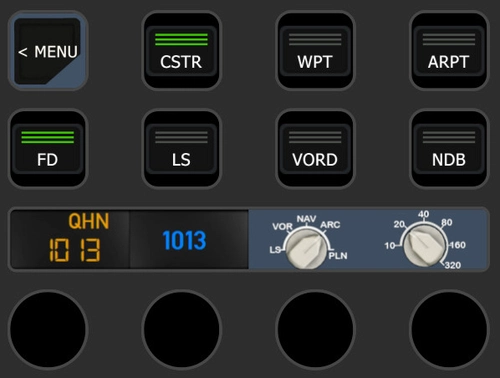
PilotsDeck/StreamDeck Profile for Fenix A320
Customize your Fenix A320 experience with PilotsDeck/StreamDeck Profile featuring comprehensive controls for Overhead, MIP/Glareshield, Pedestal, FCU, MCDU, and DCDU. Choose between SD, SD+, and XL profiles designed for specific StreamDeck setups, enhancing your flight operations. Requirements include FSUIPC7, a registered copy of FSUIPC7, and Font installation, ensuring optimal performance with Fenix 2.0.0.407. Explore the detailed installation instructions and set up automatic Lua-Files for seamless integration into your flight simulator setup.
by Fragtality
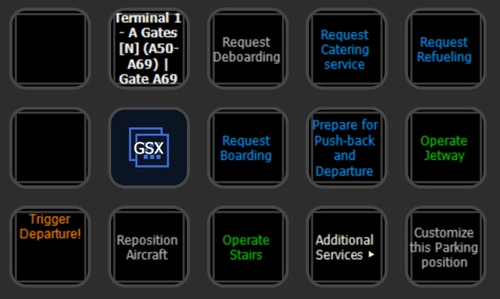
PilotsDeck/StreamDeck Profile for GSX Pro & Any2GSX
Full interactive GSX Menu on the StreamDeck! You can do everything now from your StreamDeck - the GSX In-Game Menu can be disabled in the Toolbar.
by Fragtality
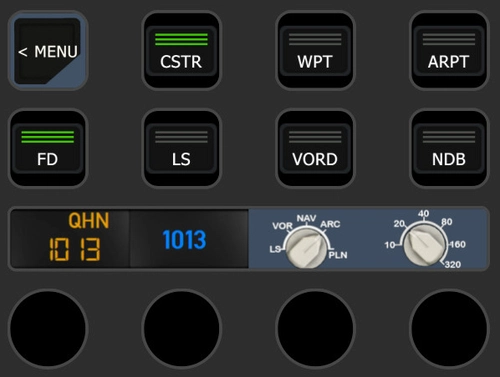
PilotsDeck/StreamDeck Profile for FBW A32NX
Enhance your piloting experience with PilotsDeck/StreamDeck Profile for FBW A32NX, featuring dedicated buttons for Overhead, MIP/Glareshield, Pedestal, FCU, and MCDU controls. Three profile options cater to different StreamDeck sizes, providing a comprehensive setup for normal flight operations. Custom images, Lua files, and detailed installation instructions are included, ensuring seamless integration with the FBW A32NX. Explore additional functionalities, such as automatic Lua script setup, custom camera mappings, and GSX menu integration for enhanced simulation realism.
by Fragtality
PilotsDeck/StreamDeck Profile for iniBuilds A300
Enhance your iniBuilds A300 experience with the PilotsDeck/StreamDeck profile, featuring buttons and switches for various panels and areas like Overhead, MCU, Radio/ILS, and MCDU. Designed for StreamDeck XL/Plus setups, it includes different profiles for supplementary functions, additional controls, and critical flight phases. Customize your own StreamDeck profile using the provided plugins, lua scripts, and images for private use only. Requirements include PilotsDeck Plugin version 0.7.12, specific fonts, and a registered FSUIPC7 copy for full functionality.
by Fragtality
Log in to join the discussion
Log InComments(182)
about 1 month ago
If not, how can it be turned off or even removed?
Thanks
about 1 month ago
It's an easy fix if I could get the script to work. The problem is that either SimVar or SimRead are returning 0. Not the bearing. Has anyone else come across this. I am hoping somewhere I set things up wrong, because right now lua is useless to me. If anyone thinks they can help I can copy/pasta the code as well as the lua variable call I am making.
about 1 month ago
If its just a plain +180 that needs to be added, maybe a Composite Action and an Offset on the Value Element would do the Trick?
For the Script: Did you register the Variable in the Script with SimVar? With the Syntax as used elsewhere in the Plugin? Else SimRead would just return 0.
about 1 month ago
about 1 month ago
(variable_bearing + 360) % 360
about 1 month ago
about 1 month ago
about 1 month ago
I'm struggling as I could not configure the PilotsDeck to my StreamDeck on a button that I would like MASTER CAUTION button to illuminate, when triggered. I am using MSFS2024 inbuilt Boeing 737 Max 8 (Asobo). Does anyone have a solution, please?
about 1 month ago
Fine... So I took a different approach and made a very long and skinny .png graphic for the speed tape thinking I could just move it up and down based on the airspeed using a position manipulator... but I can't use an image more than 144px tall.
I really wish I could find a way to make the first idea work since the gauge gives me a lot of flexibility with defining colored ranges, I can get those regularly occurring tick marks at the 10s and 5s, and I could modify it easily for different aircraft with all of their different V speeds. I think I could even add extra faux indicators at the Vr, Vx, and Vy speeds that would move along with the speed tape just like how you'd see on a G1000, for example.
Is there something I'm missing or doing incorrectly that's causing the gauge to slide diagonally when I use a position manipulator on a rotated gauge?
about 1 month ago
But I don't know if that Use-Case could be implemented in the Way you imagine. The Plugin isn't really designed to replicate Displays/HUD in that Complexity.
about 1 month ago
about 1 month ago
3 months ago
3 months ago
3 months ago
6 months ago
Anyway, I’m using it with MSFS 2024 and the default Cessna 172 G1000, and I’ve hit a wall trying to read back the state of the main battery switch so I can show the correct on/off icon on my Stream Deck. (OF ALL THINGS!)
Toggling the switch works fine using (1 >B:ELECTRICAL_Battery_1_Toggle), but I need to be able to read the state back. B: vars are write-only, right? So I can't read that back.
I’ve gone through the Behavior Viewer pretty thoroughly:
The animation uses (B:ELECTRICAL_Battery_1, Number) 1 == 100 * - not readable externally
The Variables > Global tab shows no L: var that corresponds to the main battery switch state.
There are a few BATTERYSTBY vars but those obviously relate to the standby battery, not the main one.
The Variables > Local tab only shows POWER_12V which stays at 0.000 regardless of switch position
I also tried several SimVars with no luck:
A:ELECTRICAL_MASTER_BATTERY, Bool - returns 0 regardless of switch state
A:CIRCUIT SWITCH ON:1, Bool - returns 1 regardless of switch state
A:ELECTRICAL BATTERY LOAD:1, Amperes - returns 0
A:ELECTRICAL MAIN BUS VOLTAGE:1, Volts - returns 0
It seems like Asobo simply haven’t exposed the main battery switch state as a readable variable in MSFS 2024. Has anyone found a workaround, or a variable I might have missed?
Further to that I’m also having similar trouble with the Avionics Bus 1 and 2 switches. Again I can control them by poking relevant Bvars, but Pilotsdeck doesn’t like (A:LINE CONNECTION ON:BUS_1_To_AVIONICS_BUS_1, Bool), which comes from the simvar in the behaviours window “LINE CONNECTION ON:‘BUS_1_To_AVIONICS_BUS_1’_n”
Any pointers would be great, thanks!
6 months ago
First to your Reply: please don't do that ^^
The Navigation on this Page is really shitty, so finding a new Reply to an old Post from someone else is just unnessecary work for both of us.
To the Question in the Reply: more or less the same Answer ^^
First of all the Examples
C:(A:DESIGN SPEED VS1, knots) 1.3 * = -61.5
C:(A:DESIGN SPEED VS1, mph) = 4620
don't really make Sense. If these are A-Vars, use them as A-Vars. A Factor/Scale like 1.3 can be applied by the Plugin.
Background being: A-Vars use SimConnect directly to get the Values on an Event/on Change based Pattern - like intended by Asobo. C-Vars run Calculator Code repeatedly through WASM (the Mobiflight Module). They are polled. That is certainly not intended by Asobo to be used in that Way and generally they discourage from using Calculator Code in WASM Modules as it isn't a performant Way to do things, i.e. Developers like FBW already removed them in their Codebase because of Problems in 2024.
So in the End, it is just a more wasteful Way to query an A-Var/SimVar. I think it is better to add some kind of "deprecated" Flag to those and remove that Variable Type in the Future. The Use Cases for it can be better served by Composite Actions and/or Lua Scripts by now.
To your Battery-Issue in this Comment:
Could it be that you also try that with C-Vars throughout? Maybe that is your Issue.
B-Var aka InputEvents can have a Value - which can be read when the Variable is used as a B-Var. BUT: because of Asobo's ingenuity, only certain InputEvents are enumerated for SimConnect Clients - some are just not accessible from the Outside. Look in the File InputEvents.txt of the Plugin to see which ones are known (when a Session is running - linked in the Developer UI as "Detected B-Vars").
On the LINE CONNECTION ON Situation:
It isn't supported by the Plugin - it only knows numeric Parameters to A-Vars (i.e. the Index). I see in the SDK that Asobo *of course* requires the Name - which is a brilliant Idea within a SDK that mostly is concerned with numeric Values ...
I have to look into that one if that can be at formulated through SimConnect and if how to implement that in the shared Library and Plugin
6 months ago
Expect a Cessna 172 G1000 profile soon for the 4 of us that fly it regularly ;)