
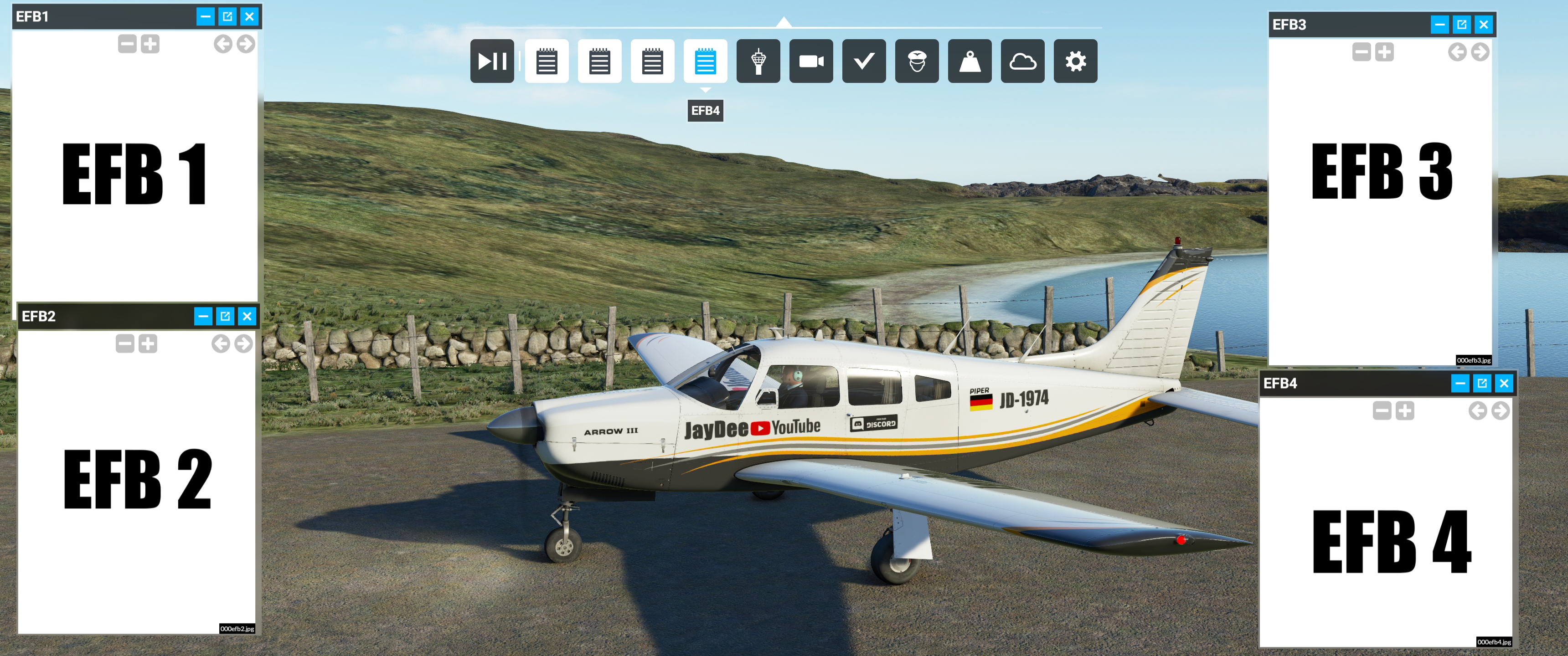
Description
18.09.2021 New Version 1.19.1
- fixed missing toolbar icons
- fixed one typo
-removed remains of tiny.exe warning from batch file
ENGLISH
This Mod adds up to 4 electronic flight bags (EFB) to your ms fs panel bar. Each EFB can show you JPG and TXT files ingame. you can also use PDF files, which will be converted automatically into JPG files (one JPG per PDF page).
The mod consits of two seperate parts.
Folders which contain the mods for the MS Flightsimulator. One folder/mod for every EFB.
A folder which contains the files and folders to run a local server on your computer, which provides the HTML data to show in the EFB windows in the sim.
A document with detailed instructions on how to setup this mod is included in the ZIP. Please read it carefully.
ADDITIONALLY YOU NEED PYTHON 3.x INSTALLED!
Simply Install the free python 3.9 app via the microsoft store.
My mod is based on the great EBAG mod of Spit40. It just basically adds 4 EFBs instead of one, so you can sort things.
So credits and a big thanks to Spit40
https://flightsim.to/file/9001/ebag-electronic-flight-bag-also-works-in-vr
https://authentikit.org/
DEUTSCH
Dieser Mod fügt bis zu vier elektronische Flight Bags (EFBs) zur Toolbarleiste hinzu. Jedes EFB Fenster kann JPG und TXT Datein im Flugsimulator anzeigen. Ihr könnt auch PDF benutzen, welche der Mod in JPG umwandelt (ein JPG pro PDF Seite).
Der Mod besteht aus zwei Hauptbestandteilen.
Ordern welche die eigentlichen Mods für den MS Flugsimluator enthalten. Ein Ordner pro EFB.
Einen Ordner, der die notwendigen Ordner und Dateien beinhaltet, um einen lokalen Server auf Eurem PC zu starten, welcher dann die notwendigen HTML Daten für die EFB Fenster im Spiel hosted.
Eine detaiiierte Anleitung auf Deutsch ist der ZIP beigefügt. Bitte sorgfältig lesen.
ZUSÄTZLICH MUSS PYTHON 3.x INSTALLIERT SEIN.
Ihr könnt einfach die kostenlose Python 3.9 App aus dem Microsoft Store herunterladen.
Mein Mod basiert auf den großartigen EBAG Mod von Spit40, nur das mein Mod 4 Fenster statt einem anzeigt.
Kind Regards
JayDee
www.youtube.com/c/jaydeegaming
JDs EBAG/Electronic Flight Bag x 4 Mod (Four Ingame EFBs/EBAG)
Add up to 4 electronic flight bags (EFBs) to your Microsoft Flight Simulator panel bar, capable of displaying JPG, TXT, and PDF files converted to JPG. This mod includes detailed instructions and requires Python 3.x to be installed for optimal functionality. Based on the EBAG mod by Spit40, now enhanced to provide multiple EFBs for better organization.


Supporters

User Reviews
4 reviews
Version History
- fixed toolbar icons (this time for real^^)
Related
JayDee´s - PMS GTN750 on Others Mod
Adds the GTN750 to various aircraft models expanding beyond official support, enhancing your flying experience. Make sure to also download the GTN750 mod from PMS50.com. Compatible with a wide range of aircraft, offering individual installations for optimal performance. Includes support for GNS530/430 and G1000 replacements, benefiting from continuous updates and fixes.
by JayDee
FBW A32NX/A320 (incl. FS2Crew) - Guide - Checklists & Procedures
A comprehensive guide with checklists and procedures for the FBW A32NX/A320, including recent updates for EFB changes. Designed for single-pilot operation, this mod offers in-game toolbar integration for easy access to checklists. Consider supporting the developer if you find this guide helpful.
by JayDee
JayDee´s Ingame Toolbar Checklists
Access a comprehensive in-game toolbar featuring checklists for numerous aircraft with JayDees Ingame Toolbar Checklists mod. Perfect for both VR and Non-VR experiences, this mod provides easy access to a variety of checklists without the need for constant updates, as they are called from a server. Explore a wide range of included aircraft checklists and streamline your flight preparations effortlessly.
by JayDee
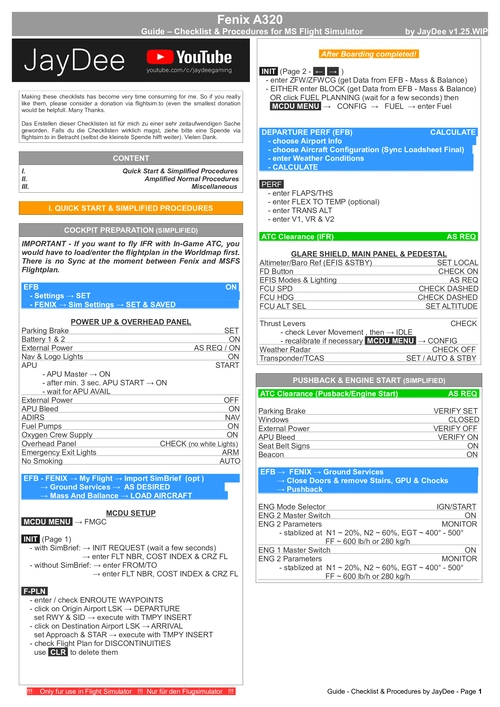
Fenix A320 - Guide - Checklists & Procedures
A comprehensive guide featuring checklists and procedures for the Fenix A320, including updated normal procedures. This mod is designed for single pilot operation in flight simulation. Additionally available as part of the Ingame Toolbar Checklist Mod. For support, visit the Discord server hosted by JayDee, the creator of this mod.
by JayDee
Log in to join the discussion
Log InComments(54)
over 3 years ago
Es geht noch immer um den EFB server.
[16:40]
Python läuft,im EFB Content wird das PDF File konvertiert in jpg, im localhost :8080 kommt EFB1 sowie das konvertierte PDF File (Bearbeitet)
[16:41]
Die vierPanel Mods stehen im Community Ordner,das Ingame Toolbar Mod auch.
[16:42]
nur im FS kommt in der oberen Leiste keine Icons für die 4 Mods sowie das Ingame Mod.
[16:43]
Woran kann das liegen, bitte um Hilfe.liegt das vielleicht bei den Updates.
[16:44]
Im vergangenen Jahr lief der EFB Mod einwandfrei, musste alles neu machen, danach ist das Problem aufgetreten.
over 3 years ago
Ich hab dir mal auf Discord geantwortet. ggf. schick mir per PM mal einen Screenshot von der Addon linker Oberfläche.
almost 4 years ago
Hello! This amazing mod has sadly stopped working for me since the latest SU10 update. All I get is a grey screen now. I used to use all 4 EFB's... This was an amazing tool, I hope I can get it running again
almost 4 years ago
Nothing really changed. But I will take a look into it.
almost 4 years ago
Could you follow up on this or offer some troubleshoot steps? Like I said this did work flawlessly, then with the update all I get is grey screens. The .pdfs work when shown in browser, but in sim they show nothing. Your checklist app still works fine. I was literally in the middle of training in VR and I haven't been able to continue since SU10. I dunno how I am gonna complete what I need to do if this thing no longer works.
almost 4 years ago
I hadnt time to check on this. But if you have discord, you could contact me there and I could see if I can send you a test version, when I tried to find the error.
almost 4 years ago
Thanks Jaydee. I'm new to Discord but I did not see your user name under your profile in flightsim.to. I'm subbed on Youtube but not Discord lol. I discovered that the server cmd prompt closes after it does its thing now. I dunno why. It literally started immediately after SU10, so it could be a coincidence, but a strange coincidence. Yeah, the damn thing just closes too fast to even read what theast line is.
Thanks for your time. I used this thing religiously.
almost 4 years ago
Did you changed any paths? Can you try to update the phyton programm. Also you could try to change the port in the 00_Start_EFB***** batch. Maybe there is a conflict with a new addon. If the window stays open with another port, I will show you how to change the ports in the Mod, so that ingame the windows alos use the new port.
almost 4 years ago
BTW my discord tag is JayDee#9534.
over 4 years ago
I have done all the steps, and the efb is showing up correctly on the server in the browser. But in the game i just get a grey screen
over 4 years ago
Can you scroll up with the mousewheel and see arrows in the grey area? Can you contact me on discord JayDee#9534 and send me a screenshot?
over 4 years ago
Hello, I have followed all the steps and the image does not appear in the game, the program transforms the PDF into images correctly and I can see the four EFBs in the top bar of the game, but I see everything white. Could you do a little tutorial please? Greetings
over 4 years ago
Have you tested if you can see the EFB on your browser?
over 4 years ago
Yes, I just got a blank screen.
over 4 years ago
If you get a blank screenthen the server is not running or the port is used by another programm. Stays the black window from the server open?
over 4 years ago
Everything works great!!!
Question, if I have an iPad or second computer on the same network is there a URL that would display EFB 1 or instead EFB 2, etc.
Would ngrok work?
over 4 years ago
Url would be IPAdresse:8080/index_efb1.html or IPAdresse:8080/index_efb2.html or IPAdresse:8080/index_efb3.html IPAdresse:8080/index_efb4.html
over 4 years ago
Thank you for the quick reply.
Works great.
over 4 years ago
On my older iPad (iOS < 10) that cannot use Javascript I use:
IPAdresse:8080/efb1_content/
IPAdresse:8080/efb2_content/
IPAdresse:8080/efb3_content/
IPAdresse:8080/efb4_content/
This displays the raw files which I can now select... even the PFDs. Creating favorites makes it easy to reconnect.
Worth noting a static IP for your computer is needed. DHCP will just create problems.
over 4 years ago
A nice iPad Safari "favorite" is a direct link to a known file like:
IPAdresse:8080/efb1_content/navlog.pdf
Then you benefit from PDF features like scrolling.