
![[Thanzo] Mrsat PMDG 777 Lights - Image 1](https://cdn.flightsim.to/images/27/thanzo-mrsat-pmdg-777-lights-449954-1753100361-RdMN1.jpg)
Description
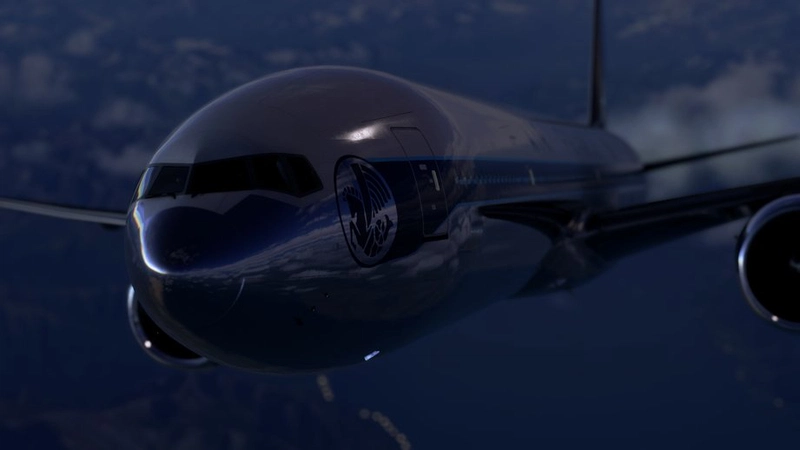
[Thanzo] Mrsat Pmdg 777 lights
FOR 777W,777ER,777LR,777F
MSFS 2020 : ✅
MSFS 2024 : ✅ SU5
This is a compatibility of the mod of MrSaturday530 not being up to date for some time, I adapted it for all PMDG 777, I will not modify his mod without his agreement
drag and drop into your community folder
Discord :
Thanzo
Credit :
MrSaturday530
[Thanzo] Mrsat PMDG 777 Lights
This add-on provides updated lighting compatibility for the PMDG 777 series, including the 777W, 777ER, 777LR, and 777F. Adapted from the original MrSaturday530 mod, this version ensures functionality across all PMDG 777 models while retaining the originals integrity. A future release for MSFS 2024 is in development, and testers are sought prior to its launch.
User Reviews
12 reviews
Version History
V 1.1 : Beacon : Adjustment of intensity and volumetric lighting NavLight : increased intensity and angle of effect
Related
![[PMDG 777] Thanzo Cockpit Light](https://cdn.flightsim.to/images/28/20260328_141842_5a5d8a2e23c858fb_pmdg-777-thanzo-cockpit-light.png?width=500)
[PMDG 777] Thanzo Cockpit Light
The Thanzo Cockpit Light add-on enhances the PMDG 777 by replacing the default cockpit lighting with more realistic alternatives. Designed specifically for all variants of the PMDG 777, it aims to improve visual immersion during night operations. The installation process is straightforward, requiring users to simply drag and drop the files into their community folder.
by Thanzo
![[PMDG 737] Thanzo Mod Light Enhanced](https://cdn.flightsim.to/images/28/20260328_140333_89e6a6a0283e3cb6_pmdg-737-thanzo-mod-light-enchanced.png?width=500)
[PMDG 737] Thanzo Mod Light Enhanced
The Thanzo Mod Light Enhanced for the PMDG 737 improves the aircrafts lighting system by enhancing reflection effects for better visual comfort. Key features include the option to select between Halogen or LED lights, the addition of volumetric lighting, and updated beacon reflections. This mod aims to increase the overall intensity and realism of the lighting effects within the simulator. Installation is straightforward, requiring only a drag and drop into the community folder.
by Thanzo
![[PMDG 777ER] Thanzo Cabin Light](https://cdn.flightsim.to/images/27/thanzo-mod-cabin-light-449954-1724939097-HXG68.jpg?width=500)
[PMDG 777ER] Thanzo Cabin Light
The Thanzo Cabin Light add-on for the PMDG 777-300ER enhances the cabin lighting by replacing the standard yellowish ambient light with a brighter white light, improving overall visibility. This version also addresses previous issues with cabin shadows during night flights. The update adds functional backlighting for seats and luggage racks while maintaining compatibility with custom liveries. A shader cache reset is suggested for optimal performance, with a utility provided to assist in this process.
by Thanzo
![[ Fenix ] Thanzo Mod Backlight [ A319,A320,A321 ]](https://cdn.flightsim.to/images/26/fenix-a320-v2-thanzo-mod-backlight-449954-1721260351-YrOZ9.jpg?width=500)
[ Fenix ] Thanzo Mod Backlight [ A319,A320,A321 ]
The Thanzo Mod Backlight is designed for the Fenix A319, A320, and A321 aircraft. This add-on allows users to operate the luggage rack backlight independently, ensuring functionality even when the cabin lights are turned off. Installation is straightforward, requiring users to simply drag and drop the mod folder into their community folder.
by Thanzo
Log in to join the discussion
Log InComments(51)
3 months ago
3 months ago
about 1 month ago
6 months ago
6 months ago
6 months ago
about 1 month ago
6 months ago
7 months ago
8 months ago
8 months ago
9 months ago
10 months ago
10 months ago
10 months ago
11 months ago
12 months ago
12 months ago
12 months ago
about 1 year ago