

Description
Global AI Ship Traffic MSFS - GAIST Ultra Version 7.1
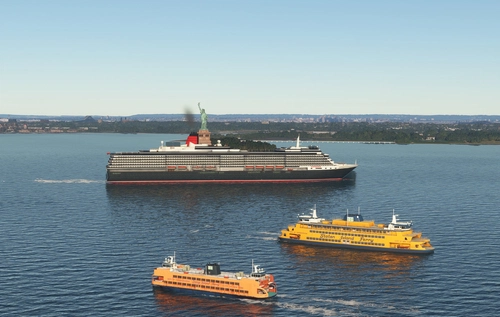
More that 1000 unique ship models with more than 2400 liveries and activated with more than 85.000 ship movements creates a realistic simulation of shipping around the globe or they can be used with MSFS 2024 real time traffic.
Version 7.1 og GAIST works with both MSFS 2020 and MSFS 2024 with preprogrammed traffic and with MSFS 2024 real time ship traffic data.
This package contains almost all types of ships from dredgers, barges, tugs, pilot boats to giant cruise ships from major companies like AIDA Cruises, Carnival Cruises, Cunard, Royal Caribbean, Norwegian Cruise Lines and small luxury or expedition cruise ships from eg National Geographic. It contains all sorts of bulk carriers, container ships, and tankers as well as typical fishing vessels from all parts of the world. It contains navy vessel from most of the major navies and Coast Guard vessels from countries like the US, Canada, United Kingdom, and China. Add to that yachts, tall ships, motorboats and small sailboats and more than three hundred ferry routes are covered with their specific ferries.
This project has been made possible through a combined effort from flightsim enthusiasts from 15 countries. Models and textures by Erwin Welker, Jean-Pierre Fillion, Knud Kristoffersen, Martin Rueedi, Larry Robinson, Dexter, Milton Shupe, Manfred Siedler, Bernardo Barroso, Paul Donnelly, Finn Kristoffer, Didier ‘‘Lagaffe’’ Puentes, Andrew Thomsen, Kevair, Robystar, Antonio Diaz, Sebastien Viale, Alberto Garcia, Cxema, Pascal Dumat, Rick Keller, Lazarus Starkweather, Dave Garwood, Darren Lane, Jan de Jong, Wildlynxpilot, Sir Topham Hatt, Phaxmodels, Henrik Nielsen, and more
A great thank also to the many beta testers and a special thanks to the shipping company DFDS www.dfds.com for providing documentation to make realistic models of their fleet of passenger and freight ferries and to DGzRS Die Seenotretter for allowing to model their 28m rescue boat Nis Randers. You can find more information about their see rescue operation and support them here: https://www.seenotretter.de/
Idea and conceptualization Henrik Nielsen, KL791, and Kai Kamjuncke
For support and additional information please follow our threads on the project on forums.flightsimulator.com, avsim.com, fsdeveloper.com in English, on flightsim.no in Norwegian and Danish, on voovirtual.com in Portuguese, and pilote-virtuel.com in French.
Installation:
- Before installation please remove all old versions of Global AI Ship Traffic / GAIST. However if you use Global AI Ship Traffic Great Lakes in MSFS 2020 you should leave this active as this version 7.1 of Global AI Ship Traffic GAIST Ultra does not add preprogrammed traffic on the Great Lakes.
- Notice that in V7.1 route files are included inside the main GAIST-Ultra-V7_1 folder. Please remember to delete your old route folder (the last version was gaist-ship-routes_V1_3)
- To install please unzip the folder GAIST_V7.1 and drop file gaist-ultra-v7_1 in your Community folder. If you use automatic installation programme you might have to unzip the main folder before installation.
- In order for ships to display in MSFS 2020 ensure your traffic settings for Ships and Ferries are 5-10%. You can use a higher setting but it will not increase the amount of shipping provided by GAIST and it can result in onflicts with other AI ship traffic including default.
- In order for ships to display in MSFS 2024 you must first choose under settings/online whether you want to use real time live traffic or pre-programmed offline AI traffic. Next under graphics setting increase ship traffic to ultra independently of which of the two modes you chose. It is possible to have real time shipping without having real time air traffic. More on that here: https://www.alpha-india.net/2025/05/25/msfs-ai-traffic-settings/
Known issues:
MSFS 2020 and 2024:
- Models do not have hard decks - it will eventually be reintroduced later
- Effects will display best with ground wind setting between 5 - 15 knots. Below this wind speed not much to see, above they might look exaggerated-
- The MSFS engine is simple and not very stable; ships will sometimes be unstable or making strange movements if they meet other objects
- Not all ships appear in harbor areas with heavy scenery; some prioritization by the sim engine can prevent ships from showing
- The project includes more than 15.000 textures and almost 1000 model files, we do expect some glitches - if you find something really disturbing, please send me a PM here or comment on forums.flightsimulator.com
MSFS 2024:
- Depending on whether you chose online traffic mode or offline traffic mode, you can have different types of problems. In general offline traffic is more stable with less problems.
- MSFS 2024 live ship traffic relies on AIS data from ships all over the world. That data can be erroneous or missing and further GAIST relies on a model matching done by the simulator.
- AIS data comes from ships - normally it contains beyond position, heading, and speed also ship type, flag nation, ship dimensions and MMSI identification. However, sometimes AIS data is wrong from the source eg. ship dimensions or type missing. Currently MSFS can not filter out these erroneuous data and the result can be wrong type or size of ship being displayed in the simulator. GAIST v7.1 suppress more of these errors than GAIST v7.0, but it is impossible to remove all without having access to filter raw data.
- In harbors it is common to see ships mored with wrong heading - sometimes they will be well aligned with quais but often they will be completely misaligned. Even small sideways movements of more ships can contribute to this.
- Some ships eg military ships will sail without AIS activated and smaller ships will often switch off AIS in port so don't expect to see all ships in the simulator.
- Ships might spin around when stopped
- Wakes only display when the ship moves above 5-6 knots - in the offline version that is always the case - but in real life some ships move very slowly just 1-2 knots eg sail boats and worse, in MSFS ships are sometime just displayed as static due to data flow.
- The data MSFS currently provides only contains 32 general ship types eg. it doesn't make a difference between a cruise ship and a car ferry - both are denominated PASSENGER - so you will often see a car ferry where a cruise ship should be or the opposite.
- The current sim.cfg structure does not contain a section for IMO or MMSI identification making it difficult to achieve a sufficiently good model matching. Sometimes a 100% match will occur, but mostly not.
- The live data flow is often not sufficient to show moving ships, however, you can get very impressive amounts of static ships if you go to places like Panama City, Santos, Singapore, or other big harbor towns and sometimes the moving traffic will be decent
- If you use offline traffic in MSFS 2024 you will typically see less traffic than in MSFS 2020 and there can be a saturation over time.
- You might experience sailboats in MSFS 2024 switching several times between having sail up and down while seemingly stationary. This is due to an animation being triggered by misleading AIS data - it can be solved but currently I have no solution which would allow to do it without spliting up the package in a real time and and offline package.
- You will have ships on lakes and rivers, however the MSFS match module can not distinguish between inland vessel types and ocean going ships. If you fly inland switch off real time ship traffic in MSFS 2024.
- Most of the above issues require action from Asobo, MSFS, and in some instances their AIS supplier to be resolved, please do not spam with comments or questions to us. We have given all the appropriate inputs already.
Copyright Information
Models in Global AI Ship Traffic are the result of long time collaboration between a group of friends and developers. Please respect copyrights. Models are copyright of Henrik Nielsen, Erwin Welker, Jean-Pierre Fillion, Knud Kristoffersen, Martin Rueedi, Larry Robinson, Dexter, Milton Shupe, Manfred Siedler, Bernardo Barroso, Paul Donnelly, Finn Kristoffer, Didier ‘‘Lagaffe’’ Puentes, Andrew Thomsen, Kevair, Robystar, Antonio Diaz, Sebastien Viale, Alberto Garcia, Cxema, Pascal Dumat, Rick Keller, Lazarus Starkweather, Dave Garwood, Darren Lane, Jan de Jong, Wildlynxpilot, Sir Topham Hatt, Phaxmodels, and more
Referencing models in other projects or any other use or sharing of the models included in Global AI Ship Traffic / GAIST can only happen after written permit by the respective copyright holders for the individual models.
Global AI Ship Traffic Version 7.
Global AI Ship Traffic Version 7 enhances Microsoft Flight Simulator with over 1,000 unique ship models and more than 2,400 liveries, alongside 80,000 programmed ship movements. Compatible with both MSFS 2020 and MSFS 2024, this add-on includes a wide variety of vessels, ranging from cargo ships and fishing boats to luxury cruise liners and military ships. Users can experience a realistic global shipping simulation by utilizing preprogrammed traffic or real-time AIS data in MSFS 2024. The project is the result of collaboration among international developers and enthusiasts, providing an immersive maritime experience.
Starred
Hand-picked by our team — this addon significantly enhances the MSFS experience and is a must-have for your setup.

Supporters

McKale
DKK 71
Strazd369146
$50

Bahrometrix
$30
triflyman
$25

jvortiz56
$25
cpschulz
$25
Bahrometrix
$22
A$20
andy1252
$20

Ron_Attwood
$20
dumpfbacke
$20
cpbohn006
$20
poobah
$20

FlyMe2Dunoon
$20

pmb
$20
triflyman
$20
thor32881
$15
$15

steve
$15
AlOlSz
$15

HeKa48
$15
MICHAELHERMANN
$12
efelber
$10
Sircrashalot
$10
IBJOERN
$10
ejways
$10
HausiAir
$10
bigmike56
$10

imilne
$10
MiltonFS
$10
tlittle66
$10
fettpet
$10

paulbax
$10
Franzl4974
$10
jonit
$10
FSC733
$10
voske
$10
jvi787
$10
Pfe81
$10
Showtime72
$10
BlackArcangel69
$10
lightbg
$10
AxelGaudlitz
$10
cflord
$10
Pjotz
$10
Airman2023
$10
schulzkroetmp
$10

MUCAirport
$10
Boudista
$10
flightfan
$10
FSC733
$10
kriebie
$10
Thesamurai
$10
fettpet
$10
wjnoordhuizen
$10
nanzo
$10
Knuddel
$10
BenniT
$7
Leonharm
$5
jmhelms
$5
Loopingos73700
$5
Copter
$5
Mucka1
$5
Brutos
$5
pjonc
$5

Foxtrot_Juliet
$5

Flap5
$5
Wouter
$5
Franzl4974
$5
petergloor
$5
VT_Goding
$5

machuca99
$5

jansmit2020
$5
Captcaballero
$5
indus2
$5
ADET0013
$2

EricTea
$1
Superheld
$1
User Reviews
110 reviews
Version History
Adds new yachts and tugs Increase leisure traffic in MSFS 2020 and in MSFS 2024 in offline mode adding more than 5000 additional ship movements Corrects texture issues on 5 models Suppress in MSFS 2024 real time traffic mode the majority of appearances of very large ships erroneously placed by the simulator when it has no size data from AIS Improves matching of ship models in MSFS 2024, but still only based on type and the match module in MSFS continues to be the same so do not expect a high match rate beyond size and overall type of ship Route files are now contained inside the main GAIST folder, so you will only have one file folder and not two as in V7.0
Featured in Collections(1)

Related

Realistic Taxi Signs Texture Pack
Enhance your taxiing experience with this Realistic Taxi Signs Texture Pack. This add-on provides higher resolution and realistic textures for taxiway signs in Microsoft Flight Simulator. Replace the original files in your Community folder for an improved visual experience. Remember to remove any other mods for taxi signs before installing this pack. Created by Pretzed, this pack aims to enhance the realism of your taxiing operations in the sim.
by PretZed

AirHispania - Libraries
Essential libraries containing objects necessary for displaying AirHispania sceneries. Required for enhancing the overall visual experience of AirSpain scenery addons.
by AirHispania
Japan world update scenery enhancement (no google imagery and no performance impact)
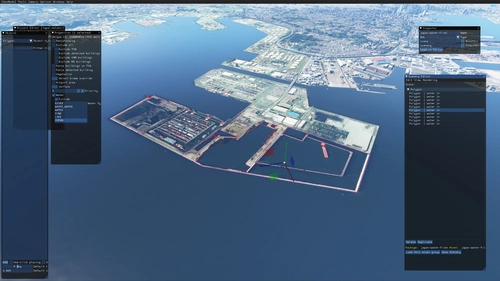
Enhance your Japan flying experience with this ongoing scenery update, featuring fixes for dark lines on river entrances, addition of cargo ships, and uncovering hidden features underwater. With no reported impact on performance, this add-on brings a more detailed and realistic landscape to explore in Microsoft Flight Simulator.
by DOR RAGER

Airpower Airshow for Microsoft Flight Simulator
Experience the largest airshow in Europe with "AIRPOWER for Microsoft Flight Simulator 2020." Join military and civil aviation demonstrations at Zeltweg Air Base, featuring realistic crowd depictions and 43 handcrafted aircraft on display. Dont miss out on this immersive airshow experience with static displays and dynamic elements!
by Troglodytus, Littlekrg, Mikea.at, AnelToro089, LeRoi
Comment Summary
User feedback on Global AI Ship Traffic Version 7 reflects a mix of appreciation for its detailed ship models and extensive variety, especially in MSFS 2020, and frustration with compatibility problems and bugs in MSFS 2024. Many users praise the addon for bringing realism and immersion, but a large number report that ships either do not appear or behave erratically in MSFS 2024, particularly after simulator updates. Common issues include ships not showing up, only appearing very close, moving in jumps rather than smoothly, or lacking wakes and navigation lights. Some users also mention graphical glitches such as translucent cubes, ships on land, or missing textures, and there are reports that offline AI traffic no longer functions as expected in the latest sim versions. Occasionally, installation or settings confusion is mentioned, with tips suggesting to set ship traffic to Ultra and to use real-time online mode in MSFS 2024. Some users note issues with extracting the ZIP archive and provide workarounds like using 7-zip. Overall, while the add-on is still valued by many, there is consensus that MSFS 2024 support is problematic and the developer is encouraged to update or clarify compatibility and instructions.
Summarized on Nov 13, 2026
Log in to join the discussion
Log InComments462
Is anyone else experiencing a complete disappearance of maritime traffic in MSFS 2024 over the last couple of days (November 11–12)?
I used to see plenty of GAIST ships, cruise ships, cargo vessels and sailing boats, but now I cannot see any ships anywhere.
I have tested both Real-Time Online traffic and Offline AI traffic, with Maritime Traffic set to Ultra. I have also removed GAIST Ultra V7.1 and the Seafront Core and Global Shipping packages from my Community folder to test the default simulator traffic.
Still, absolutely no ships appear, including default MSFS maritime traffic.
Could anyone please confirm whether they are experiencing the same issue, particularly after the latest SU7.2 update (version 1.9.24.0)?
I would really appreciate hearing from other users.
Thanks!