
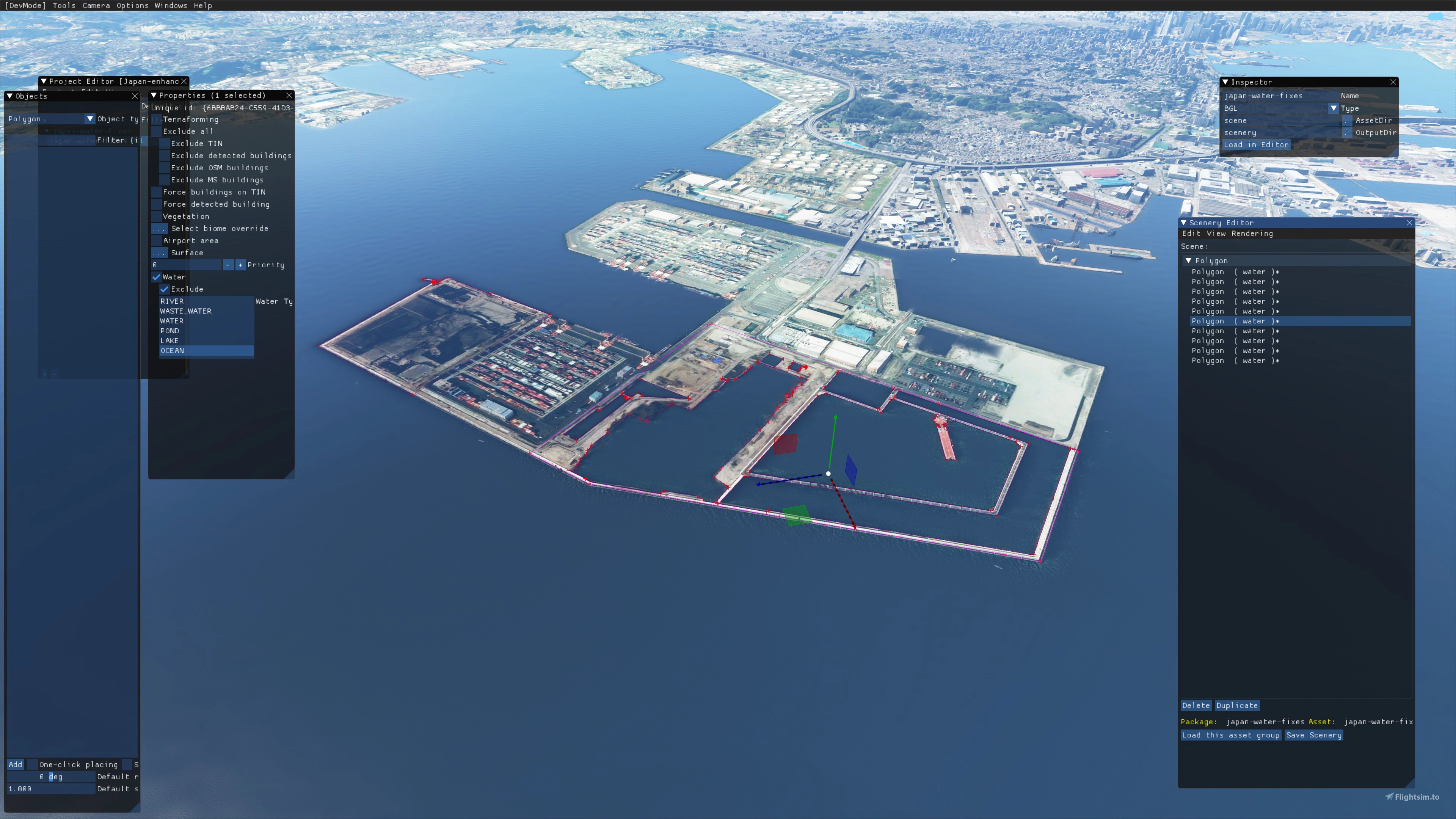
Description
Build version 1.0 Japan world update scenery enhancement build notes:
Have so far fixed dark lines on river entrances for the whole south side of Japan from east to west..
-Fixed dark lines on river entrances.
-uncovered some hidden features will uncover more in future.
-added some cargo ships at various ports.
-added water to some rivers that were missing water more to do though.
-excluded water on most bridges in the tokyo bay area so far.
This is build 1 is far from finished and will be a huge ongoing update, please be patient as only myself working on it.
I don't see this add-on having any extra impact on performance of MSFS.
Build 1.5 notes:
-have fixed more dark lines at river entrances along the rest of the south coast of mainland Japan and up and around the west coast and started the north side.-added some cargo ships and couple of oil cargo ships.-Uncovered more hidden features under the water.-fixed more rivers with missing water.-fixed some areas along the coast with missing water.-fixed some terrain height issues.
Build 1.6: Made my way round the north west of mainland Japan:
-Fixed more dark lines at river entrances.
-added water to some rivers.
-removed water covering scenery.
-uncovered more hidden objects under the water.
-added more solar panels.
-added water along the coast to cover areas missing water.
Build 1.8:
-added around 30 missing windmills.-Fixed more black marking in river entrances.-uncovered more hidden features.-added a couple of appropriate ships.-fixed some water issue's along beaches.Almost completed the first pass around mainland japan.
To install this add-on download the zip file and unzip into the flight sims community folder easy as that.
If you install any 3rd party japan add-ons in future you may need to order my add-on below them in the content.xml folder. to do this follow this file path below:
go to drive c > users > your username > app data > local > Packages > Microsoft.FlightSimulator_8wekyb3d8bbwe >
local cache > double left click the content.xml folder and open with notepad.
When in the content xml just make sure my Japan add-on is below any other japan content so their update doesn't overide my edits unless you intend to then it doesn't matter.
This is what you need to copy and paste below other Japan add-ons:
Build 2.0:
-Fixed the last of the river mouth dark patches.
-removed water covering features.
-added water to fix coastline edges.
-added some ships when appropriate.
-added some water to a couple of rivers where it was missing.
-completed first pass round mainland japan.
To add this to your sime just unzip the downloaded file straight into your MSFS community folder.
Make sure to click follow when downloading so that you will be notified when a new update is released.
There is a donate button if anyone wants to reward me for my work, but will never be compulsory and no pressure to donate.
Just to let you know I am working on a new update for this I will probably fix one area at a time instead of going round the whole of Japan in one hit. I will update this add-on once done an area. Currently adding water to river and ponds where it is missing and other small fixes as i go. Not sure on a time for release yet but should be soon.(26/12/2022)
Japan world update scenery enhancement (no google imagery and no performance impact)
Enhance your Japan flying experience with this ongoing scenery update, featuring fixes for dark lines on river entrances, addition of cargo ships, and uncovering hidden features underwater. With no reported impact on performance, this add-on brings a more detailed and realistic landscape to explore in Microsoft Flight Simulator.


Supporters

User Reviews
10 reviews
Version History
-Fixed the last of the river mouth dark patches. -removed water covering features. -added water to fix coastline edges. -added some ships when appropriate. -added some water to a couple of rivers where it was missing. -completed first pass round mainland japan.
Related
Global AI Ship Traffic Version 7.
Global AI Ship Traffic Version 7 enhances Microsoft Flight Simulator with over 1,000 unique ship models and more than 2,400 liveries, alongside 80,000 programmed ship movements. Compatible with both MSFS 2020 and MSFS 2024, this add-on includes a wide variety of vessels, ranging from cargo ships and fishing boats to luxury cruise liners and military ships. Users can experience a realistic global shipping simulation by utilizing preprogrammed traffic or real-time AIS data in MSFS 2024. The project is the result of collaboration among international developers and enthusiasts, providing an immersive maritime experience.
by Henrik Nielsen, KL791
Realistic Taxi Signs Texture Pack
Enhance your taxiing experience with this Realistic Taxi Signs Texture Pack. This add-on provides higher resolution and realistic textures for taxiway signs in Microsoft Flight Simulator. Replace the original files in your Community folder for an improved visual experience. Remember to remove any other mods for taxi signs before installing this pack. Created by Pretzed, this pack aims to enhance the realism of your taxiing operations in the sim.
by PretZed

AirHispania - Libraries
Essential libraries containing objects necessary for displaying AirHispania sceneries. Required for enhancing the overall visual experience of AirSpain scenery addons.
by AirHispania

Airpower Airshow for Microsoft Flight Simulator
Experience the largest airshow in Europe with "AIRPOWER for Microsoft Flight Simulator 2020." Join military and civil aviation demonstrations at Zeltweg Air Base, featuring realistic crowd depictions and 43 handcrafted aircraft on display. Dont miss out on this immersive airshow experience with static displays and dynamic elements!
by Troglodytus, Littlekrg, Mikea.at, AnelToro089, LeRoi
Log in to join the discussion
Log InComments(31)
almost 2 years ago
about 3 years ago
about 3 years ago
over 4 years ago
Looks great, just wondering if this is still relevant?
over 4 years ago
Thanks for the reply. Happy to hear you are working with ORBX! Look forward to future projects
about 5 years ago
I've been using this with SU5, so you can update your pink warning bar to green OK.
about 5 years ago
Thanks appreciate it.
over 5 years ago
over 5 years ago
over 5 years ago
over 5 years ago
over 5 years ago
almost 6 years ago
Great job!! Only 6999 islands to go :)
almost 6 years ago
almost 6 years ago
almost 6 years ago
almost 6 years ago
almost 6 years ago
almost 6 years ago